 ProMapRanker
AI Native Business Analytics Software: Best Picks of 2026

Microsoft based reporting and sharing · Pricing starts at: $14 per user/month (billed yearly)
Direct answer
For Microsoft based reporting and sharing, Power BI is where this list starts. Listed starting prices: Power BI from $14 per user/month, Luzmo from $2,495 a month and Tableau from $15 per user/month. Look at Luzmo for embedded AI analytics inside a product, and at Tableau for visual exploration and governed dashboards. The other 4 tools in the list cover narrower or pricier cases.
ProMapRanker compared 7 tools for AI native business analytics software. The goal is a practical shortlist: published prices, free plan facts, best-fit use cases and honest limits for every entry.
Key takeaways
- Power BI is the opening pick, best for Microsoft based reporting and sharing.
- The main caution on Luzmo: high starting price for small products.
- Julius AI suits conversational analysis of files and databases.
- Power BI is the lowest-priced starter here at $14 per user/month.
- Free plans exist at 4 of 7 tools (Power BI, Tableau, Metabase, Julius AI).
Quick comparison
| Pick | Great for | Pricing starts at | Free tier | |
|---|---|---|---|---|
| Power BI | Microsoft based reporting and sharing | $14 per user/month (billed yearly) | Yes | Visit |
 Luzmo | Embedded AI analytics inside a product | $2,495 a month (billed yearly) | Free trial | Visit |
 Tableau | Visual exploration and governed dashboards | $15 per user/month (billed yearly) | Yes | Visit |
 ThoughtSpot | Search first AI analytics for business teams | $25 per user/month (billed annually) | Free trial | Visit |
 Qlik Sense | Free form exploration with an associative engine | $30 per user/month (billed yearly) | Free trial (30 days) | Visit |
 Metabase | Straightforward dashboards on a small team budget | $100 per month | Yes | Visit |
 Julius AI | Conversational analysis of files and databases | $20 per month ($16 per month billed yearly) | Yes | Visit |
AI Native Business Analytics Software compared in detail
Where Power BI fits: Microsoft based reporting and sharing. Analysts build reports in Power BI Desktop, which is free for individual use, then publish and share them through the Power BI service.
What to check first: Copilot AI features need Fabric capacity, which brings cost.
What you pay to start with Power BI: $14 per user/month. Power BI has a free plan.
- Microsoft Fabric
- Deep links to Excel, Teams
- Sharing needs a Pro licence for each viewer below Fabric F64 capacity
Pick Luzmo if this describes you: embedded AI analytics inside a product. It is designed for software businesses that want to put analytics inside their own product, so customers can see dashboards, edit views, and ask questions without leaving the app.
What works well: Luzmo IQ provides end users governed AI answers inside a product.
Luzmo pricing: $2,495 per month. Free plan details: Free trial.
The main drawbacks: usage above 500 AI conversations and 100 million Warp rows is billed on top.
- White labelling included
- Angular SDKs
- High starting price for small products
Pick Tableau if this describes you: visual exploration and governed dashboards. Tableau Cloud Standard costs $75 per Creator, $42 per Explorer, and $15 per Viewer per user a month, billed annually. For everyday use, Tableau AI features, including natural language questions and automatic explanations, sit on top of that visual core.
Limits to weigh: much more than Viewer.
As for the details, users can drag fields onto a canvas, change a chart type in a handful of clicks, and filter a dashboard to test a hunch. Every deployment needs a minimum of one Creator. Price to start with Tableau: $15 per user/month. A free plan is available with Tableau.
- Free Tableau Public and Desktop Free Edition
- Role based licences for viewers, explorers, creators
- AI features sit in higher editions and add ons
In short, ThoughtSpot is for search first AI analytics for business teams. ThoughtSpot is built around search.
In practice, a user types a question in plain language, like sales by region last quarter, and the product returns a chart or table from a governed data model. Price to start with ThoughtSpot: $25 per user/month. Free options: Free trial.
What to check first: Spotter AI is not included on the entry Essentials plan.
- Natural language search and Spotter AI agent
- Published entry pricing with a usage based choice
- Per user costs rise quick as more people need access
In short, Qlik Sense is for free form exploration with an associative engine. Qlik Sense uses an associative engine, which means selections in one chart update related values across the entire dataset. That design helps analysts explore without knowing the exact question in advance.
Qlik Sense also provides a 30 day trial. For everyday use, Qlik Sense Business begins at $30 per user a month billed yearly, with a 5 user minimum. For everyday use, buyers should confirm which AI features are included in Business, and which ones need an Enterprise edition. On cost, Qlik Sense starts like this: $30 per user/month. Free options: Free trial (30 days).
The main drawbacks: per user costs grow rapidly for large viewer groups.
- Associative engine presents related values across the full dataset
- AI assistance for insight generation and chart suggestions
- Enterprise SaaS and client managed editions are quote only
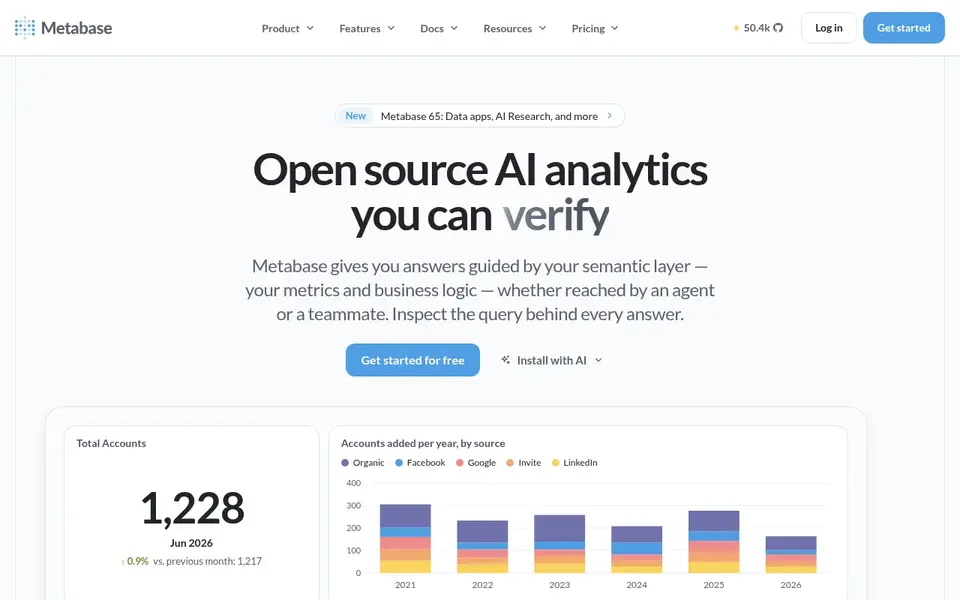
Metabase is a good fit for straightforward dashboards on a small team budget. Metabase is a straightforward, open source business intelligence tool that fits teams that want dashboards without a long setup project.
From a buyer's view, Metabase Cloud Starter costs $100 a month, or $90 a month billed yearly, with 5 users included and $6 per additional user a month. Metabase pricing: $100 per month. Metabase offers a free plan.
Honest limits: AI token costs apply after the first 1 million tokens on Cloud.
- Free open source edition for self hosting
- Straightforward question builder for non technical users
- White labelling need Pro at $575 a month
Julius AI was built for conversational analysis of files and databases. Julius AI works like a data analyst in a chat window. Business costs $450 a month, or $375 a month billed yearly, with 60,000 credits per month and up to 50 team members.
The main drawbacks: Database connectors are on the Business plan at $450 a month.
Pro costs $45 a month, or $37 a month billed yearly, with 5,000 credits per month. Plus costs $20 a month, or $16 a month billed yearly, with 2,000 credits per month. The Free plan costs $0 a month with a daily credit allowance. Julius writes the code, runs the analysis, and returns a chart, a table, or a short report. Starting cost for Julius AI: $20 per month. A free plan is available with Julius AI.
- Plain language analysis of spreadsheets and databases
- Free plan with a daily credit allowance
- Credits do not roll over and there is no top up choice
How the list was put together
For each of the 7 tools we noted price, free plan or trial, fit for AI native business analytics software and the main limit, using vendor pages and documentation. Where a vendor does not publish a price, the entry says quote. Where a price depends on seats or billing term, the entry says so. The sequence is a judgement call: typical use case first, then pricing transparency, then free access. Use the profiles to check fit.
Things to verify first
- Check the vendor page for the current price: Power BI starts at $14 per user/month here, and seats or billing terms can move it.
- Read the fine print on the free plans from Power BI, Tableau, Metabase and Julius AI; seat, project and feature caps differ.
- Take the trial from Luzmo, ThoughtSpot and Qlik Sense and push a live task through it before you pay.
- Read the limits listed for Power BI first: sharing needs a Pro licence for each viewer below Fabric F64 capacity.
- Check the integration list for Power BI against the tools you run today, and note which ones need a higher plan.
- Total up the real monthly cost of Tableau, including add-ons, extra users and usage-based fees.
Frequently asked questions
Can I try these options before paying?
Often, yes. Power BI, Tableau, Metabase and Julius AI have a free plan and Luzmo, ThoughtSpot and Qlik Sense offer a free trial. Use your own data and a real task during the test, and check what the free tier or trial limits before you rely on it.
Is Power BI the right pick for everyone comparing AI native business analytics software?
No single tool suits every team. Power BI comes first because it fits Microsoft based reporting and sharing, while Luzmo suits embedded AI analytics inside a product and Tableau suits visual exploration and governed dashboards. Match the tool to your own size, budget and workflow before deciding.
Which options for AI native business analytics software have a free plan?
On this list, Power BI, Tableau, Metabase and Julius AI include a free plan. Caps on seats, usage or features are common, so test the free plan against your real workload. Several others offer a trial instead.
How are the tools for AI native business analytics software ordered?
Power BI sits first and Julius AI last because the order follows typical fit for AI native business analytics software, then price clarity and free access. It is a judgement call, so read each profile for fit and limits.
Is my data safe when I use AI analytics?
Safety relies on the vendor, the plan, and your settings. Check whether the AI model is hosted by the vendor or a third party, whether your data is used to train models, where data is stored, and which controls handle single sign on, row level security, and audit logs.
Sources
See where you really rank - block by block
ProMapRanker scans Google Maps across a grid of your service area. Simple monthly plans from $19, white-label on every plan.
Start freeBrowse all guides
← 7 Notion Alternatives Compared (2026)AI Spreadsheet Tools: Best Picks of 2026 →
 best live transfer service for ai receptionists
6 Best Live Transfer Service for AI Receptionists in 2026
Best live transfer service for AI receptionists: 6 tools compared on price, free plans and fit. Concise write-ups of every option. Checked this month.
Read → best enterprise platforms for unified data and ai
7 Best Enterprise Platforms for Unified Data and AI Options (2026)
Best enterprise platforms for unified data and AI: 7 contenders ranked by fit, with entry costs and free tiers. Every pick includes one clear drawback.
Read → best all in one ai workspace tool
Best All in One AI Workspace tool: 2026 Prices and Picks
Comparing the best all in one AI workspace tool? 6 contenders, each with entry cost, free tier and best-fit buyer. Prices and drawbacks included. Start here.
Read → best data democratization tools
Best Data Democratization Tools in 2026
Best data democratization tools in 2026: we compare 9 platforms for governed self service analytics, catalogs and shared metrics for business teams today.
Read → best sports analytics tools for player data
Best Sports Analytics Tools for Player Data in 2026
The best sports analytics tools for player data compared, from GPS tracking and video analysis to scouting data, so teams can pick the right fit for any team.
Read → best app analytics tools
Best App Analytics Tools in 2026
Best app analytics tools compared for mobile teams in 2026, covering product funnels, session replay, attribution, and free plans, with honest trade-offs.
Read →More in Data & Analytics · All guides A to Z by date · Latest guides