 ProMapRanker
AI Spreadsheet Tools: Best Picks of 2026

AI functions in Google Sheets · Pricing starts at: $12 per user/month (billed annually)
Direct answer
SheetAI comes first here, mainly for AI functions in Google Sheets. Listed starting prices: SheetAI from $12 per user/month, Ajelix from $32 per user/month and Quadratic from $18 per user/month. Ajelix is the stronger choice for Excel formula and VBA help, while Quadratic suits Python and SQL in the grid. Prices, free plans and limits for all 7 tools follow.
ProMapRanker put together this guide to AI spreadsheet tools for readers who want a clear shortlist without reading every vendor page. It compares 7 tools on starting price, free plans, who each one suits and where each one falls short.
Key takeaways
- Top of the list is SheetAI, which targets AI functions in Google Sheets.
- Equals is the one to check for large team analytics.
- Starting prices begin at $6 per user/month with Rows.
- Before buying SheetAI, weigh this: hosted Starter permits only about 500 AI runs per month.
Quick comparison
| Pick | Great for | Pricing starts at | Free tier | |
|---|---|---|---|---|
| SheetAI | AI functions in Google Sheets | $12 per user/month (billed annually) | Yes | Visit |
 Ajelix | Excel formula and VBA help | $32 per user/month (billed annually) | Yes | Visit |
 Quadratic | Python and SQL in the grid | $18 per user/month (billed annually) | Yes | Visit |
 GPTExcel | Cheap formula toolbox | $6.30 per user/month (billed annually) | Yes | Visit |
 Formula Bot | Formulas and file analysis | $20 per user/month (billed annually) | Yes | Visit |
 Rows | AI analyst with live data | $6 per user/month (billed yearly) | Yes | Visit |
 Equals | Large team analytics | Quote only | No | Visit |
AI Spreadsheet Tools, one by one
Where SheetAI fits: AI functions in Google Sheets. The Free plan costs $0 to SheetAI and uses your own API key from OpenAI, Claude, Gemini, Grok or Replicate, so you pay the AI provider straight for model use.
The hosted Pro plan costs $29 a month, or $290 a year, and brings higher use, bulk fills and priority support. On top of that, a user who already has an API key can run unlimited SheetAI calls at the add-on layer and pay only the model bill, which SheetAI estimates at about $0 Worth adding: the hosted Starter plan costs $12 a month and comes with about 500 AI runs a month, AI formulas, a formula-generator side panel and email support. On cost, SheetAI starts like this: $12 per user/month. SheetAI offers a free plan.
Where it falls short: hosted Starter lets only about 500 AI runs per month.
- Free plan with your own key
- Works inside Google Sheets
- Media tools cost additional through Replicate
Choose Ajelix for Excel formula and VBA help. Ajelix is an AI toolkit for Excel and Google Sheets that creates formulas, VBA scripts, SQL queries and data analysis from plain-English prompts. In daily use, the Free plan bundles 10 requests per month.
Where it falls short: free plan lets only 10 requests per month.
From a buyer's view, the Lite plan costs $39 per user a month, or $32 per user a month on annual billing. More specifically, the Max plan costs $199 per user a month, or $165 per user a month on annual billing. It checks formula logic, explains each part of a formula and can translate a formula between Excel and Google Sheets. What you pay to start with Ajelix: $32 per user/month. You can start on Ajelix without paying.
- Supports numerous languages
- Solid formula accuracy
- Lite plan is expensive for formula help alone
Quadratic serves Python and SQL in the grid. The Business plan costs $36 per user a month on annual billing and contains $40 of AI credits per user a month.
Beyond that, the Personal plan costs $0 and contains restricted AI use, sharing, files and connections. On cost, Quadratic starts like this: $18 per user/month. Quadratic includes a free tier.
Where it is weaker: needs some technical skill to use well.
- AI writes and debugs code
- Code cells for Python
- AI use is metered by credits
Pick GPTExcel if this describes you: cheap formula toolbox. GPTExcel is a low-cost web toolbox that creates spreadsheet formulas, VBA and Apps Script code, SQL queries, regular expressions and charts from plain-English prompts.
Watch-outs: free runs refresh slowly.
It also has more than 1.6 million users and has generated more than 60 million formulas, which displays that the tool is widely used for straightforward formula w GPTExcel starts at: $6.30 per user/month. GPTExcel offers a free plan.
- Spans formulas, VBA
- Very low price
- Web app only
Formula Bot is aimed squarely at formulas and file analysis. Formula Bot, now also sold as Better Analyst, started as an Excel formula generator and has grown into a full AI analytics tool.
On top of that, the Team plan costs $149 a month, or $119 a month on annual billing. Starting cost for Formula Bot: $20 per user/month. Formula Bot has a free plan.
Where it falls short: subscription plans have changed names and prices more than once.
- Now layers on file analysis
- Works in Excel and Google Sheets
- Free plan is restricted
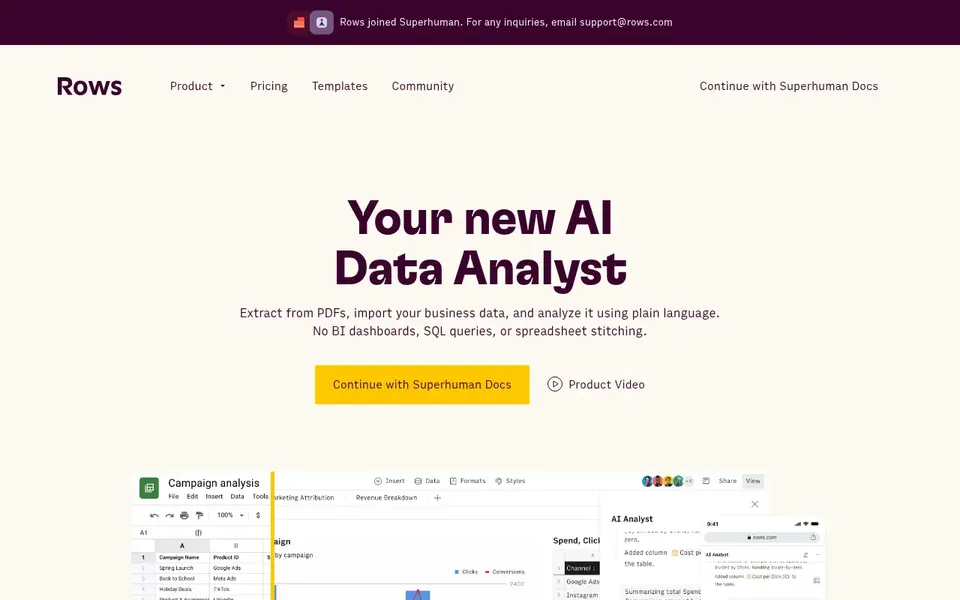
Rows makes the most sense for AI analyst with live data. The Free plan costs $0 and includes unlimited spreadsheets, 5 AI tasks a month, 10 integration accounts, 3 guests and a 1 MB file import cap.
Where it falls short: AI tasks are capped a month.
A team that asks the AI analyst for a weekly report, a forecast and a data clean-up will use far more tasks than a team that only writes formulas. Price to start with Rows: $6 per user/month. Rows includes a free tier.
- Live data links
- Plain-language AI analyst
- Future is unclear after the Superhuman deal
Where Equals fits: large team analytics. Equals is now a very different product from the per-seat spreadsheet it used to sell. Its pricing page lists Essential at $24,000 a year, Business at $36,000 a year and Enterprise at $60,000 a year, with unlimited seats on each plan.
Downsides: no free level.
Essential contains 3 connectors, a 6-hour data sync and $250 a month of included AI spend. As for the details, Equals no longer sells a $25 or $99 per user plan. Its entry plan is demo-gated, so a small team cannot register and start at a low monthly price. Equals sells by quote instead of a published price. No free plan comes with Equals.
- Unlimited seats on each plan
- Live warehouse links
- Entry price is far above other tools in this list
How we compared the tools
The comparison looks at four things: starting price, free access, how well the feature set matches AI spreadsheet tools, and the main limit of each tool. Plan names, prices and limits change often. Treat the figures here as a starting point and verify them with the vendor. The order reflects how well each tool fits the most common buying scenario for AI spreadsheet tools, then price clarity, then free plan access. It is a starting point, not a verdict.
A buyer's checklist
- Confirm the entry price on the vendor page. For Equals that means a quote rather than a fixed price.
- Look at free plan limits closely: SheetAI, Ajelix, Quadratic and others have one, and the caps decide whether it is usable for real work.
- Before choosing SheetAI, weigh its main limit: hosted Starter lets only about 500 AI runs per month.
- Find out what support Formula Bot includes on your plan, and whether onboarding help costs extra.
- Total up the real monthly cost of Ajelix, including add-ons, extra users and usage-based fees.
Frequently asked questions
Which options for AI spreadsheet tools have a free plan?
On this list, 6 of 7 tools include a free plan, among them SheetAI, Ajelix, Quadratic and GPTExcel. Caps on seats, usage or features are common, so test the free plan against your real workload.
Is SheetAI the right pick for everyone comparing AI spreadsheet tools?
No single tool suits every team. SheetAI comes first because it fits AI functions in Google Sheets, while Ajelix suits Excel formula and VBA help and Quadratic suits Python and SQL in the grid. Match the tool to your own size, budget and workflow before deciding.
How are the tools for AI spreadsheet tools ordered?
SheetAI sits first and Equals last because the order follows typical fit for AI spreadsheet tools, then price clarity and free access. It is a judgement call, so read each profile for fit and limits.
Is Rows still available to buy?
The status is unclear, so a buyer should confirm the current status with Rows support before it commits to an annual plan.
Do these tools publish their prices?
Not all of them. Equals publishes no starting price, so expect a quote request for it. The rest, SheetAI included, show a starting price, though seats and billing terms still change the final cost.
Sources
See where you really rank - block by block
ProMapRanker scans Google Maps across a grid of your service area. Simple monthly plans from $19, white-label on every plan.
Start freeBrowse all guides
← AI Native Business Analytics Software: Best Picks of 2026Best AI Data Quality Tools: 2026 Prices and Picks →
 notion alternatives without ai
7 Notion Alternatives Compared (2026)
7 products for notion alternatives without ai, ranked by fit, with starting costs and free tiers. Price notes and drawbacks come with each one. Prices included.
Read → best live transfer service for ai receptionists
6 Best Live Transfer Service for AI Receptionists in 2026
Best live transfer service for AI receptionists: 6 tools compared on price, free plans and fit. Concise write-ups of every option. Checked this month.
Read → best enterprise platforms for unified data and ai
7 Best Enterprise Platforms for Unified Data and AI Options (2026)
Best enterprise platforms for unified data and AI: 7 contenders ranked by fit, with entry costs and free tiers. Every pick includes one clear drawback.
Read → alternatives to power bi
Alternatives to Power BI in 2026
We compared the best alternatives to Power BI on pricing, ease of use, and data sources, so teams can find a dashboard tool that fits their budget and skills.
Read → ux research alternatives methods tools
Best UX Research Alternatives, Methods and Tools in 2026
Compare 8 UX research alternatives, methods and tools for prototype testing, interviews and behaviour insight, with pricing, free plans and honest limits.
Read → best data protection software
Best Data Protection Software in 2026
Compare the best data protection software in 2026, from Veeam and Acronis to Backblaze and Druva, with backup, recovery, and pricing notes. See our picks.
Read →More in Data & Analytics · All guides A to Z by date · Latest guides