 ProMapRanker
Local Google Advertising: A Complete Guide

Local Google advertising is a powerful strategy that connects businesses directly with nearby customers actively searching for products or services. It encompasses three primary components: Google Local Service Ads (LSAs) for verified service providers, geo-targeted Google Ads campaigns (Search, Display, Performance Max) that focus on specific geographic areas, and robust optimization of your Google Business Profile (GBP) to enhance organic local visibility. This integrated approach ensures your business appears prominently when potential customers in your service area need you most, driving high-intent traffic and conversions.
What is Local Google Advertising?
Local Google advertising refers to any Google-powered strategy designed to reach consumers within a defined geographic area, typically near a business's physical location or service territory. It combines paid advertising options like Local Service Ads and geo-targeted Google Ads with the foundational importance of an optimized Google Business Profile.
This multi-faceted approach ensures that your business is visible across different touchpoints of the local search journey. From the prominent, paid placements at the top of search results to the organic listings on Google Maps and the Local Pack, effective local advertising covers all bases to capture nearby customer demand.
Local Service Ads (LSAs)
Local Service Ads are Google's pay-per-lead advertising program for specific service businesses, prominently featuring a "Google Guaranteed" badge. These ads appear at the very top of Google search results, above traditional Google Ads, and allow customers to call or message businesses directly after a strict vetting process.
LSAs are ideal for plumbers, electricians, locksmiths, HVAC technicians, and other home service providers. Businesses only pay when a customer calls or messages them directly from the ad, making it a cost-effective solution for lead generation, provided the leads are qualified.
Geo-Targeted Google Ads
Geo-targeted Google Ads are traditional Google Ads campaigns (Search, Display, Shopping, or Performance Max) configured to show only to users within specific geographic areas. This allows businesses to reach potential customers based on their physical location, location of interest, or frequently visited places.
By applying precise location targeting, businesses can ensure their ad spend is focused on the most relevant audience. This is crucial for local shops, restaurants, medical practices, or any business that relies on customers visiting a physical location or receiving services within a specific radius. Ad copy and extensions are often customized to highlight local relevance, such as "plumbers near me" or "dentist in [City Name]".
Google Business Profile (GBP) Optimization
Your Google Business Profile is a free listing that displays crucial information about your business across Google Search and Maps, serving as the organic backbone of local advertising. A well-optimized GBP is essential for appearing in the Local Pack, Google Maps results, and general local organic searches, complementing any paid ad efforts.
Optimizing your GBP involves keeping all information accurate and up-to-date, including name, address, phone number (NAP consistency), business hours, categories, services, photos, and actively managing customer reviews. A strong GBP improves your visibility and credibility, making your paid ads more effective by providing a solid foundation. Learn more about how to optimize your Google Business Profile with our detailed guide on optimizing your Google Business Profile.
Why is Local Google Advertising Essential for Your Business?
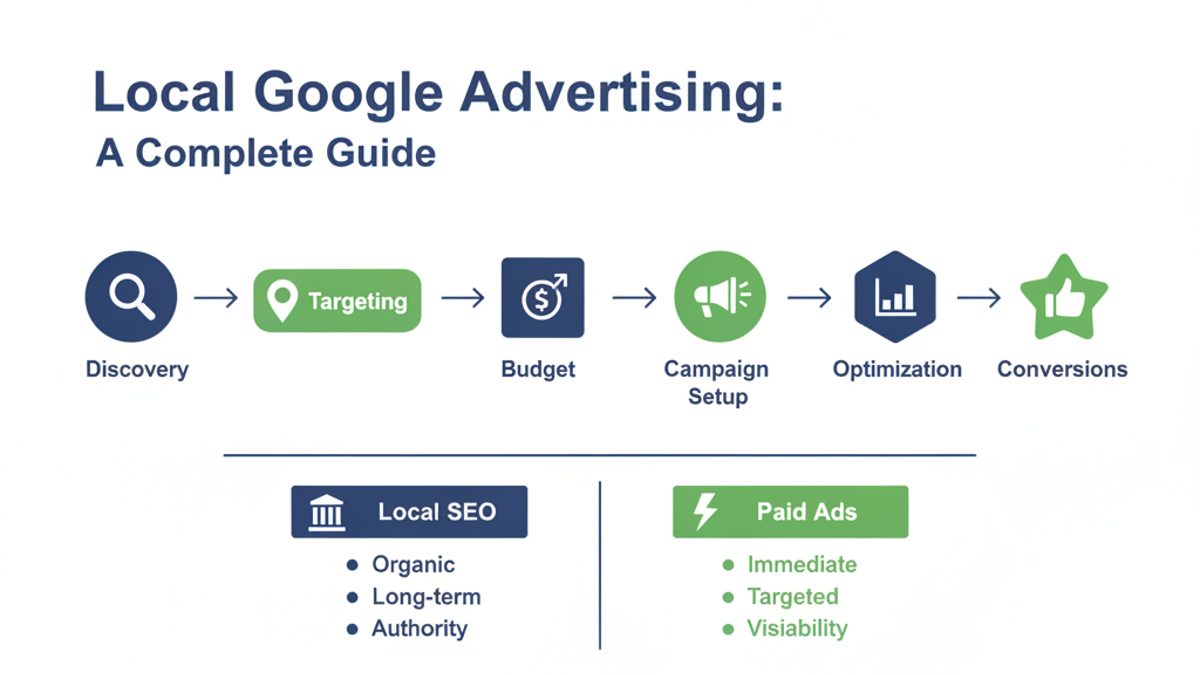
Local Google advertising is essential because it connects businesses with high-intent local searchers at the precise moment they are looking for specific products or services nearby. This targeted approach drives immediate action, increases foot traffic, and builds local brand authority more effectively than broad advertising.
Studies consistently show that a significant percentage of "near me" searches result in a store visit or purchase within 24 hours. By leveraging local Google advertising, businesses can capture this immediate demand, directly impacting their bottom line and fostering strong community engagement. It's about being visible where your customers are, when they need you most.
How Do Local Service Ads (LSAs) Work?
Local Service Ads work by pre-qualifying service businesses and then displaying their ads at the very top of Google search results, often above traditional paid ads. When a customer searches for a service like "plumber near me," relevant LSA providers appear with a "Google Guaranteed" badge, their star rating, and phone number.
The process begins with an application and background check by Google or its partners. Once approved, businesses set a weekly budget and define their service areas and job types. Google then matches customer queries with eligible providers. Businesses are charged per qualified lead (phone call or message), not per click, and can dispute unqualified leads. This ensures you're paying for actual customer interest, not just impressions or accidental clicks.
How Do You Set Up Geo-Targeted Google Ads?
Setting up geo-targeted Google Ads involves creating standard Google Ads campaigns and then applying precise location targeting settings within the campaign configuration. This ensures your ads are displayed only to users within your desired service areas, maximizing relevance and minimizing wasted spend.
- Choose Your Campaign Type: Start by selecting a campaign type like Search, Display, or Performance Max, depending on your advertising goals. For local intent, Search campaigns are often most effective.
- Define Location Targeting: In the "Locations" section of your campaign settings, specify the geographic areas you want to target. You can target by:
- Radius: A specific mileage radius around your business address (e.g., 5 miles around 123 Main St).
- Specific Locations: Cities, postal codes, states, or even countries.
- Location Groups: Custom lists of locations.
- Refine Targeting Options: Under "Location options (advanced)", you can choose to target "People in or regularly in your targeted locations" for the most precise local reach. Avoid "People in, regularly in, or who've shown interest in your targeted locations" if your budget is tight, as it can broaden your audience beyond immediate physical presence.
- Bid Adjustments: Consider setting bid adjustments for specific locations within your targeted area. For example, if you know a particular neighborhood converts better, you can bid 10-20% higher for searches originating from there.
- Localize Ad Copy and Extensions: Ensure your ad headlines and descriptions include local keywords or references (e.g., "Best HVAC in Phoenix"). Use location extensions to display your business address and a map link, and call extensions to encourage direct phone calls.
- Monitor and Optimize: Regularly review your location performance reports to identify areas that are performing well or poorly. Adjust your targeting and bids accordingly to optimize your spend.
What Role Does Google Business Profile (GBP) Play in Local Advertising?
Your Google Business Profile (GBP) is the cornerstone of local advertising, acting as the primary source of truth for your business across Google and forming the foundation for both organic and paid local visibility. An optimized GBP significantly improves your chances of appearing in the Local Pack, Google Maps, and organic search results, driving free local traffic.
A complete and accurate GBP enhances trust and authority, which indirectly boosts the performance of your paid local ads. Customers often check a business's GBP before clicking on an ad or visiting a location. Key elements like consistent NAP (Name, Address, Phone), relevant categories, high-quality photos, detailed services, and active review management are crucial. We provide comprehensive Google Business Profile audit services to ensure your listing is always performing at its peak, identifying gaps and opportunities that impact your local search presence.
How Much Does Local Google Advertising Cost?
The cost of local Google advertising varies significantly depending on the ad type, industry, geographic location, and competition, making it difficult to give a single figure. For Local Service Ads (LSAs), costs are per qualified lead and can range from $15 to $150+ per lead, while geo-targeted Google Ads operate on a cost-per-click (CPC) model, with daily budgets typically starting from $10-$20.
Factors like the competitiveness of your keywords, the quality of your ads and landing pages, and your chosen bidding strategy all influence the overall expenditure. Businesses have control over their daily or monthly budgets, allowing for scalable investment based on their goals and return on ad spend (ROAS).
Cost Comparison: Local Service Ads vs. Geo-Targeted Google Ads
| Feature | Local Service Ads (LSAs) | Geo-Targeted Google Ads |
|---|---|---|
| Pricing Model | Pay-per-lead (PPL) | Pay-per-click (CPC) |
| Ad Placement | Very top, above all other ads | Below LSAs, above/below organic results |
| Google Badge | "Google Guaranteed" or "Google Screened" | No specific badge |
| Industries | Specific service industries (e.g., plumbers, electricians) | Any industry that can benefit from local targeting |
| Vetting Process | Mandatory background checks and insurance verification | No specific vetting beyond Google Ads policy compliance |
| Budget Control | Weekly budget based on expected leads | Daily budget, flexible CPC bidding |
| Cost Range (Approx.) | $15 - $150+ per lead | $0.50 - $10+ per click |
| Lead Quality | High-intent, pre-qualified leads | Varies, depends on keyword targeting and ad copy |
Is $100 a Day Good for Google Ads?
A daily budget of $100 for Google Ads (approximately $3,000 per month) is a substantial amount that can be highly effective for many local businesses, especially in competitive markets. This budget allows for a significant volume of clicks, extensive testing of ad copy and keywords, and reaching a broad local audience, making it a good starting point for growth-oriented businesses.
Whether it's "good" ultimately depends on your industry's average Cost Per Click (CPC), your conversion rates, and the lifetime value of a customer. For example, if your average CPC is $2, a $100 daily budget allows for 50 clicks per day. If your conversion rate is 5-10%, this could yield 2-5 leads or sales daily. For high-value services, this can be an excellent return on investment. Tools like ProMapRanker help you monitor the true ROI by tracking not just clicks but local rank performance across a geo-grid, giving you a complete picture of your local search presence and the effectiveness of your spend.
Is $20 a Day Good for Google Ads?
A $20 daily budget for Google Ads (approximately $600 per month) can be good for local businesses with very specific targeting, highly niche services, or those operating in less competitive areas. While it offers less volume than a larger budget, it allows businesses to test the waters, generate initial leads, and gather data for future optimization, provided expectations are managed.
With a $20 daily budget, you'll need to be extremely precise with your keyword targeting and geographic reach. Focus on long-tail, hyper-local keywords and ensure your location targeting is a tight radius around your business. This budget is excellent for proving the concept of local ads before scaling up, or for businesses with a lower customer acquisition cost threshold. It's about quality over quantity when working with a more constrained budget.
Does Google Still Have Local Service Ads?
Yes, Google absolutely still has Local Service Ads, and they continue to be a prominent and growing part of Google's local advertising ecosystem. LSAs are actively expanding to include more service categories and geographic locations, demonstrating Google's commitment to connecting consumers with trusted local businesses.
For service-based businesses, LSAs offer a unique opportunity to appear at the very top of search results with a verified badge, providing a strong signal of trust to potential customers. Businesses interested in LSAs should check if their industry and location are currently supported via the official Google Local Services Ads website.
What Are Best Practices for Optimizing Local Google Ad Performance?
Optimizing local Google Ad performance requires a holistic approach that integrates precise targeting, compelling ad copy, a strong online presence, and continuous monitoring. The goal is to maximize relevance for local searchers and drive measurable conversions.
- Hyper-Local Keyword Strategy: Beyond general keywords, use geo-specific terms (e.g., "emergency plumber Boston," "pizza delivery 02108"). Also, incorporate "near me" variations in your keyword research and ad copy, as Google intelligently matches these queries.
- Craft Compelling, Localized Ad Copy: Your ad headlines and descriptions should clearly state your location or service area and highlight unique local selling points. Include strong calls to action (CTAs) like "Call Now," "Get Directions," or "Visit Our [City Name] Store."
- Optimize Landing Pages for Local Conversions: Ensure your landing pages are mobile-friendly, load quickly (aim for an INP under 200ms, as per Google's Core Web Vitals guidance), and prominently feature your local address, phone number, and a clear conversion form or button. The content should be relevant to the local search intent.
- Maintain an Immaculate Google Business Profile: Your GBP is often the first interaction point for local searchers. Keep all information accurate, upload fresh photos regularly, respond to all reviews (both positive and negative), and utilize GBP Posts for announcements or offers. This strengthens your overall local SEO, which impacts ad quality scores. A regular Google Business Profile audit is critical.
- Implement Robust Review Management: Positive reviews on your GBP and other platforms are vital for both LSA trust and Google Ads credibility. Encourage satisfied customers to leave reviews and respond promptly. Effective local reputation management builds trust.
- Refine Geo-Targeting and Bid Adjustments: Continuously analyze your location reports. Exclude areas that yield low-quality leads or no conversions. Use bid adjustments to increase bids in high-performing neighborhoods or during peak hours when local intent is highest.
- Utilize Ad Extensions: Maximize the use of location extensions, call extensions, structured snippet extensions (to highlight services), and callout extensions (for unique selling points like "24/7 Service" or "Free Estimates"). These expand your ad's footprint and provide more information.
- Monitor Performance with Geo-Grid Rank Tracking: Don't just track clicks and conversions; track your actual local search visibility. ProMapRanker's geo-grid rank tracking allows you to see your business's ranking across a specific grid (e.g., a 5x5 grid at 5 miles around your location). This visual representation helps you understand how local algorithm updates or competitor actions impact your visibility. Learn more about how to measure local SEO performance effectively.
- Leverage Competitor Analysis: Understand what your local competitors are doing with their ads and GBP. Tools like ProMapRanker offer local competitor analysis to identify their strengths and weaknesses, informing your own strategy.
Step-by-Step: Launching Your First Local Google Ads Campaign
Launching a local Google Ads campaign can seem daunting, but by following a structured approach, you can create effective ads that reach your target audience. This guide focuses on a geo-targeted Google Search Ads campaign.
- Define Your Goal: What do you want to achieve? More phone calls, website visits, store visits, or form submissions? This will dictate your campaign's bidding strategy and conversion tracking setup.
- Choose Your Campaign Type: For most local businesses, a "Search campaign" is the best starting point as it captures high-intent users actively searching for your services. If you qualify for LSAs, consider running them in tandem.
- Set Your Budget: Determine your daily or monthly spend. Start with a conservative budget (e.g., $20-$30 per day) and scale up as you see results.
- Target Your Audience (Location and Demographics):
- Location Targeting: Use a precise radius around your business or target specific cities/postal codes you serve. For example, a 10-mile radius around your physical address.
- Location Options: Set your location option to "People in or regularly in your targeted locations" for the tightest local focus.
- Demographics (Optional): If relevant, narrow by age, gender, or household income, but start broad and refine later.
- Conduct Local Keyword Research: Identify keywords customers use to find businesses like yours locally. Include branded terms, service-specific terms, and "near me" variations. Use Google Keyword Planner for ideas.
- Craft Compelling Ad Copy and Extensions:
- Responsive Search Ads (RSAs): Write multiple headlines (15+) and descriptions (4+) that highlight your local advantage, services, and unique selling propositions. Google will test combinations.
- Location Extensions: Link your Google Business Profile to display your address and a map link.
- Call Extensions: Add your phone number so users can call directly.
- Structured Snippets/Callout Extensions: Highlight specific services or benefits.
- Create a Localized Landing Page: Direct ad clicks to a landing page that is highly relevant to the ad copy and keywords. Ensure it features your local contact info, a clear call-to-action, and a mobile-friendly design.
- Set Up Conversion Tracking: This is critical. Track phone calls, form submissions, and directions requests. Without conversion tracking, you can't measure your campaign's success or optimize effectively.
- Monitor and Adjust: Once your campaign is live, don't set it and forget it. Regularly check performance metrics (clicks, impressions, conversions, CPC). Make adjustments to bids, keywords, ad copy, and targeting based on what's working and what's not.
Measuring Your Local Advertising Success with ProMapRanker
Measuring local advertising success goes beyond simple clicks; it's about understanding real-world impact and local visibility. ProMapRanker provides the tools to accurately track your performance, giving you a competitive edge and insights far beyond what basic Google Ads reporting offers.
- Geo-Grid Rank Tracking: Our core feature allows you to monitor your business's local search rankings across a detailed grid, such as a 7x7 grid at 3-mile intervals around your target location. This visual data reveals precisely where you are ranking well (or poorly) in Google Maps and the Local Pack, providing a clear understanding of your true local reach and allowing you to identify any "red zones" where you need to improve visibility. This is crucial for understanding why your geo-grid is mostly red.
- Share of Local Voice (SoLV) and Average Rank Position (ARP): ProMapRanker calculates your SoLV, showing your percentage of visibility in the local pack compared to competitors, and your ARP, indicating your average ranking across your tracked grid. These metrics provide a holistic view of your local search dominance.
- Google Business Profile Audits: Our platform offers in-depth GBP audits to identify optimization opportunities that directly impact your local search performance, both organically and in support of your paid efforts.
- Competitor Analysis: Understand how your local competitors are performing on the same geo-grid. See their strengths and weaknesses, and adapt your strategy accordingly with our local competitor analysis features.
- AI Rank Tracking and Reporting: Leverage AI-powered insights to predict ranking changes and understand the impact of various local SEO factors. Generate clean, white-label reports for clients or stakeholders.
ProMapRanker helps you connect the dots between your local Google advertising spend and your actual local search presence. By understanding your geo-grid performance, you can make more informed decisions about your ad targeting, GBP optimization, and overall local marketing strategy, ensuring every dollar spent delivers maximum local impact.
Ready to see your true local search performance? Sign up for ProMapRanker today or request a free Google Business Profile audit to get started!
Frequently Asked Questions About Local Google Advertising
What's the difference between Local Service Ads and regular Google Ads?
Local Service Ads (LSAs) are pay-per-lead ads appearing at the top of Google search results for specific service industries, featuring a "Google Guaranteed" badge after a vetting process. Regular Google Ads (geo-targeted) are pay-per-click ads that appear below LSAs and organic results, allowing for broader industry targeting and more customizable ad formats, requiring active management of keywords and bids.
How long does it take to see results from local Google ads?
You can often see initial results from local Google Ads within days or weeks of launching a well-optimized campaign, particularly with geo-targeted Search Ads that capture immediate intent. Local Service Ads may take slightly longer due to the verification process, but once live, leads can start flowing quickly. Sustainable, significant results typically require ongoing optimization over several months.
Should I run local ads if my Google Business Profile isn't optimized?
While you can technically run local ads without a fully optimized Google Business Profile (GBP), it's highly recommended to optimize your GBP first. A strong GBP builds trust, improves your organic visibility, and provides essential information that complements your paid ads. An unoptimized GBP can lead to lower ad quality scores, higher costs, and reduced conversion rates, as potential customers may distrust incomplete listings.
Can I target specific neighborhoods with local Google Ads?
Yes, you can target specific neighborhoods with local Google Ads by using precise location targeting options. You can define target areas by postal codes, specific city districts, or even draw custom polygons on a map. This allows for hyper-local campaigns that reach residents in very defined geographic zones, maximizing relevance and efficiency.
Does local Google advertising help with organic SEO?
Yes, local Google advertising can indirectly help with organic SEO. Increased visibility from paid ads can lead to more brand searches, website visits, and potentially more Google Business Profile interactions (like calls or directions requests), which are all positive signals to Google. While ads don't directly boost organic rankings, the increased brand exposure and engagement can contribute to overall local search authority and performance.
What is a good conversion rate for local Google Ads?
A good conversion rate for local Google Ads typically falls between 5% and 10% for Search campaigns, although this can vary significantly by industry and service. For highly specialized or high-value local services, conversion rates might even exceed 10-15%. Factors like ad relevance, landing page quality, and call-to-action clarity play a crucial role in achieving strong conversion rates.
See where you really rank - block by block
ProMapRanker scans Google Maps across a grid of your service area. Simple monthly plans from $19, white-label on every plan.
Start free