 ProMapRanker
6 Best AI Time Tracking Software for Freelancers in 2026

A free start with automatic reports for freelancers · Pricing starts at: $3.99 per user/month (billed annually)
Direct answer
For a free start with automatic reports for freelancers, Clockify is where this list starts. Listed starting prices: Clockify from $3.99 per user/month, DeskTime from $6.42 per user/month and TrackingTime from $4.50 per user/month. For a different need, DeskTime covers automatic tracking and productivity reports and TrackingTime covers automatic app and site capture for freelancers. The full list of 6 tools follows, with prices and free plan facts.
Choosing AI time tracking software for freelancers usually comes down to price, fit and limits. This ProMapRanker guide sets 6 tools side by side on those three points, with the facts kept short and checkable.
Key takeaways
- This list starts with Clockify, which is built for a free start with automatic reports for freelancers.
- The lowest published monthly entry price here is $3.99 per user/month, from Clockify.
- Clockify, TrackingTime, TimeCamp, Everhour: these are the 4 tools out of 6 that offer a free plan.
- For automatic timesheets built from real work, Timely is worth a look.
Quick comparison
| Pick | Great for | Pricing starts at | Free tier | |
|---|---|---|---|---|
| Clockify | A free start with automatic reports for freelancers | $3.99 per user/month (billed annually) | Yes | Visit |
 DeskTime | Automatic tracking and productivity reports | $6.42 per user/month (billed annually) | Free trial (14 days) | Visit |
 TrackingTime | Automatic app and site capture for freelancers | $4.50 per user/month (billed annually) | Yes | Visit |
 TimeCamp | Automatic tracking with invoicing for freelancers | $7 per user/month (billed yearly) | Yes | Visit |
 Everhour | Timers inside Asana, Trello, or Jira | $8.50 per user/month (billed annually) | Yes | Visit |
 Timely | Automatic timesheets built from real work | $9 per user/month (billed yearly) | Free trial (14 days) | Visit |
AI Time Tracking Software for Freelancers, one by one
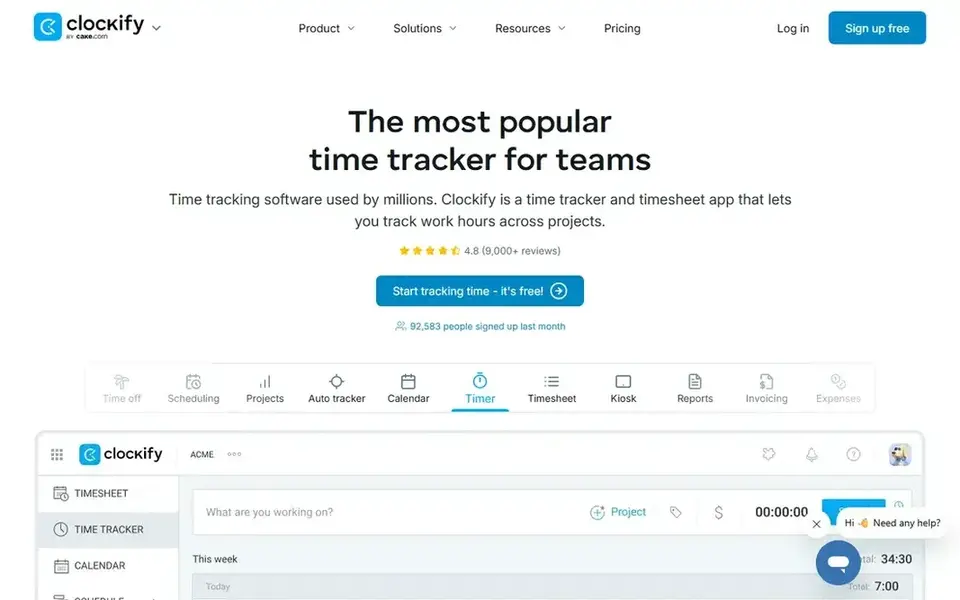
Choose Clockify for a free start with automatic reports for freelancers. Check the plan list before you depend on automatic capture, since that feature sits above Basic. Entry-level costs $3.99 per user a month billed yearly and brings time off, invoicing, timesheet approval, and manager roles.
Standard costs $5.49 per user per month billed yearly and layers on attendance, overtime, and QuickBooks sync. The free plan includes up to 5 users, so a solo freelancer suits easily. Projects, clients, and tags keep hours organised, and billable rates turn tracked time into figures a freelancer can use for client billing. On cost, Clockify starts like this: $3.99 per user/month. Clockify includes a free tier.
Where it falls short: Automatic time capture needs a higher level.
- Free plan with unlimited tracking for up to 5 users
- Automatic reports by project and client
- Free plan limits reporting depth
DeskTime works best for automatic tracking and productivity reports. Worth adding: Pro costs $6.42 per user a month billed yearly and spans automatic tracking, productivity reports, and project tracking. A 14 day trial lets a freelancer test automatic tracking before choosing.
Absence tracking handles holidays and sick leave, and a manager view presents who is online when a freelancer works with a small team. Beyond that, reports present where the day went, and project tracking ties hours to client work. DeskTime pricing: $6.42 per user/month. Free plan details: Free trial (14 days).
Trade-offs to know: only a 14 day trial.
- Automatic time tracking with no manual timers
- Productivity reports by app and site
- Shift scheduling needs the Premium plan
Pick TrackingTime if this describes you: automatic app and site capture for freelancers. Pro costs $6.50 per user a month billed yearly and brings billing rates, invoicing, timesheet approval, and time off.
In practice, a freelancer can stay on the free plan whereas learning the tool, then move to Pro when invoicing matters. On cost, TrackingTime starts like this: $4.50 per user/month. TrackingTime offers a free plan.
Drawbacks to consider: attendance features need Pro or higher.
- Free plan with unlimited users, projects, tasks
- AutoTrack records app and site use
- Billing and invoicing need the Pro plan
Think of TimeCamp for automatic tracking with invoicing for freelancers. For everyday use, reports show hours by project and client, and exports go to CSV and PDF. Worth adding: a free plan spans one user with entry-level tracking.
Downsides: attendance features need a higher level.
Premium costs $10 per user a month billed yearly and layers on attendance, approvals, and more integrations. Check the user limit on the free plan, since a freelancer who brings a collaborator needs Starter. On top of that, starter costs $7 per user a month billed yearly and includes automatic tracking, invoicing, and reporting. Starting cost for TimeCamp: $7 per user/month. TimeCamp includes a free tier.
- Automatic tracking with keyword based time entries
- Invoicing built from tracked time
- The free plan limits the number of users
Everhour is designed for timers inside Asana, Trello, or Jira. Everhour fits a freelancer who already plans work in Asana, Trello, or Jira and wants time tracking inside those tools.
Timers sit inside each task, so the freelancer logs time without opening a second app. The starting price for Everhour: $8.50 per user/month. A free plan is available with Everhour.
Downsides: Best value only for teams already using Asana, Trello, or Jira.
- Jira tasks
- Timers inside Asana, Trello
- Invoicing needs the higher level
Timely is aimed squarely at automatic timesheets built from real work. Check the integrations before you buy, because automatic capture fits best when the freelancer links the calendar and the tools they use each day.
A 14 day trial handles the full feature set. What you pay to start with Timely: $9 per user/month. As for free access: Free trial (14 days).
The main drawbacks: only a 14 day trial.
- App use
- Automatic capture from calendar, email
- No free plan
How we chose
Pricing pages, product documentation and feature lists were the main sources, and every entry carries at least one honest drawback. Where a vendor does not publish a price, the entry says quote. Where a price depends on seats or billing term, the entry says so. Tools are placed by general fit for AI time tracking software for freelancers, with price clarity and free access as tie-breakers. A different team can reasonably rank them differently.
Questions to settle before buying
- Confirm the entry price on the vendor page: Clockify starts at $3.99 per user/month, but seat counts and billing terms change the total.
- Check what the free option really includes: Clockify, TrackingTime, TimeCamp and Everhour offer a free plan, and usage caps differ.
- Take the trial from DeskTime and Timely and push a live task through it before you pay.
- Before choosing Clockify, weigh its main limit: automatic time capture needs a higher level.
- Price Clockify for your actual team size; headline prices rarely include add-ons or overage.
- Verify that exporting from TimeCamp is possible on your plan and covers all your records.
Frequently asked questions
How are the tools for AI time tracking software for freelancers ordered?
Clockify sits first and Timely last because the order follows typical fit for AI time tracking software for freelancers, then price clarity and free access. It is a judgement call, so read each profile for fit and limits.
What is the cheapest option for AI time tracking software for freelancers in this list?
On published monthly entry prices, Clockify is the lowest here at $3.99 per user/month. Entry price is only part of the cost, because seats, add-ons and billing terms can change the total. For the full picture, the cards above cover all 6 entries of this AI time tracking software for freelancers list, including price, free plan and limits.
Which options for AI time tracking software for freelancers have a free plan?
On this list, Clockify, TrackingTime, TimeCamp and Everhour include a free plan. Caps on seats, usage or features are common, so test the free plan against your real workload. Several others offer a trial instead.
Does AI time tracking replace manual timers?
No, it fits best as a backup. Most freelancers use both: automatic capture for the full day, and a timer for live client work.
Is automatic time tracking private?
It relies on the tool. Check the privacy settings before you install any automatic tracker, and read the vendor page on what is recorded.
What is AI time tracking software?
AI time tracking software builds timesheets automatically from calendar events, emails, documents, and app use, rather than relying on a manual timer. The user still reviews and approves every entry before it becomes a timesheet.
Sources
See where you really rank - block by block
ProMapRanker scans Google Maps across a grid of your service area. Simple monthly plans from $19, white-label on every plan.
Start freeBrowse all guides
← Best AI Project Management Software for Small Teams (2026)6 Best Platforms for AI Powered Workflows in 2026 →
 best ai powered python notebook platforms
Best AI Powered Python Notebook Platforms (2026)
Compare 6 best AI powered python notebook platforms, with prices, free plans and who each fits. Strengths and gaps are listed per tool. Quick to scan.
Read → best ai tools for platform engineering teams
AI Tools for Platform Engineering Teams: Best Picks of 2026
Compare 6 best AI tools for platform engineering teams, with prices, free plans and who each fits. Concise write-ups of every option. Updated for 2026.
Read → best ai resource planning software for consulting firms
7 Best AI Resource Planning Software for Consulting Firms for 2026
Compare 7 best AI resource planning software for consulting firms, with prices, free plans and who each fits. Each pick comes with its main catch. Easy to scan.
Read → best sop software
Best SOP Software in 2026: 8 Tools Compared
Compare the best SOP software for writing, training and tracking standard operating procedures, with prices and free plans for small teams in 2026 now.
Read → best online gaming platforms in france
Best Online Gaming Platforms in France in 2026
Best online gaming platforms in France must be ANJ licensed. We compare 9 legal operators for sports, poker, and horse betting, with safety notes for 2026.
Read → v0 alternatives
Best v0 Alternatives in 2026
Looking for v0 alternatives? We compare 9 AI app builders and code tools on pricing, full-stack support, code ownership and the best fit for each project.
Read →More in Project Management & Productivity · All guides A to Z by date · Latest guides