 ProMapRanker
Best Word Alternatives in 2026


Free online writing and collaboration · Pricing starts at: Free
Key takeaways
- Google Docs is the best free alternative for most people, with real-time collaboration and no install.
- LibreOffice Writer is the best offline, no-account option, and it is completely free and open source.
- Apple Pages is the best free pick for Apple device owners, with polished templates and iCloud sync.
- ONLYOFFICE Docs offers the closest Word file compatibility for teams that exchange DOCX files daily.
Quick comparison
| Pick | Great for | Pricing starts at | Free tier | |
|---|---|---|---|---|
| Google Docs | Free online writing and collaboration | Free | Yes | Visit |
 LibreOffice Writer | Free offline writing | Free | Yes | Visit |
 Apple Pages | Apple device owners | Free | Yes | Visit |
 WPS Office | Word-like interface with a free tier | Free | Yes | Visit |
 Zoho Writer | Free online docs with offline mode | Free | Yes | Visit |
 ONLYOFFICE Docs | Word file compatibility | Free | Yes | Visit |
 Notion | Docs, wikis, and notes in one place | Free | Yes | Visit |
 Proton Docs | Private collaborative writing | Free | Yes | Visit |
 FreeOffice TextMaker | Lightweight free Word-compatible editor | Free | Yes | Visit |
The best word alternatives
Most people do not need Word itself; they need to write, edit, share, and open DOCX files without trouble. The nine tools below cover free online editors, offline desktop apps, and privacy-focused options, so you can pick based on how you write and who you share with.
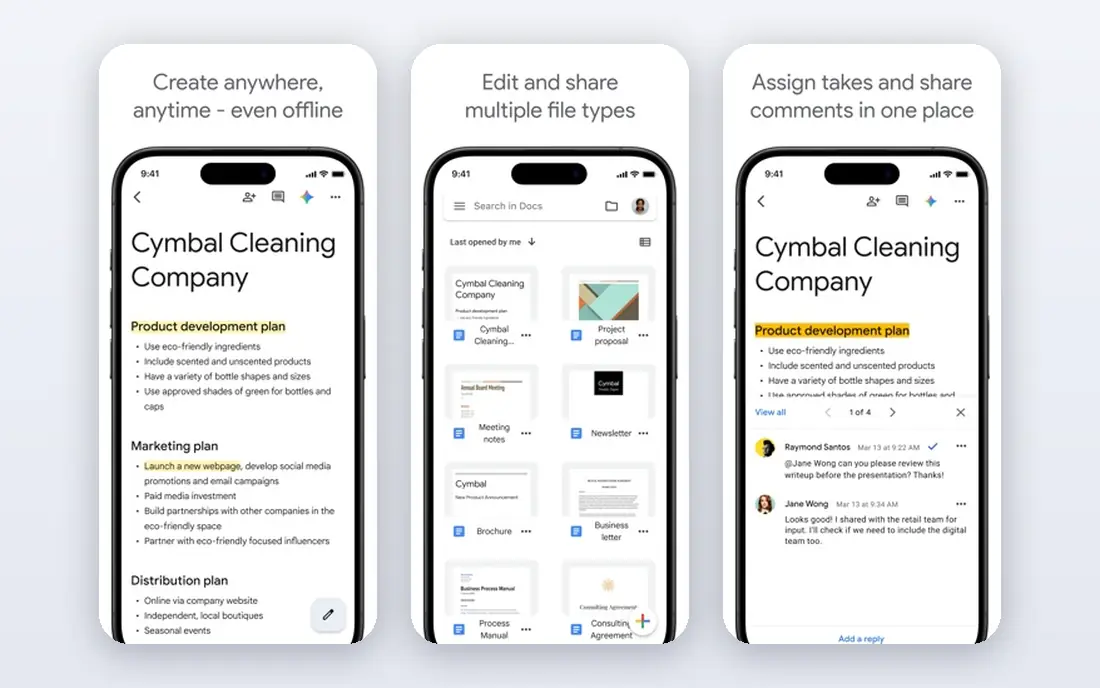
Google Docs is the default free alternative for a reason. It runs in any browser, saves automatically, and lets several people edit and comment on the same document at once. Sharing is a link, not an attachment, and version history makes it easy to recover earlier drafts. For students, small teams, and anyone who collaborates online, Docs is hard to beat.
The limits show up with complex documents. Heavy Word files with intricate styles, tracked changes, and embedded objects can shift formatting on export, and offline access needs the Chrome extension and some setup. For everyday writing and collaboration, though, Docs covers nearly everything Word does.
- Free with a Google account
- Real-time collaboration and comments
- Autosaves to Google Drive
- Needs an internet connection for full features
- Offline mode requires setup
- Formatting can shift when exporting complex Word files
LibreOffice Writer is the best pick for writers who want a real desktop word processor without a subscription or an account. It runs on Windows, Mac, and Linux, opens and saves DOCX files, and handles styles, tables, footnotes, and mail merge. Because it is open source, there is no paywall, no trial, and no account requirement.
The trade-off is collaboration. Writer is a desktop app first, so real-time co-editing is not its strength, and tracked changes across Word and Writer can need a careful check on complex documents. For solo writing, offline work, and everyday documents, Writer is the strongest free desktop option.
- Completely free and open source
- Works fully offline with no account
- Strong Word file compatibility for a free tool
- Interface feels dated
- Collaboration features are thinner than Google Docs
- Complex Word layouts can shift
Pages is free for Apple device owners and is far more capable than its reputation suggests. Templates for reports, resumes, newsletters, and books look genuinely good, and documents sync across Mac, iPad, and iPhone through iCloud. Pages also exports to Word and PDF, so sharing with non-Apple users is straightforward.
The limits are ecosystem and compatibility. The full experience is Apple only, and complex Word documents can lose formatting on round trips between Pages and Word. For Apple owners who write mostly for themselves or share PDFs, Pages is an excellent free choice.
- Free on Apple devices
- Polished templates
- Syncs across Mac, iPad, and iPhone through iCloud
- Apple only for the full experience
- Word export can shift complex formatting
- Collaboration is best inside the Apple ecosystem
WPS Office Writer will feel instantly familiar to Word users, since its ribbon interface closely mirrors Word's. The free tier covers documents, spreadsheets, and presentations, and it runs on Windows, Mac, Linux, and mobile. For users who want Word's look without Word's price, WPS is the closest free match.
The catches are ads on the free tier and AI features reserved for the paid Pro tier. Some users also prefer to review WPS privacy terms before using it for sensitive business documents. For everyday writing and Word-compatible files, the free tier is generous.
- Interface closely resembles Word
- Free tier covers Writer, Spreadsheets, and Presentation
- Runs on desktop and mobile
- Free tier includes ads
- AI features sit on the paid Pro tier
- Privacy terms deserve a read before business use
Zoho Writer is a strong free online alternative that deserves more attention than it gets. It offers real-time collaboration, comments, and version history, plus a genuine offline mode that lets you keep writing without a connection. The interface is clean and focused, with fewer distractions than larger suites.
The drawback is ecosystem size. Fewer people use Zoho, so sharing a Zoho document with outsiders sometimes means exporting to Word or PDF first, and some advanced automation features use paid credits beyond a free allowance. For writers who want a free, capable online editor outside Google, Zoho Writer is a solid pick.
- Free with a Zoho account
- Real offline mode
- Clean writing interface with collaboration and document automation options
- Smaller ecosystem than Google Docs
- Some advanced features use paid credits
- Fewer third-party integrations
ONLYOFFICE Docs is the best pick for teams that exchange Word files constantly and cannot afford formatting surprises. Its editors are built around Microsoft formats, so DOCX, XLSX, and PPTX files open with fewer shifts than in most free alternatives. Desktop apps are free, and the open-source community editions suit self-hosters.
The cloud version needs a closer look. The free Startup plan covers up to 3 admins, unlimited users and guests, 12 rooms, and 2 GB of storage, while Business costs $20 per admin per month. For a team that mostly needs desktop editing and occasional sharing, the free desktop apps are the simplest route.
- Excellent DOCX compatibility
- Free desktop apps and open-source community editions
- Cloud DocSpace has a free Startup plan
- Cloud free plan limits storage to 2 GB and rooms to 12
- Business plan costs $20 per admin per month
- Self-hosting needs technical setup
Notion is a different kind of Word alternative: less a word processor, more a workspace where writing lives alongside notes, databases, and team wikis. For personal notes, project docs, and internal knowledge bases, Notion's flexible pages beat a traditional document. The free plan covers individuals and small teams, and Plus costs $10 per user per month billed annually.
The limit is traditional document work. Notion is not the tool for a formatted report with headers, footers, and precise page layout, and Word export is basic. Use Notion for living documents and internal writing, and pair it with Docs or Writer for formal documents.
- Flexible pages combine writing, databases, and wikis
- Free plan suits individuals
- Good for personal knowledge and team docs
- Not a traditional word processor
- Word export is basic
- Offline access is limited
Proton Docs suits writers who care about privacy. Documents live inside Proton Drive with end-to-end encryption, and the free plan includes 5 GB of storage. Real-time collaboration works for teams inside Proton, and there are no ads. For journalists, lawyers, and anyone handling sensitive drafts, the privacy story is the reason to choose Proton.
The trade-off is maturity. Proton Docs has fewer features and integrations than Google Docs, and collaboration is smoothest when everyone uses Proton. Paid Drive tiers start at $3.99 per month billed annually for more storage. For privacy-first writing, Proton Docs is the strongest free option.
- End-to-end encrypted docs inside Proton Drive
- Free plan includes 5 GB of storage
- No ads and a privacy-first approach
- Feature set is younger than Google Docs
- Collaboration is best inside Proton
- Paid Drive tiers start at $3.99 per month billed annually
FreeOffice TextMaker, from SoftMaker, is a lightweight desktop word processor that is free for both personal and business use. It opens and saves Word files well, runs fast on older computers, and offers a familiar ribbon-style interface. For a user who wants a simple, fast, free desktop editor without the size of LibreOffice, TextMaker is a good fit.
The limits are scope. TextMaker has fewer features than LibreOffice Writer, and it offers no real-time online collaboration. It is best as a desktop writing tool for everyday documents, not as a collaboration platform.
- Free for personal and business use
- Lightweight and fast
- Good Word file compatibility with a familiar interface
- Fewer features than LibreOffice
- No real-time collaboration
- Part of a suite rather than a standalone cloud tool
How we picked these
We compared official product pages, pricing pages, and app listings for word processors that are live and genuinely handle everyday writing and Word file exchange. We favored tools with clear free tiers and noted where paid features or storage limits change the real cost. Our comparisons rest on vendor documentation and public reviews, not on hands-on testing.
How to choose the right Word replacement
Decide how you share documents
If you collaborate in real time, pick Google Docs, Zoho Writer, or Proton Docs. If you mostly send files, pick LibreOffice Writer, ONLYOFFICE, or FreeOffice TextMaker for better file control.
Test your hardest document
Open a copy, never the original, of your most complex Word file in each candidate and check styles, tables, images, and tracked changes. The tool that preserves your real documents best is the right one, regardless of feature lists.
Check offline needs
Writers who work on planes, in rural areas, or on unreliable connections should favor desktop apps such as LibreOffice Writer or FreeOffice TextMaker, or confirm that an online tool's offline mode works on their device.
Keep Word for one-off compatibility
If a client or employer requires Word files with perfect formatting, keeping a free web version of Word or a trial for final checks can be cheaper than fighting formatting shifts. Use the alternative for daily writing and Word only for final delivery.
Frequently asked questions
What is the best free Microsoft Word alternative?
Google Docs is the best free alternative for most people, thanks to collaboration and autosave. LibreOffice Writer is the best free desktop option for offline work, and Apple Pages is the best free option for Apple device owners.
Are there free alternatives to Word that open DOCX files?
Yes. LibreOffice Writer, ONLYOFFICE Docs, WPS Office, and FreeOffice TextMaker all open and save DOCX files, and Google Docs, Zoho Writer, and Pages can import and export Word files. Test your most complex files before committing, since formatting can shift.
What is the best alternative to Word for Mac?
Apple Pages is free and built for Mac, iPad, and iPhone, with polished templates and iCloud sync. LibreOffice Writer and Google Docs are strong cross-platform options for Mac users who share files with Windows users.
Can I use Word alternatives for professional documents?
Yes, for most professional writing. Google Docs, LibreOffice Writer, and ONLYOFFICE all handle reports, resumes, and letters well. For documents with strict Word formatting requirements, check the final file in Word or export to PDF before sending.
Is Google Docs really free?
Yes, Google Docs is free with a Google account, including real-time collaboration and Drive storage up to the account's storage limit. Paid Google Workspace plans add business admin controls and more storage, but individual writing is free.
Sources
See where you really rank - block by block
ProMapRanker scans Google Maps across a grid of your service area. Simple monthly plans from $19, white-label on every plan.
Start freeKeep reading
 which software is best for pdf page removal
Which Software Is Best for PDF Page Removal in 2026
Find which software is best for pdf page removal, from free online tools to desktop editors, with page controls, privacy, safety, and pricing compared.
Read → when i work alternatives
Best When I Work Alternatives in 2026
Looking for when i work alternatives? We compare 8 scheduling apps for hourly teams, covering pricing, free plans, time clocks and the best fit for business.
Read → the best tool for keyword analysis
The Best Tool for Keyword Analysis in 2026
Find the best tool for keyword analysis with our 2026 comparison of 10 keyword analysis software tools on data depth, difficulty scores and price today.
Read →