 ProMapRanker
Best Work Out Apps in 2026: 10 Apps Compared

Key takeaways
- Nike Training Club is the best free starting point, with a large workout library and no subscription needed for the core app.
- Fitbod is the strongest pick for gym lifters who want plans that adjust to recovery and available equipment.
- Peloton and Apple Fitness+ suit people who stay consistent with classes and instructor-led sessions.
- A simple tracker such as JEFIT or Seven can beat a fancy app if it is the one you actually open each week.
Quick comparison
| Pick | Great for | Pricing starts at | Free tier | |
|---|---|---|---|---|
 Nike Training Club | Free workouts at home or in the gym | Free | Yes | Visit |
 Peloton | People who stay motivated with live and recorded classes | $15.99 per month | Free trial | Visit |
 Fitbod | Gym lifters who want adaptive strength plans | $15.99 per month | Free trial | Visit |
 Apple Fitness+ | Apple Watch owners who want guided video workouts | $9.99 per month | Free trial | Visit |
 Strava | Runners and cyclists who want tracking and routes | Free | Yes | Visit |
 Freeletics | Bodyweight training with no gym needed | See website | Yes | Visit |
 Sweat | Structured programs with a strong community | See website | Free trial | Visit |
 JEFIT | Lifters who want detailed workout logs | Free | Yes | Visit |
 Seven | Building a daily movement habit in seven minutes | See website | Yes | Visit |
 Down Dog | Yoga, Pilates, and mobility at home | See website | Free trial | Visit |
The best work out apps
This is general information only, not medical advice. If you have an injury, a heart condition, or another health concern, talk with a clinician before starting a new training plan. We compared official pricing pages, app store listings, and published feature lists for apps live in October 2026, and we focused on apps with a clear plan structure, honest pricing, and a free or trial option where possible.
Nike Training Club is hard to beat on value, because the core app is free. You get guided workouts across strength, cardio, yoga, and mobility, plus training plans that give structure to a week. The sessions are clear, the coaching cues are practical, and the app works well for home training with little or no equipment.
The limit is personalization. Nike Training Club does not adapt each session to your recovery or your gym equipment in the way a paid strength app does. If you want a free, well-made library and you can pick your own sessions, start here and spend money only when you hit a clear limit.
- Large workout library at no cost
- Plans for strength, cardio, and mobility
- Needs only a free Nike account
- No live classes in the same style as Peloton
- Less personal progression than Fitbod
Peloton App One gives access to classes without buying a bike or treadmill. You can follow strength, running, cycling, yoga, and meditation sessions from a phone, tablet, or television. The instructors, music, and leaderboards give many people the push they need on days when a solo workout feels flat.
That energy is also the drawback. If you prefer to train quietly, set your own pace, and avoid screen-led sessions, Peloton can feel like too much. The subscription is also a real monthly cost, so use the trial for a full week of your normal training before you commit.
- Huge class library across cardio, strength, yoga, and meditation
- Live classes add energy
- Works without Peloton hardware
- Monthly cost adds up
- Class style will not suit people who prefer quiet self-guided training
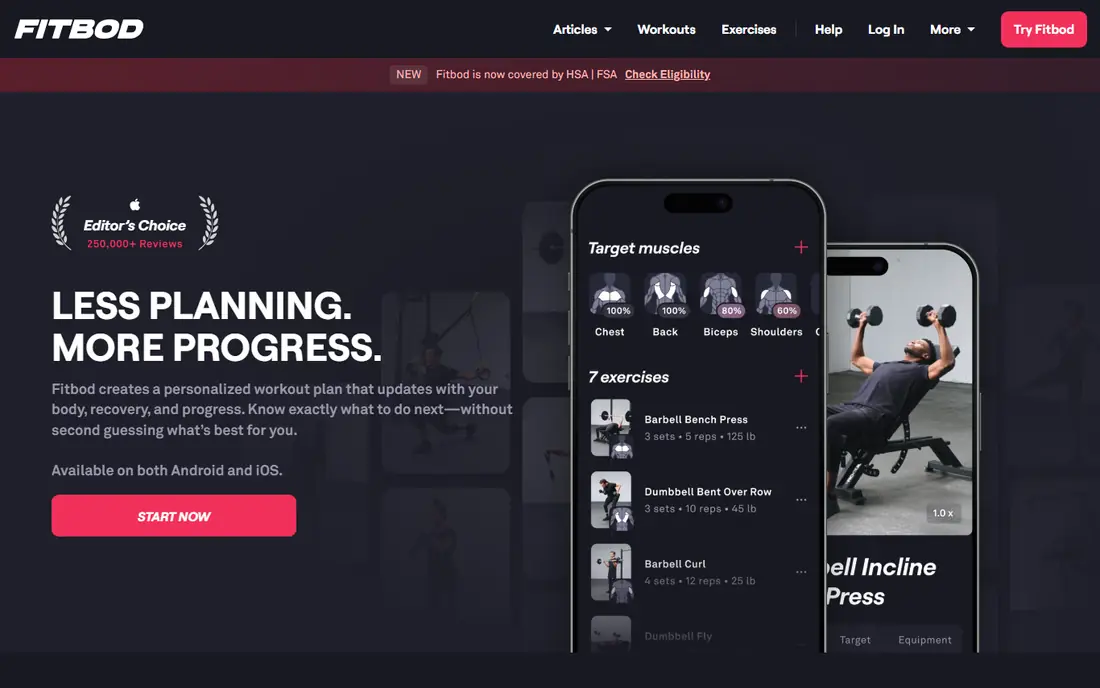
Fitbod builds each workout from the equipment you have, the muscles you trained recently, and your past performance. That makes it a strong choice for people who lift three or more times a week and want progression without writing their own programs. The exercise videos and tracking are clear, and the app adjusts when you miss a session.
The focus is narrow by design. Fitbod is not a class app, and it will not replace a running coach or a yoga teacher. If strength is your main goal, that focus is a strength. If you want variety across many workout styles, pair it with a free app instead of expecting one subscription to do everything.
- Builds sessions around your equipment and recovery
- Large exercise library
- Tracks sets, reps, and progress over time
- Strength focus means less class variety
- Monthly price is high for casual lifters
Apple Fitness+ works best inside the Apple system. With an Apple Watch, you see heart rate and activity rings on screen during a workout, which helps you judge effort without guessing. The library covers strength, high-intensity training, yoga, dance, Pilates, and meditation, and new sessions arrive regularly.
Without an Apple Watch, much of that appeal fades, since the live metrics are the main advantage over a free video library. The price is fair for Apple users who train often, and a one-month trial for new subscribers makes it easy to test. Android users should look at Peloton or Nike Training Club instead.
- Live on-screen metrics with an Apple Watch
- Wide workout types
- Family sharing through Apple plans
- Needs Apple devices
- Less useful without an Apple Watch
Strava is the default tracker for many runners and cyclists, and the free tier covers the core job well. You record a run or ride, see pace, distance, and elevation, and compare efforts on familiar segments. Routes and challenges give structure without turning every session into a class.
Paid plans add deeper analysis and training features, but casual runners may never need them. The main caution is social pressure. Leaderboards can push you to chase speed on days when an easy session would serve you better. Used with that in mind, Strava is an excellent free companion to a workout app.
- Strong GPS tracking for runs and rides
- Routes, segments, and challenges
- Free tier covers core tracking
- Training plans sit behind a paid plan
- Social features can distract from simple tracking
Freeletics builds training around your body, your space, and your time. That makes it a good fit for travel, small apartments, and people who do not want a gym membership. The coach adapts sessions to your feedback, and many workouts fit into 20 to 30 minutes.
The limit is load. Bodyweight training can build fitness and muscle endurance, but it cannot fully replace barbell work for lifters chasing heavy strength goals. Pricing also varies by plan length, so check the current price in the app before subscribing. For no-equipment training, Freeletics is one of the most complete options.
- Works with little or no equipment
- Adaptive coach plans
- Short sessions suit busy days
- Full coach features need a paid plan
- Bodyweight focus limits heavy strength work
Sweat offers structured programs that remove daily decision making. You follow a plan week by week, with sessions for strength, cardio, Pilates, and recovery. That structure helps people who start strong and then stall when they must invent each workout themselves.
The trade-off is flexibility. Experienced lifters who like to design their own sessions may find the programs too fixed. The price is also at the higher end, so use the trial to finish at least two full weeks before judging it. For people who want a plan handed to them, Sweat is a dependable choice.
- Clear multi-week programs
- Strength, Pilates, and low-impact options
- Progress tracking built in
- Monthly price is high
- Program style may feel rigid for experienced lifters
JEFIT is a workhorse for gym training. You log exercises, sets, reps, and weights, and the app keeps a clear record of progress over months. The free tier covers the core logging job, which is more than many paid apps offer, and the exercise library helps when you want to swap a movement.
The app looks and feels older than Fitbod or Peloton, and the paid tier is where the deeper plans and stats live. If you already know how to train and you mainly need a reliable log, JEFIT is excellent and cheap. If you need the app to build the plan for you, Fitbod is the better fit.
- Large exercise library
- Detailed sets, reps, and rest tracking
- Free tier is genuinely useful
- Design feels dated next to newer apps
- Plans and advanced stats need a paid tier
Seven is built around one idea: a short workout you cannot reasonably skip. The seven-minute circuits use bodyweight moves, and the streak system gives a small daily win that keeps many people going. It is a strong first app for people returning to exercise, traveling often, or building a habit from zero.
Be honest about its limits. Seven minutes a day is a good start, not a complete training plan for strength or endurance goals. Use Seven to build consistency, then graduate to Nike Training Club, Fitbod, or a running plan when the habit is solid. As an on-ramp, it is one of the best apps on this list.
- Very short sessions lower the barrier to starting
- Streaks help habit building
- No equipment needed
- Seven minutes alone will not meet every fitness goal
- Advanced plans need a paid tier
Down Dog generates a new yoga or Pilates session each time you practice, so you do not repeat the same routine for months. You can set the level, the length, the focus area, and the pace, which makes it useful for both beginners and regular practitioners. The instruction is calm and clear, and the app works well in a small space.
The scope is the limit. Down Dog is a yoga and mobility app first, so pair it with a strength or cardio app if you want a complete week of training. A free trial lets you test the generated sessions before paying, and the adjustable settings are the feature most users end up valuing most.
- Sessions are generated fresh each time
- Adjustable level, pace, and focus
- Works well for home practice
- Yoga focus means it is not a full strength or cardio app
- Pricing varies by plan
How we picked these
We compared official pricing pages, app store listings, and published feature lists for apps live in October 2026. We kept apps that cover a real training need, from free home workouts to gym strength plans, and we favored apps with a free tier or trial so readers can test before paying. We left out apps with unclear pricing, apps that had stopped working, and apps that promised results no workout app can guarantee.
How to choose the right app for your week
Match the app to your training style, not to the longest feature list. If you train at home with no equipment, start with Nike Training Club or Freeletics. If you lift in a gym, start with Fitbod or JEFIT. If classes keep you consistent, test Peloton or Apple Fitness+ for a full week. If you only need to build a habit, start with Seven and add a second app later.
Check three practical points before paying: whether the app works on your phone and watch, whether sessions fit your available time, and whether you can cancel easily from the app store. A cheaper app you use four times a week beats an expensive app you open once. This is general information only, not medical advice, so ease into a new plan and stop if pain, dizziness, or chest discomfort appears.
Frequently asked questions
What is the best app to work out at home for free?
Nike Training Club is the best free home workout app on this list, with a large library and no subscription for the core app. Seven is a good second choice for very short daily sessions, and Strava covers free run and ride tracking.
What is the best work out app for weight lifting?
Fitbod is the best choice for lifters who want adaptive plans, while JEFIT is the best choice for lifters who want detailed logging at low cost. Fitbod builds the session for you, and JEFIT records the session you build yourself.
Do I need a paid workout app to get fit?
No. Free apps cover the basics well, and consistency matters more than any subscription. Pay when a paid feature solves a real problem, such as adaptive strength programming, live classes, or a structured multi-week plan.
Which workout app works best with an Apple Watch?
Apple Fitness+ works best with an Apple Watch, since live metrics appear on screen during workouts. Fitbod, Strava, and Peloton also offer Apple Watch support, but Fitness+ is built around the watch in a way the others are not.
Can a seven-minute workout really help?
Yes, as a habit builder and a starting point, especially for people who currently do little exercise. Seven minutes alone will not meet every strength or endurance goal, so treat it as a first step and add longer sessions as fitness improves.
How do I pick between Peloton and Apple Fitness+?
Pick Peloton if you want the widest class library and you do not use Apple devices. Pick Apple Fitness+ if you own an Apple Watch and want live metrics on screen. Both offer trials, so test each for a week of your normal training before paying.
Sources
See where you really rank - block by block
ProMapRanker scans Google Maps across a grid of your service area. Simple monthly plans from $19, white-label on every plan.
Start freeKeep reading
 wpforms alternatives
Best WPForms Alternatives in 2026
We compare 9 wpforms alternatives for WordPress forms, with free and paid options, current pricing notes, and honest limits for small business sites in 2026.
Read → windows task scheduler alternatives
Best Windows Task Scheduler Alternatives in 2026
Looking for Windows Task Scheduler alternatives? We compare 9 schedulers for Windows and cross-platform work, from free tools to enterprise automation.
Read → which ai video service is best
Which AI Video Service Is Best in 2026
which ai video service is best? We compare 10 legitimate AI video services on price, avatars, editing and output quality to help you pick the right tool.
Read →