 ProMapRanker
Best Wardrobe Apps in 2026: 8 Apps Compared

Key takeaways
- Whering is our pick for most people because its core closet is free and planning tools are simple to use.
- Cladwell suits people who want a smaller capsule wardrobe and a daily outfit suggestion without extra noise.
- Stylebook suits people who like detailed records, packing lists, and cost-per-wear numbers.
- Acloset and Alta suit people who want app-generated outfit ideas from the clothes they already own.
- The best wardrobe apps only help if you add your real clothes, so pick the upload flow you will actually finish.
Quick comparison
| Pick | Great for | Pricing starts at | Free tier | |
|---|---|---|---|---|
 Whering | Free digital closet | Free | Yes | Visit |
 Acloset | AI outfit suggestions | Free | Yes | Visit |
 Cladwell | Capsule wardrobes | See website | Yes | Visit |
 Stylebook | Detailed outfit tracking | See website | No | Visit |
 Indyx | Human styling help | Free | Yes | Visit |
 Pureple | Simple outfit planning | Free | Yes | Visit |
 Combyne | Sharing outfits with friends | Free | Yes | Visit |
 Alta | Fast closet setup | Free | Yes | Visit |
The best wardrobe apps
A good wardrobe app should make getting dressed faster, not turn your closet into another chore. These picks cover free closets, capsule planning, and styling help.
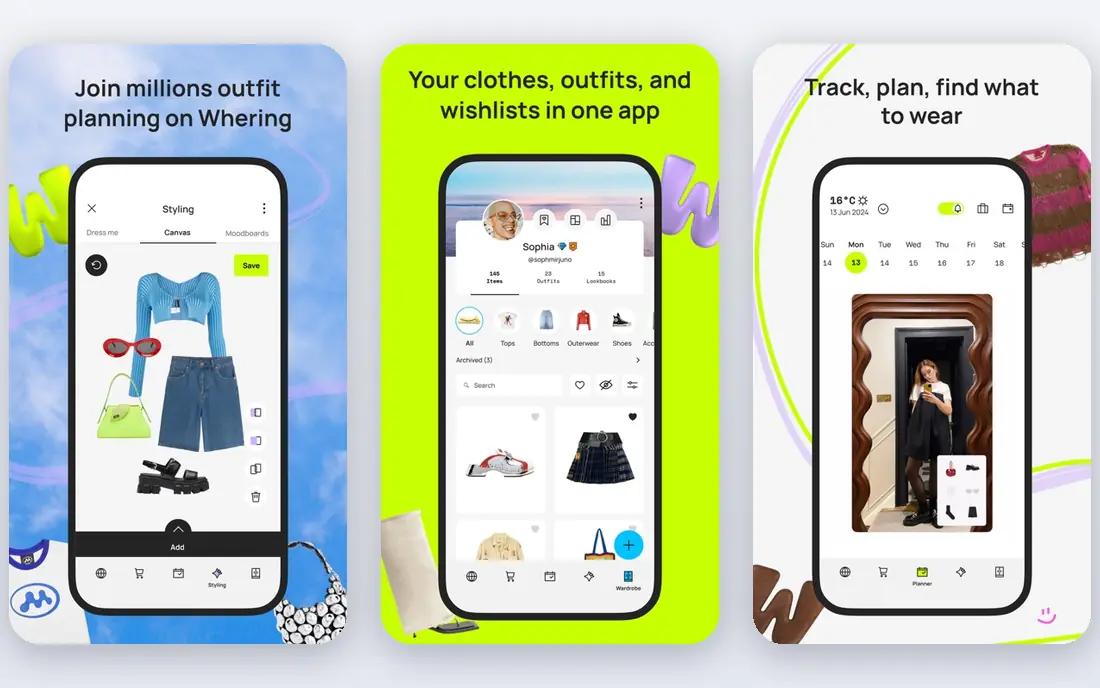
Whering is our pick for most people because it starts free and covers the basics well. You upload photos of your clothes, the app crops and tags them, and you can build outfits, plan ahead, and make packing lists for trips. That simple loop is what most people actually need from a wardrobe app, and the free tier does not force you into a paid plan to keep a usable closet.
The catch is that Whering is a planning tool first and a stylist second. Its suggestions can help on a busy morning, but they will not replace a human stylist or a detailed style quiz. If you want deep personal styling advice, pair it with one of the stylist-led options below, or accept that you will still make most outfit calls yourself.
- Free and unlimited closet
- Outfit planning and packing lists
- Weather-based outfit suggestions
- Styling suggestions are basic compared with paid stylist apps
- Photo quality depends on your own photos
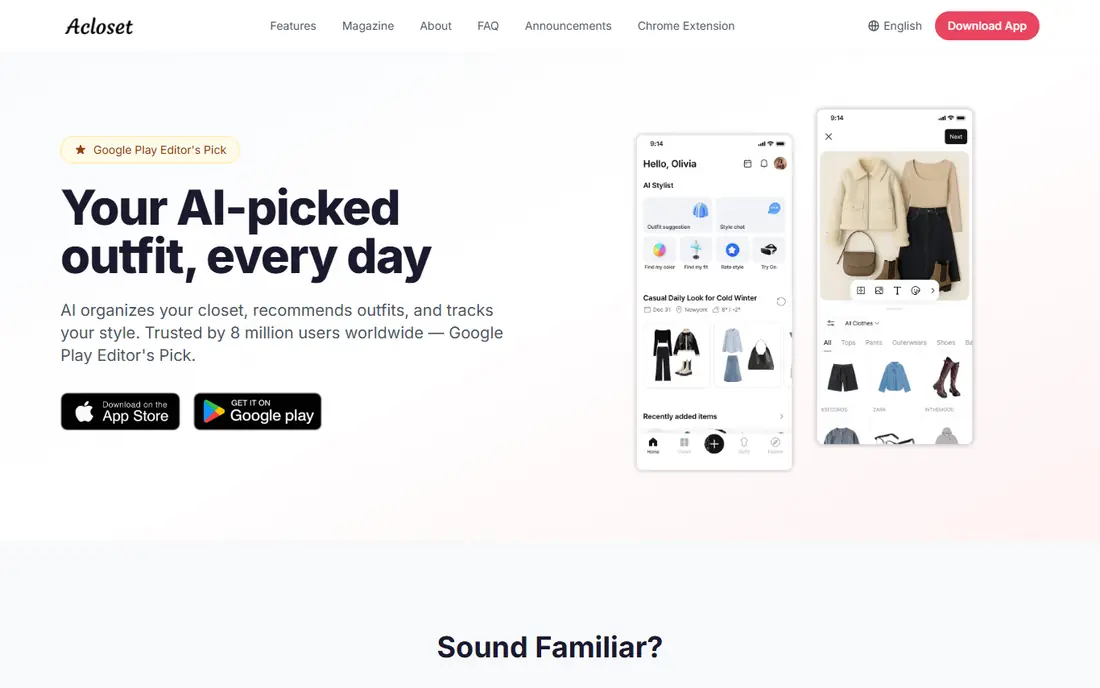
Acloset suits people who open a closet app and want an answer, not a blank canvas. You add your clothes, and the app can suggest outfits, track how often you wear each item, and help you plan looks on a calendar. Cost-per-wear tracking is a nice reality check too, since it shows which pieces earn their place and which ones just take up space.
The trade-off is patience at the start. A small or poorly tagged closet gives the app little to work with, so early suggestions can feel generic. Give it a full closet, with seasons and categories filled in, before you judge the outfit ideas.
- AI outfit ideas from your own closet
- Cost-per-wear tracking
- Calendar planning
- Suggestions improve only as your closet data grows
- Some features sit behind in-app purchases
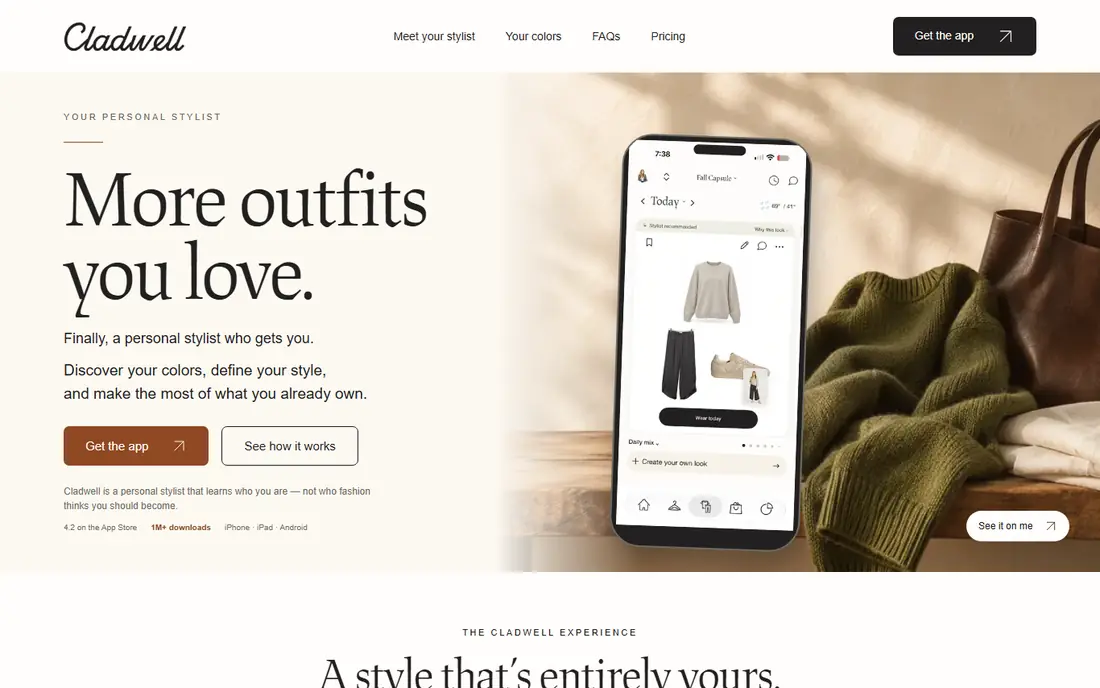
Cladwell is built for people who want fewer clothes and less morning debate. It guides you toward a capsule wardrobe, which is a smaller set of pieces that mix and match well, and then gives you a daily outfit suggestion based on your closet and the weather. That structure suits people who feel overwhelmed by a full closet and want a calmer routine.
The honest catch is that Cladwell rewards commitment. If you keep adding random pieces and ignore the capsule plan, the daily suggestions lose their logic. It is also less playful than apps built around sharing outfits or trying bold combinations, so style experimenters may find it too restrained.
- Capsule wardrobe planning
- Daily outfit suggestions
- Weather-aware ideas
- Works best if you commit to the capsule method
- Paid features vary by store listing
Stylebook is the pick for people who like records. Its visual calendar lets you plan outfits days or weeks ahead, its packing lists help with trips, and its stats show your most worn items, least worn items, and cost per wear. If you enjoy seeing proof that a jacket was worth the price, this level of detail is satisfying in a way simpler apps are not.
The downside is the workload. Stylebook asks you to do the cataloguing, and a large closet can take a while to enter. There is also no free plan to test the full workflow first, so check the current store listing and price before you buy, and start with a small section of your closet to see if the routine sticks.
- Visual outfit calendar
- Packing lists
- Detailed stats on wear and cost per wear
- Paid app with no free plan
- Setup takes time because you add and tag items by hand
Indyx stands out because it mixes app tools with real human stylists. You can organise your closet, build outfits on boards, and get styling input from a person rather than only from an algorithm. That matters when your question is about fit, occasion, or a tricky piece that an automated suggestion keeps getting wrong.
The catch is cost and effort. Human help is not always included in the free tier, so check what is included before you expect a full styling session. You will also get better advice if your photos are clear and your items are tagged well, since a stylist can only work with what they can see.
- Access to human stylists
- Drag-and-drop outfit boards
- Closet organisation tools
- Human styling help may cost extra
- Best results need a well-photographed closet
Pureple suits people who want a straightforward closet app without a learning curve. You add clothes, make outfits, and plan what to wear, without wading through social features or complex styling systems. For everyday dressing, that simplicity is a strength, not a gap.
The limit is ambition. Pureple does less automated styling than Acloset or Alta, and it has fewer analytics than Stylebook. If you want the app to surprise you with new combinations every day, you may outgrow it. If you want a tidy digital closet that stays out of your way, it fits well.
- Simple closet setup
- Outfit creation and planning
- Works well for everyday looks
- Fewer advanced styling features than larger apps
- Outfit ideas are less automated
Combyne is the social pick in this list. You can build outfits from your own closet, share them, and browse looks from other users for ideas. That community layer helps when you are stuck in a rut and want to see how other people style a similar jacket, skirt, or pair of boots.
The honest catch is that social apps reward browsing, and browsing can eat the time you were trying to save. Inspiration quality also varies, since it comes from other users rather than from a stylist or a curated system. Use it for ideas, then save the outfits you actually plan to wear.
- Social outfit sharing
- Outfit inspiration from other users
- Easy outfit building
- Social features may distract from personal planning
- Quality of inspiration varies by user
Alta suits people who have put off digitising a closet because setup felt like too much work. Its tools aim to speed up that first step, with background removal and categorisation that turn phone photos into tidy closet items. Once your clothes are in, its AI stylist can suggest looks for events, seasons, and travel, not just for today.
The catch is that fast setup still needs decent photos. Blurry, dark, or cluttered photos lead to messy items and weaker suggestions. Alta is also newer than Stylebook or Cladwell, so there is less long-term history to judge. Try it with one drawer or one season first, and expand only if the setup speed holds up.
- Fast wardrobe setup with background removal
- AI styling ideas
- Virtual try-on features
- Newer app with fewer long-term track records to compare
- Some features depend on photo quality
How we picked these
We compared official feature pages, app store listings, and pricing pages for wardrobe apps that are live in October 2026. We looked for apps that let you add your own clothes, build outfits, and plan ahead, rather than apps that only sell clothes or only generate looks from a selfie. We kept a mix of free closets, capsule planners, and styling help, and we left out apps we could not confirm as live and working.
What to check before you pick a wardrobe app
Start with how you will add clothes. An app with perfect stats is useless if you never finish uploading your closet, so test the photo flow with ten items before you commit. Check whether background removal works on your photos, whether categories match how you think about clothes, and whether you can edit tags without a fight.
Next, decide what kind of help you want each morning. A capsule app gives you one clear suggestion. A tracking app gives you data and a calendar. A stylist app gives you a person or an AI answer. Those are different products, even when they all call themselves wardrobe apps, so match the help to the part of getting dressed that slows you down.
Finally, check the price and the platform. Some apps are free with in-app purchases, some are paid once, and some charge monthly. Check if the app works on your phone, if your closet can be exported or backed up, and if you are comfortable with photos of your clothes stored in that app. A quick check now saves a painful move later.
Frequently asked questions
What is the best wardrobe app for most people?
Whering is a strong starting point because its core closet is free and its planning tools are simple. If you want automated outfit ideas, try Acloset next, and if you want detailed tracking, try Stylebook. The best wardrobe apps depend on whether you want planning, styling, or data.
Are there good free best wardrobe apps?
Yes. Whering, Acloset, Pureple, Combyne, and Alta all offer free tiers, though some features sit behind purchases. Start free, add a real section of your closet, and pay only if the paid features solve a problem you actually have.
Can a wardrobe app help me build a capsule wardrobe?
Yes, and Cladwell is built for that job. It helps you pick a smaller set of pieces that mix well and then suggests daily outfits from that set. Other apps can support a capsule too, but you will need to set the capsule rules yourself.
Do wardrobe apps work for men and women?
Yes. Most apps in this list work for any closet, since you add your own clothes and categories. Cladwell and Pureple are often used for everyday wardrobes, while Indyx can help when you want human advice on fit or occasion.
How long does it take to set up a digital closet?
It depends on closet size and photo quality. Ten items can take a few minutes, while a full closet can take several sessions. Start with one season or one category, and use apps with background removal if photo editing slows you down.
Sources
See where you really rank - block by block
ProMapRanker scans Google Maps across a grid of your service area. Simple monthly plans from $19, white-label on every plan.
Start freeKeep reading
 wpforms alternatives
Best WPForms Alternatives in 2026
We compare 9 wpforms alternatives for WordPress forms, with free and paid options, current pricing notes, and honest limits for small business sites in 2026.
Read → windows task scheduler alternatives
Best Windows Task Scheduler Alternatives in 2026
Looking for Windows Task Scheduler alternatives? We compare 9 schedulers for Windows and cross-platform work, from free tools to enterprise automation.
Read → which ai video service is best
Which AI Video Service Is Best in 2026
which ai video service is best? We compare 10 legitimate AI video services on price, avatars, editing and output quality to help you pick the right tool.
Read →