 ProMapRanker
Best Tools for Fiber Optic Testing in 2026


field crews doing access and metro fiber work · Pricing starts at: See website
Key takeaways
- VIAVI and EXFO lead for full handheld OTDR work, with icon-based views that help newer technicians read a link.
- Fluke Networks OptiFiber Pro suits formal certification, while AFL FlexScan suits pocket-sized field checks.
- NOYAFA and Klein Tools cover basic power and continuity checks at a lower cost, but they do not replace an OTDR.
- Match the tool to the job: PON work, data center certification and long-haul spans need different wavelength and range choices.
- Safety matters with lasers and live fibers: never look into a fiber end and follow the vendor safety guidance.
Quick comparison
| Pick | Great for | Pricing starts at | Free tier | |
|---|---|---|---|---|
| VIAVI SmartOTDR | field crews doing access and metro fiber work | See website | No | Visit |
 EXFO MaxTester OTDR | FTTx and PON testing through splitters | See website | No | Visit |
 Fluke Networks OptiFiber Pro | enterprise and data center fiber certification | See website | No | Visit |
 AFL FlexScan | pocket-sized PON and point-to-point OTDR work | See website | No | Visit |
 Yokogawa OTDR | core, metro and access fiber measurement | See website | No | Visit |
 Anritsu Network Master | multi-service field testing beyond fiber alone | See website | No | Visit |
 Jonard Tools Fiber Test Kit | technicians who need a practical inspection and cleaning kit | See website | No | Visit |
 NOYAFA NF-919 | low-cost power, source and fault location checks | $65 | No | Visit |
 Klein Tools Fiber Tester | generalist technicians adding fiber checks to copper work | See website | No | Visit |
The best tools for fiber optic testing
Fiber faults rarely announce themselves clearly, so the right tester turns a vague outage into a location, a loss value and a fix. We compared handheld OTDRs, loss test sets and practical field checkers, with attention to who each tool suits and what it cannot do.

VIAVI SmartOTDR is a strong match for field crews doing access and metro fiber work. Its combined test set means one device can cover OTDR traces, loss checks and end-face inspection on a single visit. In practice, that helps when a crew must prove a link is good or find a fault before leaving site, and a vague result means a return visit.
The catch is worth stating plainly. The full kit can feel like a lot to carry and learn for a team that only needs basic loss testing. Check the plan limits and the export or reporting options before you commit, since those details decide whether the tool fits your workflow. Our view is that VIAVI SmartOTDR earns its place for field crews doing access and metro fiber work, as long as you buy it for that job and not for every job at once.
- Handheld OTDR plus power meter, light source and inspection in one unit
- Guided job workflows
- Clear pass or fail views
- Hardware pricing is quote based
- Higher-end kits add cost quickly
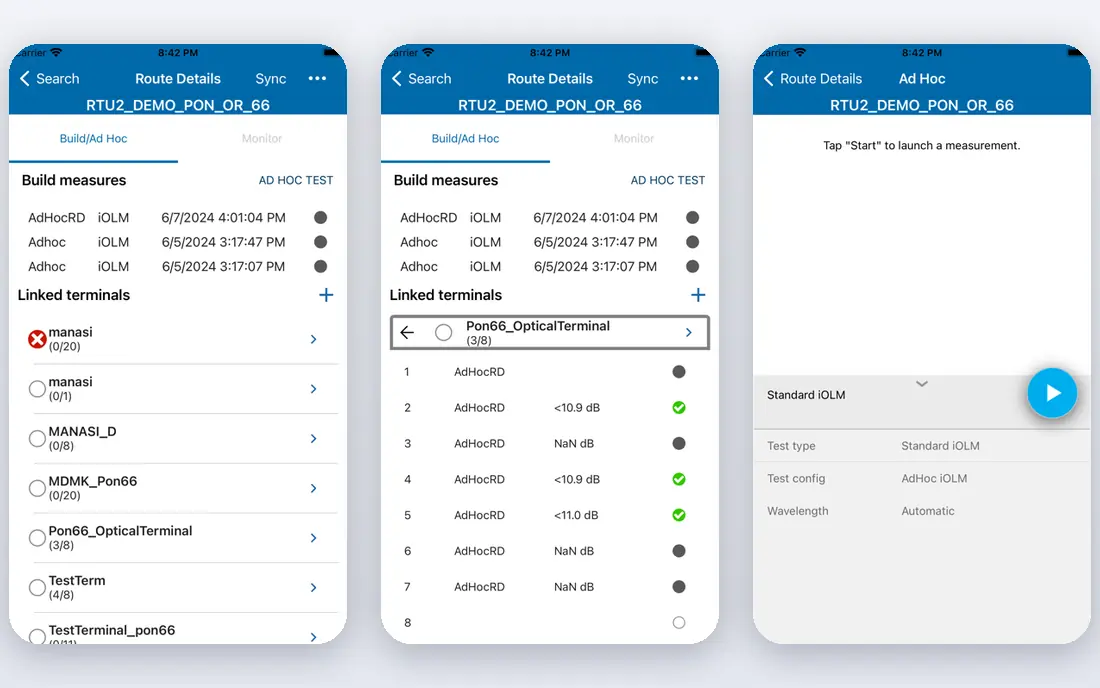
For FTTx and PON testing through splitters, EXFO MaxTester OTDR stands out because the icon-based link view turns a trace into a readable chain of events, which helps newer technicians spot a bad splice or bend. That matters in daily work, since a crew must prove a link is good or find a fault before leaving site, and a vague result means a return visit.
There is a trade-off to weigh. Some advanced reporting and analysis options sit in separate software, so check what your chosen model includes. Look at the current pricing page and test the tool on a real example before paying, since a demo can hide limits that only show up in daily use. For FTTx and PON testing through splitters, EXFO MaxTester OTDR remains a solid pick when that trade-off is acceptable.
- Tablet-style touchscreen
- IOLM icon-based link view
- Strong battery life for outdoor work
- Model range is wide, so picking the right wavelength set takes care
Fluke Networks OptiFiber Pro
Great for: enterprise and data center fiber certification
Fluke Networks OptiFiber Pro fits enterprise and data center fiber certification well. Certification reporting is the draw here, with project tracking that keeps test results tied to a specific job and location. The practical effect is clear when a crew must prove a link is good or find a fault before leaving site, and a vague result means a return visit.
Be clear-eyed about the limit. It is built for formal certification, so it may be more tool than a small crew needs for simple fault finding. Confirm what the plan includes, try a realistic task, and compare the result with your current tool. For enterprise and data center fiber certification, Fluke Networks OptiFiber Pro is worth shortlisting, provided the limit above does not block your main use.
- Part of the Versiv system
- EventMap view
- SmartLoop testing of two fibers in one test
- Needs the Versiv mainframe and modules, so the entry cost is high
AFL FlexScan is a strong match for pocket-sized PON and point-to-point OTDR work. Its size is the practical win, since a tester that fits in a pocket is more likely to be on site when a fault is reported. In practice, that helps when a crew must prove a link is good or find a fault before leaving site, and a vague result means a return visit.
The catch is worth stating plainly. Battery life and screen size trade against the larger handheld OTDRs, so long trace sessions need planning. Check the plan limits and the export or reporting options before you commit, since those details decide whether the tool fits your workflow. Our view is that AFL FlexScan earns its place for pocket-sized PON and point-to-point OTDR work, as long as you buy it for that job and not for every job at once.
- Very compact size
- LinkMap icon view
- SmartAuto setup for faster tests
- Small screen limits detailed trace work
- Some models are PON specific
For core, metro and access fiber measurement, Yokogawa OTDR stands out because the range covers short access links and long backbone spans, so a team can stay with one vendor as jobs change. That matters in daily work, since a crew must prove a link is good or find a fault before leaving site, and a vague result means a return visit.
There is a trade-off to weigh. Choosing between models takes time, and the wrong dynamic range choice can limit what a unit can measure. Look at the current pricing page and test the tool on a real example before paying, since a demo can hide limits that only show up in daily use. For core, metro and access fiber measurement, Yokogawa OTDR remains a solid pick when that trade-off is acceptable.
- Wide model range from access to long-haul work
- Touch and key operation
- Power meter and fault locator options
- Range is complex and pricing is through sales channels
Anritsu Network Master fits multi-service field testing beyond fiber alone well. Where a job mixes fiber checks with transport testing, one platform can cut the number of instruments carried. The practical effect is clear when a crew must prove a link is good or find a fault before leaving site, and a vague result means a return visit.
Be clear-eyed about the limit. Teams that only test fiber may pay for transport features they never open. Confirm what the plan includes, try a realistic task, and compare the result with your current tool. For multi-service field testing beyond fiber alone, Anritsu Network Master is worth shortlisting, provided the limit above does not block your main use.
- Large touchscreen
- Two-port testing on some models
- PDF and XML reporting
- Broad capability brings a higher price and a steeper learning curve
Jonard Tools Fiber Test Kit
Great for: technicians who need a practical inspection and cleaning kit
Jonard Tools Fiber Test Kit is a strong match for technicians who need a practical inspection and cleaning kit. For routine installs, clean connectors and a quick visual check prevent many of the faults that later look like cable problems. In practice, that helps when a crew must prove a link is good or find a fault before leaving site, and a vague result means a return visit.
The catch is worth stating plainly. It does not replace an OTDR when you need distance to a fault or a formal loss budget. Check the plan limits and the export or reporting options before you commit, since those details decide whether the tool fits your workflow. Our view is that Jonard Tools Fiber Test Kit earns its place for technicians who need a practical inspection and cleaning kit, as long as you buy it for that job and not for every job at once.
- Focused hand tools and inspection gear
- Practical for daily install work
- Easy to add to an existing kit
- Not a full OTDR replacement for certification or long-span fault location
For low-cost power, source and fault location checks, NOYAFA NF-919 stands out because at this price, a small crew can put a basic fiber checker in every van without a capital request. That matters in daily work, since a crew must prove a link is good or find a fault before leaving site, and a vague result means a return visit.
There is a trade-off to weigh. It cannot show distance to a fault the way an OTDR can, so keep expectations tied to loss and continuity checks. Look at the current pricing page and test the tool on a real example before paying, since a demo can hide limits that only show up in daily use. For low-cost power, source and fault location checks, NOYAFA NF-919 remains a solid pick when that trade-off is acceptable.
- Combines power meter, light source and visual fault locator
- Pocket size
- Clear price on the vendor site
- Limited depth compared with a true OTDR
- Best for short and simple links
Klein Tools Fiber Tester
Great for: generalist technicians adding fiber checks to copper work
Klein Tools Fiber Tester fits generalist technicians adding fiber checks to copper work well. For a technician who mainly works on copper and only sometimes touches fiber, a simple checker avoids buying a specialist instrument first. The practical effect is clear when a crew must prove a link is good or find a fault before leaving site, and a vague result means a return visit.
Be clear-eyed about the limit. Serious fiber certification or PON work still needs a dedicated OTDR from a specialist vendor. Confirm what the plan includes, try a realistic task, and compare the result with your current tool. For generalist technicians adding fiber checks to copper work, Klein Tools Fiber Tester is worth shortlisting, provided the limit above does not block your main use.
- Familiar hand-tool brand
- Practical visual fault and continuity checks
- Good for mixed cable jobs
- Fiber range is narrower than specialist OTDR vendors
How we picked these
We compared official product pages, specifications and pricing pages for current fiber test equipment. We favoured tools that are still sold and supported, that cover a clear test job such as OTDR, loss or inspection, and that state their wavelength and use case plainly. Where a vendor sells through distributors, we used See website rather than guessing a street price.
What to check before you buy a fiber tester
Match the tester to the link type
A PON tester needs the right filtered wavelength for live work, while a data center tester needs short dead zones for close events. A long-haul unit needs dynamic range for distance. Write down the link types you test most, then shortlist only tools built for those links.
Decide between certification and fault finding
Certification tools produce formal reports tied to a job, which matters for handover and warranty work. Fault finders focus on locating a break fast. Buying a certification system for occasional fault finding wastes money, while a simple checker will frustrate a team that must hand over signed reports.
Budget for accessories and training
Launch cables, inspection probes, cleaning tools and reporting software add cost and time. A team that skips cleaning and inspection will chase faults that are really dirty connectors. Ask what is in the kit, what is optional, and how long training takes for a new technician.
Frequently asked questions
Do I need an OTDR, or is a power meter enough?
A power meter and light source confirm loss on a link, which suits routine checks. An OTDR adds distance to a fault and a view of events along the fiber, which matters when a link fails and you need to find where. Many crews carry both, with the OTDR reserved for faults and certification.
What is the difference between singlemode and multimode testing?
Singlemode fiber carries light over longer distances and uses wavelengths such as 1310 and 1550 nm. Multimode fiber is used for shorter links, often at 850 and 1300 nm. The tester and its modules must match the fiber type, so check the specification before buying.
Why does cleaning matter so much in fiber testing?
Dirty connectors are a leading cause of high loss and false failures. A quick inspection and clean before testing gives a truer result and protects test ports. Budget for inspection and cleaning tools, not just the tester itself.
Can I test a live PON without taking customers offline?
Some testers use a filtered wavelength for live PON work, which is designed to avoid disturbing service. This still needs care, the right model and vendor guidance. Do not use an unfiltered OTDR on a live network unless the vendor states it is safe for that job.
Are cheap fiber testers reliable?
Low-cost checkers can be fine for continuity and basic loss work on short links. They are not a substitute for a calibrated OTDR on certification or long-span work. Match the price to the decision the result must support.
Sources
See where you really rank - block by block
ProMapRanker scans Google Maps across a grid of your service area. Simple monthly plans from $19, white-label on every plan.
Start freeKeep reading
 wpforms alternatives
Best WPForms Alternatives in 2026
We compare 9 wpforms alternatives for WordPress forms, with free and paid options, current pricing notes, and honest limits for small business sites in 2026.
Read → windows task scheduler alternatives
Best Windows Task Scheduler Alternatives in 2026
Looking for Windows Task Scheduler alternatives? We compare 9 schedulers for Windows and cross-platform work, from free tools to enterprise automation.
Read → which ai video service is best
Which AI Video Service Is Best in 2026
which ai video service is best? We compare 10 legitimate AI video services on price, avatars, editing and output quality to help you pick the right tool.
Read →