 ProMapRanker
Best Student Management Software in 2026


Large K-12 public districts · Pricing starts at: See website
Key takeaways
- PowerSchool SIS and Infinite Campus suit large public districts, while Gradelink and QuickSchools suit small private and charter schools.
- Gradelink publishes a starting price around $121 per month for up to 50 students, and QuickSchools starts from about $0.99 per student per month.
- Many enterprise platforms are quote-based, so a school should compare total cost including setup, modules, and training, not just a headline figure.
- Check student data protections and parent access early, since a system that handles grades and billing must be easy for families as well as staff.
Quick comparison
| Pick | Great for | Pricing starts at | Free tier | |
|---|---|---|---|---|
| PowerSchool SIS | Large K-12 public districts | See website | No | Visit |
 Infinite Campus | Large US public school districts | See website | No | Visit |
 Alma | Modern K-12 schools replacing legacy systems | See website | No | Visit |
 Gradelink | Small private and faith-based schools | $121 per month | Free trial | Visit |
 Skyward | Districts needing SIS plus finance tools | See website | No | Visit |
 FACTS | Private schools needing tuition and SIS tools | See website | No | Visit |
 Classter | International and multi-program schools | See website | No | Visit |
 QuickSchools | Small schools needing affordable core features | $0.99 per student per month | Free trial | Visit |
 Classe365 | All-in-one management for schools and academies | $100 per month | Free trial | Visit |
The best student management software
Student management software, often called a student information system, holds enrollment, grades, attendance, schedules, and parent communication in one place. The platforms below differ mainly in school size, price transparency, and how much they cover beyond core records.
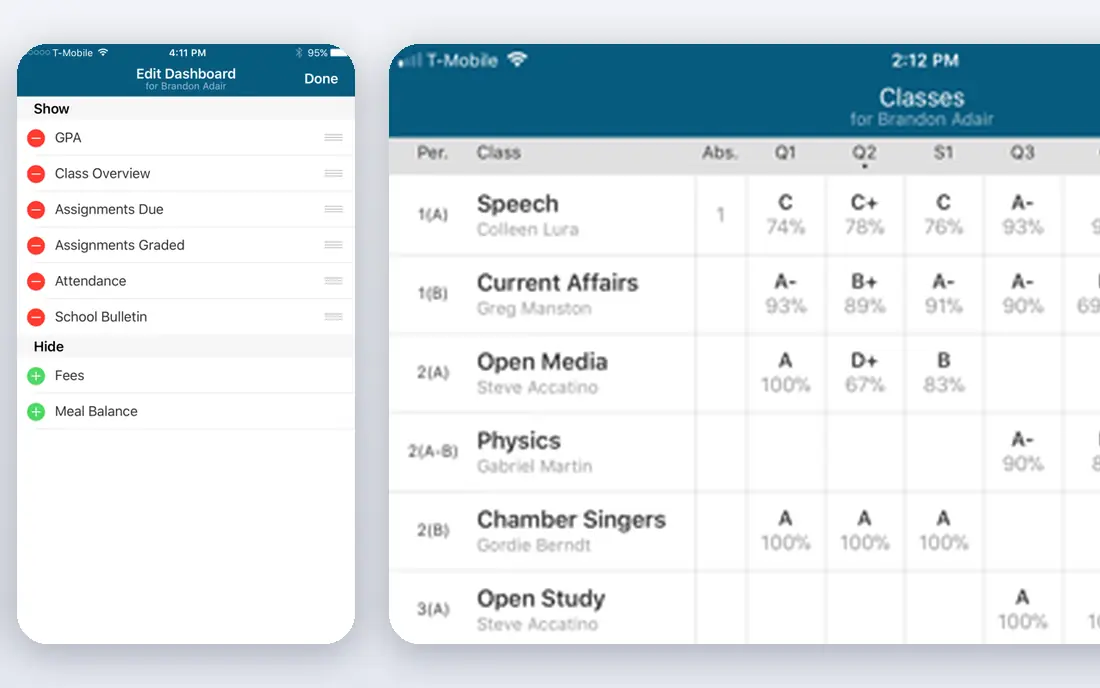
PowerSchool SIS is the default choice for many large K-12 districts because it centralizes grades, attendance, student records, and parent communication across many schools. A district office can see consistent data rather than a patchwork of local systems, which helps with reporting and state requirements.
The trade is cost and complexity. Pricing is custom, there is no free plan, and a district should expect a structured rollout with training. PowerSchool fits districts that need scale and consistency, and it is more system than a small school usually needs.
- Centralized student data across many schools
- Broad grade, attendance, and parent portal tools
- Large district ecosystem
- Quote-based pricing
- No free plan
- Implementation can be complex
Infinite Campus is built for large US public districts, with student information, grading, scheduling, and parent access in one platform. Its state reporting tools matter for districts that must submit consistent data to state systems, since manual reporting from spreadsheets is slow and error-prone.
As with PowerSchool, pricing is handled by quote, and the platform is aimed at districts rather than small schools. A small private school will likely find a lighter, cheaper system easier to run. A large district that values a single system of record will find Infinite Campus a strong contender.
- Built for large US districts
- SIS, grading, and parent tools in one system
- State reporting support
- Quote-based pricing
- Best suited to larger organisations

Alma positions itself as a modern replacement for older student systems, with a cleaner interface for teachers, administrators, and families. It covers grades, attendance, schedules, and communication, with learning tools that help teachers manage coursework alongside records.
Pricing is quote-based, so schools need a proposal based on enrollment and modules. Alma suits schools that want a fresh system without the weight of a district-scale platform, provided the quoted price fits the budget once all needed modules are included.
- Modern interface
- SIS plus learning and communication tools
- Easier adoption than older systems
- Quote-based pricing
- Feature depth varies by plan
Gradelink is a strong pick for small private and charter schools. Its starting price around $121 per month for up to 50 students is published, which makes budgeting simpler than a quote-only shortlist. Setup is handled with vendor support, and the system covers attendance, report cards, scheduling, and parent communication.
The limit is scale. Very large districts will need a platform built for district reporting and multi-school management. For a single school or a small group of schools, Gradelink offers a practical balance of price, ease of use, and core features.
- Published starting price
- Easy setup with vendor support
- Grade, attendance, and parent tools in one place
- Less suited to very large districts
- Add-on modules add cost
Skyward, part of the broader school software market for districts, covers student management alongside business and finance workflows. That combination suits districts that want student records and administrative operations in related systems, rather than buying each piece separately.
Pricing is quote-based and implementation is a district project, so small schools should look elsewhere. For a district already evaluating Skyward for finance or human resources, adding its student system can reduce the number of vendors to manage.
- SIS and business tools in one family
- Student and finance workflows
- Suited to districts
- Quote-based pricing
- Implementation effort for districts
FACTS serves private schools with a mix of student information, enrollment, and tuition management. That last point matters, since many private schools otherwise run billing in a separate system and reconcile it by hand. Bringing tuition, enrollment, and records together reduces duplicate entry and billing errors.
Pricing is quote-based, and the full value depends on which modules a school buys. A private school that needs tuition handling alongside student records should compare FACTS closely with Gradelink, since the right pick depends on whether billing or classroom tools matter more.
- Tuition management strength
- SIS and enrollment tools
- Built for private schools
- Quote-based pricing
- Breadth can mean a longer setup
Classter suits international schools and training centres that run several programs at once. Its pricing has been reported in a range of about $2 to $15 per student per month, depending on plan and features, which reflects how much the platform can be configured. Admissions, billing, and academic management sit alongside core student records.
The broad price range means a school must get a firm quote for its exact program mix. Classter fits best when a school runs varied programs, levels, or campuses and needs one system to handle that complexity, rather than a simple single-school setup.
- Multi-program and international school support
- Flexible pricing per student
- Admissions and billing tools
- Pricing range is broad
- Setup needs planning for complex programs
QuickSchools is one of the most affordable starting points in this list, from about $0.99 per student per month. It covers the core jobs a small school needs: grades, attendance, report cards, and basic communication, without the weight of a district platform.
Advanced needs such as complex billing, district reporting, or deep learning tools may require add-ons or a larger system. For a small school that wants a working student system quickly and cheaply, QuickSchools is a sensible first step, with room to move up later if needs grow.
- Low per-student starting price
- Core grade, attendance, and report tools
- Simple setup
- Fewer advanced modules than enterprise suites
- Add-ons increase cost
Classe365 takes an all-in-one approach, combining student information, learning management, fee handling, and customer relationship tools in one platform. Its starting price around $100 per month for up to 100 students makes it accessible for small schools, academies, and training providers.
The breadth is both a strength and a caution. A team that uses only the SIS may pay for features it never opens, and learning the full platform takes time. Classe365 fits best when a school or academy genuinely needs several of those areas in one system, rather than a single core function.
- Published starting price
- SIS, learning, fees, and CRM in one platform
- Suits academies as well as schools
- Breadth can mean a longer learning curve
- Enterprise needs may need custom pricing
How we picked these
We compared official feature pages, pricing pages, and public comparison coverage checked in October 2026, and kept only platforms that are live and still sold for student management. We included large district systems, small-school options with published prices, and all-in-one platforms, so the list covers different school sizes. Where a vendor does not publish a price, we wrote See website rather than guessing.
What to check before you buy
Start with enrollment size and school type, since a district platform and a small-school system are built for different jobs. A small school that buys a district system pays for reporting and scale it may never use, while a district that buys a small-school tool may hit limits on state reporting and multi-school management.
Next, test the parent and teacher experience, not just the admin dashboard. Grades, attendance alerts, and report cards must be easy for families to find, and teachers must be able to enter grades and attendance quickly. Finally, confirm data protections, including student privacy requirements in your country or state, and ask how data is exported if the school changes systems later.
Questions to ask on a demo
- How are grades, attendance, and report cards handled for your grade levels?
- What is included in the quoted price, and what is an add-on module?
- How long does setup take, and who handles data migration?
Frequently asked questions
What is student management software?
Student management software, often called a student information system, stores enrollment, grades, attendance, schedules, and communication in one place. It gives administrators, teachers, students, and parents a shared record instead of separate spreadsheets and paper files.
How much does student management software cost?
Prices range from about $0.99 per student per month for QuickSchools and around $100 to $121 per month for small-school plans, up to custom district pricing for PowerSchool and Infinite Campus. Always confirm setup fees and module costs, since the headline price may not include everything.
Is PowerSchool or Gradelink better for a small school?
Gradelink usually suits a small private or charter school better, thanks to its published price and simpler setup. PowerSchool suits large districts that need centralized data across many schools. Match the platform to school size first, then compare features.
Does student management software include learning tools?
Some platforms, such as Alma and Classe365, include learning and coursework tools alongside records. Others focus on records and billing, and pair with a separate learning platform. Check whether learning tools are included or need a separate purchase.
How long does implementation take?
Small-school platforms can go live in weeks, especially when setup is vendor-assisted. District platforms can take months, including data migration, configuration, and training. Ask for a written timeline tied to your term start date.
How do parents access grades and attendance?
Most platforms in this list offer a parent portal or app for grades, attendance, and messages. Test the parent view during a trial, since a portal that parents find confusing will generate support work for the school office.
Sources
See where you really rank - block by block
ProMapRanker scans Google Maps across a grid of your service area. Simple monthly plans from $19, white-label on every plan.
Start freeKeep reading
 wpforms alternatives
Best WPForms Alternatives in 2026
We compare 9 wpforms alternatives for WordPress forms, with free and paid options, current pricing notes, and honest limits for small business sites in 2026.
Read → windows task scheduler alternatives
Best Windows Task Scheduler Alternatives in 2026
Looking for Windows Task Scheduler alternatives? We compare 9 schedulers for Windows and cross-platform work, from free tools to enterprise automation.
Read → which ai video service is best
Which AI Video Service Is Best in 2026
which ai video service is best? We compare 10 legitimate AI video services on price, avatars, editing and output quality to help you pick the right tool.
Read →