 ProMapRanker
Best Free Phone Cleaner App in 2026

Key takeaways
- Files by Google is the best free cleaner for Android, since it is free, made by Google and shows each suggestion before you delete anything.
- Clever Cleaner is the best free starting point for iPhone photo cleanup, with daily free limits and a paid plan for unlimited use.
- iPhones do not allow Android-style cache cleaners, so iPhone apps here focus on photos, videos, contacts and large files you approve yourself.
- Back up photos before any bulk delete, and review every suggestion, since a cleaner can flag a burst photo or screenshot you wanted to keep.
Quick comparison
| Pick | Great for | Pricing starts at | Free tier | |
|---|---|---|---|---|
 Files by Google | Android junk and large files | Free | Yes | Visit |
 Clever Cleaner | iPhone duplicate photos | Free | Yes | Visit |
 Cleaner Kit | iPhone photos, videos and contacts | Free | Yes | Visit |
 Avast Cleanup | Android deep cleaning | Free | Yes | Visit |
 AVG Cleaner | Android guided cleanup | Free | Yes | Visit |
 Smart Cleaner | iPhone photo and contact cleanup | Free | Yes | Visit |
 Cleanup | iPhone duplicate photo review | Free | Yes | Visit |
 SD Maid SE | Android advanced file cleanup | Free | Yes | Visit |
The best free phone cleaner apps
Phone cleaners differ by platform, because Android allows deeper file access than iPhone. The list below notes that split for every app, so you do not install an app that cannot do what you expect on your phone.
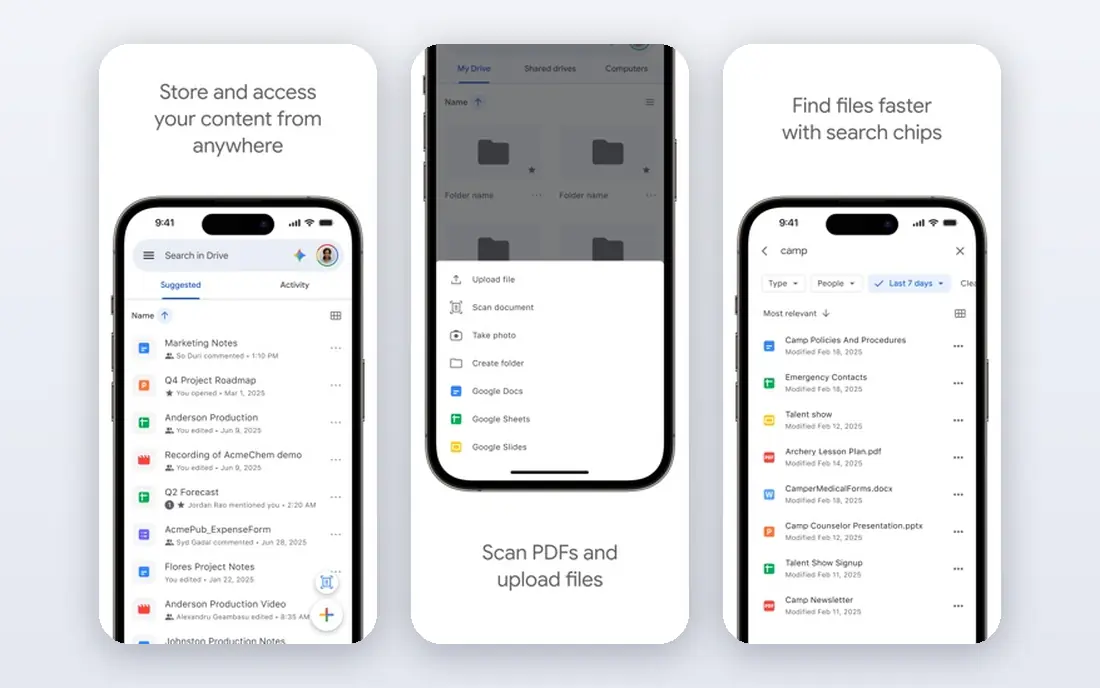
Files by Google is the safest free cleaner for Android, and the one we would install first. It finds junk files, duplicate files, large files, old screenshots and downloaded files, plus apps you rarely use, and it presents each group as a suggestion card you review before deleting. That review step matters, because it keeps you in control of what leaves the phone.
The app is free, with no paid version needed to clear cleaning suggestions, and it is made by Google, which reduces the privacy worry that comes with unknown cleaner apps. It also includes file browsing and offline sharing, so it can replace a separate file manager for many users.
Its limits are platform and depth. There is no iPhone version, and photo cleanup is less specialized than Clever Cleaner or Cleaner Kit on iPhone. For Android storage, though, start here, work through one suggestion card at a time, and only add a second cleaner if you need a specific tool Files does not offer.
- Free with no paid cleaning tier
- Clear suggestion cards for junk, duplicates and large files
- 30-day trash for recovery
- Android only
- Fewer photo tools than specialist iPhone cleaners
- No iPhone version
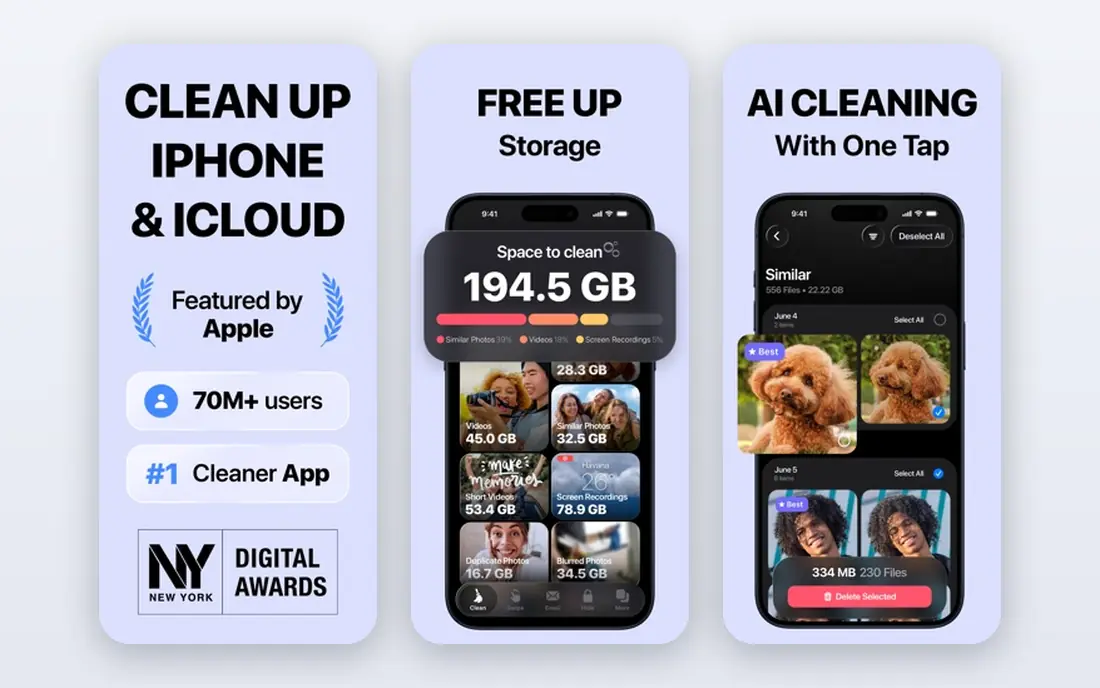
Clever Cleaner is the best free starting point for iPhone owners whose storage is full of photos. It groups duplicate and similar photos, marks the best one in each group, gathers screenshots in one place, sorts videos from largest to smallest, and can convert Live Photos to regular photos that take up less space. That set targets the real cause of most full iPhones: repeated photos and large videos.
The free tier works within daily limits, with a paid Premium plan for unlimited use, so it suits a short daily cleanup habit better than a single giant purge. Work through one group at a time, check the marked best photo, and keep any burst or similar shot that matters to you, since similar does not always mean unwanted.
Privacy is a fair question for any photo cleaner, so check the app privacy label and permissions before granting full photo access. Clever Cleaner processes photos for grouping, and you should back up your library before a bulk delete, even when the app marks a photo as a duplicate.
- Groups duplicate and similar photos and marks the best shot
- Sorts videos by size
- No ads according to its listing
- Free use sits within daily limits
- Full unlimited use needs a paid Premium plan
- IPhone only
Cleaner Kit, formerly Smart Cleaner in some listings, is a broader iPhone cleanup app than Clever Cleaner. It scans for duplicate and low-quality photos and videos, compresses large videos, merges duplicate contacts, cleans calendar entries and offers a secure vault for private files. That breadth suits iPhone owners who want one app for the whole library, not just photos.
Review is swipe-based, which makes a large library faster to work through, but speed can also lead to mistakes. Slow down on groups where photos look similar but are not identical, such as burst shots or slightly different framings, and use the full-screen review before confirming a delete.
The free download lets you try the tools, but key features may need a subscription, and promotional lifetime prices vary, so check the subscription screen in the app before a trial ends. If you only need photo duplicates, Clever Cleaner may be enough. If you also want contact and video tools, Cleaner Kit is the broader pick.
- Photo, video, contact and calendar cleanup in one app
- Swipe review for photos
- Video compression and secure vault
- Key features may need a subscription
- Lifetime and subscription prices vary by offer
- IPhone focus
Avast Cleanup is the best-known brand-name cleaner for Android, from the security company Avast. The Android app offers junk cleaning, large-file review, photo optimization and battery tools, with a free tier for basic cleaning and a Premium upgrade for deep clean and automatic cleaning. That brand familiarity helps when you are wary of unknown cleaner apps asking for storage access.
The iPhone version is narrower, since Apple limits what cleaner apps can touch. It offers media cleaning for old or large images and screenshots free, with duplicate and similar photo detection behind the paid version, plus a limited secret folder. iPhone owners should expect a photo tool here, not a system cleaner.
Paid pricing needs care. Avast lists multi-device Premium plans with a lower first-year price and a higher renewal price, so check the renewal figure, not just the first-year offer, before subscribing. For most Android users, the free tier plus Files by Google covers storage cleanup without a subscription.
- Junk, large-file and photo review on Android
- Free iOS media cleaner with limits
- Premium adds deep and automatic cleaning
- Premium features sit behind a subscription
- IOS version is more limited than Android
- Renewal prices rise after the first year on paid plans
AVG Cleaner suits Android users who want guided cleanup with clear suggestions. It finds junk files, large files and unused apps, and walks you through each category, which helps if Files by Google feels too plain or if you want a second opinion on what can go. The free tier covers basic cleaning, with a paid upgrade for advanced tools.
There is little reason to install both AVG Cleaner and Avast Cleanup, since both come from the same company and offer a similar toolset. Pick one, use it alongside Files by Google if needed, and avoid stacking cleaners, since multiple apps scanning the same files add confusion without adding much space.
As with Avast, iPhone users should not expect Android-style system cleaning. AVG's value is on Android, where file access allows junk and cache-related cleanup that Apple does not permit in the same way. Review each suggestion, back up photos first, and skip any tool that promises speed boosts you cannot verify.
- Guided junk and large-file cleanup
- Similar toolset to Avast Cleanup
- Free tier for basic cleaning
- Same parent company as Avast, so little reason to install both
- Advanced tools need a paid upgrade
- IOS limits apply
Smart Cleaner is a focused iPhone cleanup app for duplicate photos, similar photos, videos and contacts. It suits owners who want a straightforward review flow without the extra vault, email and calendar tools of larger apps. The interface centers on grouping similar items and letting you keep the best shot, which matches how most iPhone libraries fill up.
The free tier lets you test the grouping, but full cleanup may need a subscription, so check the paywall before you plan a large purge. That is a common pattern for iPhone cleaners, since Apple restricts deeper cleaning and developers fund photo tools through subscriptions.
Smart Cleaner earns its place as a simpler alternative to Cleaner Kit. If Cleaner Kit feels busy, or if you only need photo and contact cleanup, Smart Cleaner is easier to finish in one sitting. If you need video compression and calendar cleanup too, the broader app fits better.
- Duplicate photo and contact cleanup
- Simple review flow
- Useful for iPhone owners who want a focused tool
- Key features may need a subscription
- Free tier limits apply
- Less broad than Cleaner Kit
Cleanup is an iPhone photo cleaner built around careful review. It groups results with one shot marked best and shows a final review screen before anything is removed, which is the safeguard you want when deleting in bulk. That review step helps catch the similar-but-not-identical photo that a fast swipe might discard.
The pricing model needs attention. The download is free, but substantial tools sit behind a Pro subscription, reported between about $5.95 and $11.99 per week depending on variant, with a trial in some offers and a lifetime option reported inside the app. Weekly subscriptions add up fast, so check the subscription screen in iOS Settings before a trial ends, and prefer a monthly or lifetime option only if you will use the app regularly.
Cleanup suits iPhone owners who want a careful, review-first photo tool and are willing to pay for it or use the limited free tier. If you want a free-first tool, start with Clever Cleaner, and use Cleanup only if its review flow fits your habits better.
- Groups duplicates with one shot marked best
- Final review screen before deletion
- On-device scanning claimed by its maker
- Download is free but substantial tools sit behind a subscription
- Weekly subscription prices vary
- Check trial terms carefully
SD Maid SE is the advanced Android pick. It goes beyond junk suggestions to find corpse files left by uninstalled apps, analyze storage by folder, and clean system-adjacent clutter that simpler apps miss. For an older Android phone with years of app installs, that depth can free space Files by Google does not surface.
That power is also the risk. The interface is technical, and some categories need care, since deleting files from an app folder can break that app's data. Use SD Maid SE only after a backup, review each category, and skip anything you do not understand. Beginners should stick with Files by Google.
SD Maid SE belongs on this list because it fills a real gap for advanced users, not because most people need it. If your phone is new and your storage problem is photos, an iPhone-style photo cleaner or Files by Google will solve it faster and with less risk.
- Finds leftover files from uninstalled apps
- Detailed storage analysis
- Open approach for advanced Android users
- Android only
- Interface is technical
- Beginners can delete the wrong files if they rush
How we picked these
We compared official app pages, app store listings and recent cleaner guides, and we kept only cleaners that are live, from identifiable developers, and genuinely usable for storage cleanup in 2026. We separated Android system cleaners from iPhone photo cleaners, because Apple limits what iPhone apps can clean, and we favored free tiers, clear review steps and backup warnings over apps that promise speed gains they cannot prove. We did not claim hands-on testing of every app, and we note where a free download still hides key tools behind a subscription.
Cleaning safely, step by step
Back up first. Turn on iCloud Photos, Google Photos or a computer backup, and confirm recent photos are saved before you delete anything in bulk. A cleaner can be undone only if you have a copy elsewhere or if the app trash window is still open.
Next, check your phone storage settings to see what actually fills the phone. On Android, Files by Google shows the breakdown. On iPhone, Settings, General, iPhone Storage shows app sizes and large attachments. Start with the largest category, not the smallest, since one long video can free more space than hundreds of screenshots.
Work in small batches and review each group. Keep the best photo in a burst, keep screenshots you still need for tickets or receipts, and delete downloads you have already used. Empty the app trash only after you are sure, and repeat the check once a month rather than waiting until the phone warns you again.
Frequently asked questions
What is the best free phone cleaner app for Android?
Files by Google is the best free Android cleaner, since it is free, shows each suggestion before deletion, and covers junk, duplicates, large files and unused apps. SD Maid SE adds depth for advanced users, while Avast Cleanup and AVG Cleaner add guided tools.
What is the best free phone cleaner app for iPhone?
Clever Cleaner is the best free starting point for iPhone photo cleanup, with daily free limits and a paid plan for unlimited use. Cleaner Kit and Smart Cleaner add contact and video tools, while your iPhone Settings app already offers offload and large-attachment review free.
Can a cleaner app speed up my phone?
A cleaner can free storage, which helps a nearly full phone run better, but it cannot add memory or fix an old battery. Be wary of apps that promise large speed gains, and check whether the real problem is storage, background apps or aging hardware.
Is it safe to give a cleaner app access to my photos?
Only grant photo access to a cleaner from an identifiable developer, with a clear privacy policy, and back up first. Review every deletion group, and avoid apps that upload your library without a clear reason or that hide their developer details.
Why do iPhone cleaners focus on photos?
Apple limits third-party access to system caches and app data on iPhone, so cleaners cannot clear Android-style junk in the same way. iPhone cleanup therefore centers on photos, videos, contacts and large files you approve, plus the built-in storage tools in Settings.
How often should I clean my phone?
Once a month is enough for most people. Check storage, review large videos and screenshots, remove unused apps, and back up photos. Waiting until the phone is full makes the job larger and raises the chance of deleting something in a rush.
Sources
See where you really rank - block by block
ProMapRanker scans Google Maps across a grid of your service area. Simple monthly plans from $19, white-label on every plan.
Start freeKeep reading
 best rank tracking software
Best Rank Tracking Software in 2026
Searching for the best rank tracking software? We compare 8 tools for daily keyword tracking, local rankings, client reports, and competitor checks in 2026.
Read → best platform for ecommerce website
Best Platform for Ecommerce Website in 2026
Find the best platform for ecommerce website builds in 2026. We compare Shopify, WooCommerce, BigCommerce, Wix and more on price, fees and scale for stores.
Read → best math apps
Best Math Apps in 2026: 8 Apps Compared
Find the best math apps for homework, revision, and deeper study in our 2026 comparison of 8 free and paid solvers, courses, and visual tools for students.
Read →