 ProMapRanker
Best Free EDM Production Software in 2026

Key takeaways
- Cakewalk is the strongest free desktop studio for Windows, with unlimited tracks and full VST3 support.
- LMMS is the closest free match to a pattern-based EDM workflow, with built-in synths and beat tools.
- GarageBand is the best free starting point on Mac and iOS, with polished sounds and an easy learning curve.
- BandLab suits collaboration and mobile sketching, while Waveform Free suits cross-platform producers who want no track limits.
Quick comparison
| Pick | Great for | Pricing starts at | Free tier | |
|---|---|---|---|---|
 Cakewalk Sonar Cakewalk Sonar | Full Windows studio | Free | Yes | Visit |
 LMMS LMMS | Pattern-based EDM beats | Free | Yes | Visit |
 GarageBand GarageBand | Mac and iOS beginners | Free | Yes | Visit |
 Waveform Free Waveform Free | Cross-platform, no track limits | Free | Yes | Visit |
 BandLab BandLab | Collaboration and mobile | Free | Yes | Visit |
 Audacity Audacity | Audio editing and sampling | Free | Yes | Visit |
 Ardour Ardour | Recording and mixing on Linux | Free | Yes | Visit |
 SoundBridge SoundBridge | Simple beatmaking | Free | Yes | Visit |
The best free edm production software
We compared official product pages, download pages and feature lists for free digital audio workstations and music tools that can make electronic dance music. The list covers desktop studios, pattern beatmakers, a browser studio and an audio editor, so you can match the tool to your computer and your workflow.
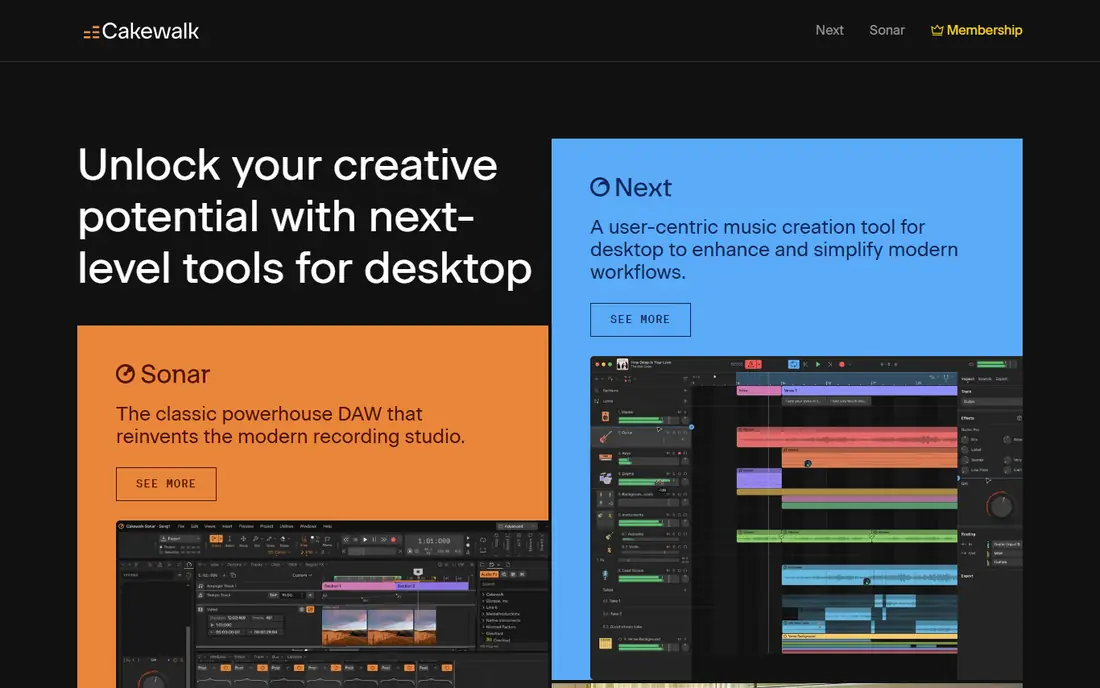
Cakewalk Sonar, the successor to Cakewalk by BandLab, is a full professional studio offered free on Windows, with core audio and MIDI recording, editing, mixing and exporting. It supports VST3 plugins, ARA editing for vocals, and the ProChannel mixing suite, which gives EDM producers room to shape drums, bass and synths without hitting a track limit. For a Windows producer who wants a complete studio at no cost, Sonar is the strongest free option.
The limits are platform and learning curve. Sonar does not run on Mac, and its deep feature set can feel busy for a first-time producer. The free tier also uses an activation process, and some extra content and tools sit behind a BandLab membership. Start with the free core, learn one synth and one drum workflow well, and add plugins only when a track actually needs them.
- Unlimited audio and MIDI tracks
- VST3 support
- Professional mixing tools
- Windows only
- Activation process needed
- Interface can feel busy at first
LMMS is a free, open source music production tool built around patterns, which makes it a natural fit for EDM. You build drum patterns, bass lines and melodies in a step sequencer, arrange them into a song, and shape sounds with built-in synthesizers and effects. That workflow is close to FL Studio in spirit, which helps producers who think in loops and drops rather than in linear recordings.
LMMS is weaker for recording vocals or live instruments, and its interface feels older than GarageBand or BandLab. VST support exists but is less polished than in a commercial studio. For a beginner on any desktop system who wants to make beats for free, LMMS is still an excellent starting point, especially for house, techno and trap sketches.
- Free and open source
- Pattern-based beat and melody sequencer
- Built-in synths and samples
- Interface feels dated
- Less suited to live audio recording
- Plugin support is more limited than Cakewalk
GarageBand is free on Mac and iOS, and it remains the easiest way for an Apple user to start making EDM. It includes virtual instruments, drum kits, loops and effects, with a clean timeline and a live loops view for arranging sections. A beginner can build a credible house or pop-EDM track in an afternoon, using only the included sounds and a few loops.
The ceiling is lower than a full studio. GarageBand lacks some advanced routing, mixing and plugin features found in Logic Pro, and it only supports Audio Units plugins, not VST. For many beginners, that ceiling is far away, and the polish of the included sounds matters more. When a project outgrows GarageBand, Logic Pro offers a familiar upgrade path on the same Mac.
- Free on Mac and iOS
- Polished loops and instruments
- Easy to learn
- Apple only
- Fewer advanced mixing tools than Logic Pro
- Plugin format is Audio Units only
Waveform Free from Tracktion is a cross-platform digital audio workstation with unlimited audio and MIDI tracks, VST3 support, automation and a flexible rack system for effects. That combination suits an EDM producer who works on more than one operating system, or who wants a free studio without track limits. The arrangement view handles loops, MIDI clips and audio clips together, which fits electronic production well.
The learning curve is steeper than GarageBand or BandLab, and some promoted expansion features belong to paid feature packs rather than the free core. Check the edition on the download page before you assume a feature is included. For an intermediate producer who wants a free, serious studio on Windows, Mac or Linux, Waveform Free is a strong choice.
- Unlimited tracks on Windows, Mac and Linux
- VST3 support
- Full MIDI and automation
- Interface takes time to learn
- Some feature packs are paid
- Included sounds are lighter than GarageBand
BandLab is a free, cloud-based studio that runs in a browser and on iOS and Android, with a loop library, virtual instruments and collaboration tools. You can start a beat on a phone, share it with a collaborator, and continue in a browser, which suits producers who work with vocalists or other beatmakers remotely. BandLab also includes mastering tools and a social feed for sharing finished tracks.
The browser studio does not support VST plugins, and its mixing depth is below a desktop studio such as Cakewalk or Waveform Free. Internet access is also needed for the full cloud workflow. Use BandLab for sketches, collaborations and mobile ideas, then export stems to a desktop studio when a track needs detailed mixing and plugin processing.
- Free browser and mobile studio
- Loop library
- Real-time collaboration
- No VST plugin support in the browser studio
- Mixing depth is limited
- Needs internet for full features
Audacity is a free, open source audio editor, not a full EDM studio, but it earns a place here for sampling and editing. You can record, cut, clean and process audio, build sample chops, and export in many formats. Many EDM producers use Audacity alongside a beatmaker, to prepare vocal chops, field recordings or drum samples before arranging them in LMMS, Cakewalk or another studio.
Audacity is not built for pattern sequencing or virtual instruments, and its MIDI support is limited. Treat it as a companion tool, not as your only production software. For sample preparation, podcast-style vocal edits and quick audio fixes, Audacity is free, lightweight and reliable on Windows, Mac and Linux.
- Free and open source
- Precise audio editing
- Broad format support
- Not a full beatmaking studio
- MIDI support is limited
- Interface feels dated
Ardour is a powerful open source digital audio workstation for recording, editing and mixing, with strong support on Linux and versions for Mac and Windows. It handles multitrack audio, MIDI, automation and plugin processing, which suits a producer who records hardware synths, vocals or guitars alongside electronic elements. On Linux, Ardour is often the most capable free studio available.
Ardour is less direct for pattern-based EDM than LMMS, and its interface is geared toward recording engineers rather than first-time beatmakers. The source code is free, while official ready-to-run binaries are offered on a pay-what-you-can basis, so check the download page for your system. For a Linux producer who wants a serious mixing studio, Ardour is the right free choice.
- Powerful recording and mixing
- Runs on Linux, Mac and Windows
- Plugin support
- Beatmaking workflow is less direct
- Interface suits engineers more than beginners
- Official binaries use a pay-what-you-can model
SoundBridge is a free digital audio workstation for Windows and Mac, built around a simple interface with a drum machine, synthesizers and VST support. That focus suits a beginner who wants to make beats without learning a complex studio first. You can program drums, add a bass line, and arrange sections quickly, with a workflow that stays close to the music rather than to menus.
The community and included sound library are smaller than those for Cakewalk, LMMS or GarageBand, and large projects may feel the limits sooner. SoundBridge is best as a first studio for a new producer, or as a lightweight sketch tool on a second computer. When a track grows complex, export it to a deeper studio for final mixing.
- Beginner-friendly interface
- Drum machine and synths
- VST support on desktop
- Smaller community than larger studios
- Fewer included sounds
- Less depth for large projects
How we picked these
We compared official product pages, download pages and feature lists, and kept only tools that are free to download and use for core EDM production in October 2026, and that are actively maintained. We included desktop studios, a pattern beatmaker, a browser studio and an audio editor, because EDM production uses all of those jobs. Paid tools with only a short trial, such as FL Studio or Ableton Live trials, were left out, since the topic is free software.
We also checked platform honestly. Cakewalk Sonar is Windows only, GarageBand is Apple only, and LMMS, Waveform Free, Ardour and Audacity cover more systems. Where a free tier has paid extras, we noted the limit rather than calling the whole tool paid or fully free without qualification.
How to choose your first free EDM tool
Start with your computer, not with a brand
If you use Windows, start with Cakewalk Sonar or LMMS. If you use a Mac or iPhone, start with GarageBand. If you use Linux, start with LMMS or Ardour. A tool that runs well on your machine and that you actually open every day will teach you more than a more powerful tool that feels like a chore.
Learn drums, bass and arrangement first
EDM tracks are built from a small set of jobs: a drum pattern, a bass line, a lead or chord part, and an arrangement that builds and releases tension. Pick one synth, one drum kit and one project template, and finish three short tracks before adding new plugins. Finished tracks teach arrangement far better than unfinished plugin collections.
Use free plugins and samples carefully
Free VST plugins and sample packs can expand your sound, but they can also slow down a project with crashes or licence confusion. Download plugins only from official vendor pages, keep a short list of favourites, and check the licence for any sample pack you plan to release commercially. A small, trusted toolkit beats a large, untested one.
Frequently asked questions
What is the best free EDM production software?
Cakewalk Sonar is the best free full studio for Windows, LMMS is best for pattern-based EDM beats on any desktop system, and GarageBand is best for Mac and iOS beginners. BandLab is best for collaboration and mobile sketching. Choose by your computer and whether you prefer patterns, a timeline studio or a browser tool.
Is LMMS good for EDM?
Yes, LMMS is well suited to EDM, because its pattern-based sequencer, built-in synths and beat tools match how electronic tracks are built. It is less suited to recording live audio, and its interface feels dated compared with GarageBand. For house, techno, trap and similar styles, LMMS can produce complete tracks for free.
Can you make professional music with free software?
Yes, free tools such as Cakewalk Sonar, LMMS and GarageBand can produce professional-sounding tracks, and Cakewalk was once a paid professional studio. Skill, sound choice and mixing matter more than price. Free tools may lack some advanced plugins or support, but they do not limit the quality of a well-arranged track.
What free EDM software works on Mac?
GarageBand is free on Mac and iOS and is the easiest Mac starting point. Waveform Free, LMMS, Ardour, Audacity and BandLab also run on Mac, with Waveform Free offering the deepest free desktop studio after GarageBand. Cakewalk Sonar does not run on Mac, so Windows producers should not plan around it on Apple hardware.
Is BandLab really free?
Yes, BandLab is free to use in a browser and on mobile, with a loop library, instruments and collaboration tools at no cost. Some extra content and mastering options may be paid, and the browser studio does not support VST plugins. For sketching, collaboration and sharing, the free tier is genuinely useful without a subscription.
Sources
See where you really rank - block by block
ProMapRanker scans Google Maps across a grid of your service area. Simple monthly plans from $19, white-label on every plan.
Start freeKeep reading
 zoom alternatives
Best Zoom Alternatives in 2026
Compare Zoom alternatives in 2026, with free meeting limits and prices, so you can pick the best alternative to Zoom for your team, class, or community.
Read → which software is best for remote work
Which Software Is Best for Remote Work in 2026
Answering which software is best for remote work, we compare Slack, Zoom, Asana, Notion, Teams and more, with pricing and honest tradeoffs in 2026 now.
Read → which ai tool is best for content writing
Which AI Tool Is Best for Content Writing in 2026
Wondering which ai tool is best for content writing? We compare ChatGPT, Claude, Jasper, Grammarly, and more on price, quality, and best use in 2026 now.
Read →