 ProMapRanker
Best Capsule Wardrobe Apps in 2026

Key takeaways
- Cladwell is the most capsule-first app, while Whering, Acloset, and Smart Closet work better as full digital closets.
- A capsule app only helps if you catalog the clothes you actually wear, so pick the setup effort you will finish.
- Free tiers vary a lot: some cover a small closet well, while others limit outfit suggestions to paid plans.
- Weather and calendar features matter for daily outfits, but they are only useful if the app knows your real wardrobe.
- Stylebook suits iPhone users who want one-time pricing and detailed wear tracking, while most rivals use subscriptions.
Quick comparison
| Pick | Great for | Pricing starts at | Free tier | |
|---|---|---|---|---|
 Cladwell | Building a capsule from scratch | See website | Yes | Visit |
 Whering | Free digital closet | Free | Yes | Visit |
 Acloset | Automatic cataloguing | Free | Yes | Visit |
 Stylebook | One-time purchase and analytics | See website | No | Visit |
 Indyx | Human stylist help | Free | Yes | Visit |
 Smart Closet | Budget closet and outfit planner | Free | Yes | Visit |
 Pureple | Lightweight outfit planning | Free | Yes | Visit |
 Modebase | Chat-based closet help | See website | Yes | Visit |
 Outflik | Social discovery plus wardrobe | Free | Yes | Visit |
The best capsule wardrobe apps
We compared official app pages, store listings, and feature descriptions for wardrobe apps that support capsule planning in October 2026. The list covers capsule-first tools, full closets, and apps with stylist help.
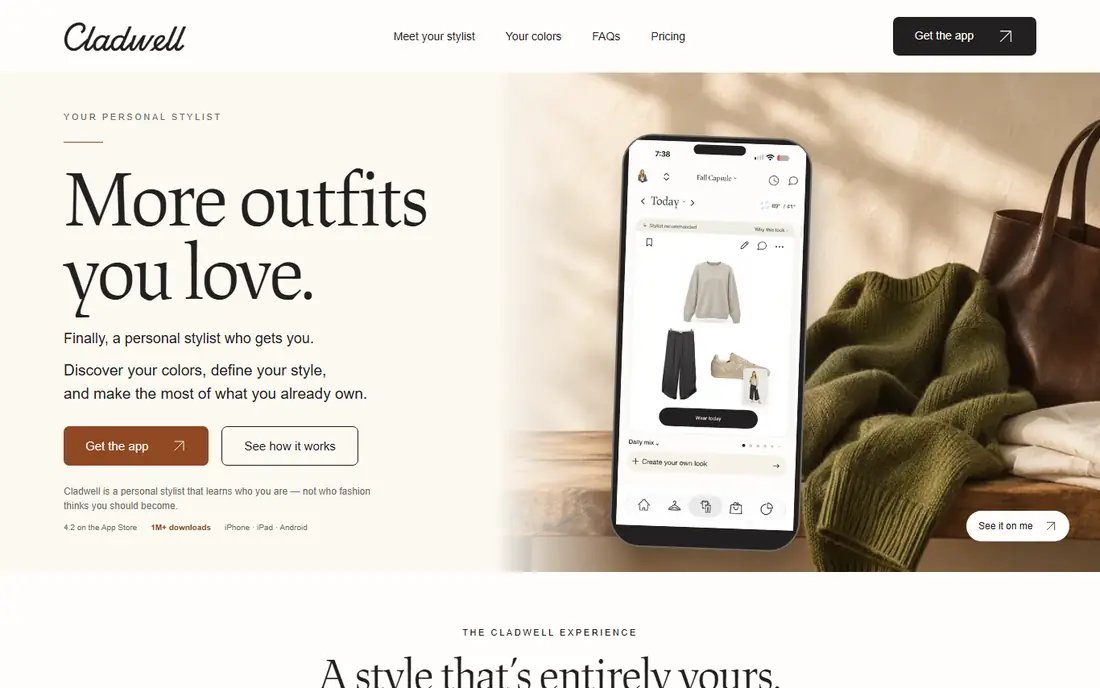
Cladwell is the clearest capsule-first choice. It starts with a style quiz, helps you define a set of versatile pieces, and then suggests daily outfits from that set, with weather in mind. That structure helps people who own too much, wear too little, and want a smaller wardrobe that mixes well.
The limit is scope. Cladwell works best when you commit to a capsule of a few dozen pieces, not a full closet of several hundred items. The free tier also limits the outfit suggestions that make the app useful, so check current plan terms before relying on it daily. For a true capsule reset, Cladwell is our pick for most people.
- Capsule method built in
- Daily outfit suggestions
- Weather-aware planning
- Free tier limits outfit features
- Works best with a smaller, curated set
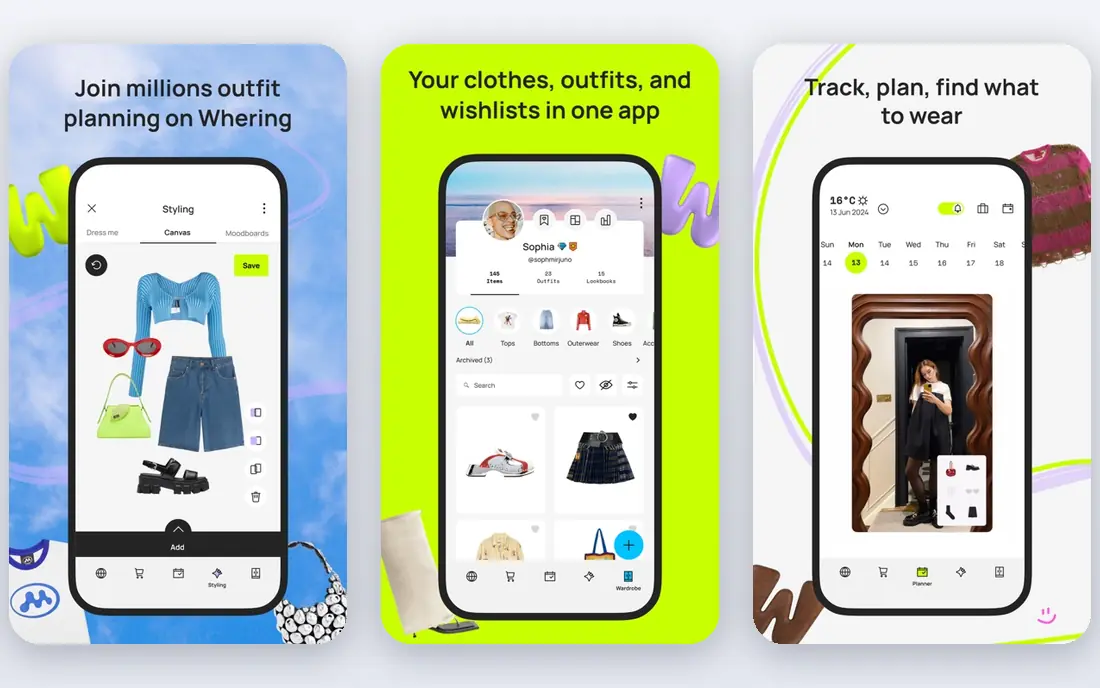
Whering gives you a free digital closet where you photograph or import clothes, organize them by category and color, and plan outfits on a calendar. Cost-per-wear tracking shows which pieces earn their place and which sit unworn, which is useful when you are trimming a wardrobe toward a capsule.
Setup takes a few sessions, since each item needs a photo and basic details. Outfit suggestions are simpler than Cladwell or a stylist-led app, so Whering suits people who like to choose outfits themselves with a clear view of what they own. For a no-cost starting point, it is hard to beat.
- Free closet cataloguing
- Outfit calendar
- Cost-per-wear tracking
- Outfit suggestions are basic
- Cataloguing takes time
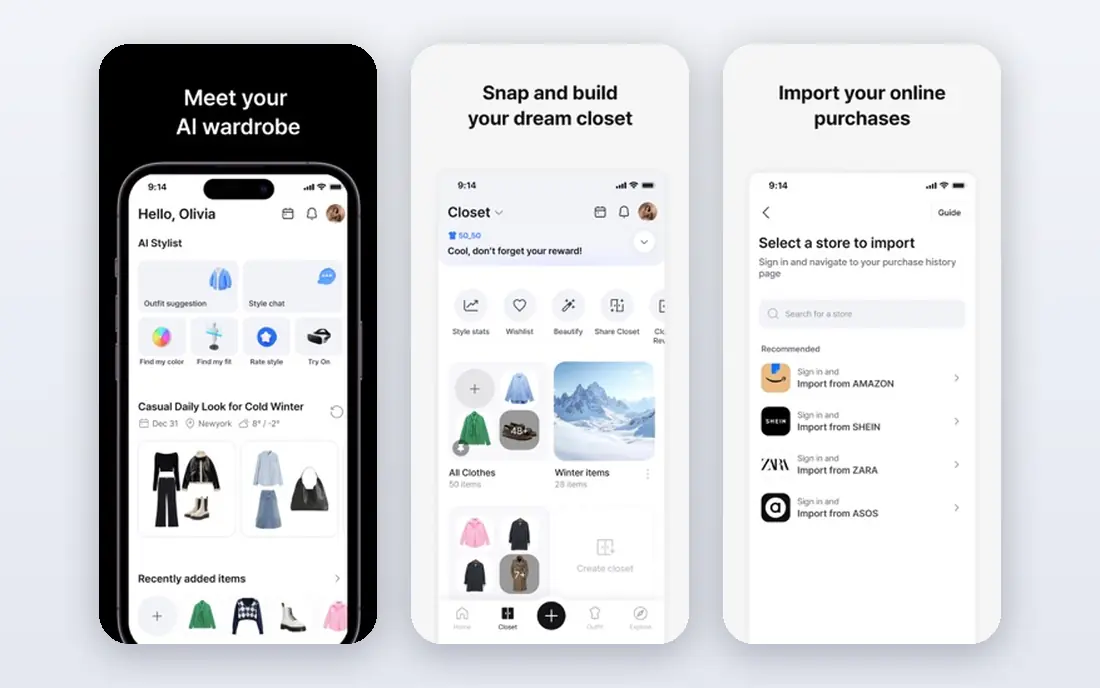
Acloset focuses on making cataloguing faster. It tags items automatically as you add them, organizes them into a visual closet, and can suggest outfits from what you own. That helps people who like the idea of a digital closet but stall on manual entry for every piece.
The free tier covers a limited number of items, so a large wardrobe may need a paid plan. Acloset also offers a wider feature set than a capsule-only app, which can feel busy if you only want daily capsule picks. For visual thinkers who want a rich closet view, it is a strong choice.
- Automatic tagging as you add items
- Outfit suggestions
- Broad closet features
- Free item limits apply
- Paid tiers vary by platform
Stylebook is the long-running iPhone closet app for people who love data. You photograph items, build outfits, track wear counts, and see cost per wear over time. Because it uses a one-time purchase rather than a subscription, it appeals to users who dislike monthly fees for a closet tool.
The trade-off is effort and platform. Stylebook is iPhone only, setup is manual, and it does not generate outfits automatically in the way newer apps do. If you want analytics, packing lists, and a closet that lives on your phone, Stylebook remains a solid pick. If you want daily suggestions with little setup, look at Cladwell or Whering first.
- One-time purchase
- Detailed wear and cost analytics
- Data stays on your device
- IPhone only
- Manual setup takes longer
- No automatic outfit generation
Indyx pairs a digital closet with human stylists who can help you build outfits, shop with intent, and shape a capsule from pieces you already own. That human layer helps when automated suggestions feel generic or when you want advice on fit, color, and occasion.
The app itself is free to start, but stylist time and premium services cost extra, so check current pricing before booking help. You still need to photograph your wardrobe, which takes time. Indyx suits people who want expert guidance for a capsule reset or a special season, rather than only automated picks.
- Real stylist input
- Outfit planning from your own clothes
- Resale options
- Styling services cost extra
- Setup still needs photos of your clothes
Smart Closet is a budget-friendly closet app with outfit planning, a calendar, and basic organization. It covers the core job well: see what you own, plan what to wear, and avoid buying duplicates. The paid tier is low cost compared with many rivals, which makes it a good test case for digital wardrobe habits.
It does not offer the same automatic tagging or stylist depth as Acloset or Indyx. For many users, that simplicity is fine, since the daily job is choosing an outfit, not managing a complex system. Smart Closet suits people who want a cheap, practical closet without a heavy setup.
- Low-cost paid tier
- Outfit planner and calendar
- Works on iPhone and Android
- Interface is simpler than rivals
- Automatic features are limited
Pureple is a lightweight outfit planner that helps you catalog clothes and mix outfits without a complex system. It suits people who want a simple daily planner and do not need deep analytics or stylist input. The app works on both major phone platforms, which helps households that share planning.
The free version includes ads and some limits, and it does not match the depth of larger closet apps. Pureple is best as a starter app: if you use it daily for a month, you will learn whether a fuller closet tool is worth paying for.
- Simple outfit planner
- Works on iPhone and Android
- Low setup friction
- Free plan has ads and limits
- Fewer analytics than Stylebook
Modebase takes a different route: you can work with your wardrobe through a chat interface, asking for outfit ideas from your own pieces and planning around weather or events. That conversational style suits people who prefer asking for help over browsing a grid of clothes.
Because Modebase is newer than Stylebook or Cladwell, its long-term feature set is less proven, and the experience depends on how you access it. Still, for users who already plan by chat and want a capsule that adapts to daily life, it is an interesting option. Check current platform support before committing your full wardrobe to it.
- Chat-based outfit help
- Works inside chat tools
- Capsule-friendly planning
- Newer and less proven than older closet apps
- Features depend on chat access
Outflik blends a digital closet with social discovery and AI styling ideas. Your wardrobe can grow from items you save and outfits you explore, and the app can suggest combinations from what you own. That discovery angle suits people who get outfit ideas from other users and want a free tool without a subscription.
The social side is a drawback for private users who only want a personal closet. Outflik is also newer than established rivals, so its community and feature depth are still growing. For a free, social capsule tool, it is worth trying, especially if you enjoy browsing outfits for ideas.
- Free wardrobe features
- Social discovery
- AI styling ideas
- Social features may not suit private users
- Newer app with a smaller user base
How we picked these
We compared official app pages, store listings, and feature descriptions for wardrobe apps live in October 2026. We favored apps that support capsule planning, outfit suggestions, or closet cataloguing, and that have a clear official homepage or store page. We left out apps that only sell clothes, apps with no wardrobe planning, and tools that could not be verified as active.
How to build a capsule that lasts
Start with the clothes you wear most, not with a shopping list. Photograph or list about thirty to fifty versatile pieces that fit well, suit your daily life, and mix across tops, bottoms, layers, and shoes. Add a few seasonal pieces, and leave statement items out of the core capsule until you see how often you reach for them.
Plan outfits for a week at a time, using weather and calendar events as a guide. Track what you wear for a month, then remove pieces you never chose and note gaps that forced repeat outfits. A capsule works when it reduces morning decisions, not when it forces you into outfits you dislike. If an app makes that tracking easy, keep using it. If it adds friction, switch to a simpler planner.
Frequently asked questions
What is the best app for capsule wardrobe planning?
Cladwell is the most capsule-first app, since it builds a capsule and suggests daily outfits from it. Whering and Acloset suit people who want a full digital closet first, with capsule planning as one use among others.
Is there a free capsule wardrobe app?
Yes. Whering and Outflik offer free closet features, and several other apps offer free tiers with limits. Check whether outfit suggestions, item limits, or calendar planning sit behind a paid plan before you catalog a large wardrobe.
How many items should a capsule wardrobe have?
Many capsule methods use about thirty to fifty pieces for a season, excluding underwear, workout gear, and occasion wear. The right number depends on your climate, work, and laundry rhythm, so treat that range as a guide, not a rule.
Can a capsule wardrobe app work on Android and iPhone?
Most apps here work on both platforms, except Stylebook, which is iPhone only. Check the store listing for your phone before starting setup, especially if you plan to share a closet across devices.
Do I need to photograph every item I own?
No. Start with the pieces you wear regularly, and add the rest over time. A useful capsule app only needs your core wardrobe to suggest outfits, and cataloguing everything at once often leads to giving up.
Can a stylist app help me shop less?
Yes, when it starts from your own clothes. Indyx and capsule-first apps can show gaps and suggest outfits from existing pieces, which reduces impulse buys. Shopping guidance works best when you set a clear budget and a list of missing items first.
Sources
See where you really rank - block by block
ProMapRanker scans Google Maps across a grid of your service area. Simple monthly plans from $19, white-label on every plan.
Start freeKeep reading
 wpforms alternatives
Best WPForms Alternatives in 2026
We compare 9 wpforms alternatives for WordPress forms, with free and paid options, current pricing notes, and honest limits for small business sites in 2026.
Read → windows task scheduler alternatives
Best Windows Task Scheduler Alternatives in 2026
Looking for Windows Task Scheduler alternatives? We compare 9 schedulers for Windows and cross-platform work, from free tools to enterprise automation.
Read → which ai video service is best
Which AI Video Service Is Best in 2026
which ai video service is best? We compare 10 legitimate AI video services on price, avatars, editing and output quality to help you pick the right tool.
Read →