 ProMapRanker
Which Software Is Best for Data Entry in 2026

Key takeaways
- For most teams, data entry starts with a form, so Google Forms, Jotform and Zoho Forms cover the bulk of everyday collection work.
- Spreadsheets still matter for cleaning and checking data, and Google Sheets and Excel remain the most practical places to do that work.
- Airtable suits teams that need linked records and views, while Nanonets suits teams that need to pull data from scanned documents.
- Free plan limits are the main trap: response caps, form caps and record caps decide whether a free tool stays free.
- The best data entry app for a job depends on volume, field use and whether data must flow into another system without manual retyping.
Quick comparison
| Pick | Great for | Pricing starts at | Free tier | |
|---|---|---|---|---|
 Google Forms | Free simple forms | Free | Yes | Visit |
 Microsoft Forms | Microsoft 365 surveys | Free | Yes | Visit |
 Jotform | Feature-rich forms and payments | $39 per month | Yes | Visit |
 Typeform | Conversational forms | $39 per month | Yes | Visit |
 Zoho Forms | High-volume forms on a budget | $12 per month | Yes | Visit |
 Fillout | Generous free responses | $19 per month | Yes | Visit |
 Airtable | Linked team databases | $24 per user per month | Yes | Visit |
 Microsoft Excel | Spreadsheet data entry and cleaning | $9.99 per month | Free trial | Visit |
 Google Sheets | Free collaborative spreadsheets | Free | Yes | Visit |
 Nanonets | Document data extraction | See website | Free trial | Visit |
The best data entry software
This guide answers which software is best for data entry, which app is best for data entry, and which data entry apps suit different jobs. We compared official feature pages, pricing pages, app store listings and public reviews, and we favoured tools that are actively sold and supported in October 2026.
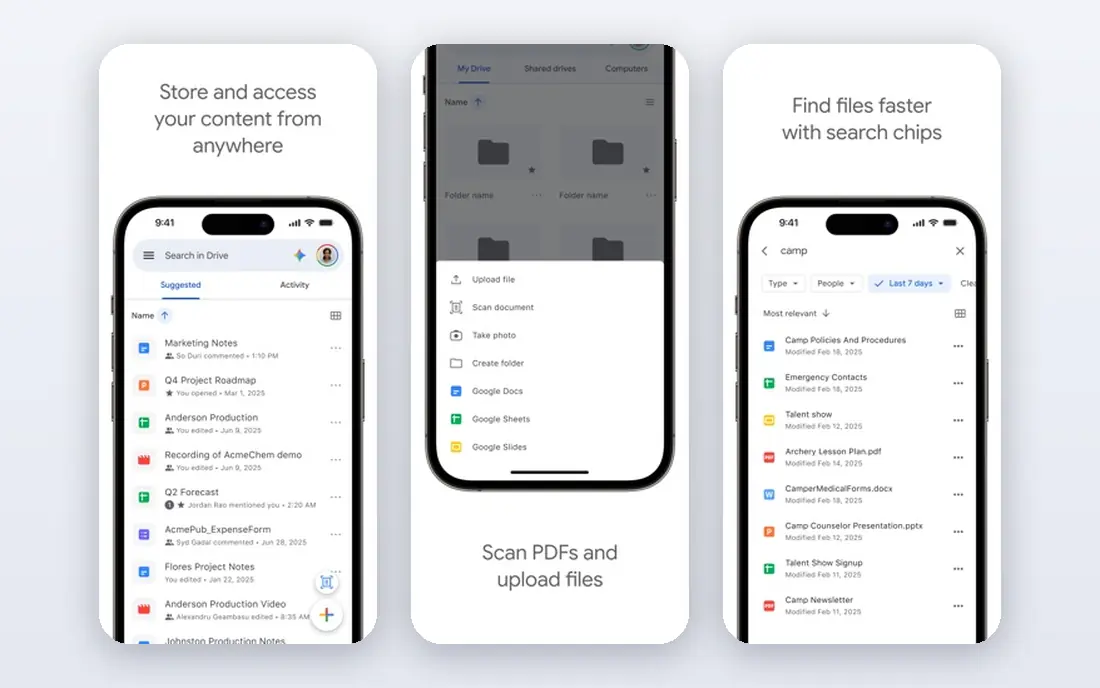
Google Forms is the fastest way to start collecting data, and for many small jobs it is all that is needed. A form can be built in minutes, shared by link or email, and every response lands in a linked Google Sheet for checking and sorting. Quizzes, event registrations, internal surveys and simple intake forms all work well, with section branching for multiple choice and dropdown questions.
Design and workflow limits are the trade-offs. Forms look plain, payment collection is not built in, and approval workflows need outside tools. A team that needs branded forms, payments or complex logic will outgrow Google Forms quickly. For free, fast and simple collection, though, it remains our pick for most people starting out.
- Free with a Google account
- Responses flow straight into Google Sheets
- Simple branching for multiple choice
- Limited design options
- No built-in payment collection
- No per-submission audit trail on free accounts
Microsoft Forms suits teams and schools that already live in Microsoft 365. Surveys, quizzes and polls can be built quickly, shared inside an organisation, and exported to Excel for analysis. Branching helps guide respondents past irrelevant questions, and the familiar Microsoft layout keeps training time low.
The free personal limit matters: 200 responses per form is enough for a class or a small team survey, but not for a public campaign. Paid personal and work accounts raise allowances, so check the current account type before launching a large form. Microsoft Forms is our pick for Microsoft-centred teams that want simple, reliable collection without a new vendor.
- Free with a personal account
- Included with eligible Microsoft 365 plans
- Results flow into Excel
- Free personal accounts cap responses at 200 per form
- Design is basic
- Public respondent options vary by account
Jotform is the all-in-one option for teams that need more than a basic questionnaire. The builder covers forms, surveys, quizzes, payment forms, order forms and applications, with approvals, workflows and e-signature tools in the wider platform. Jotform Tables organises submissions, and the mobile app suits field teams collecting data away from a desk.
Free limits are tight, with 5 forms and 100 submissions a month, so a busy team will need a paid plan. Paid plans start at 39 dollars per month on monthly billing, with a lower annual rate, and higher tiers raise submission and storage limits. Jotform suits operations teams that want one platform for collection, payment and workflow, and who can justify the higher entry price.
- Large template library
- Payments, approvals and e-signatures in one platform
- Mobile forms for field work
- Free plan allows 5 forms and 100 submissions a month
- Paid plans start higher than rivals
- Branding stays on free forms
Typeform wins on respondent experience. The conversational layout shows one question at a time, which can lift completion rates for surveys and lead forms where a long grid of fields would put people off. Design options, logic and calculations help teams build polished, on-brand forms that feel more like a conversation than a chore.
Value is the problem. The free plan allows only 10 responses a month across all forms, so it works as a demo rather than a working tool. Paid plans start at 39 dollars per month on monthly billing, with lower annual rates, and branding removal and Stripe payments sit on higher tiers. Typeform suits teams where completion rate and design matter more than raw response volume.
- One-question-at-a-time design
- Strong visual polish
- Logic and calculations on paid plans
- Free plan allows only 10 responses a month
- Branding removal and payments need higher tiers
- Value is weaker than rivals
Zoho Forms is the capacity pick. The Basic plan at 12 dollars per month on monthly billing, or 10 dollars billed annually, offers unlimited forms and 10,000 submissions a month, a figure that costs far more elsewhere. Higher tiers raise submissions to 25,000, 75,000 and 150,000 a month, with approvals, payments and, on Premium, HIPAA compliance. The free plan allows 3 forms and 500 submissions a month.
The catch is ecosystem fit. Zoho Forms shines when responses flow into Zoho CRM, Books or Desk, and its mobile app is genuinely useful for field data collection. Outside Zoho it is a solid but plain form builder. If a team already runs on Zoho, this is the obvious pick. If not, weigh the low price against design and lock-in before committing.
- Very high submission allowances for the price
- Deep Zoho CRM links
- Strong mobile app for field collection
- Free plan allows only 3 forms
- Design is traditional
- Leaving the Zoho ecosystem later is painful
Fillout stands out for its free tier, which allows 1,000 responses a month with logic, payments, scheduling and PDFs included. Unlimited seats on every plan also help teams where many people need to view or manage forms without paying per seat. Links to Airtable and Notion make it a strong pick for teams that already store data in those tools.
Paid plans start at 19 dollars per month on monthly billing, with lower annual rates, and Pro adds full branding removal. The template library is smaller than Jotform, and buyers with strict compliance needs should confirm HIPAA status directly before use. Fillout suits small teams that want a generous free plan and a clean upgrade path.
- 1,000 free responses a month
- Unlimited seats on every plan
- Deep Airtable and Notion links
- Full branding removal needs the Pro plan
- No HIPAA statement found in recent reviews
- Smaller template base than Jotform
Airtable is less a form tool and more a shared database that happens to include forms. Teams enter data once into linked tables, then view it as a grid, a calendar, a kanban board or a form, without copying rows between sheets. That structure suits inventory, content pipelines, applicant tracking and any job where one record relates to another.
Pricing needs care. The free plan allows up to 5 editors and 1,000 records per base, while Team costs 24 dollars per seat per month on monthly billing, or 20 dollars billed annually, with higher record limits. Business raises limits further at a higher seat price. Airtable suits teams that need a living database rather than a one-off survey, and it is less useful for a single public form.
- Relational records with linked tables
- Multiple views including grid, form and kanban
- Strong automations
- Seat pricing adds up for larger teams
- Free base caps records at 1,000
- Permissions can confuse new users
Excel remains the workhorse for structured data entry, checking and cleaning. Data validation rules, dropdown lists, conditional formatting and formulas help catch errors at entry, while filters, sorting and pivot tables turn raw rows into usable summaries. Most office workers already know the basics, which cuts training time to near zero.
The web version is useful, but the strongest Excel experience still sits in the desktop app or a paid Microsoft 365 plan, with Personal starting at 9.99 dollars per month in recent pricing. Shared workbooks need version discipline, since two editors can overwrite each other without clear rules. Excel suits teams that enter, validate and analyse tabular data in one place, especially inside Microsoft 365.
- Powerful formulas, filters and data validation
- Familiar to most office users
- Strong desktop and web versions
- Collaboration is weaker than Google Sheets on free accounts
- Version control needs care
- Large shared files can slow down
Google Sheets is the free collaborative counterpart to Excel, and it pairs naturally with Google Forms. Responses land in a sheet that several people can view, filter and comment on at once, with version history to undo mistakes. Formulas, data validation and conditional formatting cover most everyday data entry needs, and add-ons extend the tool for specific jobs.
Very large workbooks and complex models run better in Excel, and offline access needs setup in advance. Paid Google Workspace plans add administration and storage, starting at higher per-user rates, but the free sheet itself is enough for most small teams. Google Sheets suits teams that value live collaboration and a zero price over desktop power.
- Free with a Google account
- Real-time collaboration
- Forms feed directly into sheets
- Weaker than Excel for very large or complex workbooks
- Offline use needs setup
- Advanced features need add-ons
Nanonets covers a different kind of data entry: pulling structured fields out of documents that already exist. Invoices, receipts, purchase orders and paper forms can be read by trained models, with fields such as dates, totals and vendor names exported to a spreadsheet or business system. That saves hours of manual retyping for accounts and operations teams.
Extracted data still needs checks, especially on poor scans, unusual layouts or handwritten notes, so treat Nanonets as an assistant rather than a fully automatic clerk. Pricing varies by volume and model, so use the trial with real sample documents before committing. Nanonets suits teams with a steady flow of similar documents, not teams that only need a simple web form.
- Extracts data from invoices, receipts and forms with AI models
- Reduces manual retyping
- Integrates with common business tools
- Pricing is quote-led for larger volumes
- Extracted data still needs human checks
- Setup needs sample documents
How we picked these
We compared official feature pages, pricing pages, app store listings and public reviews for tools sold and supported in October 2026. We kept tools that collect, enter, validate or extract data in a direct way, and we set aside pure survey research platforms and pure database development tools. Where monthly and annual rates differed, we used the monthly rate in the product fields and noted the annual option in the text.
How to choose the right tool
Match the tool to the source
Forms suit data that people type in. Spreadsheets suit data that a team enters, checks and analyses in rows. Document tools suit data that already exists on paper or in PDFs. Using a form tool for document extraction, or a spreadsheet for a public survey, creates extra work.
Check the free limits first
Count expected responses, forms, records and editors before choosing. A free plan with 100 responses a month will fail on a public campaign, while a paid plan with 10,000 submissions may be wasted on an internal survey. Test with a real form and real volume during the trial.
Plan validation and checks
Add required fields, dropdowns, date rules and format checks at entry, rather than cleaning messy data later. A short validation step saves hours of fixing, and it gives cleaner reports. For document extraction, add a human review step for high-value fields such as totals and account numbers.
Think about where data goes next
A form that feeds a CRM, a sheet or a database without retyping is worth more than a pretty form that exports to a dead file. Check integrations, exports and automation options before committing, especially for recurring jobs.
Frequently asked questions
Which software is best for data entry overall?
For most teams, Google Forms for free collection plus Google Sheets or Excel for checking is the best starting combination. Teams that need workflow, payments or high volume should look at Jotform, Zoho Forms or Fillout, while teams that need linked records should look at Airtable.
Which app is best for data entry on a phone in the field?
Zoho Forms and Jotform offer strong mobile apps for field collection, including offline options on some plans. Google Forms also works well on a phone browser for simple jobs, but it lacks the offline and workflow depth of the paid field tools.
What is the best data entry software for high volume?
Zoho Forms offers the highest submission allowances for its price, with 10,000 submissions a month on its Basic plan. Fillout offers a generous free tier at 1,000 responses a month, while Jotform and Typeform suit high-value forms where design and workflow matter more than raw volume.
Is Excel or Google Sheets better for data entry?
Excel suits large, complex workbooks and Microsoft 365 teams, while Google Sheets suits free, real-time collaboration and Google Forms users. Both support validation, formulas and filtering, so the choice usually follows the wider office system a team already uses.
What is the best data entry app for scanned documents?
Nanonets suits teams that need to extract fields from invoices, receipts and forms at scale. It still needs human checks on unusual documents, so pair it with a review step for totals, dates and account numbers before the data enters a system of record.
Sources
- https://youform.com/blog/best-free-form-builders/
- https://www.jotform.com/blog/formplus-alternatives/
- https://www.flozic.ai/blog/alternatives/jotform-alternatives
- https://www.appypie.com/blog/airtable-alternatives
- https://forms.google.com
- https://forms.office.com
- https://www.jotform.com
- https://www.typeform.com
- https://www.zoho.com/forms/
- https://www.fillout.com
- https://www.airtable.com
- https://www.microsoft.com/microsoft-365/excel
- https://sheets.google.com
- https://nanonets.com
See where you really rank - block by block
ProMapRanker scans Google Maps across a grid of your service area. Simple monthly plans from $19, white-label on every plan.
Start freeKeep reading
 top custom software development company
Top Custom Software Development Company in 2026
Looking for a top custom software development company? We compare 9 firms for web, mobile, and enterprise software, covering strengths and fit for 2026.
Read → tableau alternatives
Tableau Alternatives in 2026
Compare the best Tableau alternatives for 2026, from Power BI to Metabase, with prices, hosting options, and picks for small teams and enterprises today.
Read → microsoft teams alternatives
Best Microsoft Teams Alternatives in 2026
Looking for microsoft teams alternatives? We compare 9 chat and video tools for 2026, covering free plans, pricing, meetings, and integrations for teams.
Read →