 ProMapRanker
Netflix Alternatives in 2026

Key takeaways
- Hulu and Max are the closest general replacements, with broad TV catalogs and strong originals.
- Disney+ is the best family pick, while Apple TV suits viewers who want fewer, higher-quality originals.
- Tubi is the only truly free service on this list, with ads and a rotating movie and TV catalog.
- Prices changed again in 2026, so check the signup page before you commit to a yearly plan.
Quick comparison
| Pick | Great for | Pricing starts at | Free tier | |
|---|---|---|---|---|
 Hulu | Current TV shows and originals | $12.49 per month | No | Visit |
 Disney+ | Families, Marvel, Star Wars, and Pixar | $12.49 per month | No | Visit |
 Max | Prestige drama, HBO series, and films | $10.99 per month | No | Visit |
 Peacock | NBC shows, Bravo, and selected sports | $8.99 per month | No | Visit |
 Paramount+ | CBS shows, Paramount films, and Showtime | $8.99 per month | No | Visit |
 Apple TV | High-quality originals without ads | $14.99 per month | No | Visit |
 Prime Video | Prime members and a broad film library | $8.99 per month | No | Visit |
 Tubi | Free movies and TV with ads | Free | Yes | Visit |
The best Netflix alternatives
Each service below is a legal, licensed streaming service with its own catalog. None of them requires piracy tools or unofficial sources, and all of them work in the United States in October 2026.

Hulu is the closest swap for viewers who watch a lot of television rather than only films. Many shows appear the day after broadcast, and the library covers drama, comedy, reality, and animation alongside Hulu originals. For households that follow several current series at once, that timing is the main advantage over services built mainly around back catalogs.
The price structure needs a close look. The entry plan includes ads, and the no-ads plan is a large step up in price. Bundles with Disney+ can soften the total if you would use both services anyway, but they do not help if you only want Hulu. Check which shows you actually watch before choosing the ad tier, since ad breaks change the viewing experience most on long drama episodes.
- Next-day episodes from many broadcast and cable shows
- Strong originals and FX programming
- Bundle options with Disney+
- Lower tier includes ads
- No-ads plan costs much more
- Catalog varies by licensing deals
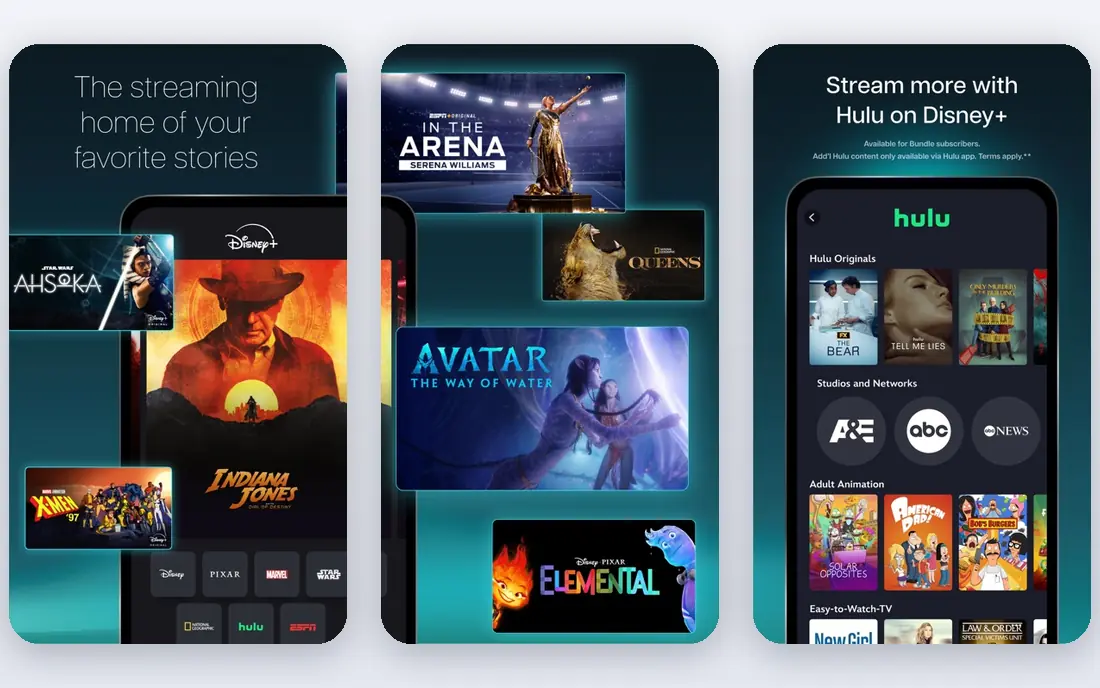
Disney+ is the easiest pick for households with children, and it also serves adults who follow Marvel, Star Wars, Pixar, and National Geographic. The catalog is deep in those areas, and many films and series are presented in high quality with good device support. Parental controls and profiles make it simple to separate adult and child viewing.
As a single general service for adults, it is narrower than Hulu or Max. Drama and documentary coverage outside its franchises is thinner, and licensing changes can move titles. The bundle with Hulu fixes much of that gap, and it is often the better value if your household watches both kinds of programming. On its own, Disney+ works best when franchise and family viewing is the priority.
- Deep family and franchise catalog
- Strong 4K presentation on many titles
- Bundle options with Hulu
- Less depth for adult general drama alone
- Some titles rotate or move to other services
- Entry plan includes ads
Max, the home of HBO programming, suits viewers who prefer a smaller number of high-profile series and films over a very large catalog. HBO dramas, documentaries, and comedy specials anchor the service, and the film library adds recent releases and older titles that hold up on repeat viewing. For a household that watches one or two prestige series at a time, Max often gives the most talked-about shows per dollar.
Tier choice matters more here than on some rivals. The entry plan includes ads, and downloads, simultaneous streams, and 4K sit on higher tiers. Read the plan details before paying, especially if you watch on a large television or download for travel. Max is a strong replacement for viewers who value originals over sheer volume.
- HBO originals and a strong film library
- Good documentary and adult drama selection
- Multiple tiers including 4K on higher plans
- Features such as downloads and 4K are tier-dependent
- Entry plan includes ads
- Catalog can feel smaller than broader rivals
Peacock is a good value pick if you follow NBC programming, Bravo reality shows, or selected live sports. The entry Select plan is cheaper than most paid rivals, and the Premium plan adds more films, originals, and sports coverage. For viewers who already watch those networks, Peacock can replace a large part of a general subscription at a lower monthly cost.
The tier limits are the catch. The cheapest plan excludes some sports, movies, and originals, so fans of live events may need Premium or Premium Plus. Ads also appear on lower tiers, with an ad-free option only at the top. Check the sports and show coverage for your teams and series before choosing, since that coverage drives the value here.
- Lower entry price than many rivals
- NBC and Bravo catalogs plus originals
- Live sports and news content on higher tiers
- Free tier is gone
- Lower tier excludes some sports, films, and originals
- Ads on entry and mid tiers
Paramount+ fits viewers who follow CBS dramas, reality competitions, news, and sports, or who want Paramount films in one place. The Essential plan covers the core library at a modest price, while the Premium plan adds Showtime programming and removes most ads. Local live CBS access in many areas is a useful extra for news and sports fans.
It is not a full general replacement on its own. Drama and comedy depth outside CBS and Paramount is thinner than Hulu or Max, so many households pair it with a broader service or a free option such as Tubi. If CBS and Showtime shows are already a large share of your viewing, Paramount+ is a focused and fairly priced choice.
- CBS library and live local stations in many areas
- Paramount films
- Showtime content on the Premium plan
- Catalog is narrower than general rivals
- Entry plan includes ads
- Some titles also appear on other services
Apple TV, formerly Apple TV+, takes a different approach: a smaller catalog built almost entirely around originals. Series and films on the service tend to be well produced, and the service is ad-free, which makes long viewing sessions smoother. For viewers who pick one series, watch it through, and then pick another, the smaller library is less of a problem than it sounds.
The price is now higher than several entry plans, and the lack of a deep back catalog means you will run out of familiar comfort viewing faster. Device support is broad, and Apple device buyers sometimes get a trial period, so check for an offer before paying full price. Apple TV is best as a focused originals service, often paired with a free service for background viewing.
- Ad-free originals by default
- Strong picture quality
- Good value for viewers who finish series rather than browse
- Smaller catalog than broad rivals
- Price rose in August 2026
- Fewer back-catalog films and older series
Prime Video is the best value for people who already pay for Prime, since the service is included with that membership. The standalone plan also costs less than several rivals, and the library covers originals, licensed films, and series across many genres. Rentals and channel add-ons extend the catalog further, though they add cost beyond the base plan.
Navigation is the main frustration. Included titles sit beside rentals and paid channels, so it is easy to start a film that is not actually included. Ads also appear on the base plan, with an extra monthly charge to remove them. If you already use Prime for delivery, Prime Video is a strong, low extra-cost replacement; as a standalone purchase, compare its ad terms with Hulu and Max first.
- Included with Prime membership
- Large film and series library plus rentals
- Originals across drama, comedy, and documentary
- Included, rental, and add-on content are mixed together
- Entry plan includes ads
- Ad-free viewing needs a paid add-on
Tubi is the only service on this list that costs nothing, and that alone makes it worth trying. The library includes films, series, and live channels across drama, comedy, documentary, and reality, with new titles rotating in as others leave. For background viewing, older films, and discovering titles you missed, it covers a surprising amount of ground.
Ads are the trade-off, and they appear regularly during films and episodes. Picture quality and title availability also vary, and you will not find the newest originals that drive paid subscriptions. Used alongside one paid service, or on its own for casual viewing, Tubi is the best free legal option in this comparison and a useful way to cut a monthly bill.
- Truly free with no subscription
- Large rotating library of films and series
- No account needed for much viewing
- Ads interrupt viewing
- Catalog rotates and varies in quality
- Fewer new originals than paid rivals
How we picked these
We compared official pricing pages and recent October 2026 price coverage, and we included only licensed services that operate in the United States. We looked for a mix of general, family, prestige, sports, and free services, so different households can find a fit without stacking five paid plans. Prices change often in streaming, so we used the latest entry figures available and recommend confirming the signup page before you pay.
How to replace a subscription without overspending
Start by listing the shows you actually finished in the last month, not the shows you might watch someday. That list usually points to one or two services, not five. Try the free option first, then add a single paid service for a month and see whether it covers your list.
Rotate instead of stacking
Rotating services is the simplest way to save money. Subscribe to one service, watch its current originals, cancel, and move to the next. Most services are month to month, so you lose little by switching, and you avoid paying for catalogs you are not using. Keep a note of renewal dates so a trial does not turn into an unwanted charge.
Frequently asked questions
What are the best free alternatives to paid streaming?
Tubi is the strongest free legal option, with a large rotating library of films and series supported by ads. Pluto TV and The Roku Channel also offer free films and live channels. Free services will not match paid originals, but they cover a lot of casual and background viewing at no cost.
Which service is closest to a general replacement?
Hulu is the closest general replacement for viewers who watch current TV, while Max is the closest for prestige drama and films. Many households pair one of those with Tubi for free extra viewing. The right answer depends on whether your list is mainly current series, films, or franchise programming.
Can I get these services without cable?
Yes. All eight services work over the internet on smart TVs, streaming devices, phones, tablets, and computers, with no cable subscription needed. You need a broadband connection and, for paid services, a payment method. Most also allow downloads on higher tiers for offline viewing.
Do these services offer free trials?
Trial offers vary and change often. Apple device buyers sometimes receive a trial period, and some services run short promotions, but most paid services on this list do not offer a standing free trial in October 2026. Check the signup page for the current offer before you pay.
How do I keep streaming costs down?
Pick one paid service based on your recent viewing, add Tubi for free, and rotate paid services every few months. Avoid bundles unless you already use every service in the bundle, and check for ads on entry plans before choosing the cheapest tier. Review subscriptions every few months and cancel any service you have not opened.
Sources
See where you really rank - block by block
ProMapRanker scans Google Maps across a grid of your service area. Simple monthly plans from $19, white-label on every plan.
Start freeKeep reading
 twitch alternatives
Twitch Alternatives in 2026
Explore the best Twitch alternatives in 2026 for live streaming, with free platforms, monetisation options, audiences, chat tools, and tips for new streamers.
Read → firebase alternatives
Best Firebase Alternatives in 2026
Looking for Firebase alternatives? We compare 9 backend platforms for auth, databases, realtime, storage, functions, self-hosting, and pricing for your app.
Read → companies with best work life balance
Companies With Best Work Life Balance in 2026
See companies with best work life balance in 2026, ranked by employee ratings, with flexible work options, benefits, and what to check before applying.
Read →