 ProMapRanker
How to Respond to Google Reviews (Good and Bad) Like a Pro

As Md Shihab Mia, founder of ProMapRanker, I often see businesses overlook one of the most powerful tools in their local SEO and reputation arsenal: responding to Google reviews. To respond to Google reviews like a pro, you must consistently engage with both positive and negative feedback by being timely, personalized, and professional. For positive reviews, express genuine gratitude, reference specific details, and invite future business. For negative reviews, acknowledge the issue, apologize sincerely, offer a private resolution pathway, and demonstrate a commitment to improvement. This proactive engagement not only builds trust and loyalty but also signals to Google that your business is active and customer-centric, significantly impacting your local search visibility and authority.
Why Does Responding to Google Reviews Matter for Your Business?
Responding to Google reviews is crucial because it directly influences your online reputation, customer trust, and local search engine optimization (SEO). Engagement with reviews demonstrates that you value customer feedback, which can significantly enhance your brand image and encourage new customers to choose your business over competitors.
Beyond customer perception, Google explicitly states that responding to reviews can improve your local ranking. According to Google Business Profile Help, "Responding to reviews shows that you value your customers and their feedback. High-quality, positive reviews from your customers will improve your business’s visibility and increase the likelihood that a potential customer will visit your location." This means that consistent, thoughtful responses act as a powerful signal to Google's algorithms, contributing to better local search performance and potentially earning a coveted spot in the AI Overview.
The Impact of Reviews on Local SEO and Rankings
Reviews are a critical ranking factor for local businesses. Google considers the quantity, quality, and recency of reviews, as well as your engagement with them, when determining local search rankings. A business with many recent, positive reviews and thoughtful responses will generally outrank a competitor with fewer or unaddressed reviews.
Keywords naturally appearing in reviews can also boost your visibility for specific search queries. For example, if customers frequently mention "best gluten-free pizza" in reviews for a restaurant, Google learns to associate that business with "gluten-free pizza" searches. Our Google Maps ranking factors breakdown further details how reviews contribute to your overall local search presence. Utilizing tools like ProMapRanker can help you track how your review profile impacts your local geo-grid rankings.
Building Trust and Reputation
In an age where 93% of consumers read online reviews before making a purchase (Statista), your response strategy is your public face. Thoughtful responses show empathy, professionalism, and a commitment to customer satisfaction. This builds trust with both existing and potential customers, transforming a potentially negative experience into an opportunity to showcase excellent customer service.
Customer Retention and Loyalty
Engaging with customer feedback, especially negative feedback, provides an opportunity to resolve issues and retain customers who might otherwise churn. A swift, empathetic response can turn a dissatisfied customer into a loyal advocate, demonstrating that their voice is heard and valued. For positive reviews, a thank you reinforces their positive experience and encourages repeat business.
What Are the Golden Rules for Responding to Any Google Review?
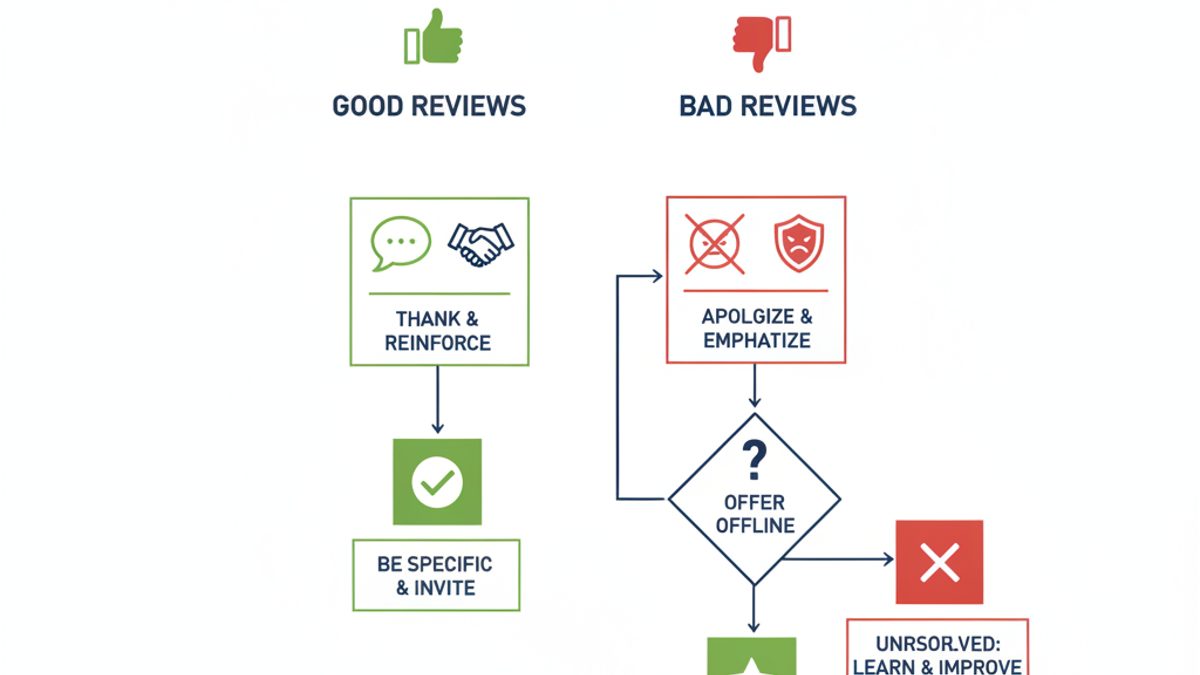
Regardless of the review's sentiment, adhere to a few core principles: be timely, personalize your message, maintain professionalism, keep it concise, and always offer a clear next step or expression of gratitude. These rules ensure your responses are effective, consistent, and reflective of your brand's commitment to service.
- Be Timely: Aim to respond within 24-48 hours. A prompt response shows you're attentive and responsive.
- Personalize Your Message: Avoid generic, copy-pasted responses. Reference specific details from the review to show you've read and understood it.
- Maintain Professionalism: Always keep a calm, respectful tone, even when faced with unfair or aggressive feedback. Your response is public and reflects on your brand.
- Be Concise: Get straight to the point. Long, rambling responses can deter readers.
- Offer a Clear Next Step (for negative reviews) or Express Gratitude (for positive reviews): Guide the conversation offline for complaints or thank customers for their praise.
How to Respond to Positive Google Reviews (5-Star & 4-Star) Like a Pro?
When responding to positive Google reviews, always express genuine gratitude, reference specific details mentioned by the customer, and subtly reinforce your brand's unique selling points or values. This approach not only thanks the customer but also helps to market your business to future readers and encourages repeat visits.
Positive reviews are a goldmine for your business. They boost morale, attract new customers, and signal to Google that your business is high-quality. Your response should amplify this positivity.
- Say Thank You: Start with a sincere expression of gratitude.
- Reference Specifics: Point out something unique they mentioned (e.g., "We're so glad you enjoyed our "Spicy Thai Basil" dish!" or "It's wonderful to hear Sarah provided such excellent service."). This proves you've read their review carefully.
- Reinforce Your Brand: Briefly mention a core value or aspect of your business that aligns with their positive experience (e.g., "Our team strives for exactly this kind of welcoming atmosphere!").
- Invite Them Back: Encourage repeat business. "We look forward to seeing you again soon!" or "Come back and try our new seasonal menu item!"
Examples for Positive Google Review Responses:
- 5-Star Review Example: "The best coffee shop in town! Great atmosphere and friendly staff."
- Response: "Thank you so much for your kind words! We're thrilled to hear you enjoy our coffee and the atmosphere we strive to create. Our team loves serving wonderful customers like you. We look forward to welcoming you back for your next coffee fix!"
- 4-Star Review Example: "Good service, but the wait was a bit long during peak hours."
- Response: "We appreciate your feedback and are so glad you experienced good service! We're constantly working to optimize our operations, especially during busy periods, and your comment helps us improve. We hope to see you again soon, perhaps during off-peak hours for an even smoother visit!"
How to Respond to Negative Google Reviews (1-Star & 2-Star) Effectively?
Responding to negative Google reviews requires a calm, empathetic, and solution-oriented approach: acknowledge the customer's frustration, sincerely apologize for their experience, and offer a clear path to resolve the issue privately. This demonstrates accountability and a commitment to customer satisfaction, which can mitigate damage to your reputation and even win back the customer.
Negative reviews are inevitable, but how you handle them is critical. A well-crafted response can turn a bad situation into a testament to your customer service. Remember, you're not just responding to the reviewer, but also to all potential customers who will read this public exchange.
- Acknowledge and Apologize: Start by acknowledging their experience and apologizing for any shortcomings. "I'm truly sorry to hear about your experience..." or "We sincerely apologize that our service did not meet your expectations."
- Empathize, Don't Argue: Show understanding for their frustration, even if you disagree with the facts. Avoid getting defensive or debating details publicly.
- Offer a Solution or Path to Resolution (Offline): Provide a specific way to contact your business directly to discuss and resolve the issue. "Please contact us at [phone number] or [email address] so we can make this right." This moves the sensitive conversation out of the public eye.
- Keep it Brief and Professional: Your public response should be concise. The goal is to show you're taking action, not to resolve the entire issue in the review section.
- Learn from Feedback: Use negative reviews as an opportunity to identify areas for improvement within your business operations.
Examples for Negative Google Review Responses:
- 1-Star Review Example: "Terrible service, waited forever for my food and it was cold when it arrived. Never coming back."
- Response: "We are truly sorry to hear about your disappointing experience with the wait time and the quality of your food. This is certainly not the standard we aim for. We would appreciate the opportunity to discuss this further and make amends. Please contact us directly at [phone number] or [email address] at your earliest convenience."
- 2-Star Review Example: "The product broke after only a week, very poor quality."
- Response: "We sincerely apologize that the product you purchased did not meet your expectations and broke so quickly. We take product quality very seriously. Please reach out to our customer service team at [phone number] or [email address] with your order details so we can investigate and find a suitable resolution for you."
How to Respond to Neutral Google Reviews (3-Star)?
For neutral Google reviews, acknowledge the customer's feedback, express appreciation for their input, and politely invite them to provide more specific details offline if there are areas for improvement. This demonstrates your commitment to continuous improvement and can help uncover opportunities to enhance customer experience.
Neutral reviews (often 3-stars) can be tricky. They're not overtly positive or negative, but they indicate a lukewarm experience. These are excellent opportunities to learn and potentially convert a neutral customer into a loyal one.
- Thank Them for Their Feedback: Acknowledge their time and input.
- Express Desire for Improvement: Show you're keen to understand how to move from "okay" to "excellent."
- Invite Specifics Offline: Offer a way for them to elaborate privately, allowing you to gather actionable insights.
Example for Neutral Google Review Response:
- 3-Star Review Example: "It was an okay experience. Nothing spectacular, but no major complaints either."
- Response: "Thank you for taking the time to share your feedback. We're glad to hear your experience was generally okay, but we're always striving for spectacular! If you have any specific suggestions on how we could have improved your visit, please feel free to reach out to us at [email address]. We'd love to hear more and hope to impress you on your next visit."
Why Can't I Respond to Google Reviews? (Troubleshooting Guide)
If you're unable to respond to Google reviews, the most common reasons include not being properly verified for your Google Business Profile, being logged into the wrong Google account, or a technical issue with Google itself. Ensure your business profile is fully verified and you are using the primary owner account to manage it.
Frustrating, right? Here are the most common reasons you might be unable to respond:
- Your Google Business Profile Isn't Verified: You must have a verified Google Business Profile to respond to reviews. If your business is still pending verification or unverified, you won't have this capability. Check your Google Business Profile dashboard for verification status.
- You're Not Logged into the Correct Google Account: Ensure you are logged into the Google account that owns or manages your Google Business Profile. If you have multiple Google accounts, this is a common mistake.
- You Don't Have Manager or Owner Access: If someone else set up the GBP, you might only have "Site Manager" access, which typically doesn't include responding to reviews. You need "Manager" or "Owner" permissions.
- The Review Was Removed: If Google removed a review (e.g., for violating content policies), you won't be able to respond to it, and it will no longer appear on your profile.
- Technical Glitch: Rarely, there might be a temporary bug with Google Business Profile. Try clearing your browser cache, using a different browser, or waiting a few hours.
Step-by-Step Guide: Crafting Your Pro Review Response
Follow this systematic approach to ensure every review response is professional, effective, and beneficial for your business:
- Receive Notification & Assess Sentiment: Get an alert for a new review. Immediately identify if it's positive, neutral, or negative.
- Read the Review Carefully: Understand the core message, any specific details, and the customer's overall tone.
- Draft a Personalized Response:
- Positive: Thank, reference specifics, reinforce brand, invite back.
- Neutral: Thank, express desire for improvement, invite offline specifics.
- Negative: Acknowledge, apologize, empathize, offer offline resolution.
- Review for Tone and Professionalism: Read it aloud. Does it sound genuine? Is it calm and respectful, even for negative reviews? Are there any typos or grammatical errors?
- Check for Conciseness: Is it brief and to the point?
- Post Your Response: Publish the response on your Google Business Profile.
- Monitor & Learn: Track response times and customer reactions. Use insights from reviews to improve your business operations. Our guide on optimizing your Google Business Profile covers leveraging reviews for improvement.
The Role of Review Management Software in Pro Responses
While manual responses are essential, managing a high volume of reviews across multiple locations can be overwhelming. This is where dedicated review management software like ProMapRanker comes in. These tools streamline the process, ensuring no review goes unnoticed or unaddressed.
How ProMapRanker Elevates Your Review Strategy:
- Centralized Dashboard: Monitor all your Google reviews (and reviews from other platforms) in one place.
- Automated Alerts: Get instant notifications for new reviews, allowing for timely responses.
- Sentiment Analysis: Quickly identify review sentiment to prioritize responses and understand overall customer satisfaction.
- Response Templates (with Personalization Prompts): Speed up responses while ensuring personalization by prompting you to insert specific details.
- Reporting & Analytics: Track trends in review volume, average ratings, and response times. See how review sentiment impacts your geo-grid local rank tracking.
- GBP Audit Features: Identify gaps in your Google Business Profile, including missed review opportunities or areas for optimization. Our free GBP audit can get you started.
- AI Rank Tracking & Visibility: ProMapRanker's AI Visibility Index helps you understand how your review profile and other GBP factors contribute to your visibility in Google's AI Overviews and traditional search results.
By integrating a robust tool like ProMapRanker, businesses can manage their online reputation more efficiently and strategically, ensuring every review response is professional and impactful. Register today to see how ProMapRanker can transform your review management.
Comparison: Manual vs. Software-Assisted Review Management
Understanding the benefits of each approach can help you decide the best strategy for your business:
| Feature | Manual Review Management | Software-Assisted Review Management (e.g., ProMapRanker) |
|---|---|---|
| Response Time | Can be slow, especially for high volume/multiple locations. | Fast, automated alerts ensure timely responses (often within 24 hours). |
| Personalization | High, but time-consuming to craft unique responses. | High, with templates and prompts to aid personalization. |
| Scalability | Difficult to manage across many locations or high review volume. | Excellent, designed for multi-location businesses and high volume. |
| Data & Insights | Limited, requires manual tracking. | Comprehensive analytics, sentiment analysis, trend tracking. |
| Consistency | Challenging to maintain brand voice across different responders. | Easier to maintain consistent brand voice with guided templates. |
| Cost Efficiency | Low direct cost, but high labor cost for time spent. | Subscription cost, but significant savings in labor and improved ROI. |
| SEO Impact | Positive, but less optimized due to potential inconsistencies or delays. | Maximized due to consistent, timely, and optimized responses. |
Frequently Asked Questions
How to reply to Google reviews examples?
To reply to Google reviews, use specific examples based on sentiment: for positive reviews, thank them sincerely and reference specifics ("Glad you loved our pasta!"); for negative reviews, apologize, empathize, and offer a private resolution ("Sorry for the wait, please call us at [number] to discuss."). Neutral reviews should acknowledge feedback and invite further detail offline.
What is a good response to a 5-star review?
A good response to a 5-star review expresses genuine gratitude, thanks the customer by name if possible, references a specific positive detail they mentioned, and invites them to return. For example: "Thank you so much, [Customer Name]! We're thrilled you enjoyed our [specific dish/service]. We look forward to seeing you again soon!"
Why can't I respond to Google reviews?
You might not be able to respond to Google reviews if your Google Business Profile is not fully verified, you are not logged into the correct Google account associated with the business, or you lack the necessary "Manager" or "Owner" permissions for the profile. Ensure your profile is verified and you have appropriate access.
How do you say thank you for a Google review?
To say thank you for a Google review, start with a direct expression of gratitude, and then personalize the message by mentioning something specific from their review. For instance, "Thank you for your fantastic review! We're so happy you enjoyed the [product/service] and found our team helpful. We appreciate your support!"
How quickly should I respond to Google reviews?
You should aim to respond to Google reviews as quickly as possible, ideally within 24 to 48 hours. Prompt responses demonstrate excellent customer service and signal to both customers and Google that your business is attentive and values feedback.
Can I remove a Google review?
Generally, you cannot directly remove a Google review yourself unless it violates Google's content policies (e.g., spam, hate speech, off-topic content). You can flag inappropriate reviews for Google to review and potentially remove, but Google will not remove reviews simply because they are negative or you disagree with them.
See where you really rank - block by block
ProMapRanker scans Google Maps across a grid of your service area. Simple monthly plans from $19, white-label on every plan.
Start free