 ProMapRanker
Best Vision Board App in 2026

Key takeaways
- Hay House Vision Board and VisuApp are the most dedicated mobile vision board apps, while Canva suits users who want design control.
- Perfectly Happy Vision Board suits users who want daily visualization, affirmations, and progress tracking in one app.
- Pinterest is best for collecting inspiration, but it is not a structured vision board with goals and reminders.
- Notion and Milanote suit users who want a board linked to goals, notes, and plans, rather than images alone.
- Our pick for most people is VisuApp for daily mobile use, with Canva as the best choice for a polished, printable board.
Quick comparison
| Pick | Great for | Pricing starts at | Free tier | |
|---|---|---|---|---|
 VisuApp | Daily mobile visualization | See website | Yes | Visit |
 Hay House Vision Board | Dedicated mobile board | See website | Yes | Visit |
 Perfectly Happy Vision Board | Goal tracking plus board | See website | Yes | Visit |
 Canva | Polished design and templates | Free | Yes | Visit |
 Pinterest | Collecting inspiration | Free | Yes | Visit |
 Notion | Board linked to goals and notes | Free | Yes | Visit |
 Milanote | Visual planning workspace | Free | Yes | Visit |
 Subliminal Vision Board | Affirmations and visualization | See website | Yes | Visit |
 VisionBoardsAI | AI-generated goal imagery | See website | No | Visit |
The best vision board apps
A vision board works when you see it often and when it connects to actions you actually take. The apps below differ on that point: some focus on daily viewing, some on design, and some on linking images to goals.
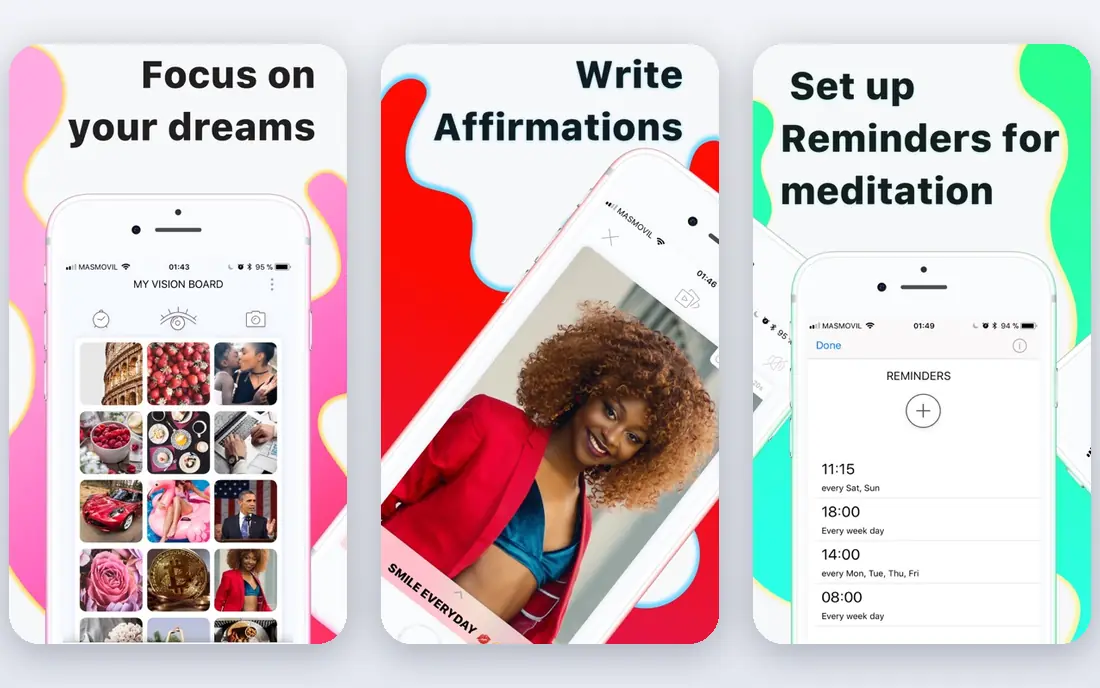
VisuApp is a focused mobile vision board app built around daily practice. You create boards, add images and affirmations, set reminders, and run a daily visualization session that plays your board as a slideshow with music. A gratitude journal and goal categories help structure different areas of life, and a Feng Shui board option covers nine life areas for users who want that layout.
The design tools are simpler than Canva, so users who want a magazine-quality collage may find VisuApp plain. Its strength is habit: reminders and a daily session make it more likely you actually look at the board, which is the point of the exercise. Check current in-app purchase pricing in the app store listing before buying extra boards or features.
- Dedicated vision board app
- Affirmations, music, and daily visualization sessions
- Reminders and progress tracking
- Fewer design options than Canva
- Some features need in-app purchases
Hay House Vision Board is the established dedicated mobile app in this category, built around a strong imagery library and simple board creation. It suits users who want to build a board quickly on a phone, without learning a design tool or setting up a workspace. You pick images, add text, and arrange them into a board you can view on the go.
It is lighter on goal tracking than Perfectly Happy or Notion, so users who want deadlines, tasks, and progress charts will need a second tool. For a pure vision board, that simplicity is a benefit: fewer settings, faster creation, and a board that is easy to revisit. Check the current purchase terms in the app store listing, since Hay House has offered a one-time purchase model.
- Established dedicated vision board app
- Strong imagery library
- Simple mobile creation
- Light on goal tracking
- Some features need a one-time purchase
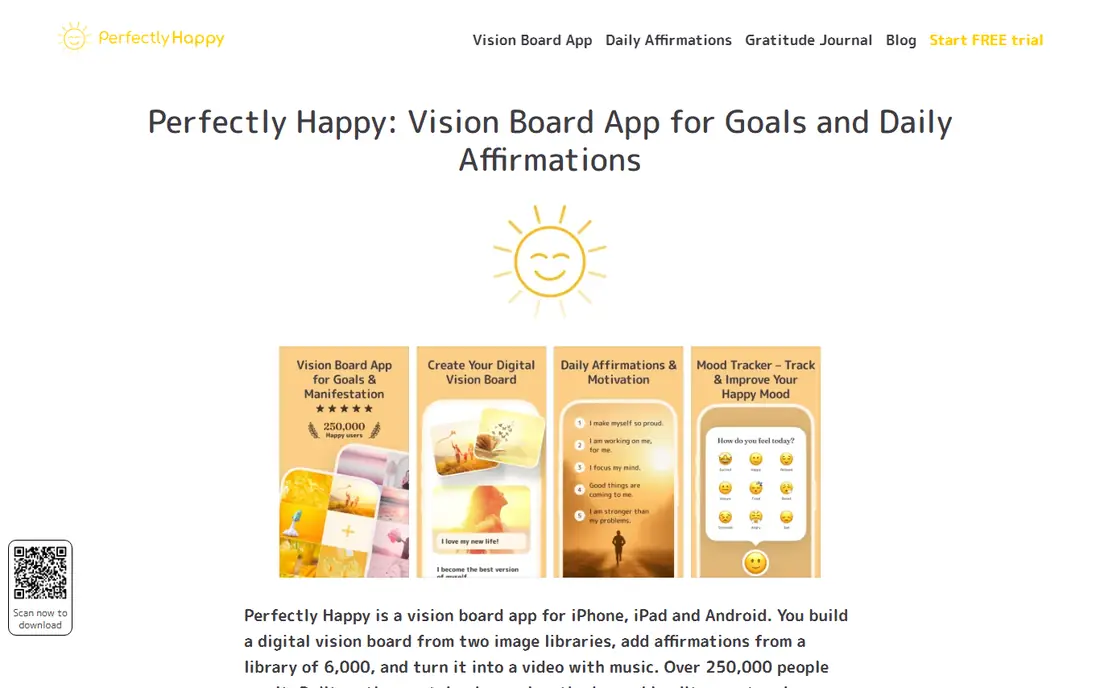
Perfectly Happy Vision Board scored highly in a 2026 comparison across criteria such as image library, affirmation library, music, and spoken affirmations. It combines a board with daily practice tools and goal tracking, which suits users who want more than a static collage. You can build a board in minutes, add affirmations, and use music and voice features during visualization.
Availability varies by platform, with stronger iOS coverage in published comparisons, so Android users should check the current store listing before committing. The app is also more structured than a simple collage tool, which suits goal-oriented users but may feel busy for users who only want images. Use the free tier to test the workflow first.
- Combines board, affirmations, music, and spoken affirmations
- Goal tracking features
- High user ratings in comparisons
- IOS-focused in many comparisons
- Android coverage is more limited
Canva is the best choice when the look of the board matters most. Its templates, photos, fonts, and layout tools let you build a polished board for print, a phone wallpaper, or social sharing, with a free basic version that covers most vision board needs. You can start from a template or a blank page and arrange images, text, and colors freely.
Canva is a design tool, not a habit tool. It does not send daily visualization reminders or track goals in the way VisuApp or Perfectly Happy do, so you need your own routine for viewing the board. Pair Canva with a phone wallpaper or a printed copy if you want the board in daily view, and check Pro pricing on the site if you need premium photos and features.
- Thousands of templates and design elements
- Easy drag-and-drop design
- Free basic version
- No built-in daily visualization reminders
- Premium features need a paid plan
Pinterest is a vast source of inspiration, and many people start a vision board by saving images there. You can create boards by theme, save images from across the web, and browse related ideas quickly. It is free, and its search and recommendation tools make it easy to find images you would not have thought to look for.
The limit is structure. Pinterest boards do not include goal tracking, affirmations, reminders, or progress tools, and it is easy to keep collecting images without ever turning them into plans. Use Pinterest as a source of images, then build your working board in VisuApp, Canva, or Notion, where you can add goals and a viewing routine.
- Vast image library
- Easy saving and organizing into boards
- Free
- Not a structured vision board with goals or reminders
- Easy to collect without acting
Notion suits users who think in lists, databases, and plans as well as images. You can build a vision board page with images, then link each image or theme to a goal database, tasks, and notes. That link between image and action is valuable: a board that connects to a plan is more likely to lead to steps than a board that only looks good.
Setup takes longer than opening VisuApp or Hay House Vision Board, and the first version of a Notion board can look plain until you add images and layout. Notion is free for individuals, with paid plans for teams and extra features. If you already use Notion for planning, adding a vision board there keeps everything in one place.
- Free for individuals
- Boards linked to goal databases and notes
- Flexible templates
- Needs setup
- Less visual than a dedicated board app at first
Milanote is a visual workspace for organizing images, notes, links, and ideas on boards, which makes it a natural fit for vision boards tied to creative projects. You can arrange images freely, add notes beside them, and share boards with collaborators. That flexibility suits designers, writers, and planners who want a board that grows with a project.
It is not built for daily visualization sessions or affirmations, so it lacks the habit features of VisuApp. The free plan covers basic use, with paid plans adding more boards and features. Check current free limits on the site, since they affect how many boards you can keep active at once.
- Visual boards for images, notes, and links
- Good for creative planning
- Collaboration features
- Free plan has limits
- More of a workspace than a daily visualization app
Subliminal Vision Board is an alternative dedicated app for users whose practice leans on affirmations and visualization rather than design or planning. It lets you build boards, add affirmations, and use them in a daily practice, with a simpler interface than a full workspace tool. That focus suits users who already use affirmations and want a board to support that habit.
It does not match Canva for design or Notion for planning, so choose it for the practice, not for a polished collage or a project plan. Check the current app store listing for pricing and platform availability, since dedicated vision board apps vary in what they offer on iOS versus Android.
- Focus on affirmations and visualization practice
- Simple board creation
- Alternative to Hay House for affirmation-led users
- Smaller feature set than Canva or Notion
- Less goal tracking depth
VisionBoardsAI takes a different approach: it generates realistic images of you in your goal scenarios, rather than asking you to find stock images. That personal imagery can make a board feel more concrete, especially for goals such as fitness, travel, or career milestones. The site states refund eligibility when fewer than 20 photos have been generated, and that deleting a photo removes it from storage.
It is not a full vision board app with reminders, affirmations, and goal tracking, so most users will arrange generated images in Canva, VisuApp, or Notion as well. Pricing is per use rather than a simple free tier, so check the current price and photo limits on the site before buying. It suits users who want personal imagery that stock libraries cannot provide.
- Generates realistic images of you achieving your goals
- Personal goal visualization
- Clear refund terms for low use
- No free plan
- Image generation, not a full board and habit app
How we picked these
We compared official product pages, app store listings, and 2026 vision board comparisons covering design, affirmations, music, reminders, and goal tracking. We favored apps that are live in October 2026, state their pricing or free limits openly, and serve a clear vision board use, from daily practice to design to planning. We left out apps that had closed or could not be verified as current.
How to make a vision board you actually use
Pick one board, not five, and limit it to a small number of images that represent goals you can act on in the next few months. A board with dozens of unrelated images looks inspiring and means nothing, while a board with six clear themes gives you a daily reminder of what to do next. Put the board where you will see it: as a phone wallpaper, a printed copy, or a daily app session.
Link each image to a next step
For each image, write one next step you can take this week, even a small one. A travel image becomes a savings target, a fitness image becomes a workout schedule, and a career image becomes a course or a conversation to start. That link turns a board from decoration into a plan, and it is why Notion and Milanote suit some users better than a static image alone.
Review and update regularly
Review your board monthly, remove images that no longer fit, and add new ones as goals change. A board that never changes becomes background noise, while a board you update stays relevant. Celebrate completed goals by marking them done, rather than deleting them at once, so you can see progress over time.
Frequently asked questions
What is the best app for vision board creation?
VisuApp is the best app for vision board creation for daily mobile use, thanks to affirmations, reminders, and visualization sessions. Canva is better for a polished design, and Notion is better when you want a board linked to goals and tasks.
What are the best vision board apps for daily use?
VisuApp and Perfectly Happy Vision Board are the best vision board apps for daily use, since both offer reminders, affirmations, and visualization sessions. Hay House Vision Board is simpler and suits users who want a quick board without habit features.
Is there a free vision board app?
Yes, Canva, Pinterest, and Notion all offer free tiers that can be used for vision boards, and VisuApp and Hay House Vision Board offer free starting options. Paid features usually add premium images, extra boards, or advanced tracking, so test the free tier first.
Can I make a vision board on Canva?
Yes, Canva offers templates and drag-and-drop tools for vision boards, with a free basic version. You can export a board as an image for a phone wallpaper or print it, though Canva does not include daily visualization reminders or goal tracking by default.
How often should I look at my vision board?
Daily viewing works best for most users, even for a few minutes, since the point is to keep goals in mind. Use app reminders, a phone wallpaper, or a printed board in a visible spot, and review the board monthly to update images and next steps.
Do vision boards actually help achieve goals?
A vision board alone does not achieve a goal, but it can help you keep goals visible and prompt action when paired with plans and next steps. The most useful boards link each image to a concrete step, a date, or a habit, rather than relying on images alone.
Sources
See where you really rank - block by block
ProMapRanker scans Google Maps across a grid of your service area. Simple monthly plans from $19, white-label on every plan.
Start freeKeep reading
 who has best internet service
Who Has the Best Internet Service in 2026
Who has best internet service for US homes? We compare fiber, cable, fixed wireless and satellite providers on speed, price, availability and terms today.
Read → which survey tool has the best analytics
Which Survey Tool Has the Best Analytics in 2026
Find which survey tool has the best analytics in 2026, comparing Qualtrics, SurveyMonkey, Typeform, Alchemer, and more on reports, text, and stats today.
Read → which streaming service has the best movies
Which Streaming Service Has the Best Movies in 2026
Answering which streaming service has the best movies, with Netflix, Max, Criterion and more compared on libraries, prices and free options in this guide.
Read →