 ProMapRanker
Best Tool Management Software in 2026


small and mid-sized crews · Pricing starts at: $80 per month
Key takeaways
- This article covers workshop and job-site tool-inventory tracking software for trades and teams, not general project management or review software.
- ShareMyToolbox suits small and mid-sized construction crews, while Milwaukee ONE-KEY is free and best for crews with mostly Milwaukee tools.
- EZOfficeInventory and Cheqroom suit larger inventories, since their pricing does not rise with every item added.
- Barcode or QR checkout, offline mobile use, and maintenance reminders are the features that matter most on a busy job site.
Quick comparison
| Pick | Great for | Pricing starts at | Free tier | |
|---|---|---|---|---|
| ShareMyToolbox | small and mid-sized crews | $80 per month | Free trial | Visit |
 Milwaukee ONE-KEY | Milwaukee-heavy inventories | Free | Yes | Visit |
 EZOfficeInventory | broad asset and tool tracking | See website | Free trial | Visit |
 Cheqroom | equipment reservations and checkout | See website | Free trial | Visit |
 Hilti ONTrack | tool custody and compliance | See website | Free trial | Visit |
 AlignOps | large specialty contractors | See website | No | Visit |
 ToolHound | tool room and crib control | See website | No | Visit |
 Sortly | simple visual tool inventory | $49 per month | Yes | Visit |
 GigaTrak | tool crib checkout control | See website | No | Visit |
The best tool management software
Tool management software tracks who has which tool, where it is, when it is due back, and when it needs service. These nine tools cover construction crews, workshops, tool cribs, and larger contractors, with different approaches to checkout, inventory size, and pricing.
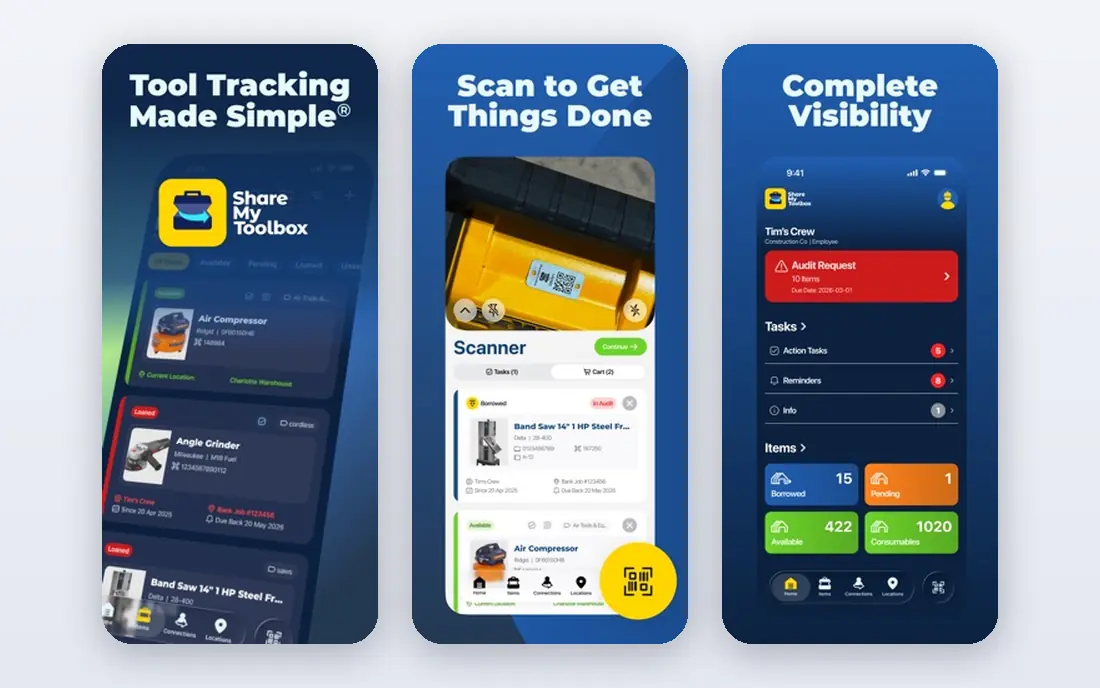
ShareMyToolbox is built for construction crews that need to know who has a tool right now, without a complex enterprise system. Field workers can check tools in and out, transfer tools to another person, and scan barcodes from a phone, with GPS coordinates captured on scans. That visibility helps a foreman see whether a tool is on site, in a truck, or with another crew.
Pricing starts at 80 dollars per month plus 10 dollars per user in recent pricing listings, so the total depends on crew size. The app is simple enough for field use, which matters more than advanced reporting for many crews. For small and mid-sized teams that lose time hunting for tools, ShareMyToolbox is a practical, focused pick.
- Peer-to-peer checkout with barcode scanning
- GPS location on scans
- Simple mobile app for field crews
- Per-user fee on top of the base price
- Less suited to very large enterprise fleets
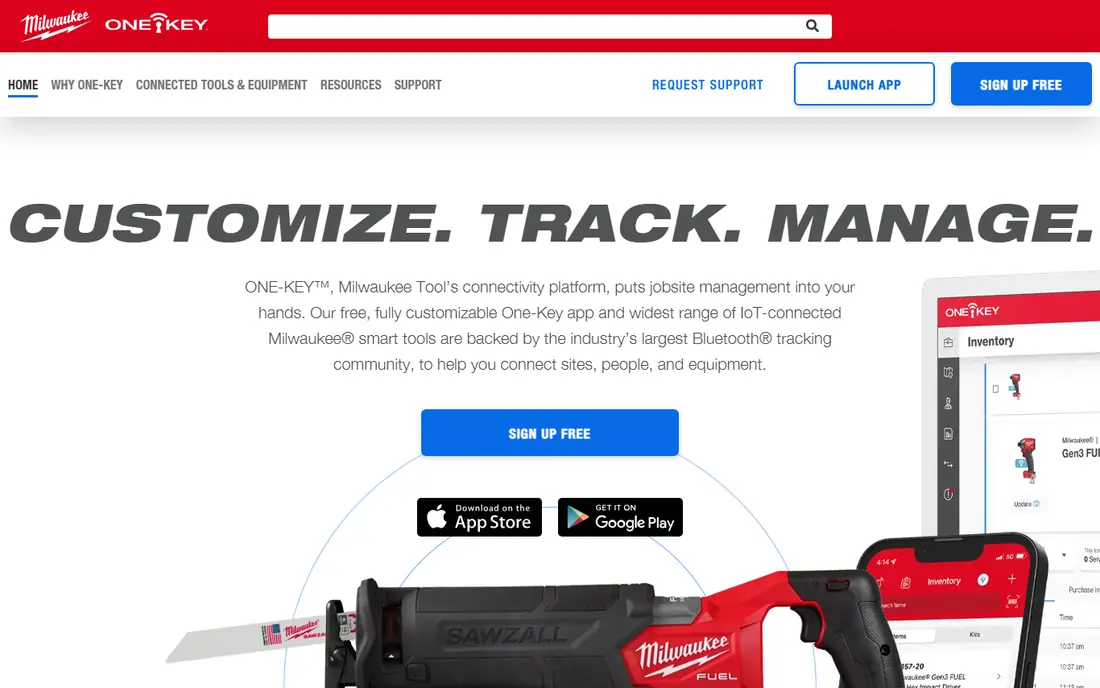
Milwaukee ONE-KEY is a free app for tracking tools and equipment, with extra features for compatible Milwaukee tools, including location tracking and lockout controls. Crews can build an inventory, assign tools to people and job sites, and keep a record of purchases and service. For a crew whose inventory is mostly Milwaukee, that free starting point is hard to beat.
The limit is brand mix. ONE-KEY works for general inventory, but its strongest features apply to Milwaukee tools, so a mixed fleet of many brands may get more from a brand-neutral tool such as ShareMyToolbox or EZOfficeInventory. If your shed is mostly red tools, start here before paying for anything else.
- Free inventory app
- Tool tracking and lockout for compatible tools
- Useful for Milwaukee users
- Best value only for Milwaukee tools
- Limited for mixed-brand fleets
EZOfficeInventory, now branded as EZO, tracks tools, equipment, and other assets with check-in and check-out, reservations, maintenance schedules, and barcode or QR scanning. Its item-based pricing with unlimited users suits organisations where many employees check tools in and out, since adding a user does not raise the bill in the same way as per-user tools. That model helps schools, workshops, and large teams.
Pricing is not always published as a single figure, so teams should request a quote for their item count. Setting up a large inventory also takes time, including labelling and data entry. For organisations with many users and a broad asset list, EZO is a strong, scalable option.
- Item-based pricing with unlimited users
- Barcode and QR checkout
- Maintenance and reservation features
- Pricing is quote-based in many listings
- Setup takes time for large inventories
Cheqroom focuses on reservations and checkout for equipment and tools. Users can book items in advance, check them out with a barcode scan, sign for receipt, and return them on a set date, with the calendar blocking double bookings. Per-admin pricing with unlimited items and users means a growing inventory does not automatically raise the bill, which helps rental, media, and workshop teams.
Cheqroom pricing is often quote-based, so small teams should confirm the entry cost before assuming it fits a tight budget. The reservation system is also more than a simple checkout log, which is a benefit for shared equipment and a little extra setup for a tiny crew. For teams where booking conflicts cause real delays, Cheqroom is a strong pick.
- Per-admin pricing with unlimited items and users
- Reservations prevent double bookings
- Mobile app with signatures
- Pricing needs a quote in many cases
- Smaller teams may not need reservation depth
Hilti ONTrack tracks tool ownership, location, custody, repairs, and compliance, with views for job sites, warehouses, and individual workers. It suits larger contractors who need an audit trail for who had a tool, when it was serviced, and whether it passed inspection. Hilti customers also benefit from integration with Hilti tool data and service history.
ONTrack is priced by quote in most listings, which puts it in the enterprise category rather than a small-shop impulse buy. Smaller crews may find ShareMyToolbox or Sortly simpler and cheaper. For larger contractors with compliance and maintenance requirements, ONTrack offers depth that simpler tools do not.
- Tool custody, repair, and compliance tracking
- Strong fit for Hilti users
- Job-site and warehouse views
- Enterprise pricing via quote
- Best value for larger contractors
AlignOps is the current name for the platform formerly known as ToolWatch, and it brings together tool tracking with wider construction operations, including field, warehouse, and back-office workflows. Tool custody, transfers between sites, maintenance, and job costing sit in one system, which suits specialty contractors running many projects at once. Reporting helps managers see tool costs by job, not just by item.
AlignOps is not a small-team tool. Pricing is enterprise and setup takes planning, including labelling, user roles, and integration with existing systems. For a large contractor that already tracks tools in spreadsheets and wants job-level cost visibility, AlignOps is a credible step up.
- Tool tracking plus job costing and field operations
- Built for construction workflows
- Broad reporting
- No free plan
- Enterprise pricing and setup
ToolHound tracks the issue and return of tools to employees and contractors from a tool room or crib, using barcode or RFID transactions. It records transfers between job sites and tool room locations, which helps industrial, power, mining, and construction operations where accountability matters. The database approach suits organisations with a central crib and many borrowers.
ToolHound pricing is quote-based and the system is enterprise-grade, so it is not a quick app install for a five-person crew. Setup includes labelling, reader hardware in some cases, and user training. For a busy tool crib that needs strict checkout control, ToolHound is a proven, focused option.
- Barcode and RFID checkout for tool rooms
- Accountability for contractors and employees
- Long history in industrial use
- Pricing via quote
- Interface and setup feel enterprise-grade
Sortly is a visual inventory tool that works well for small workshops and teams that want to see tools, not just list them. Items can carry photos, QR labels, locations, quantities, and custom fields, and the mobile app makes check-in and check-out simple. The free plan lets a small team test the core inventory before paying, with paid plans from 49 dollars per month in recent listings.
Sortly is less deep than ToolHound or AlignOps for strict crib compliance, job costing, or maintenance workflows. It fits teams that need a clear, visual inventory and simple checkout, rather than a full enterprise system. For a workshop moving from spreadsheets to a proper inventory, Sortly is an easy first step.
- Visual inventory with photos and QR labels
- Free plan available
- Easy for small teams to learn
- Less depth for tool crib compliance
- Higher tiers needed for advanced features
GigaTrak focuses on tool crib management, with barcode-based check-in and check-out, maintenance tracking, and an audit trail of who borrowed what and when. That focus suits manufacturing, maintenance, and construction tool rooms where control and accountability matter more than general asset features. The system is designed for daily crib operations, not for casual inventory lists.
GigaTrak does not offer a free plan, and pricing is quote-based, so small teams should compare it with Sortly or ShareMyToolbox first. For a tool room that needs strict checkout discipline and a clear record for audits, GigaTrak is a solid specialist choice.
- Tool crib checkout with barcode scanning
- Check-in, check-out, and maintenance tracking
- Audit trail
- No free plan
- Pricing via quote
- Narrower focus than broad asset tools
How we picked these
We compared official product pages, pricing listings, and recent 2026 tool tracking comparisons for software that tracks physical tools and equipment by checkout, location, and maintenance. We kept tools that are currently available and that fit workshop, construction, or tool crib use, and we excluded general project management tools and review management software, which do not track physical tools. Where pricing was quote-based, we wrote See website.
How to set up tool tracking that crews actually use
Label every tool before you launch, and agree on one checkout method, such as QR scanning from a phone. Assign one owner for the inventory who can add tools, fix errors, and train new starters, since an unowned system drifts quickly. Test offline use on a real job site, since signal can be weak in basements, remote sites, and large buildings, and confirm that checkouts sync when the phone reconnects.
Maintenance and loss control
Add a service date and condition note for each high-value tool, and set reminders for calibration, inspection, and repair. Review overdue checkouts weekly, not monthly, since a tool that has been missing for a month is much harder to find. Track loss by job and by borrower, and use that data to decide whether a tool needs a deposit, a sign-out rule, or a second unit on site.
Frequently asked questions
What is tool management software?
Tool management software tracks physical tools and equipment: who has them, where they are, when they are due back, and when they need service. It usually uses barcode or QR scanning for check-in and check-out, plus a mobile app for field crews. It is different from general project software, which tracks tasks rather than physical items.
What is the best tool management software for a small construction crew?
ShareMyToolbox is a strong pick for small and mid-sized crews, with simple mobile checkout and GPS on scans. Milwaukee ONE-KEY is free and best if most tools are Milwaukee. Sortly suits small workshops that want a visual inventory with photos and QR labels.
Do I need barcode labels for tool tracking?
Barcode or QR labels make checkout fast and reduce errors, especially for similar-looking tools. Most tools in this list support phone scanning, so you do not always need a dedicated scanner. Label high-value and frequently borrowed tools first, and add the rest over time.
Can tool tracking software work offline on a job site?
Many mobile apps cache checkouts and sync when signal returns, but offline behaviour varies by product and plan. Test offline checkout, return, and inspection logging during a trial on a real site before you commit, and ask the vendor specifically about sync behaviour.
How much does tool management software cost?
Prices range from free for Milwaukee ONE-KEY, through 49 to 80 dollars per month for small-team tools such as Sortly and ShareMyToolbox, to quote-based enterprise pricing for Hilti ONTrack, AlignOps, and ToolHound. The total also depends on user count, item count, and any scanner or RFID hardware.
Sources
See where you really rank - block by block
ProMapRanker scans Google Maps across a grid of your service area. Simple monthly plans from $19, white-label on every plan.
Start freeKeep reading
 free chatgpt alternatives hong kong
Free ChatGPT Alternatives Hong Kong in 2026
Find free ChatGPT alternatives Hong Kong users can access in 2026, from Gemini and Perplexity to DeepSeek and Copilot, with free tiers compared today.
Read → best work management software
Best Work Management Software in 2026
We compared the best work management software for teams, agencies, and small businesses, covering boards, timelines, automation, and current pricing today.
Read → best wiki app paid
Best Wiki App Paid in 2026: 10 Apps Compared
Compare the best wiki app paid options in 2026, with Confluence, Notion, Nuclino, Slab, Guru, and more for teams needing a real knowledge base Plus buying tips.
Read →