 ProMapRanker
Best Roth Conversion Software


DIY planners wanting depth without an advisor · Pricing starts at: $168/year
Key takeaways
- A Roth conversion moves money from a traditional IRA to a Roth IRA, and the tax bill lands in the year of the conversion, so modeling the timing matters.
- Boldin, ProjectionLab, MaxiFi and Pralana cover DIY planners for 99 to 168 dollars a year, with free tiers or trials on three of them.
- RightCapital, Holistiplan, Income Solver and eMoney are advisor tools, priced by quote, and they suit people who already work with a planner.
- No tool here replaces tax advice. Use the model to test scenarios, then confirm the conversion with a tax professional.
Quick comparison
| Pick | Great for | Pricing starts at | Free tier | |
|---|---|---|---|---|
| Boldin | DIY planners wanting depth without an advisor | $168/year | Yes | Visit |
 ProjectionLab | Visual scenario modeling and FIRE planning | $129/year | Yes | Visit |
 MaxiFi Planner | Economics-based lifetime spending plans | $149/year | No | Visit |
 Pralana Gold | Spreadsheet-level control over assumptions | $99/year | Yes | Visit |
 RightCapital | Advisors modeling conversions for clients | quote only | No | Visit |
 Holistiplan | Advisors finding tax planning opportunities | quote only | No | Visit |
 Income Solver | Advisors planning tax-efficient withdrawals | quote only | No | Visit |
 eMoney Advisor | Full advisor planning with conversion scenarios | quote only | No | Visit |
The best Roth conversion software
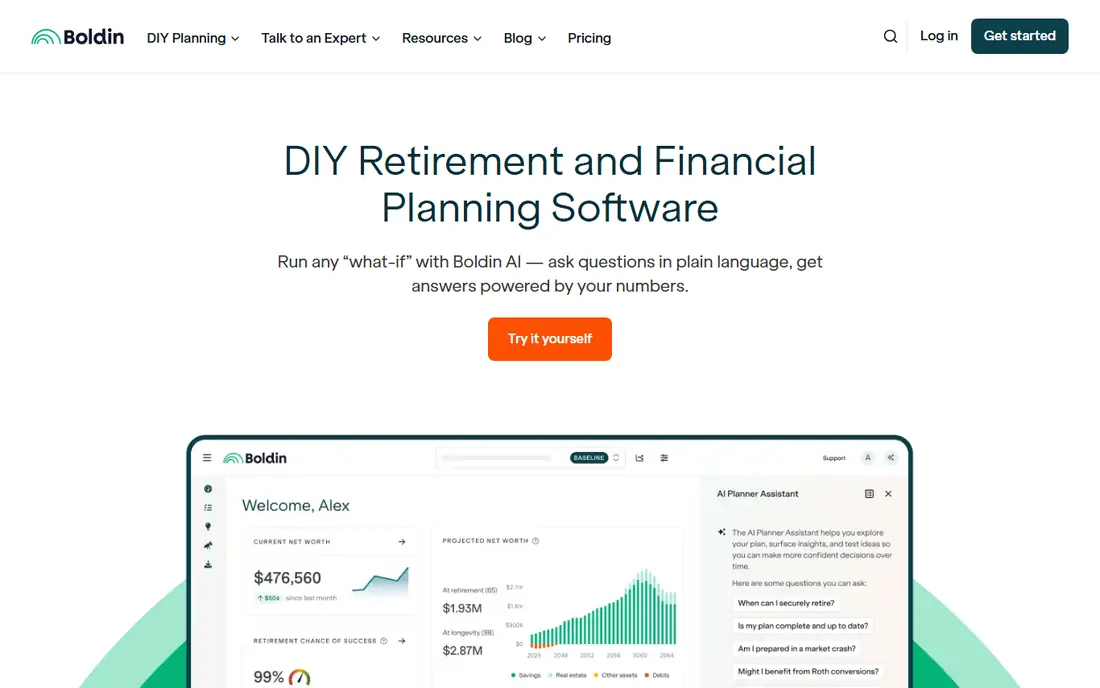
Boldin, formerly NewRetirement, is a retirement planning platform built for people who want to model their own plan. The free Basic plan covers income, assets, Social Security and a long-range projection with more than 100 inputs. PlannerPlus costs $168 a year for new subscribers, after a 14-day free trial, and it adds the Roth Conversion Explorer, Monte Carlo simulation, state and federal tax projections, Medicare and IRMAA projections, and up to 10 scenarios to compare side by side.
The Roth Conversion Explorer is the reason Boldin leads this list. You can test converting different amounts in different years and see the effect on taxes, required minimum distributions and long-term balances. The trade-offs are price and complexity. The October 2026 price rise from $144 to $168 a year is real, and the depth that makes Boldin strong also means more inputs and more screens than a casual planner expects. Start with Basic, and upgrade only when you need the tax tools.
- Roth Conversion Explorer with tax projections
- Monte Carlo simulation
- Free Basic plan for first checks
- PlannerPlus rose from $144 to $168 a year for new subscribers in October 2026
- Annual prepay only with no monthly option
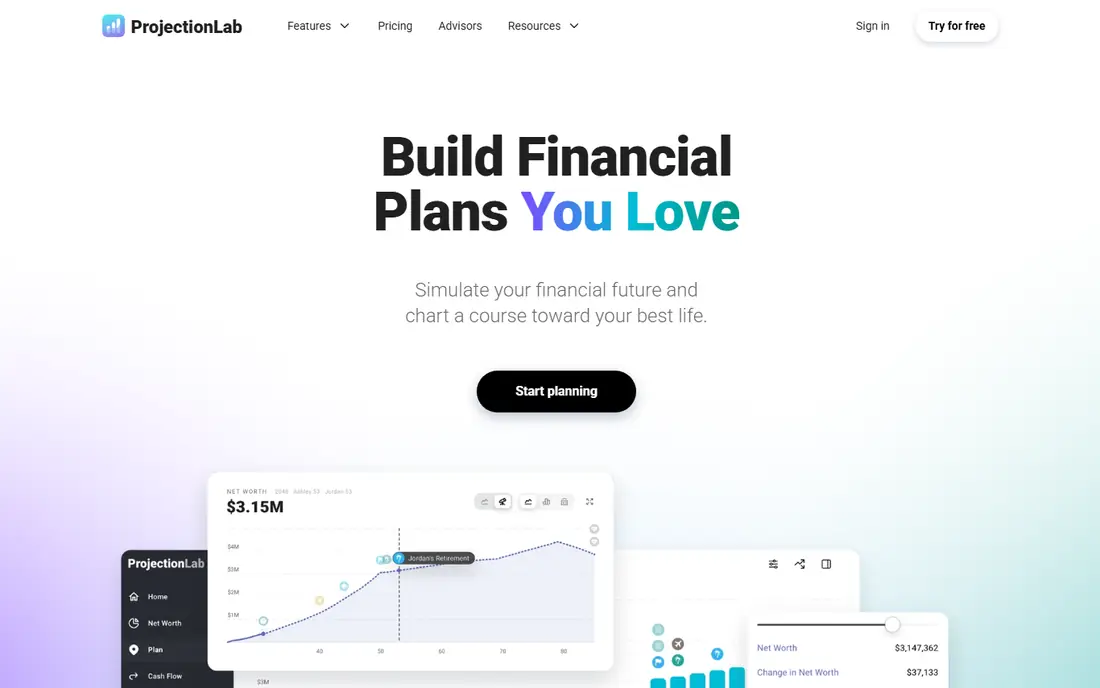
ProjectionLab is a web-based financial planning simulator with a visual timeline. You drag through your life, change retirement dates, test career breaks and model Roth conversions, and the effect shows at once. The free Basic plan includes forecasting, Monte Carlo simulations, historical backtesting and flexible modeling. Premium costs $129 a year and adds cash-flow projections, tax estimation and optimization, Roth conversions, ACA subsidy modeling, what-if scenarios and compare mode, plus multiple plans and downloadable reports.
The privacy model is a selling point. ProjectionLab asks for no bank linking at all, so every figure is entered by hand. That keeps your data private, but the first plan takes an honest afternoon of manual entry. The free tier is useful for a one-time test, yet it forgets everything when you log out, so Premium is the real product for anyone who wants to revisit a plan. For Roth conversion work, Premium is the tier to buy.
- Free Basic plan includes Monte Carlo and backtesting
- Visual timeline makes scenarios easy to test
- No bank linking
- Free Basic plan does not save your data when you log out
- Roth conversion modeling sits in the $129 Premium tier

MaxiFi Planner comes from academia. It was developed by Boston University economist Laurence Kotlikoff, and it takes a different starting point from most planners. Instead of asking you to guess your retirement spending, it calculates how much you can afford to spend each year for life while preserving your living standard. The full version costs $149 a year and includes all premium features, including detailed tax modeling, Roth conversion scenarios and safe spending calculations. A 14-day free trial is available, but a card is required to start it.
The economics-based approach is the strength and the limit. Consumption smoothing gives a rigorous answer to how much to convert and when, yet getting value from it means engaging with concepts that feel unfamiliar to many users. The interface is plain next to Boldin and ProjectionLab. If you want a defensible spending number and detailed Roth modeling, MaxiFi earns its price. If you want a polished visual planner, look elsewhere.
- Calculates a safe lifetime spending level
- Full tax and Roth conversion modeling
- 14-day free trial
- No free plan and the trial needs a card
- Design lags behind Boldin and ProjectionLab
- Economics concepts take time to learn
Pralana Gold is a retirement planning calculator for people who want spreadsheet-level control over every assumption. You can model detailed tax, income, Roth conversion and spending scenarios, and the tool is popular with DIY planners who enjoy working through manuals and detailed reports. Pralana Gold costs $99 a year, and a free online version covers basic projections for a first look. For complex cases with rentals, pensions or irregular income, that depth can be valuable.
The trade-off is the interface. Pralana looks and feels like a spreadsheet tool, and it asks more of the user than Boldin or ProjectionLab. There is no polished timeline and no account linking, so every number is entered by hand. If you like control and detail, that is a fair price for a full year of modeling. If you want guidance and polish, the extra cost of Boldin or ProjectionLab buys a smoother experience.
- Detailed control over tax, income and Roth scenarios
- Low yearly price
- Popular with hands-on DIY planners
- Spreadsheet-style interface feels dated
- Learning curve is steep for new users
- Free version covers only basic projections
RightCapital is financial planning software built for advisors, and it includes Roth conversion modeling as part of a full planning workflow. An advisor can model conversion amounts by year, show the tax effect, compare scenarios and share the results through a client portal. The platform also covers Social Security claiming, tax planning, estate basics and budgeting, so a conversion is shown inside a complete plan rather than as a standalone calculation.
The limit for a DIY buyer is access. RightCapital is not sold to individuals, and pricing is by quote to advisory firms. If you work with an advisor who uses RightCapital, ask to see a Roth conversion scenario in your own plan. If you plan alone, the consumer tools in this list are the right choice. RightCapital earns its place here because many conversions are modeled inside advisor offices, and this is one of the tools doing that work.
- Roth conversion modeling built for advisor workflows
- Client portal and reports
- Social Security and tax planning included
- Sold to advisors, not to individuals
- Pricing is by quote, so no list price to compare
- Needs an advisor relationship
Holistiplan is tax planning software for advisors. It scans a client's tax return, flags planning opportunities and produces reports that show where a Roth conversion could save tax over time. The tool is built to fit inside an advisor workflow, and it integrates with planning platforms so the conversion analysis can feed into a broader plan. For an advisor, the value is speed. A return that takes hours to review by hand becomes a short report with concrete suggestions.
The limit is scope. Holistiplan finds tax opportunities, but it does not build a full retirement plan on its own. It is also advisor-only, with pricing by quote, so individuals cannot buy it directly. If your advisor uses Holistiplan, ask for the Roth conversion report and talk through the suggested amounts. If you plan alone, use Boldin or ProjectionLab to model the same question yourself.
- Scans tax returns to find Roth conversion opportunities
- Clear reports advisors can share
- Integrates with planning software
- Advisor-only, with no individual version
- Pricing is by quote
- It finds opportunities but does not build a full retirement plan
Income Solver is retirement income software for advisors, built around one question. In what order should a client take income from taxable accounts, traditional IRAs and Roth accounts, and how much should convert each year. The software models Social Security claiming, tax brackets, required minimum distributions and Roth conversions together, then shows a tax-efficient withdrawal order with client-ready reports. For an advisor, that focus is the point. It does one job well, and it does it inside the tools the advisor already uses.
The limits are access and scope. Income Solver is sold to advisors with quote-only pricing, and it does not cover the full planning picture that Boldin or eMoney handle. An individual cannot buy it. If your advisor uses Income Solver, ask to see the withdrawal order and the Roth conversion schedule it suggests, and check how the plan changes if tax rates move. That conversation is where the value sits.
- Models Social Security, taxes and Roth conversions together
- Withdrawal order optimization
- Clear client-ready reports
- Advisor-only with quote-only pricing
- Narrower focus than full planning platforms
- No DIY version
eMoney Advisor is a full financial planning platform for advisory firms, owned by Fidelity. It covers planning, aggregation, client portals and reporting, and Roth conversion scenarios sit inside that wider plan. An advisor can model conversions by year, show the tax cost, compare the long-term effect on the plan and share the results with the client. The platform has a long record with advisory firms, which is why so many conversions are modeled inside it.
The limits are the same as the other advisor tools here. eMoney is sold to firms with custom pricing, and its depth needs advisor training to use well. It is not built for DIY use, and an individual cannot buy a subscription. If your advisor uses eMoney, ask for a Roth conversion scenario in your plan and a comparison with and without conversions. That single comparison often settles whether a conversion is worth doing.
- Full planning platform with Roth scenarios
- Client portal and aggregation
- Long record with advisory firms
- Advisor-only with custom pricing
- Depth needs advisor training
- Not built for DIY use
How we chose
We compared vendor pricing pages, product documentation and feature pages for software that models Roth conversions, checked on November 12, 2026. We kept only tools with a live Roth conversion feature and a real product record. We did not claim hands-on testing, and we did not invent prices. Consumer prices come from the vendor pricing pages linked in Sources. Advisor tools are marked quote only because their vendors do not publish list prices.
What to check before you buy
First, check the five-year cost, not just the first year. Prices change, and a tool you use every year costs five times its yearly price.
| Tool | Yearly price | Cost over 5 years | | Boldin PlannerPlus | $168 | $840 | | ProjectionLab Premium | $129 | $645 | | MaxiFi Planner | $149 | $745 | | Pralana Gold | $99 | $495 |
Second, check what the tool models. A useful Roth conversion tool should model federal and state taxes, required minimum distributions, IRMAA Medicare surcharges, Social Security taxation and multiple conversion scenarios. If it skips state taxes or IRMAA, the result can mislead you. Third, check whether the plan saves your data. ProjectionLab Basic does not save data, so a one-time test is free but a lasting plan needs Premium. Fourth, remember that software models numbers. It cannot replace personal advice for complex tax, estate or health situations, so confirm any large conversion with a tax professional.
Frequently asked questions
What is a Roth conversion?
A Roth conversion moves money from a traditional IRA or 401(k) into a Roth IRA. You pay income tax on the converted amount in the year of the conversion, and later withdrawals from the Roth account are generally tax free. The tools in this list model the timing, the tax cost and the long-term effect.
How much tax will I owe on a Roth conversion?
The tax depends on the amount you convert, your other income that year and your tax bracket. A 20,000 dollar conversion can cost far less than a 100,000 dollar conversion in the same year, because the larger amount can push you into a higher bracket. Use software to test amounts year by year before you convert.
Is Roth conversion software worth it over a spreadsheet?
A spreadsheet can model one scenario at a time. Software runs many scenarios at once, adds tax brackets, required minimum distributions and IRMAA, and shows the long-term effect in charts. For a single small conversion, a spreadsheet is enough. For a multi-year plan, software saves time and catches errors.
Can software replace a tax advisor for Roth conversions?
No. Software models numbers based on the assumptions you enter, and it cannot weigh your full tax, estate or health situation. Use the model to test scenarios and narrow the choice, then confirm the conversion amount and timing with a tax professional before you act.
Do these tools handle required minimum distributions and IRMAA?
Boldin, ProjectionLab, MaxiFi and Pralana model required minimum distributions, and Boldin also models IRMAA Medicare surcharges. The advisor tools model both as part of a full plan. Check the feature list before you buy, because a tool that skips IRMAA can understate the cost of a large conversion.
Sources
See where you really rank - block by block
ProMapRanker scans Google Maps across a grid of your service area. Simple monthly plans from $19, white-label on every plan.
Start freeKeep reading
 best scheduling software for med spas
Best Scheduling Software for Med Spas in 2026
Compare the best scheduling software for med spas, with real prices and calendar features, so you can run staff schedules and waitlists without double bookings.
Read → best scheduling software for law firms
Best Scheduling Software for Law Firms
Compare the best scheduling software for law firms, with real 2026 prices, intake forms, and calendar sync, so clients can book easily without phone tag.
Read → best scheduling software for gyms
Best Scheduling Software for Gyms in 2026
Compare the best scheduling software for gyms, with real prices and timetable features, so you can run classes, coaches and waitlists without double bookings.
Read →