 ProMapRanker
Best Review Management Software for Photographers in 2026

Review requests plus local citations · Pricing starts at: See website
Direct answer
Whitespark is my top pick for photographers because its review request tools and reputation builder are built around one simple job: asking past clients for a Google review at the right moment and making it easy for them to say yes. Pricing is quote-based, so check its pricing page for current details. If you need review requests tied to job software, look at Jobber; if you want review monitoring plus local listings in one place, look at Semrush Local.
I compared these tools using vendor documentation and public sources rather than hands-on testing. I looked at how each one handles review requests, replies, monitoring and local listings, then judged fit for a photographer's workflow: a shoot, an edit, a gallery delivery, and a follow-up that asks for a review. Where a tool is built for service businesses with jobs and invoices, I say so.
Key takeaways
- Photographers get most reviews from past clients, so a tool that makes follow-up simple matters more than a large feature list.
- Review requests sent after gallery delivery tend to work better than requests sent the same day as the shoot.
- Google review replies are public and indexable, so they are worth writing with the same care as a portfolio caption.
- Listing accuracy across Google, Apple Maps and Bing supports the local search side of your studio or service-area business.
- Avoid review gating and paid review schemes; ask every client the same way and let the review speak for itself.
Quick comparison
| Pick | Great for | Pricing starts at | Free tier | |
|---|---|---|---|---|
| Whitespark | Review requests plus local citations | See website | Not stated | Visit |
 Jobber | Photographers who also run jobs and invoices | See website | Free trial | Visit |
 Semrush Local | Reviews plus listings in one dashboard | See website | Not stated | Visit |
 NiceJob | Automated review and referral campaigns | See website | Not stated | Visit |
 GatherUp | Collecting reviews from several platforms | See website | Free trial | Visit |
 Grade.us | Agencies managing reviews for photo clients | See website | Free trial | Visit |
 Yext | Multi-location studios and listing accuracy | See website | Not stated | Visit |
The best review management software for photographers compared
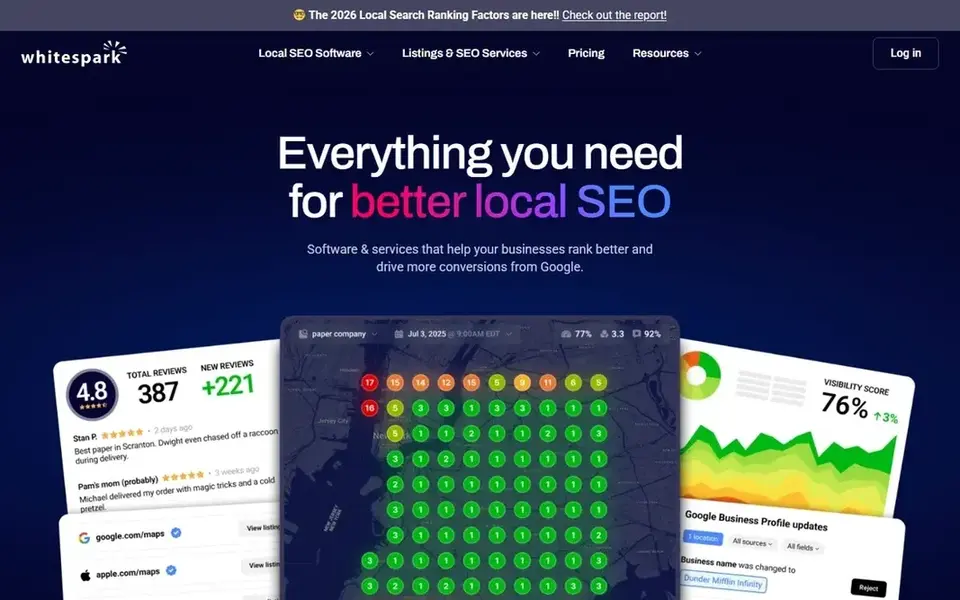
Whitespark is a local search company known for citation building and its reputation tools. For a photographer, the useful part is the review request workflow: you add a client, send a request by email or text, and track who has responded. It fits solo photographers and small studios that want a dedicated review tool without a large platform attached.
The workflow matches how photography bookings actually happen. After you deliver a gallery, you add the client and send one polite request with a direct link to your Google Business Profile review form. You can follow up once if there is no response. The citation side helps keep your studio name, address and phone number consistent across directories, which supports the local pack side of your Google presence.
The limits are straightforward. If you want review requests to fire automatically from invoices or job records, Whitespark is not that kind of tool. Skip it if you need a full client management system and only want reviews as one feature inside it.
- Focused review request tools
- strong local citation work
- clear reporting on review activity
- Pricing is quote-based
- not a full business management suite
Jobber is field service software for small businesses that schedule jobs, send quotes and collect payment. Photographers who also do on-location work, such as event coverage, headshots or real estate shoots, may find the job record useful as the place where a review request is triggered after the job is marked complete.
For review management, the value is timing. When a job is closed and paid, the system can prompt a request, which lines up with the moment a client is most likely to leave a review. You still write the message and choose the platform, and you still reply to reviews yourself. The tool handles the reminder so you do not have to keep a separate spreadsheet.
The limit is scope. A photographer who only needs review requests will pay for scheduling, invoicing and quoting features they may not use. Skip it if your booking process already lives somewhere else and you just want a review tool.
- Quotes, invoices and scheduling in one place
- review requests can follow completed work
- client records stay in one system
- Review features are a small part of a larger suite
- overkill for a photographer who only shoots and delivers galleries
Semrush Local brings review management and listing management together. For a photographer who already uses Semrush for keyword or competitor research, adding local review monitoring keeps the work in one place. You can see new reviews, track how listings appear across directories, and manage replies from the same dashboard.
The photography angle is practical. A studio that ranks for terms like "wedding photographer [city]" depends on a complete Google Business Profile and consistent listings. Semrush Local helps you spot listing errors and keep review activity visible, which supports the profile without turning review management into a separate project. It also helps you notice when a review mentions a specific service, such as newborn or engagement sessions.
The limit is that this is a platform, not a single-purpose review tool. If you want the simplest possible review request flow, a dedicated tool will be easier. Skip it if you have no interest in the wider SEO feature set.
- Review monitoring alongside listing management
- useful local SEO data
- one login for several local tasks
- Part of a larger SEO platform
- review features are not the whole product
NiceJob is review and reputation software aimed at service businesses. It runs campaigns that ask clients for reviews and can also prompt referrals. For a photographer, the campaign model fits a steady flow of sessions: you add clients, the system sends requests on a schedule, and you follow up from one place.
The useful detail is that campaigns can be adjusted to your season. A wedding photographer may want requests to go out a week after gallery delivery, while a headshot photographer may want them sooner. You still need to keep your client list current, and you still reply to reviews yourself. The referral prompts are a bonus if you rely on word of mouth.
The limit is fit. NiceJob is designed around service calls and jobs, not photo galleries, so some of its language and defaults will not match your business. Skip it if you want a tool built specifically for creative studios.
- Campaign-based review requests
- referral prompts alongside reviews
- simple client contact flow
- Built around service business patterns
- less tailored to gallery delivery timing
GatherUp is review management software that focuses on collecting feedback and reviews from several sources. For a photographer, that matters because clients do not all use the same platform. One may leave a Google review, another may post on Facebook, and another may send a private note you can ask to turn into a public review.
The workflow is built around requests and monitoring. You send a request after a session, the client lands on a page that points to the review site you choose, and you get alerts when a new review appears. You can reply from the dashboard. This keeps your Google Business Profile active without you checking it every day.
The limit is that the tool does a lot, and the interface reflects that. A solo photographer may only need a fraction of the features. Skip it if you want the smallest possible tool.
- Requests across multiple review sites
- review monitoring and alerts
- simple feedback capture
- Interface can feel busy
- setup takes a little time
Grade.us is review management software built with agencies in mind. If you run a small agency that handles marketing for photographers, or you manage reviews for several studio clients, the multi-client structure is the reason to look at it. You can run review campaigns per client and report on results.
For a photographer working with an agency, this is often how reviews get managed: the agency sends requests after gallery delivery and replies on the studio's behalf. The reporting helps show the studio what was done. If you are the photographer doing your own marketing, the agency-first design will feel heavier than you need.
The limit is exactly that. A single studio with one location does not need multi-client tooling. Skip it unless you manage reviews for more than one business.
- Multi-client review management
- white-label options for agencies
- campaign reporting
- Aimed at agencies rather than solo studios
- more setup than a single business needs
Yext is a listings and reputation platform used by businesses that need consistent information across many directories. A photographer with one studio rarely needs it. A studio with several locations, or a brand with associates in different cities, may find the listing control useful because address, hours and service details stay aligned.
On the review side, Yext lets you monitor reviews and respond from one place, and it ties review activity to the listings that support local search. For a multi-location photography business, that combination is the point. You are not just collecting reviews; you are keeping the profile and the listings that surround it in order.
The limit is scale. If you are a solo photographer, the platform is more than you need and the setup will take time. Skip it until you have multiple locations or a genuine listing consistency problem.
- Strong listing management across many directories
- review monitoring in one place
- fits businesses with several locations
- Larger commitment than a solo photographer needs
- review requests are one part of a bigger system
How I chose
I built this list from vendor documentation and public sources, not from hands-on testing. I read each vendor's own description of its review request, monitoring and reply features, then checked how those features map to a photographer's real sequence: shoot, edit, deliver gallery, follow up. I also looked at whether each tool handles local listings, since reviews and listings both feed the same Google Business Profile.
I weighted fit over feature count. A tool that sends one well-timed review request after gallery delivery is more useful to a photographer than a large platform with dozens of modules. I noted where a product is built for service businesses or agencies, because that changes the setup effort. I did not rank by price, and I did not include any tool I could not confirm exists with an official site. Where pricing is quote-based or unclear, I say to check the vendor page.
What to check before you buy
- Confirm the tool can send a review request by both email and text, since photographers often have a client's phone number but not a reliable email.
- Check whether requests can be delayed until after gallery delivery, because that is when a client is most satisfied.
- Make sure you can reply to Google reviews from the dashboard, and that replies are not limited to a single platform.
- Ask whether the tool supports multiple review sites, since clients may prefer Facebook or another platform over Google.
- Check listing management if you serve a city or region, because a complete Google Business Profile supports the reviews you collect.
- Read the vendor's terms on review requests and confirm the tool does not filter or gate clients based on expected sentiment.
Frequently asked questions
Do photographers need review management software at all?
Not strictly. A photographer with a handful of sessions a month can ask for reviews manually and reply from Google directly. Software helps when the volume grows, when requests get forgotten after a busy season, or when you want reviews from more than one platform in one place. It saves time more than it creates results on its own.
When should I ask a client for a review?
After you deliver the final gallery and the client has had a chance to look through it. That is usually when satisfaction is highest. A single request with a direct link to your Google review form works better than several reminders. If you use a tool, set the request to go out after delivery rather than on the shoot date.
Can I ask only happy clients for reviews?
No. Asking only clients you expect to be positive is review gating, and it goes against Google's guidelines. Ask every client the same way, then respond to whatever comes in. If a review is negative, reply politely and factually. A calm reply often matters more to future clients than the original complaint.
Should I reply to every Google review?
Yes, and it is worth doing. Replies are public and show future clients how you communicate. Thank the client, mention the session type if it is relevant, and keep it short. Do not stuff keywords into the reply or repeat your business name unnaturally. A plain, warm reply reads better and follows the guidelines.
Does review software help with local rankings?
Reviews are one signal among many, and no tool guarantees a ranking. What software does is make it easier to collect reviews steadily and keep your Google Business Profile and listings accurate. Combined with a complete profile, real photos and consistent business details, that supports your local visibility over time.
Sources
See where you really rank - block by block
ProMapRanker scans Google Maps across a grid of your service area. Simple monthly plans from $19, white-label on every plan.
Start freeBrowse all guides
← Best Review Management Software for Garage Door Companies in 2026Best Review Management Software for Podiatrists (2026) →
 best review management software for coffee shops
Best Review Management Software for Coffee Shops in 2026
A practical guide to the best review management software for coffee shops in 2026, covering review requests, replies, QR codes and listing sync.
Read → best reputation management software for solar installers
Best Reputation Management Software for Solar Installers in 2026
A guide to the best reputation management software for solar installers in 2026, compared from vendor docs and public sources, with review and lead tracking.
Read → best reputation management software for roofers
Best Reputation Management Software for Roofers in 2026
A roofer's guide to reputation management software in 2026: review requests, Google Business Profile replies, and who each tool fits.
Read → free geo grid scan
How to Get a Free Geo-Grid Scan of Your Business
How to get a free geo-grid scan of your business and see exactly where you rank.
Read → local citation finder
Local Citation Finder: A Complete Guide
Everything you need to know about local citation finder: what it is, why it matters for local SEO, and exactly how to act on it.
Read → geo grid heatmap seo
How to Read a Local Search Grid: A Beginner's Heatmap Tutorial
New to geo-grid heatmaps? This beginner tutorial walks you through reading every color, number, and pattern.
Read →More in Local SEO & Google Maps · All guides A to Z by date · Latest guides