 ProMapRanker
Best Price Tracking Tools in 2026

Key takeaways
- Keepa and CamelCamelCamel are the strongest Amazon price history tools, with Keepa deeper on seller data and CamelCamelCamel simpler and free.
- PayPal Honey and Capital One Shopping add coupons and multi-store coverage, but their price history is thinner than dedicated trackers.
- PriceLasso, ShopSavvy, and Google Shopping widen coverage beyond Amazon, while Slickdeals adds community deal alerts.
- Set a target price before a sale, because a price history chart only helps if you act when the alert arrives.
Quick comparison
| Pick | Great for | Pricing starts at | Free tier | |
|---|---|---|---|---|
 Keepa | Deep Amazon price history and alerts | Free | Yes | Visit |
 CamelCamelCamel | Simple free Amazon price checks | Free | Yes | Visit |
 PayPal Honey | Coupons plus multi-store Droplist alerts | Free | Yes | Visit |
 Capital One Shopping | Price comparison, coupons, and rewards | Free | Yes | Visit |
 PriceLasso | Tracking prices across many stores | See website | Yes | Visit |
 ShopSavvy | Barcode scanning and multi-store comparison | Free | Yes | Visit |
 Slickdeals | Community deal alerts for specific products | Free | Yes | Visit |
 Google Shopping | Multi-retailer comparison and price tracking | Free | Yes | Visit |
 PriceSpy | Multi-retailer history with user reviews | See website | Yes | Visit |
The best price tracking tools
We compared price tracking tools on retailer coverage, price history depth, alert types, and price, using official product pages, extension listings, and pricing pages.
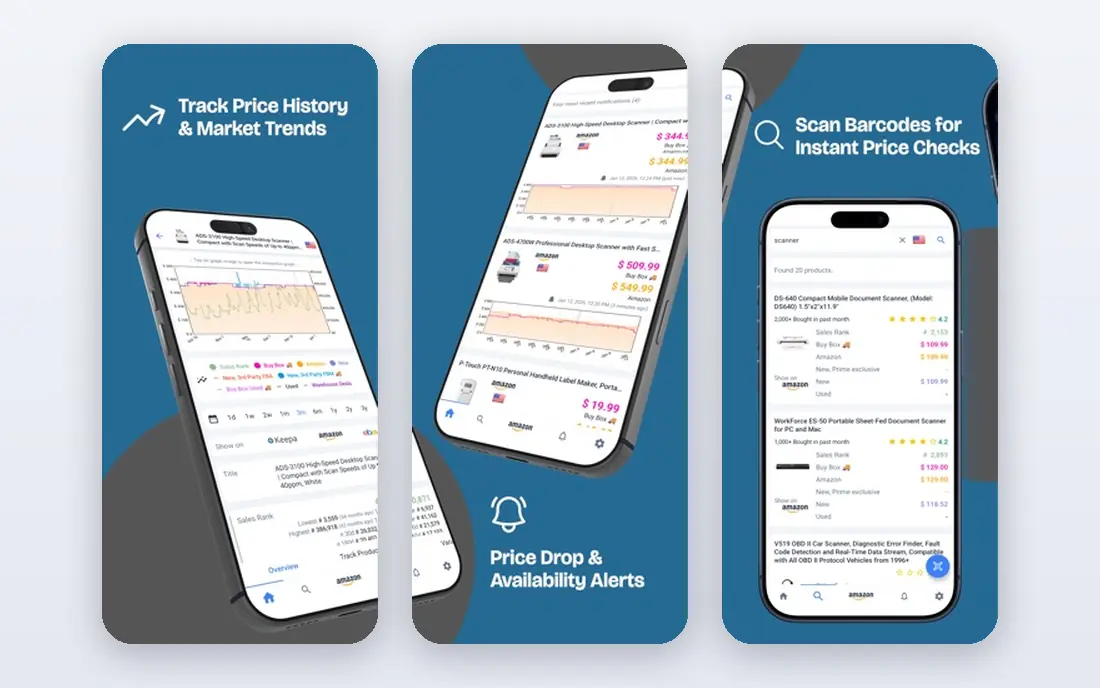
Keepa adds price history charts directly to Amazon product pages, so you can see whether a sale price is a real drop or a return to a normal price. Charts cover Amazon, third-party new, used, and sales rank data in many views, and you can set alerts for a target price or a return to stock. That depth makes it the best first check for any Amazon purchase over a modest amount.
The limit is coverage: Keepa tracks Amazon, not every retailer. Pair it with a multi-store tool when you compare Amazon against Walmart, Target, or a brand site, and use Keepa for the Amazon side of the decision.
- Detailed price history charts on Amazon pages
- Price-drop and back-in-stock alerts
- No account needed to start tracking
- Amazon-only coverage
- Full data and extra features can feel complex at first
CamelCamelCamel is the simplest Amazon tracker. Paste an Amazon link, see the price history for Amazon, third-party new, and used listings, and set an email watch for a target price. The Camelizer browser extension brings the same chart onto Amazon pages, so you do not need to leave the product page to check history.
It lacks the seller-level depth of Keepa, and it does not track other retailers. For a quick check before you buy, that simplicity is a strength. For detailed research on a high-value item, check Keepa as well.
- Completely free with no paid tier
- Simple charts
- Email price watches through the Camelizer extension
- Amazon-only coverage
- Charts are simpler than Keepa
- Mobile browsers are not fully supported

PayPal Honey is best known for testing coupon codes at checkout, but its Droplist feature also tracks saved items and alerts you to price drops. That combination suits shoppers whose main goal is a lower total at checkout, not a deep price history chart. Honey works across many stores, so it covers items Keepa cannot.
Treat Honey as a coupon tool with a price-tracking bonus, not as your main history tool. Use Keepa or CamelCamelCamel for Amazon history, and let Honey handle coupons and multi-store watchlists.
- Tests coupon codes at checkout
- Droplist tracks saved items
- Seller comparison on Amazon
- Price history is basic compared with Keepa
- Coupon coverage varies by store
Capital One Shopping compares prices while you browse, applies available codes at checkout, and offers rewards on eligible purchases that can be redeemed for gift cards. That mix suits US shoppers who want a safety net after checkout as well as a lower price before it. The extension works across many stores, not only Amazon.
As with Honey, history depth is not the main strength. Use it alongside Keepa for Amazon research, and check reward terms before you count on a rebate, because eligible stores and rates change.
- Applies codes at checkout
- Searches for better prices while you shop
- Rewards redeemable for gift cards
- Some services vary outside the US
- Price history is thinner than dedicated trackers
PriceLasso tracks prices across a wide set of retailers, including Amazon, Walmart, eBay, and other large stores, with charts and alerts for watched items. That breadth helps when a product is sold in many places and Amazon is not the cheapest option. Wishlist imports speed up setup when you already have a list of items to watch.
Because coverage varies by retailer and category, check that your main stores are supported before you rely on it. PriceLasso works best as the multi-store layer beside an Amazon specialist.
- Covers many retailers beyond Amazon
- Price charts and alerts
- Wishlist imports
- Smaller profile than Keepa or Honey, so store coverage needs checking
- Interface varies by browser
ShopSavvy lets you scan a barcode in a store and compare prices online, which is useful when a shelf price looks high or a sale label is unclear. The app also tracks prices across many retailers and alerts you to drops, so a product you scanned can stay on a watchlist after you leave the store.
Note that ShopSavvy also sells a separate business price-monitoring product with paid plans. Consumers should use the free shopping app and extension, and check plan details before paying for any business tier.
- Barcode scanning in stores
- Compares prices across many retailers
- Price-drop alerts
- Consumer app and business monitoring plans are different products
- Check which version you are using
Slickdeals is different from a history chart: a community of shoppers posts deals, coupons, and price errors, and other users vote on them. You can set alerts for a product, store, or category and get notified when a matching deal appears. That is useful for items that rarely drop in price, because a community post can surface a short-lived offer.
The risk is noise and impulse buying. Set alerts only for items already on your list, and check the original retailer price before you buy, because a voted deal is not always the lowest price for your exact model.
- Large community posts deals and coupons
- Alerts for products, stores, and categories
- Frontpage deals highlight strong offers
- Deal quality varies by post
- Alerts can tempt impulse buying
Google Shopping lets you compare the same product across retailers, see seller prices, and track prices on supported items. Because it sits in search, it is easy to use without installing an extension, and it covers categories where Amazon trackers do not help. That breadth makes it a good first comparison step.
Price history is thinner than a dedicated tracker, and tracking is not available for every product. Use Google Shopping to compare retailers, then use Keepa or CamelCamelCamel for Amazon history on the same item.
- Compares offers across many retailers
- Price tracking on supported products
- No extension needed for basic use
- Tracking availability varies by product and region
- History depth is thinner than Keepa
PriceSpy provides price history, alerts, and retailer comparisons for a wide range of products, with reviews beside prices to help you judge a model. It suits shoppers who want history beyond Amazon and who buy electronics, appliances, and other high-value goods. Alerts help you wait for a real drop rather than buying at the first sale label.
Check country coverage before you rely on it, because retailer sets differ by market. In the US, pair PriceSpy with Keepa and a multi-store extension to cover gaps.
- Detailed price history across retailers
- Price alerts
- Product reviews beside prices
- Coverage and retailer set vary by country
- US coverage is thinner than UK coverage
How we picked these
We compared official product pages, extension listings, and pricing pages for tools that track prices, show history, or alert on drops, and kept only live tools with clear consumer use. We favoured a mix of Amazon specialists, multi-store trackers, coupon tools, and community deal alerts, because no single tool covers every store and every job. We did not claim hands-on testing, and we used vendor pages for coverage and price details.
Using price trackers without buying more than you need
Set a target price before you set an alert. Look at the history chart, note the lowest price in the last few months, and pick a target you would actually pay, not a dream price that never appears. A tracker only saves money when the alert leads to a purchase you already planned.
Use two tools for important purchases: one Amazon specialist and one multi-store tool. Check the history, compare retailers, and confirm the exact model, because a similar model name can hide a different specification. Set alerts 30 to 60 days before you need an item when you can, so a real dip has time to appear.
Keep alerts narrow. Too many watchlists turn into a feed of deals for things you never planned to buy, and that feed can push impulse spending. Review your alerts monthly, remove items you no longer want, and turn off alerts for categories you do not need.
Frequently asked questions
What are the best price tracking tools overall?
Keepa is the strongest Amazon tracker for depth, CamelCamelCamel is the simplest free Amazon check, and PayPal Honey or Capital One Shopping add coupons and multi-store coverage. For most shoppers, Keepa plus one multi-store tool covers the main jobs.
What is the difference between Keepa and CamelCamelCamel?
Keepa offers deeper, more granular Amazon history across seller types, while CamelCamelCamel is simpler, completely free, and easier for a quick check. Use CamelCamelCamel for a fast sanity check and Keepa when you want detailed history before a larger purchase.
Do price tracking tools work for stores besides Amazon?
Yes. PriceLasso, ShopSavvy, Google Shopping, and PriceSpy track many retailers, while Honey and Capital One Shopping add multi-store coupons and comparison. Amazon-only tools such as Keepa and CamelCamelCamel still need a multi-store companion for other retailers.
Are price tracking apps free?
Many are free at the core tier, including Keepa, CamelCamelCamel, Honey, Capital One Shopping, ShopSavvy, Slickdeals, and Google Shopping. Paid tiers or business plans add deeper data or monitoring, but a free combination covers most consumer needs.
How do I set a price alert?
Find the product, check its history chart, set a target price below the current price, and choose email or push alerts where offered. Act promptly when an alert arrives, because flash sales and stock can change before you return to the listing.
Sources
See where you really rank - block by block
ProMapRanker scans Google Maps across a grid of your service area. Simple monthly plans from $19, white-label on every plan.
Start freeKeep reading
 who has best internet service
Who Has the Best Internet Service in 2026
Who has best internet service for US homes? We compare fiber, cable, fixed wireless and satellite providers on speed, price, availability and terms today.
Read → which survey tool has the best analytics
Which Survey Tool Has the Best Analytics in 2026
Find which survey tool has the best analytics in 2026, comparing Qualtrics, SurveyMonkey, Typeform, Alchemer, and more on reports, text, and stats today.
Read → which streaming service has the best movies
Which Streaming Service Has the Best Movies in 2026
Answering which streaming service has the best movies, with Netflix, Max, Criterion and more compared on libraries, prices and free options in this guide.
Read →