 ProMapRanker
Best Planner App for ADHD in 2026

Key takeaways
- Tiimo is the best visual planner built for neurodivergent users, with a color-coded timeline and focus timer.
- Structured shows the whole day at a glance, which helps when time feels hard to track.
- Goblin Tools breaks large tasks into small steps, which helps when starting is the hardest part.
- Todoist and TickTick suit people who want tasks, reminders, and calendars in one system.
- Try the free plan first, and pick the app whose daily view you can read in under a minute.
Quick comparison
| Pick | Great for | Pricing starts at | Free tier | |
|---|---|---|---|---|
 Tiimo | Visual planning for ADHD | Free | Yes | Visit |
 Structured | Visual daily timeline | Free | Yes | Visit |
 Goblin Tools | Breaking tasks into steps | Free | Yes | Visit |
 Todoist | Full task management | Free | Yes | Visit |
 TickTick | Tasks, habits, and timers | Free | Yes | Visit |
 Routinery | Timed daily routines | Free | Yes | Visit |
 Motion | Auto-scheduling tasks | See website | No | Visit |
 Brili | Guided routines for ADHD | See website | Yes | Visit |
 Sunsama | Guided daily planning | $22 per month | No | Visit |
The best planner apps for ADHD
ADHD planners need to solve specific problems: time that slips away, tasks that feel too large to start, and lists that grow until they are ignored. The apps below take different approaches, from visual timelines to automatic scheduling, and all of them are live in October 2026. We compared official feature pages, pricing pages, and app store listings, and we note where pricing varies by store.
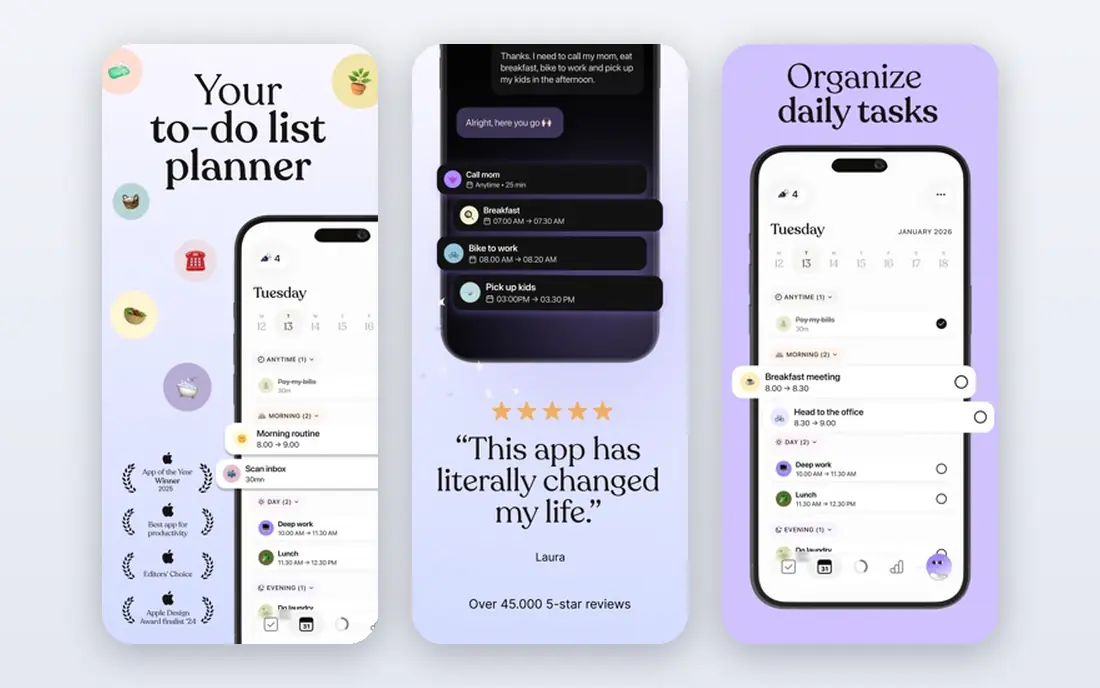
Tiimo is built for neurodivergent users, and that focus shows in the design. Plans appear as a color-coded visual timeline with icons, so time feels visible rather than abstract. A focus timer starts with scheduled tasks, routines can repeat, and widgets keep the current task in view on the phone and watch. That combination helps with time blindness and with moving from one task to the next.
The basic planner is free on iOS and Android, while Tiimo Pro adds web access, fuller AI help, and profile sharing, with yearly pricing around $54 based on recent listings and monthly prices that vary by store, so check the current price before subscribing. Some users report sync and stability issues, so test it with a real week before committing. For visual planners, Tiimo is the most ADHD-specific option here.
- Visual timeline with colors and icons
- Focus timer
- Routines and mood tracking
- Pro pricing varies by store
- Web access needs Pro
- Some users report sync bugs

Structured is the best general planner for people who think in timelines. Tasks and calendar events sit in order on a single day view, so the next step is always obvious and the gaps between tasks are visible. A Pomodoro timer on Apple devices helps break work into focused blocks, and widgets show the current task without opening the app.
The free version covers the timeline planner, inbox, sync, subtasks, and widgets. Pro pricing varies by store, with yearly and lifetime options reported, so confirm the price in your store. On days when plans fall apart, dragging tasks to new times helps, but a strict timeline can still feel unforgiving. If seeing the day laid out calms you, Structured is a strong pick.
- Clear timeline of tasks and events
- Pomodoro timer
- Widgets and calendar sync
- Timeline can feel rigid on messy days
- Pro pricing varies by store
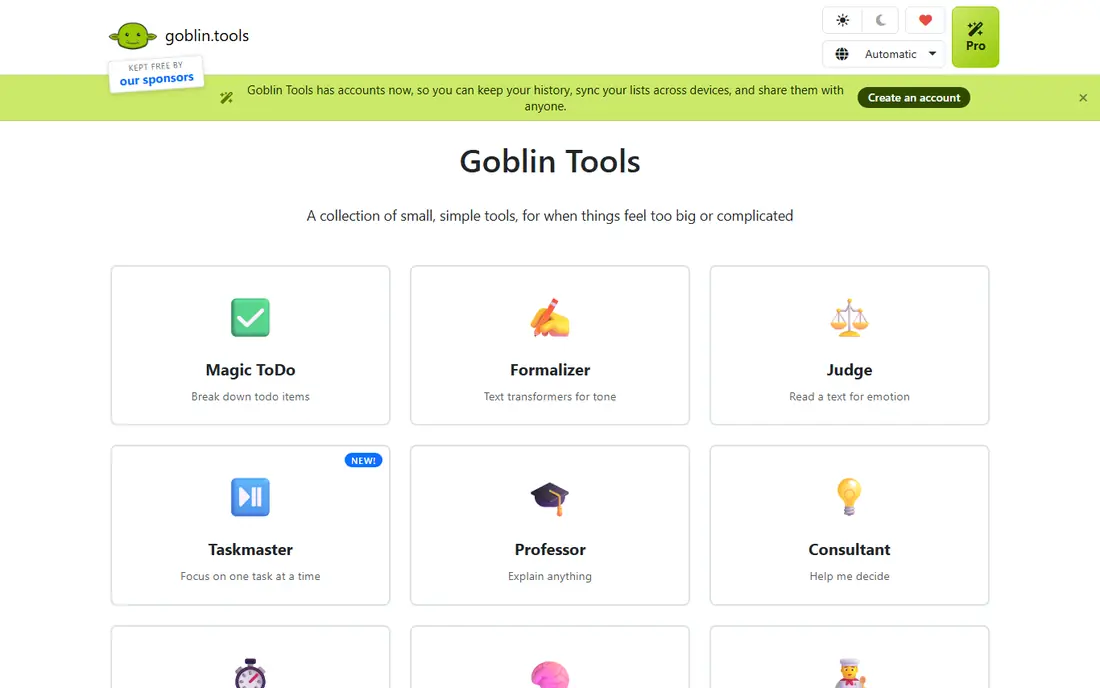
Goblin Tools is a set of small tools that solves one painful ADHD problem: not knowing where to start. Type a large task into Magic ToDo, and it breaks the task into smaller steps that you can adjust and check off one at a time. A companion mode walks through a list one step at a time, hiding the rest so the list does not overwhelm you.
The website is free with no ads or paywalls, while mobile apps are small one-time purchases, around $1.99 on iOS and $0.99 on Android based on recent listings, with an optional Pro subscription for extra features. Goblin Tools is not a full calendar or planner, so pair it with Tiimo, Structured, or Todoist for scheduling. As a starting tool, it is one of the most useful on this list.
- Magic ToDo breaks tasks into steps
- Single-task focus mode
- Free website
- Not a full calendar planner
- Mobile app is a small paid download
Todoist is a full task manager that works well for ADHD users who need one reliable capture system. Add a task from any device, set a date in plain words, and let recurring tasks bring routines back on schedule. Projects separate work, home, and personal tasks, and reminders help tasks resurface before they slip.
The free plan covers basic tasks and reminders, while Pro costs $6.99 per month or $59.99 per year based on recent listings. The risk with Todoist is over-organizing: a complex project system can become a task in itself. Keep projects few, use a single daily list, and let Todoist hold the rest in the background. For people who need a trusted system across devices, it is a reliable choice.
- Projects and recurring tasks
- Natural language dates
- Runs on almost every device
- Free plan limits projects
- Can become a second job if over-organized
TickTick combines tasks, habits, a calendar, and a Pomodoro timer, which suits ADHD users who want fewer apps to check. Habits sit beside tasks, so a daily routine and a one-off deadline live in the same view, and the timer helps you work in short, focused blocks with breaks. Calendar views show the week ahead without switching tools.
The free plan covers basic tasks and a limited number of habits, while Premium costs $4.99 per month or $49.99 per year. The breadth can feel busy in the first week, so settle on two or three views and ignore the rest. If you want tasks, habits, and a timer in one place, TickTick is the most complete option here.
- Tasks plus habits and calendar
- Pomodoro timer
- Habit tracking beside tasks
- Free plan limits habits
- Interface can feel busy at first
Routinery helps when the problem is following a routine in order, such as a morning or bedtime sequence. Each step gets its own timer, voice prompts call out the next step, and streaks track consistency with a rest mode for days off. That guided sequence reduces the decision load that can stall a routine before it starts.
The free plan covers two routines with ads, and the paid plan costs $5.00 per month or $36.00 per year based on app store listings. There is no web version, so routines run on a phone, tablet, or watch. Pair Routinery with a planner such as Structured for the rest of the day, and use Routinery for the sequences you repeat most.
- Timers for each routine step
- Voice guidance
- Streaks with rest mode
- No web version
- Free plan covers only two routines
Motion takes a different approach: it schedules your tasks into your calendar automatically, based on deadlines, priorities, and available time. Instead of deciding when to do each task, you add tasks and let Motion place them, reshuffling when meetings move or tasks run long. That auto-planning helps ADHD users who struggle with deciding where to start each day.
Pricing is subscription-based and shown on the vendor site at checkout, with a trial available, so we list it as See website rather than quoting a figure that may change by plan. Motion costs more than most apps here, and setup takes effort to enter tasks and priorities well. If decision fatigue is your main problem and you live by your calendar, Motion can be worth the price.
- Automatic task scheduling
- Calendar integration
- Prioritization
- Subscription cost is higher than rivals
- Setup takes time
Brili is a routine app built around guided, timed routines, with a focus on ADHD users and families. Routines run step by step with timers and prompts, and progress tracking shows streaks over time. That guided style suits children, teens, and adults who do better when each step is announced rather than listed on a page.
A free tier is available, with paid plans shown on the vendor site at checkout, so confirm the current price before subscribing. Brili is narrower than Todoist or TickTick: it excels at routines but does not replace a full task and calendar system. Use it for the routines that stall most, such as mornings, and keep a planner for the rest of the day.
- Guided routines with timers
- Built for ADHD and family routines
- Progress tracking
- Pricing shown at checkout
- Narrower scope than full planners
Sunsama guides you through a daily planning ritual: review yesterday, choose today's tasks, timebox them onto your calendar, and reflect at the end of the day. That structured start helps ADHD users who open a blank list and freeze, because the app asks one question at a time. It integrates with calendars and task tools, so planned work appears where you already look.
Pricing starts at $22 per month, or $17 per month billed yearly, based on vendor listings, with a trial available and no free plan. That price is high for personal use, so Sunsama fits best when daily planning is a work habit you will use every weekday. If a guided ritual appeals to you, try the trial with a real work week before paying.
- Guided daily planning ritual
- Calendar and task integration
- Timeboxing
- No free plan
- Price is high for personal use
How we picked these
We compared official feature pages, pricing pages, and app store listings for planner apps that address ADHD-related planning problems in October 2026. We kept apps with visual timelines, task breakdown, timed routines, or guided planning, and we covered a range of prices from free tools to premium auto-scheduling. We left out general calendar apps without task planning, and we used See website where vendor pricing is shown only at checkout.
How to choose an ADHD planner that actually helps
Start by naming the hardest part of your day. If time slips away, a visual timeline such as Tiimo or Structured helps most. If starting is hardest, Goblin Tools plus a simple planner beats a complex system. If deciding what to do next is hardest, a guided tool such as Sunsama or an auto-scheduler such as Motion may help more than another list.
Then test the daily view, not the feature list. Open the app in the morning and ask whether you can see the next step in under a minute. If not, the app will fail on a busy day no matter how many features it has. Set up only one routine and one daily list for the first week, and add more only after that version holds.
Finally, keep the system forgiving. Missed days will happen, so favor apps with rest modes, easy rescheduling, and no harsh penalties for a slip. A planner that helps you restart quickly is worth more than one that tracks a perfect streak. If an app makes you feel worse after a missed day, it is the wrong app, even if its features look strong.
Frequently asked questions
What is the best ADHD planner app?
Tiimo is the best ADHD-specific planner for visual timelines, while Structured is best for a clear day view. Goblin Tools is best for breaking tasks down, and Todoist or TickTick suit people who want a full task system. The best ADHD planner app is the one whose daily view you can read quickly.
What are the best planner apps for ADHD?
The best planner apps for ADHD include Tiimo, Structured, Goblin Tools, Todoist, TickTick, Routinery, Motion, Brili, and Sunsama. Each solves a different problem, from time blindness to task starting to daily planning. Test two finalists for a week before choosing.
What are the best calendar apps for ADHD?
Structured and Tiimo work best as calendar-style planners for ADHD because they show the day as a visual timeline. Todoist and TickTick also sync with calendars and show tasks beside events. Pick the app that shows time blocks clearly, rather than a dense list of events.
What is the best daily planner app for ADHD?
A daily planner app for ADHD should show today clearly, support routines, and make rescheduling easy. Tiimo and Structured do this well, while Sunsama adds a guided daily ritual. Try the free plan of each for a week with a real routine before paying.
Can a planner app help with ADHD?
A planner app can help by making time visible, breaking tasks into steps, and sending reminders, but it does not replace professional support for ADHD. Use the app as one tool beside other strategies, and talk with a clinician if planning problems affect work, school, or daily life.
Sources
See where you really rank - block by block
ProMapRanker scans Google Maps across a grid of your service area. Simple monthly plans from $19, white-label on every plan.
Start freeKeep reading
 bitly alternatives
Bitly Alternatives in 2026: 8 Tools Compared
Compare the best Bitly alternatives for branded short links, with free tiers, custom domains, analytics, and pricing that suits creators and small teams.
Read → bill.com alternatives
Best Bill.com Alternatives in 2026
Looking for bill.com alternatives? We compared 9 bill pay and AP automation tools on price, approvals, and accounting sync to help you switch with confidence.
Read → betterhelp alternatives
BetterHelp Alternatives in 2026
We compared BetterHelp alternatives for online therapy, covering Talkspace, Grow Therapy, Rula, Brightside and more on price, insurance and format in 2026.
Read →