 ProMapRanker
Best Open Source Software in 2026

Key takeaways
- This list covers ten proven open source tools, not a top 100 list, so each pick is one you can install and use today.
- LibreOffice, Firefox, and VLC replace paid office, browser, and media tools for most households and small businesses.
- Blender, GIMP, and Audacity give professional-grade creative tools for free, though they take longer to learn than simpler apps.
- Open source does not always mean no support: many projects offer documentation, forums, and paid support options.
- Check the download source carefully, and install only from the official project site to avoid bundled extras.
Quick comparison
| Pick | Great for | Pricing starts at | Free tier | |
|---|---|---|---|---|
 LibreOffice | Free office suite | Free | Yes | Visit |
 Firefox | Private web browsing | Free | Yes | Visit |
 VLC Media Player | Playing almost any media file | Free | Yes | Visit |
 Blender | 3D creation and animation | Free | Yes | Visit |
 GIMP | Photo editing and design | Free | Yes | Visit |
 Visual Studio Code | Code and text editing | Free | Yes | Visit |
 WordPress | Websites and blogs | Free | Yes | Visit |
 Audacity | Audio recording and editing | Free | Yes | Visit |
 OBS Studio | Recording and live streaming | Free | Yes | Visit |
 Nextcloud | Self-hosted files and collaboration | Free | Yes | Visit |
The best open source software
Open source software is software whose source code is openly available for anyone to inspect, use, and improve. The tools below are free to download, actively maintained, and useful for everyday work, not only for developers. They span office work, browsing, media, design, and collaboration, so this list works as a starter kit for a new computer.
LibreOffice is the best free replacement for a paid office suite. It includes Writer for documents, Calc for spreadsheets, Impress for presentations, plus Draw, Base, and Math for diagrams, databases, and formulas. The suite works fully offline, uses the open OpenDocument format by default, and can open and save Microsoft Office files for sharing with others.
Compatibility is good for everyday documents, though very complex formatting, macros, and tracked changes can shift when moving between formats. For most households, students, and small businesses, LibreOffice covers letters, budgets, invoices, and slides without a subscription. If a document must match a paid suite pixel for pixel, check the final file in that suite before sending it.
- Writer, Calc, and Impress cover most office work
- Works offline
- Reads and writes common Microsoft formats
- Interface feels less polished than paid suites
- Complex formatting can shift between formats

Firefox is a full-featured, open source browser maintained by Mozilla. It offers tracking protection, container tabs for separating work and personal browsing, and a large extension library for ad blocking, password management, and productivity. Firefox also works as a capable PDF viewer, with annotation and form filling built in.
Some websites are tested first on other browsers, so a rare site may render better elsewhere, but Firefox handles the vast majority of everyday browsing well. For users who want a browser that is not tied to a large advertising platform, Firefox is the clearest open source choice.
- Open source browser from a nonprofit-backed project
- Strong privacy controls
- Wide extension support
- Some sites are optimized first for other browsers
- Sync needs a Mozilla account
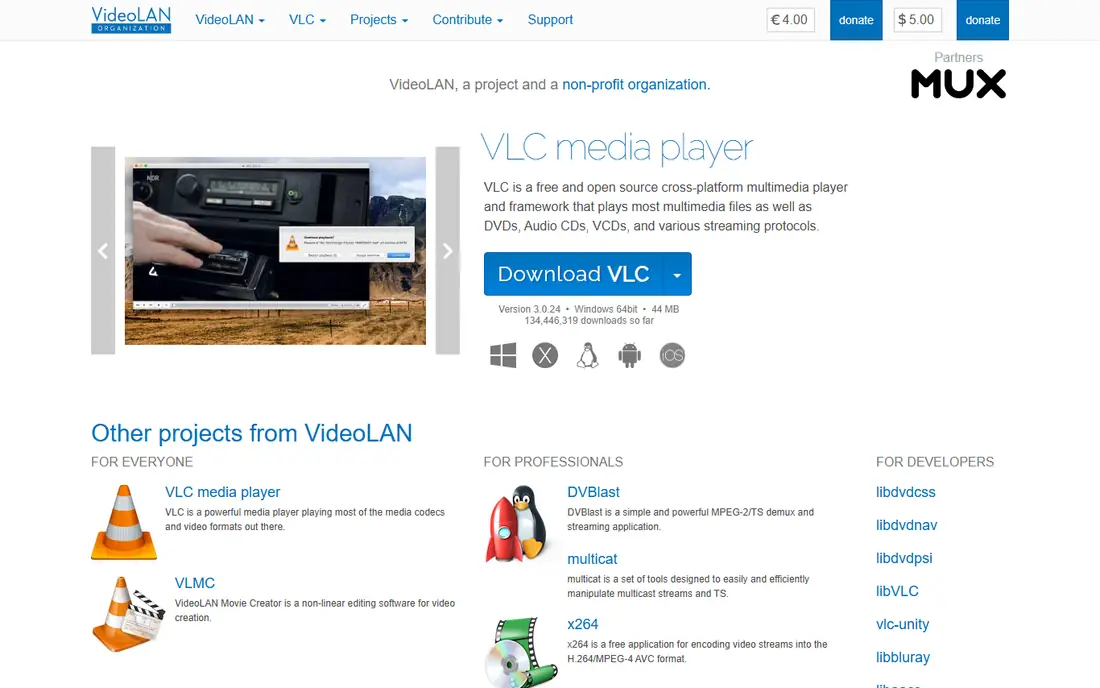
VLC Media Player, from VideoLAN, has been a staple for years because it simply plays files. It handles video, audio, subtitles, and network streams without needing extra codec packs, and it runs on desktop and mobile platforms. There are no ads, no tracking, and no subscription, which is rare for a media player with this range.
The interface is practical rather than pretty, and VLC is not a media library or streaming service. It will not organize a large music collection as neatly as a dedicated library app, and it has no built-in store. For playing a file that another player refuses, VLC is the tool to try first.
- Plays almost any video and audio format
- No ads or tracking
- Works on Windows, Mac, Linux, and mobile
- Interface is plain
- Library and streaming features are basic
Blender is a complete 3D creation suite, covering modeling, sculpting, animation, rendering, video editing, and compositing. It is used by independent filmmakers, game developers, product designers, and studios, and its community produces a huge library of free tutorials. For a free tool, its range rivals paid 3D software that costs thousands per year.
The learning curve is steep. Blender interface and shortcuts take weeks to feel natural, and heavy scenes need a modern computer with a good graphics card. Beginners should start with a guided tutorial series and a simple project, rather than a full animation. For anyone serious about 3D, Blender is the open source tool that makes professional work possible without a license fee.
- Full 3D modeling, animation, and rendering
- Used in film, games, and design
- Large tutorial community
- Steep learning curve
- Needs a capable computer for heavy scenes
GIMP, the GNU Image Manipulation Program, is the best free alternative to paid photo editors for most users. It supports layers, masks, selections, retouching, and a wide plugin ecosystem, and it handles common image formats for web and print work. Photographers, designers, and small businesses use it for product photos, social graphics, and document scans.
GIMP interface is less guided than paid editors, and print professionals who need a native CMYK workflow may need a plugin or a second tool. For web images, photo cleanup, and general design, GIMP is more than enough, and its price makes it easy to try without commitment.
- Powerful photo editing and graphic design
- Layers, masks, and plugins
- Works on Windows, Mac, and Linux
- Interface takes time to learn
- No native CMYK workflow for print shops
Visual Studio Code, often called VS Code, is a free code and text editor that has become the default for many developers. It supports dozens of languages through extensions, offers built-in Git version control, debugging, and terminal access, and runs on all major desktop platforms. Writers and data analysts also use it for Markdown, notes, and scripts.
VS Code is open source, though the official Microsoft build includes telemetry that privacy-minded users may want to review in settings. For most users, the extension library is the appeal: linters, formatters, themes, and language support can be added in minutes. For coding, scripting, or serious text work, VS Code is a strong free starting point.
- Fast editor with a huge extension library
- Built-in Git support
- Works on Windows, Mac, and Linux
- Built by Microsoft with telemetry options to review
- Heavy projects need configuration
WordPress is open source software for building websites and blogs, distinct from the hosted WordPress.com service. The software itself is free, and it powers blogs, business sites, portfolios, and online stores through themes and plugins. Users keep full control over content, design, and data, which is a key reason many small businesses choose it.
WordPress needs web hosting, and site owners must handle updates, backups, and security, or pay a host to manage those tasks. A neglected site with outdated plugins can be vulnerable, so maintenance matters. For a business that wants a flexible website without a monthly site-builder fee, WordPress remains the most capable free option.
- Powers a large share of the web
- Huge theme and plugin library
- Full control over your site
- Needs hosting and maintenance
- Security depends on updates and plugin choices
Audacity is a free, open source audio editor for recording and editing podcasts, voiceovers, music demos, and interviews. It supports multi-track editing, effects, noise reduction, and export to common audio formats. Podcasters, teachers, and small studios use it for clean, simple audio work without a subscription.
The interface looks dated, and Audacity is not a full music production workstation with virtual instruments and advanced mixing. For spoken audio and basic music editing, it is more than enough, and its simplicity helps beginners finish a project instead of getting lost in features. Always record a test clip and check levels before a long session.
- Multi-track recording and editing
- Effects and noise reduction
- Works on Windows, Mac, and Linux
- Interface is dated
- Not a full digital audio workstation for music production
OBS Studio is free, open source software for video recording and live streaming. Users build scenes from webcams, screens, images, and browser sources, add filters and transitions, and stream to platforms such as YouTube and Twitch, or record locally. There is no watermark, no time limit, and no subscription.
Setup is the hurdle. Audio routing, scene layout, and encoding settings take a tutorial or two to get right, and high-quality streaming needs a modern computer and a stable connection. For creators, teachers, and businesses that stream meetings, classes, or events, OBS Studio gives professional control for free.
- Free recording and live streaming
- Scenes, sources, and filters
- No watermark or time limit
- Setup takes time for beginners
- Needs a capable computer for high-quality streaming
Nextcloud is open source software for file sync and collaboration, offering an alternative to commercial cloud drives. Install it on your own server or use a managed host, and you get file storage, sharing, calendar, contacts, notes, and office collaboration through integrated apps. Data stays under your control, which appeals to privacy-minded households and small businesses.
Self-hosting is the trade-off. Nextcloud needs a server, regular updates, and backups, or a paid managed host to handle those tasks. For users who only need a few gigabytes of sync, a commercial drive may be simpler. For teams that want control, custom apps, and no per-user storage fee beyond hosting, Nextcloud is a powerful open source platform.
- Self-hosted file sync, calendar, and collaboration
- Full control over data
- Many apps and integrations
- Needs a server or a managed host
- Setup and updates are your responsibility
How we picked these
We compared official project pages, maintenance activity, platform support, and everyday usefulness for open source software available in October 2026. We favored projects that are actively maintained, widely used, and usable without coding skills where possible, alongside developer tools that anchor the category. We left out projects that are abandoned, that are free but not open source, and that only serve a narrow specialist niche. All ten tools here are free to download, though some offer optional paid support, hosting, or donations.
What to check before you switch
Start with one tool, not ten at once. Replace the paid app you use most, such as an office suite or media player, and use the open source replacement for two weeks before switching the next one. That pace lets you learn the interface and spot any format issues before they affect work.
Next, download only from the official project site linked in each product block, since third-party download sites can bundle unwanted software. Check the system requirements, especially for Blender and OBS Studio, which need more computing power than a text editor. Finally, keep backups. Open source tools can open many formats, but a backup of original files protects you if a conversion shifts formatting.
Frequently asked questions
Is open source software really free?
Yes, the software itself is free to download and use, though some projects accept donations or sell support, hosting, or training. Check the project site for any optional paid services, since the core tool remains free.
Is open source software safe?
Generally yes, when downloaded from the official project site, since the code is public and reviewed by a community. Keep the software updated, avoid third-party download sites, and back up important files as you would with any tool.
What is the best open source software for beginners?
LibreOffice, Firefox, and VLC are the easiest starting points, since they replace familiar paid tools with little learning time. GIMP, Blender, and OBS Studio are more powerful but take longer to learn.
Can open source software replace Microsoft Office?
For most users, yes. LibreOffice handles documents, spreadsheets, and presentations, and reads and writes Microsoft formats. Very complex documents with advanced macros or tracked changes should be checked in the original suite before sharing.
Do I need to know coding to use open source software?
No, for most tools on this list. LibreOffice, Firefox, VLC, GIMP, and Audacity are built for everyday users. Only Visual Studio Code and self-hosted Nextcloud assume more technical comfort, and both have extensive guides.
Why do companies use open source software?
Companies use it to avoid license fees, to inspect and adapt the code, and to avoid being locked into one vendor. Many also contribute fixes and features back to the projects they rely on, which keeps those projects maintained.
Sources
See where you really rank - block by block
ProMapRanker scans Google Maps across a grid of your service area. Simple monthly plans from $19, white-label on every plan.
Start freeKeep reading
 best tour operator software
Best Tour Operator Software in 2026
Compare the best tour operator software for bookings, channel management, waivers and payments, with pricing models for day tours and multi-day trips.
Read → best time clock app for small business
Best Time Clock App for Small Business in 2026
We compare the best time clock app for small business options, with free plans, GPS clock ins, scheduling and payroll links for hourly teams and payroll help.
Read → best test automation tools
Best Test Automation Tools in 2026
Compare the best test automation tools, from Playwright and Selenium to Cypress, Katalon and BrowserStack, with prices, languages and best uses explained.
Read →