 ProMapRanker
Online Platforms for Teaching Strategies: Best Picks of 2026

Active, interactive learning experiences · Pricing starts at: $159 a year
Direct answer
This list puts Nearpod first for active, interactive learning experiences. Listed starting prices: Nearpod from $159 a year and Kahoot. from $3 a month. For a different need, D2L Brightspace covers analytics and AI-supported learning and Moodle covers highly configurable learning environments. Prices, free plans and limits for all 6 tools follow.
Short on time? The summary and table above give the quick view of 6 online platforms for teaching strategies, and the profiles that follow give the detail behind each entry.
Key takeaways
- Top of the list is Nearpod, which targets active, interactive learning experiences.
- A fair warning about Nearpod: not a full course management system.
- Starting prices begin at $3 per month with Kahoot.
- A free plan is available from 2 of the 6 tools: Nearpod, Kahoot.
Quick comparison
| Pick | Great for | Pricing starts at | Free tier | |
|---|---|---|---|---|
| Nearpod | Active, interactive learning experiences | $159 a year | Yes | Visit |
 D2L Brightspace | Analytics and AI-supported learning | See website | Not stated | Visit |
 Moodle | Highly configurable learning environments | See website | Not stated | Visit |
 Canvas LMS | Simplified course management for institutions | See website | Not stated | Visit |
 Kahoot. | Game-based review and engagement | $3 a month | Yes | Visit |
 Microsoft Teams for Education | Communication and live collaboration | See website | Not stated | Visit |
The full online platforms for teaching strategies list
In short, Nearpod is for active, interactive learning experiences. Nearpod is presented as a way to build active learning experiences students can look forward to.
It does well alongside a separate learning management system that takes care of course organization and records. What you pay to start with Nearpod: $159 per year. Nearpod offers a free plan.
What works well: Complements existing course systems.
What to check first: Engagement-centered instead of administrative.
- Meant to engage students
- Focus on active learning
- Not a full course management system
D2L Brightspace targets analytics and AI-supported learning. D2L Brightspace is a learning system for higher education, K-12, associations and business, featuring D2L Lumi AI, Creator+ authoring and Performance+ analytics.
Where it falls short: Not targeted at fast game-based review.
It suits institutions that want course creation, insight into learner performance and AI-supported features within a single product, across a set of education and training settings. D2L Brightspace does not show a starting price in this comparison, so check the vendor site for current pricing. Free plan details: Not stated.
- Authoring and analytics tools
- Serves several education sectors
- Wide feature set may feel complicated

In short, Moodle is for highly configurable learning environments. Moodle describes itself as a highly configurable learning management system for education, enterprise and public sector organizations. Its adaptability makes it appealing to institutions that want to build an engaging learning ecosystem shaped around their own workflows, structures and teaching approach instead of adapting to a fixed template.
Downsides: Customization can need technical effort.
That adaptability can come with setup and maintenance effort, and organizations without technical support may find configuration demanding. It is also oriented toward structured course delivery instead of fast classroom games. Moodle shows no starting price here, so confirm the cost on the vendor site. On free options: Not stated.
- Adaptable learning ecosystem
- Solid customization choices
- Less plug-and-play for beginners
Canvas LMS works best for simplified course management for institutions. Canvas by Instructure is a learning management system built to ease teaching and enhance student learning. Its homepage emphasizes an approachable experience, which fits schools, colleges and training teams that require a central place for courses, materials and student communication.
Worth adding: pick Canvas when structured course management is the priority. Since Canvas is a full LMS, it is oriented toward organized course delivery instead of fast in-class games or standalone interactive activities. Smaller settings or instructors who only need light lesson engagement may prefer a more straightforward companion tool. This comparison lists no price for Canvas LMS; ask the vendor. Free options: Not stated.
Where it is weaker: Institution-level setup may be involved.
- Built to ease teaching
- Approachable interface
- Not a standalone engagement game tool
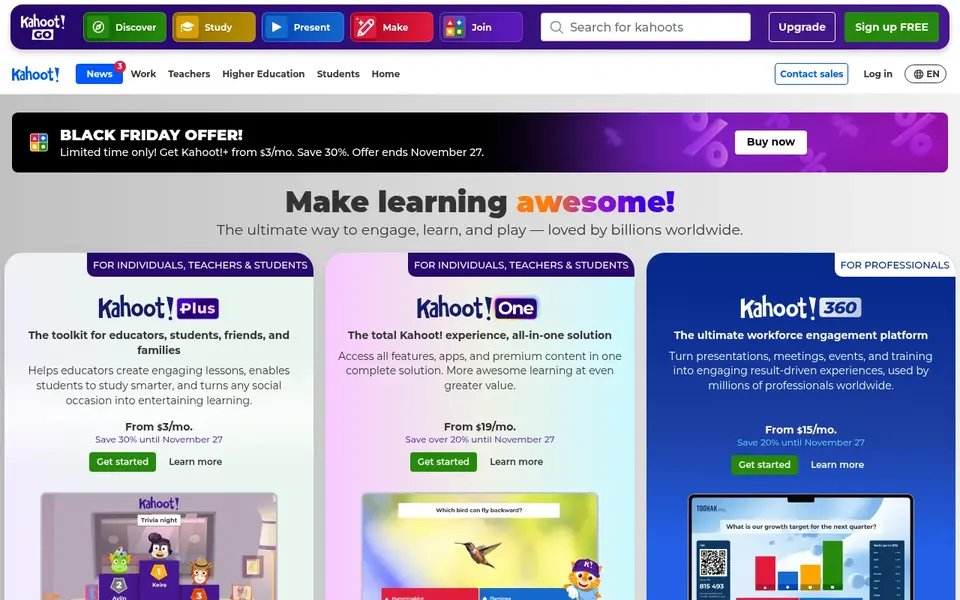
Kahoot. Was built for game-based review and engagement. Kahoot. Is a game-based learning product that brings engagement and fun to learning at school, at work and at home.
Watch-outs: Not a course management system.
On top of that, as a game-based tool, Kahoot. Is not meant to handle courses, content libraries or learner records. It performs best as a supplement to a fuller teaching system instead of a replacement. Price to start with Kahoot.: $3 per month. You can start on Kahoot. Without paying.
- Built around engagement and fun
- Works across school and work settings
- Most useful for short interactive sessions

Where Microsoft Teams for Education fits: communication and live collaboration. Teams is centered on communication and meetings, so it is not a dedicated course-authoring or assessment product on its own.
Microsoft Teams for Education is a video conferencing and communication app for schools, built to support both in-person and remote students. Microsoft Teams for Education does not show a starting price in this comparison, so check the vendor site for current pricing. Free plan details: Not stated.
Downsides: Best within Microsoft environments.
- Suits Microsoft-centered schools
- Video conferencing and communication
- Communication focus instead of full course design
Things to verify first
- Get a written quote from D2L Brightspace, Moodle, Canvas LMS and Microsoft Teams for Education; the list shows no starting price for them.
- Check what the free option really includes: Nearpod and Kahoot. Offer a free plan, and usage caps differ.
- Read the limits listed for Nearpod first: not a full course management system.
- Test how quickly Canvas LMS answers a pre-sales question; it hints at how support will feel later.
- A short pilot of Microsoft Teams for Education with your real workflow tells you more than a feature table.
Frequently asked questions
Is Nearpod the right pick for everyone comparing online platforms for teaching strategies?
No single tool suits every team. Nearpod comes first because it fits active, interactive learning experiences, while D2L Brightspace suits analytics and AI-supported learning and Moodle suits highly customizable learning environments. Match the tool to your own size, budget and workflow before deciding.
Do these tools publish their prices?
Not all of them. D2L Brightspace, Moodle, Canvas LMS and Microsoft Teams for Education publish no starting price, so expect a quote request for those. The rest, Nearpod included, show a starting price, though seats and billing terms still change the final cost.
What is the difference between a LMS and an engagement tool?
A learning management system like Canvas, Moodle or Brightspace organizes courses, materials and learner records. Engagement tools like Nearpod and Kahoot. Focus on interactive lessons and participation. Numerous educators use both together.
Which system is a good match for remote teaching?
The first pick on this list is Nearpod, because it suits active, interactive learning experiences. D2L Brightspace is better for analytics and AI-supported learning, and Moodle for highly configurable learning environments. Check price and limits against your own needs before choosing.
How are the tools for online platforms for teaching strategies ordered?
The order follows typical fit for online platforms for teaching strategies, with Nearpod first and Microsoft Teams for Education last, then price clarity and free access. It is editorial judgement, not a score, so another team could rank the tools differently.
What is the cheapest option for online platforms for teaching strategies in this list?
On published monthly entry prices, Kahoot. Is the lowest here at $3 per month. Entry price is only part of the cost, because seats, add-ons and billing terms can change the total. All 6 picks in this online platforms for Teaching Strategies comparison list a starting price, free plan details and the main limits on their cards above.
Sources
See where you really rank - block by block
ProMapRanker scans Google Maps across a grid of your service area. Simple monthly plans from $19, white-label on every plan.
Start freeBrowse all guides
← Best Online Form Builder for Schools in 2026Best Online Tutoring Platform for Test Prep Centers in 2026 →
 best lms services for small businesses
Best LMS Services for Small Businesses (2026)
Comparing the best LMS services for small businesses? 5 contenders, each with entry cost, free tier and best-fit buyer. Every tool lists pros and cons.
Read → best lms platforms for associations
Best LMS Platforms for Associations in 2026
Best LMS platforms for associations, compared. 6 tools with published prices, free plans and limits. Each entry gets a plain verdict. Jump to the table.
Read → best contract platforms with low learning curve
5 Best Contract Platforms with Low Learning Curve for 2026
Weighing the best contract platforms with low learning curve? We lined up 5 products by cost, free access and fit. Real limits included. Details below.
Read → best puppy training app free
Best Puppy Training App Free in 2026
We compared the best puppy training app free options with real free lessons, so new owners can start sit, stay, and potty training without paying from day one.
Read → best app to teach kids to read
Best App to Teach Kids to Read in 2026
Find the best app to teach kids to read, with 8 phonics and early reading apps compared on age fit, lesson style, parent controls, and price for families.
Read → alternatives to duolingo
Alternatives to Duolingo in 2026
Compare the best alternatives to duolingo for structured courses, speaking practice, vocabulary, and live tutors, with current prices and free plans today.
Read →More in Education & Learning · All guides A to Z by date · Latest guides