 ProMapRanker
Best Flight Price Tracker App in 2026

Key takeaways
- Google Flights and Skyscanner give most travelers a strong free starting point, with broad coverage and simple price tracking.
- Hopper and Kayak add buy or wait guidance, but a forecast is a probability, not a promise that a fare will fall.
- Curated deal services such as Going and Airfarewatchdog suit travelers who are flexible about where they go next.
- Always check the final fare, baggage rules and change terms with the airline before you pay, especially when a third party sells the ticket.
Quick comparison
| Pick | Great for | Pricing starts at | Free tier | |
|---|---|---|---|---|
 Google Flights | Fast route tracking | Free | Yes | Visit |
 Skyscanner | Wide market comparison | Free | Yes | Visit |
 Hopper | Buy or wait guidance | Free | Yes | Visit |
 Kayak | Price forecasts and trip tools | Free | Yes | Visit |
 Momondo | Flexible date and route search | Free | Yes | Visit |
 Kiwi.com | Unusual route combinations | Free | Yes | Visit |
 Going | Curated flight deals | Free | Yes | Visit |
 Airfarewatchdog | Hand-checked fare alerts | Free | Yes | Visit |
 Trip.com | Asia-focused routes and alerts | Free | Yes | Visit |
The best flight price tracker apps
We compared official feature pages, pricing pages and app store listings for trackers that are live in October 2026. The list below mixes broad search tools, prediction tools and curated deal services, so you can pick the approach that fits how you travel.
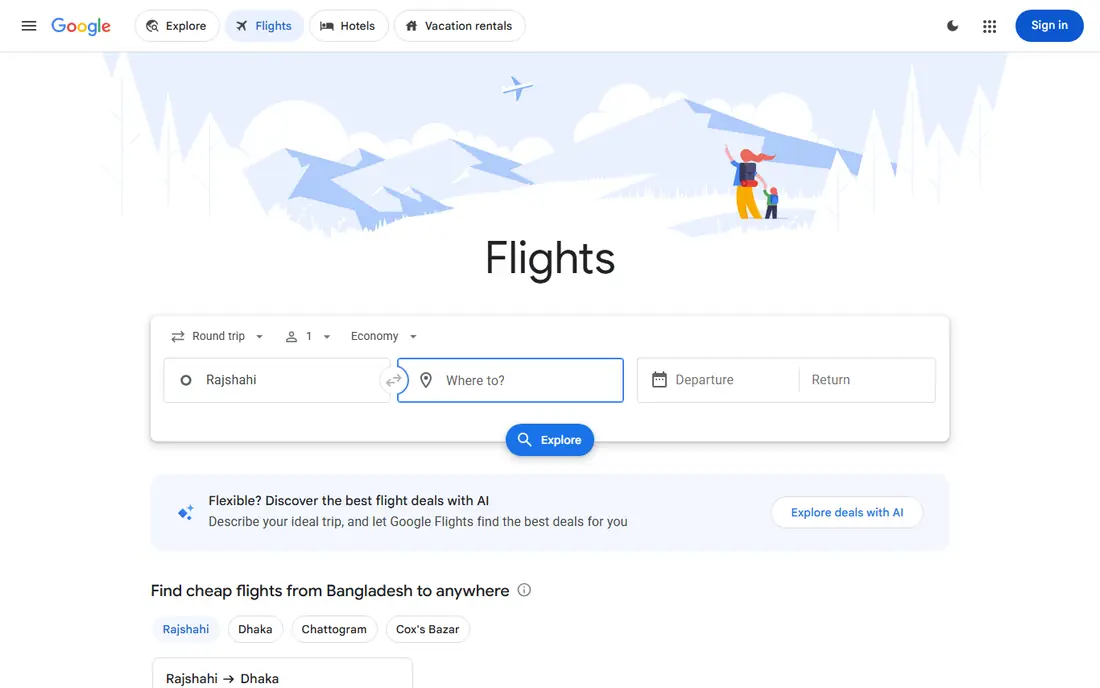
Google Flights is our first stop for most route checks because it keeps the search simple. You can compare dates on a calendar view, look at a price graph over time, and turn on tracking for a specific route and set of dates. When a tracked fare changes, you get an email, which works well if you check email often and want a low-noise alert.
The main trade-off is that Google Flights is a search and tracking tool, not a booking agent. That is often a benefit, since you can finish the purchase with the airline and keep changes and support in one place. It is less handy if you want push alerts for every small move, or if you want one app to hold every booking detail.
- Clear price history and date grids
- Simple tracking toggle
- Links out to airlines and booking partners
- Alerts arrive by email rather than push in the main web flow
- Some ultra-low-cost fares may not appear
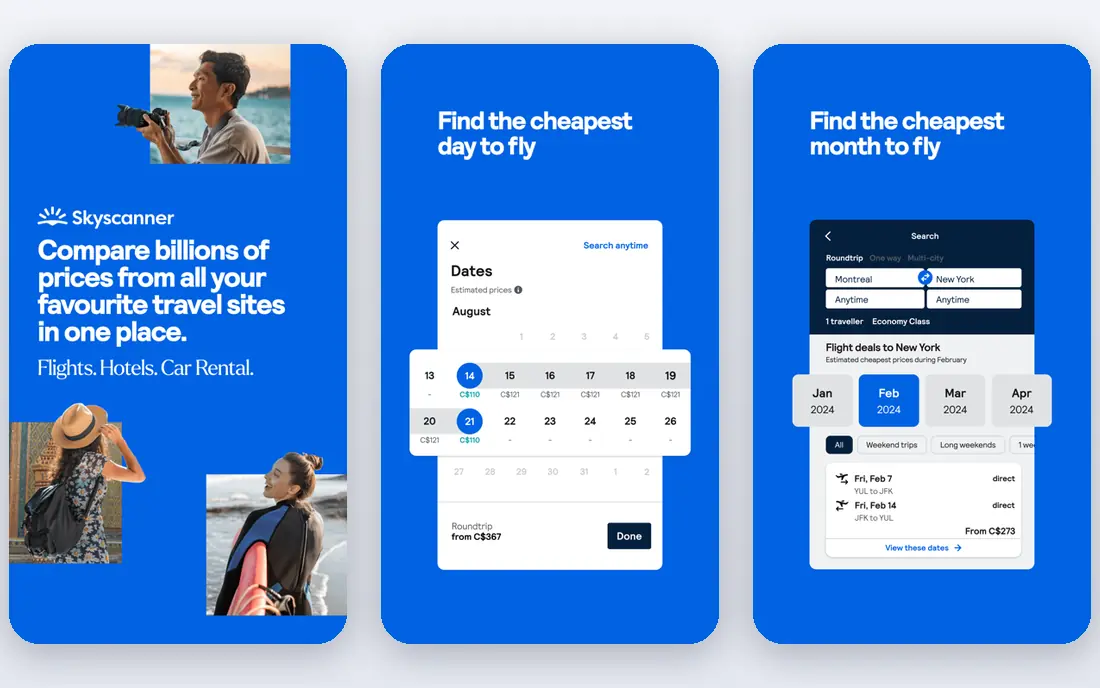
Skyscanner suits travelers who have not fixed a destination yet. Its whole month view shows cheaper dates at a glance, and the Everywhere search can surface low fares from your home airport to many places. Price alerts can follow a route, which saves repeated manual searches when a trip is still months away.
The catch is the same as with most aggregators. A low headline fare from a lesser-known seller can carry strict change rules, extra fees or slower support. Before you buy through a partner, read the fare conditions and compare the airline-direct price for the same flights.
- Whole month and Everywhere search options
- Many airlines and booking partners
- Price alerts by email and push
- Some results lead to third-party sellers with mixed support
- Fare rules vary by seller
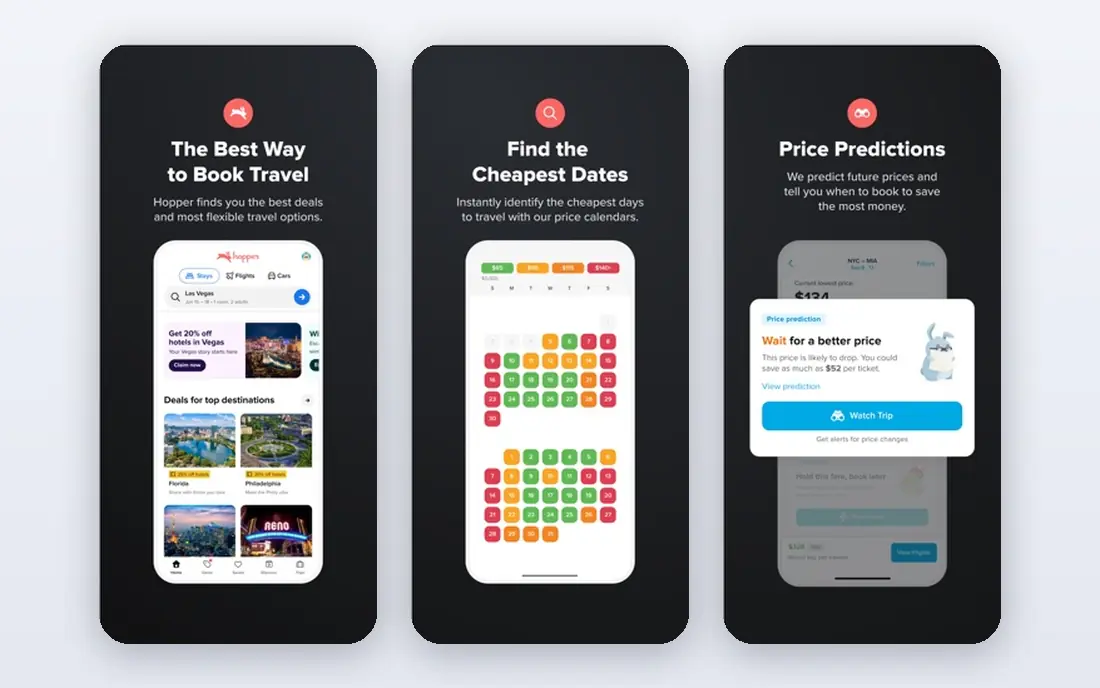
Hopper is built around one question: should you book now or wait. Its app watches fares, gives a buy or wait view, and sends push alerts when a watched trip changes. That style suits phone-first travelers who want a nudge rather than a spreadsheet of fare history.
We would still treat its guidance as an informed estimate. Fuel costs, schedule changes and demand shifts can move a fare in ways no model can guarantee. If Hopper finds a good fare, compare the airline-direct price too, and check the cost of any add-ons before you add them at checkout.
- Color-coded price calendar
- Push price alerts
- Optional fare freeze and protection add-ons
- Booking through Hopper adds a middleman
- Paid add-ons increase the total cost
Kayak combines a broad flight search with a price forecast that suggests if a fare is likely to rise or fall. That makes it useful for travelers who want both a search tool and a timing signal in one place. Its filters also help when you need to narrow results by stops, times, cabin or airline.
The honest limit is forecast accuracy. A forecast can help you decide, but it does not lock a price. As with other aggregators, check who is actually selling the ticket, and confirm baggage and change terms before you pay, since those terms can differ between sellers for the same flight.
- Price forecast tool
- Flexible search filters
- Hotel and car search in the same account
- Forecasts are estimates, not guarantees
- Some results come from third-party sellers
Momondo works well as a second opinion after Google Flights or Skyscanner. It compares fares across airlines and booking sites, and its calendar views make it easy to spot cheaper nearby dates. Travelers planning European trips often find a good range of carriers and sellers here.
The weakness is seller variation. Two results for the same flight can look similar but carry very different support and change rules. Use Momondo to find the fare, then slow down at checkout and read the seller terms, or book direct with the airline if the price gap is small.
- Clear fare calendar views
- Broad seller comparison
- Useful for European routes
- Seller quality varies
- Some cheap fares have strict terms
Kiwi.com earns its place for trips that do not fit a simple round trip. It can combine separate tickets and airlines into one itinerary, and its Nomad tool helps plan multi-city routes. Price alerts let you watch those creative routes without searching every day.
That creativity needs care. A self-transfer route may mean collecting bags, changing terminals and rechecking in, and a delay on one leg can leave you without protection on the next. Read the connection details closely, leave generous time between separate tickets, and only use this style of route if the saving is worth the added risk.
- Finds multi-airline route combinations
- Nomad multi-city search
- Price alerts
- Self-transfer routes carry missed-connection risk
- Support goes through Kiwi when it sells the ticket
Going takes a different approach from search tools. Instead of waiting for you to search, it sends curated flight deals from your chosen airports, including sales and occasional mistake fares. That suits travelers who are flexible and happy to plan a trip around a good fare.
The free tier is a sensible starting point, while paid plans offer faster alerts and more departure airports. Deals move fast, so you still need to check dates, total cost and fare rules quickly. Going is best as a discovery tool, not a replacement for checking the airline price before you book.
- Human-curated deal alerts
- Mistake fares and sale highlights
- Free tier for basic alerts
- Paid plans add cost for faster and wider alerts
- Mainly useful for US departures
Airfarewatchdog focuses on fares that its team checks and lists, rather than showing every result from every seller. You can follow specific routes and get alerts when fares on those routes look notable. That curation can cut noise for US domestic trips and common international routes from the US.
Its scope is the limit. If you fly from outside the US, or on less common routes, a global aggregator will usually give wider coverage. Use Airfarewatchdog as an extra alert channel for routes you already plan to fly, and keep a broader search tool for the rest.
- Hand-checked fare lists
- Route-specific alerts
- Mainly US-focused coverage
- Coverage is narrower than global aggregators
- Alerts suit US travelers best
Trip.com is worth adding if your travel includes Asia, where it often shows a wide range of airlines and regional options. Its target price alerts let you set a price you would accept, then wait for a match instead of checking daily. The app also keeps bookings in one place, which helps on multi-leg trips.
As with other booking platforms, the seller matters. When Trip.com sells the ticket, changes and refunds go through Trip.com rather than the airline directly. Compare the airline-direct price and terms, especially on long-haul or complex itineraries where a change is more likely.
- Strong Asia route coverage
- Target price alerts
- App booking and trip management
- Booking through Trip.com adds a middleman
- Fare and refund rules vary by ticket
How we picked these
We compared official feature pages, pricing pages and app store listings for tools that track flight prices and are live in October 2026. We kept tools that let you follow a route or receive alerts, and we favored a mix of broad aggregators, prediction tools and curated deal services. We left out tools that only search without tracking, and tools that had closed or stopped offering price alerts.
What to check before you trust an alert
Set alerts early, but set them with care. A very narrow alert can miss a cheaper nearby date, while a very broad alert can flood your inbox and train you to ignore it. Start with your real dates, then add one flexible-date search to see if shifting by a day or two changes the fare in a meaningful way.
Compare the total cost, not just the headline fare. Baggage, seat selection, payment fees and change rules can turn a cheap ticket into an expensive one. When two sellers show the same flight, the airline-direct option is often worth a small premium because support, changes and refunds are simpler.
Treat forecasts as guidance. A buy or wait signal can help you act sooner, but it cannot promise a lower fare tomorrow. If the price already fits your budget and the dates are fixed, booking can be the right move even if a tool suggests waiting. If your dates are flexible, waiting for an alert has more room to pay off.
Frequently asked questions
Is the best flight price tracker app free?
Most trackers on this list offer a free tier that covers basic route tracking and alerts. Paid plans usually add faster alerts, more routes, wider deal coverage or booking add-ons. Start free, and only pay if you use the extra alerts often enough to justify the cost.
Does a price alert guarantee the lowest fare?
No. An alert tells you a fare changed or reached a target you set. It does not mean no cheaper fare exists on another seller, date or nearby airport. Run a second search before you pay, and check the airline-direct price for the same flights.
Should I book through the tracker or the airline?
It depends on the price gap and the fare rules. Booking direct usually makes changes and support simpler. Booking through a tracker or seller can be fine if the saving is clear and you have read the change, baggage and refund terms.
How far ahead should I set a flight price alert?
For most leisure trips, set alerts as soon as your dates are roughly known, then check weekly. For peak holiday travel, set them earlier, since popular dates sell out and fare moves can be larger. Flexible travelers can set alerts for a range of dates rather than a single day.
Why does the same flight cost different amounts on different sites?
Sellers buy and package fares in different ways, and they may add fees, bundle services or apply different change rules. Taxes, baggage and payment charges also differ. That is why the final checkout total, not the search result headline, is the number to compare.
Sources
See where you really rank - block by block
ProMapRanker scans Google Maps across a grid of your service area. Simple monthly plans from $19, white-label on every plan.
Start freeKeep reading
 who has best internet service
Who Has the Best Internet Service in 2026
Who has best internet service for US homes? We compare fiber, cable, fixed wireless and satellite providers on speed, price, availability and terms today.
Read → which survey tool has the best analytics
Which Survey Tool Has the Best Analytics in 2026
Find which survey tool has the best analytics in 2026, comparing Qualtrics, SurveyMonkey, Typeform, Alchemer, and more on reports, text, and stats today.
Read → which streaming service has the best movies
Which Streaming Service Has the Best Movies in 2026
Answering which streaming service has the best movies, with Netflix, Max, Criterion and more compared on libraries, prices and free options in this guide.
Read →