 ProMapRanker
Best Driving Apps in 2026: 8 Apps Compared

Most drivers wanting places, traffic and transit in one app · Pricing starts at: Free
Key takeaways
- Google Maps and Waze cover most drivers for free, with Google Maps stronger on places and Waze stronger on live driver reports.
- Apple Maps is the natural pick on iPhone, with clean directions and CarPlay support, but it is less useful for Android drivers.
- Offline maps matter most on rural roads and abroad, and HERE WeGo, Sygic, TomTom GO and OsmAnd handle offline use better than the free defaults.
- Paid navigation makes sense mainly for drivers who need offline maps, truck routing or an ad-free drive without data use.
Quick comparison
| Pick | Great for | Pricing starts at | Free tier | |
|---|---|---|---|---|
| Google Maps | Most drivers wanting places, traffic and transit in one app | Free | Yes | Visit |
 Waze | Drivers wanting live hazard and police reports from other drivers | Free | Yes | Visit |
 Apple Maps | iPhone drivers wanting clean CarPlay navigation | Free | Yes | Visit |
 HERE WeGo | Offline driving and public transport in many cities | Free | Yes | Visit |
 Sygic GPS Navigation | Offline maps with speed warnings and lane guidance | Free | Yes | Visit |
 TomTom GO Navigation | Ad-free offline driving with live traffic | $4.99 per month | Free trial | Visit |
 MapQuest | Simple free driving directions on web and mobile | Free | Yes | Visit |
 OsmAnd | Privacy-minded drivers wanting offline OpenStreetMap maps | Free | Yes | Visit |
The best driving apps
We compared official app listings, feature pages and pricing for driving and navigation apps available in the United States in October 2026, and kept apps that still offer turn-by-turn driving directions.
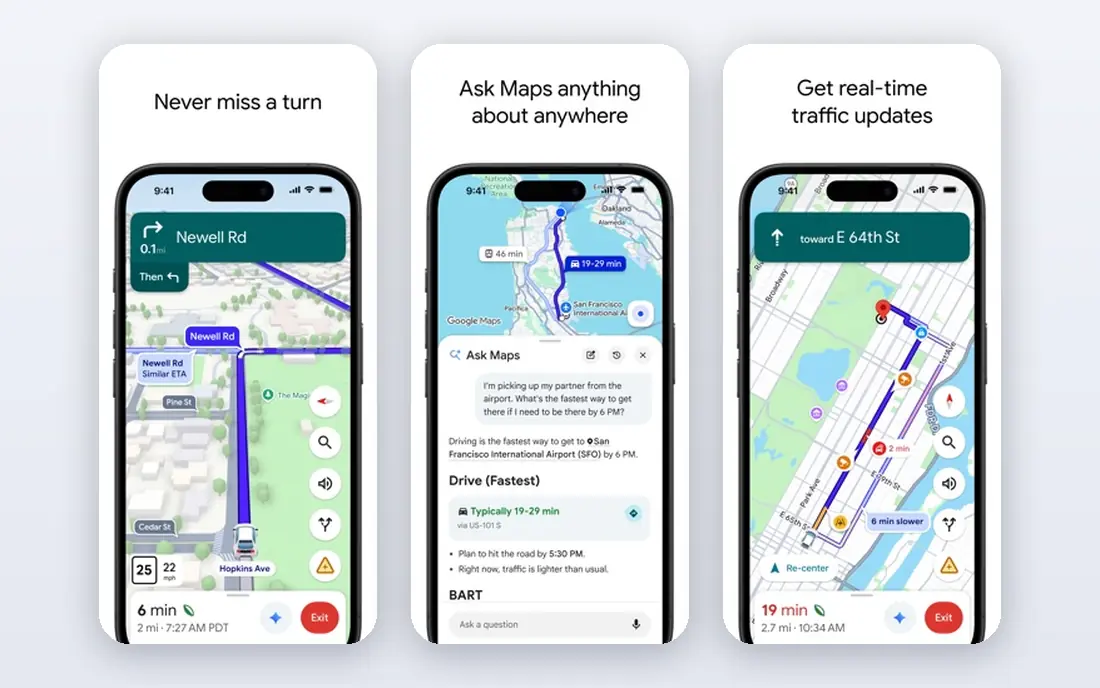
Google Maps is our pick for most people because it does more than driving directions. You can search for a restaurant, check its hours, see live traffic on the route, and switch to walking or transit directions without opening another app. Lane guidance, speed limit displays and arrival time estimates are all built in, and the app works well with Android Auto and CarPlay.
The main limits show up away from good coverage. Offline maps must be downloaded in advance for a chosen area, and they expire if not updated. Drivers who regularly cross areas with weak signal should download maps before leaving and keep a second offline app as backup.
- Huge place database
- Live traffic and rerouting
- Transit, walking and cycling directions
- Offline maps are limited to saved areas
- Ads and business listings can clutter the view
- Battery use can be high on long trips
Waze stands out for the stream of reports from other drivers. A crash, a stalled car, a speed trap or a road closure can appear quickly, and the app reroutes around trouble while you drive. For a daily commute through busy traffic, that live picture is often more useful than a static map, and the interface stays focused on the road ahead.
Waze needs a data connection to work well, so it is not the pick for remote areas or for trips abroad without a data plan. It also shows ads, which some drivers find distracting. Use it as your traffic-first app, and keep Google Maps handy for finding places.
- Fast community reports on hazards, traffic and road closures
- Clear rerouting around jams
- Fun, simple driving view
- Ads on screen
- No true offline navigation
- Place search is weaker than Google Maps
Apple Maps has improved a lot, and on iPhone it now feels like a complete driving app rather than a backup. Directions are clear, lane guidance is easy to read, and the app hands off well to CarPlay and Apple Watch. It also covers walking, cycling and transit, and it keeps personal location handling under Apple's privacy controls.
The obvious limit is platform. Android drivers should not build their routine around Apple Maps, and drivers who rely on crowd reports will miss Waze. For iPhone owners who want a calm, ad-free map that stays inside the Apple system, it is a strong default.
- Clean design and voice guidance
- Strong CarPlay integration
- Privacy-focused approach from Apple
- Android version is limited
- Place data can lag Google Maps in some areas
- Fewer community reports than Waze
HERE WeGo is the quiet free option that earns its place on offline strength. You can download a whole region or country, then drive with turn-by-turn voice guidance without using mobile data. That makes it useful for road trips, rental cars abroad and areas with patchy coverage. It also handles walking and public transport, with coverage in many cities.
Its weakness is discovery. Finding a small business or a new restaurant is less reliable than in Google Maps, so many drivers use HERE WeGo for the drive itself and another app for searching. If offline use is your main need, that trade is easy to accept.
- Free offline maps by region or country
- Public transport in many cities
- CarPlay support
- Place search is thinner than Google Maps
- Live traffic is less detailed in some areas
- Fewer extra features
Sygic suits drivers who want a dedicated navigation app rather than a general map. Its offline maps cover whole countries, its lane guidance is detailed, and speed warnings help on unfamiliar roads. The app also offers a head-up display option and dashcam features on some plans, which appeal to frequent drivers.
The free version covers basic navigation, but the best features sit behind Premium, and prices differ by region and app store. Check the exact package in your store before paying, and confirm whether traffic and speed camera data are included in the plan you choose.
- Offline 3D maps for many countries
- Speed limit warnings and lane guidance
- CarPlay and Android Auto support
- Full features need a paid Premium plan
- Traffic is a paid extra in some packages
- Pricing varies by region and store
TomTom GO Navigation brings the company's long map history to a phone app. Maps live on the device, so navigation keeps working without a data connection, and live traffic and speed camera alerts are included on paid plans. The driving view is calm and ad-free, with lane guidance and a clear route bar showing delays ahead.
The cost is the deciding factor. A monthly car plan starts at $4.99, with longer plans lowering the monthly equivalent, and a free trial lets you test it first. Drivers who drive daily in areas with weak signal, or who simply want no ads, will get value from it. Occasional drivers will likely stay with a free app.
- Offline maps stored on the phone
- Live traffic and speed camera alerts
- No ads in the driving view
- Subscription needed for full features
- Car plan pricing differs from truck plans
- Place search is narrower than Google Maps
MapQuest is still a useful free option, especially for planning a route on a computer before driving. It gives clear driving directions, multiple route choices and useful extras such as nearby gas prices. For a straightforward trip from one address to another, it does the job without a subscription or a learning curve.
It falls behind on live driving. Traffic handling and automatic rerouting are not as strong as Waze or Google Maps, and offline use is limited. Treat MapQuest as a planning tool and a simple directions app, rather than as your main live-traffic companion.
- Free and easy to use
- Route planning on desktop and mobile
- Gas prices and places along a route
- Traffic and rerouting are less advanced than Google Maps or Waze
- App features lag the web version
- Fewer offline options
OsmAnd is built on OpenStreetMap data, which gives it a different strength from the big commercial maps. It works fully offline, it does not require an account for basic navigation, and it offers detailed profiles for driving, walking and cycling. Hikers and cyclists often pair it with a driving app, but it handles car routes well too.
The trade is polish. Menus take longer to learn, and live traffic is limited compared with Google Maps or Waze. Drivers who value offline independence and open map data will accept that, while drivers who want the simplest possible drive should stick with Google Maps or Apple Maps.
- Offline maps built on OpenStreetMap
- No account needed for basic use
- Walking, cycling and driving profiles
- Interface is less polished than mainstream apps
- Map downloads need storage space
- Live traffic is limited
How we picked these
We compared official app store listings, vendor feature pages and pricing for navigation apps available in the United States in October 2026. We kept apps that offer turn-by-turn driving directions today, and we favoured free apps for everyday driving while keeping paid options that add real offline or traffic value. Where pricing varied by store or region, we wrote See website rather than stating a single figure as universal.
How to choose the right driving app
Start with your phone and your commute. iPhone drivers get a clean free start with Apple Maps, Android drivers get the same from Google Maps, and Waze fits either phone for traffic-heavy commutes. There is no need to pay for navigation unless a free app leaves a clear gap in your driving.
Next, think about coverage. If you drive in rural areas, travel abroad or rent cars often, download an offline app before you need it. HERE WeGo and OsmAnd cover that need for free, while Sygic and TomTom GO add paid traffic, camera alerts and a more polished driving view.
Finally, check car integration and data use. Confirm the app works with CarPlay or Android Auto if you use a car display, and test how it behaves with weak signal on a familiar route. A navigation app should reduce stress on the road, not add a new distraction, so keep the screen simple and set your destination before you move.
Frequently asked questions
What is the best free navigation app?
Google Maps is the best free navigation app for most drivers because it combines driving directions, live traffic, place search and transit in one free app. Waze is the better free pick if live hazard reports and rerouting around traffic matter most to you.
What is the best car navigation app for offline maps?
HERE WeGo and OsmAnd are strong free choices for offline maps, since both let you download maps in advance. Sygic and TomTom GO are paid upgrades that add speed warnings, lane guidance and live traffic on top of offline maps.
Is Waze better than Google Maps for driving?
Waze is often better for avoiding traffic jams, thanks to fast community reports, while Google Maps is better for finding places, checking business details and planning a full trip. Many drivers use Waze for the commute and Google Maps for everything else.
What is the best driving directions app for road trips?
Google Maps works well for most road trips, with route options, stops and place search built in. For trips through areas with weak signal, add HERE WeGo or Sygic with offline maps downloaded before departure.
Can I use a free map app without mobile data?
Yes, if you download maps in advance. HERE WeGo, OsmAnd, Sygic and TomTom GO all support offline navigation, while Google Maps supports saved offline areas with limits. Waze needs a data connection for its live reports and rerouting.
Sources
See where you really rank - block by block
ProMapRanker scans Google Maps across a grid of your service area. Simple monthly plans from $19, white-label on every plan.
Start freeKeep reading
 best freelance platforms for beginners
Best Freelance Platforms for Beginners in 2026
Best freelance platforms for beginners compared, with fees, job types, and first-gig tips to help new freelancers pick a strong starting place in our guide.
Read → best foreign language apps
Best Foreign Language Apps in 2026
Best foreign language apps compared in 2026: Duolingo, Babbel, Rosetta Stone, Pimsleur and more, with prices, free plans and honest trade-offs for learners.
Read → best foraging apps for plant identification
Best Foraging Apps for Plant Identification in 2026
These 8 best foraging apps for plant identification help you name wild plants, but never eat a plant based on an app alone. Check our safety notes first.
Read →