 ProMapRanker
Best Dictation App in 2026

Key takeaways
- Free built-in tools from Apple, Microsoft, and Google cover most everyday dictation, while paid tools add AI cleanup and specialized vocabularies.
- Wispr Flow suits cross-platform writers who want clean text in any app, while Dragon suits Windows professionals with legal or medical terms.
- Otter and Descript are better for meetings and recordings than for solo dictation, so match the tool to the job.
- Privacy matters for sensitive dictation, so check whether processing happens on your device or in the cloud.
- Accuracy depends on microphone quality, background noise, and clear speech, as much as on the software you choose.
Quick comparison
| Pick | Great for | Pricing starts at | Free tier | |
|---|---|---|---|---|
 Apple Dictation | Apple users | Free | Yes | Visit |
 Google Docs Voice Typing | Google Docs users | Free | Yes | Visit |
 Microsoft Word Dictate | Microsoft 365 users | See website | No | Visit |
 Wispr Flow | Cross-platform AI cleanup | $15 per month | Yes | Visit |
 Dragon Professional | Windows professionals | $699 | No | Visit |
 Otter.ai | Meeting transcription | Free | Yes | Visit |
 Speechnotes | Quick browser dictation | Free | Yes | Visit |
 Gboard | Mobile voice typing | Free | Yes | Visit |
 Descript | Audio editing by transcript | Free | Yes | Visit |
The best dictation apps
We compared official pricing pages, feature pages, and app store listings for dictation software available to US users. Dictation here means speaking text into an app or document, not only transcribing a recorded meeting, though some meeting tools are included because readers often compare them. Prices are starting prices, and free plans vary in limits, so check the vendor page before you pay.
Apple Dictation is the easiest starting point for anyone on a Mac, iPhone, or iPad, because it is already installed and works wherever your cursor sits. You can dictate messages, emails, notes, and documents, and say punctuation and formatting commands as you speak. On-device processing options help with privacy and offline use, which matters for sensitive notes.
It does not offer the specialized vocabularies or AI cleanup of paid dictation tools, so long professional dictation may need more editing afterward. For everyday dictation, short notes, and messages, though, it is free, fast, and private enough for most users. Try it first before paying for another tool.
- Built into Mac, iPhone, and iPad
- On-device processing options
- Works in any text field
- No specialized professional vocabularies
- AI cleanup is basic
- Apple only
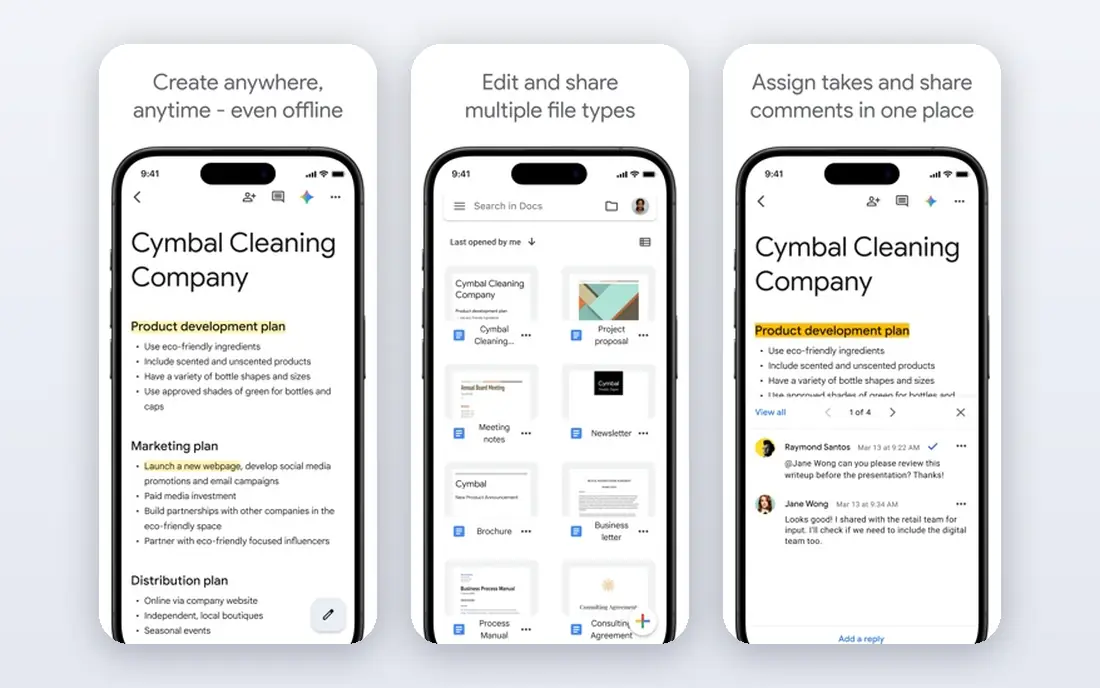
Google Docs Voice Typing lets you dictate directly into a Google Doc in Chrome, with support for many languages and voice commands for punctuation and formatting. It is a good choice for students, writers, and teams who already work in Google Docs, because there is nothing to install and no subscription to manage. You can start a document, speak a draft, and edit it in the same window.
The limit is scope. It does not dictate into other apps, and it needs a connection to work well. If you want system-wide dictation across email, notes, and other apps, a tool like Wispr Flow or Apple Dictation fits better. For Google Docs drafting, though, this free tool is hard to beat.
- Free inside Google Docs
- Wide language support
- No install needed in Chrome
- Works only inside Google Docs
- Needs an internet connection
- Editing tools are basic
Microsoft Word Dictate is built into Word, Outlook, and other Microsoft 365 apps, so Office users can dictate without installing a separate tool. It handles everyday documents, emails, and notes well, with voice commands for punctuation and formatting. Cross-device support means you can start on a laptop and continue on a phone in the same ecosystem.
The main cost is the Microsoft 365 subscription itself, which is why we list the price as See website rather than a single dictation price. It also works best inside Microsoft apps, not as a system-wide tool for every program. If you already pay for Microsoft 365, Dictate is the natural dictation choice.
- Built into Word and Microsoft 365 apps
- Good accuracy for everyday use
- Works across devices
- Needs a Microsoft 365 subscription
- Dictation is tied to Microsoft apps
- Advanced features vary by plan
Wispr Flow is built for writers and knowledge workers who want to speak in any app and get clean text back. It types into email, docs, notes, and chat apps, and its AI cleanup can remove filler words and fix grammar as you speak. That cleanup saves editing time, especially for first drafts and messages.
The free plan has word limits, and the full paid plan is a monthly cost, so casual users may prefer a free built-in tool. Language support is also narrower than Google Docs. If you dictate daily across many apps and want cleaner first drafts, Wispr Flow is our pick for paid dictation.
- Works in any text field
- AI cleanup removes fillers
- Cross-platform support
- Paid plan needed for full use
- Language support is narrower than Google
- Accuracy depends on microphone
Dragon Professional, from Nuance, has been the standard for professional dictation on Windows for many years, especially for legal, medical, and technical work. It offers specialized vocabularies, custom words, and voice commands that go beyond simple text entry, and it can work offline on Windows. For professionals who dictate for hours each day, that depth and control still matter.
The price is high, the main product is Windows only, and the interface feels older than newer AI tools. Casual writers do not need this level of customization. For Windows professionals with specialized terms and heavy dictation volume, Dragon remains a serious option.
- Specialized legal and medical vocabularies
- Offline Windows dictation
- Deep customization
- High one-time price
- Windows only for the main product
- Interface feels older
Otter.ai is best known for meeting transcription, where it records calls, identifies speakers, and produces searchable summaries. That makes it useful for interviews, lectures, and team meetings, where you need to find a quote or action item later. Its free plan includes a monthly minute allowance, which is enough to test the service.
For solo dictation, Otter is less direct than Wispr Flow or Apple Dictation, because it is built around recordings and transcripts rather than typing into any app. If your main need is meeting notes, Otter is a strong pick. If you want to dictate a document, choose a dictation-first tool instead.
- Speaker identification
- AI summaries
- Searchable transcripts
- Better for meetings than solo dictation
- Free plan has minute limits
- Needs a connection
Speechnotes is a simple browser tool for quick dictation without installing software. You open the site, speak, and watch text appear, with auto-save to protect against losing a draft. That simplicity suits people who want to dictate a short note, email draft, or paragraph without setting up an app.
It does not offer the AI cleanup of Wispr Flow or the system-wide reach of Apple Dictation, and the free version includes ads. For quick, occasional dictation on any computer with a browser, though, Speechnotes is a useful free option.
- No install needed
- Simple interface
- Auto-save in browser
- Browser-based only
- Ads on free plan
- Fewer AI cleanup features
Gboard, the Google keyboard, includes voice typing that works in almost any mobile app, from messages to notes to email. It is free, easy to use, and familiar to Android users, with an iOS version also available. For phone-first dictation, such as replying to messages while walking or cooking, Gboard is often the fastest option.
Mobile dictation accuracy depends heavily on microphone quality and background noise, and Gboard offers fewer long-form dictation commands than Dragon or Wispr Flow. It is not a replacement for professional desktop dictation, but for everyday mobile voice typing, it is our pick.
- Free on Android and iOS
- Voice typing in any app
- Offline options on some devices
- Accuracy varies by device and noise
- Fewer dictation commands
- Tied to Google keyboard
Descript is different from the other tools here, because its main job is editing audio and video by editing a transcript. You record or upload media, get a transcript, and cut words from the transcript to cut them from the recording. That workflow suits podcasters, video creators, and teams that produce spoken content.
For pure dictation into a document, Descript is more tool than most writers need, and paid plans are needed for more transcription hours. If you create podcasts or videos and want to edit by text, Descript is a strong choice. If you only want to dictate a draft, a simpler tool will be faster.
- Edit audio and video by editing text
- Filler removal
- Transcription included
- Better for creators than pure dictation
- Paid plans needed for more hours
- Learning curve
How we picked these
We compared official pricing pages, feature pages, and app store listings for dictation tools available to US users in October 2026. We included free built-in tools, paid AI dictation tools, and meeting and creator tools that readers often compare, and we noted where a tool fits a different job. We did not claim hands-on testing, and we did not invent accuracy percentages, prices, or feature lists. Where a price varied by plan or subscription, we wrote See website and advised readers to confirm it on the vendor page.
What to check before you choose a dictation app
Start with where you dictate. Apple users should try Apple Dictation first, Google Docs users should try Voice Typing, and Microsoft 365 users should try Dictate, because those free tools may already cover your needs. If you dictate across many apps, test Wispr Flow or a similar system-wide tool during its free plan.
Next, test with your real microphone and room noise. A good headset microphone improves accuracy more than switching software, and background noise hurts every tool. Check privacy too, especially for legal, medical, or unpublished work, and prefer on-device processing when sensitivity matters. Finally, learn a few voice commands for punctuation, new paragraphs, and corrections, because those commands save more time than any single feature.
Frequently asked questions
What is the best dictation app?
The best dictation app depends on your device and job. Apple Dictation suits Apple users, Google Docs Voice Typing suits Docs users, Wispr Flow suits cross-platform writers, and Dragon suits Windows professionals. Try the free built-in tool first.
What is the best dictation software for writers?
Wispr Flow is a strong paid pick for writers because it works in any app and cleans up filler words, while Apple Dictation and Google Docs Voice Typing are strong free picks. Dragon suits writers with specialized vocabularies on Windows.
What is the top rated dictation software for professionals?
Dragon Professional is often rated highly for legal and medical professionals on Windows, because of its specialized vocabularies and customization. Newer AI tools like Wispr Flow are also popular, but they do not replace Dragon for every professional workflow.
Is there a free dictation app that works well?
Yes, Apple Dictation, Google Docs Voice Typing, Gboard, and Speechnotes are all free for basic dictation. Free plans vary in limits and features, so test the one that matches your device and apps.
Can dictation software replace typing?
For drafts, notes, and messages, dictation can be faster than typing for many people, but editing, formatting, and precise work still need a keyboard. Most users get the best results by dictating a draft and then editing it by hand.
How can I improve dictation accuracy?
Use a good microphone, dictate in a quiet room, speak clearly at a steady pace, and say punctuation aloud. Correcting errors early also helps some tools learn your voice and vocabulary over time.
Sources
See where you really rank - block by block
ProMapRanker scans Google Maps across a grid of your service area. Simple monthly plans from $19, white-label on every plan.
Start freeKeep reading
 top custom software development company
Top Custom Software Development Company in 2026
Looking for a top custom software development company? We compare 9 firms for web, mobile, and enterprise software, covering strengths and fit for 2026.
Read → tableau alternatives
Tableau Alternatives in 2026
Compare the best Tableau alternatives for 2026, from Power BI to Metabase, with prices, hosting options, and picks for small teams and enterprises today.
Read → microsoft teams alternatives
Best Microsoft Teams Alternatives in 2026
Looking for microsoft teams alternatives? We compare 9 chat and video tools for 2026, covering free plans, pricing, meetings, and integrations for teams.
Read →