 ProMapRanker
Best Construction Scheduling Software in 2026

Key takeaways
- Procore and Buildertrend suit larger firms, while Contractor Foreman and Fieldwire give smaller crews a lower-cost start.
- The best construction scheduling app for a firm depends on job size: residential builders need client portals, commercial teams need document control and resource planning.
- Several vendors now price by quote only, so confirm the full annual cost, including add-on modules, before you commit.
- A free plan can cover basic field scheduling, but Gantt charts, dependencies and client scheduling views usually sit on paid plans.
Quick comparison
| Pick | Great for | Pricing starts at | Free tier | |
|---|---|---|---|---|
 Procore | Large commercial contractors | See website | No | Visit |
 Buildertrend | Residential builders and remodelers | See website | No | Visit |
 Contractor Foreman | Small contractors on a budget | $49 per month | Free trial | Visit |
 Fieldwire | Field crews and task coordination | Free | Yes | Visit |
 JobTread | Residential builders who estimate first | See website | Free trial | Visit |
 CoConstruct | Custom home builders | $49 per month | Free trial | Visit |
 Projul | Flat-rate pricing with no per-user fees | $199 per month | Free trial | Visit |
 monday.com | General scheduling and team planning | See website | Free trial | Visit |
The best construction scheduling software
Good construction scheduling is less about a pretty chart and more about keeping crews, subcontractors and clients on the same dates. We compared official feature pages, pricing pages and public reviews for tools that are live in October 2026, and we focused on scheduling depth, field use and honest pricing.

Procore is the default choice for large commercial work for a clear reason. Scheduling sits beside drawings, requests for information, submittals, daily logs and budgets, so a date change can be traced to the documents and costs behind it. Field teams get a strong mobile app, and owners, architects and subcontractors can work from the same project record.
The cost and setup are the honest catch. Pricing is quoted by annual construction volume, which means a growing firm pays more as it grows, and smaller contractors often pay for depth they never use. Firms below roughly ten million dollars in annual volume should compare Procore against Buildertrend or Contractor Foreman before signing, since those tools cover residential and mid-size work at a lower total cost.
- Strong scheduling, drawings and document control in one platform
- Widely used by commercial teams
- Unlimited users on many plans
- Quote-only pricing that scales with construction volume
- Heavy setup for small firms
Buildertrend wins residential work through its client portal. Homeowners check schedules, approve selections, view invoices and message the builder in one place, which cuts the phone calls that eat a project manager's week. Scheduling, daily logs, estimating and change orders sit in the same system, so a schedule slip can be linked to a selection delay or a change order.
Pricing is the main friction. Buildertrend no longer publishes a starting price, so buyers need a quote based on annual construction volume. That makes comparison harder, and it means the total depends on negotiation rather than a public plan page. For home builders and remodelers who use the client portal daily, the time saved often justifies the quote, but get the full annual figure in writing first.
- Strong client portal for homeowners
- Scheduling with estimating and change orders
- Unlimited users on current plans
- No published starting price, so a sales quote is required
- Less suited to heavy commercial work
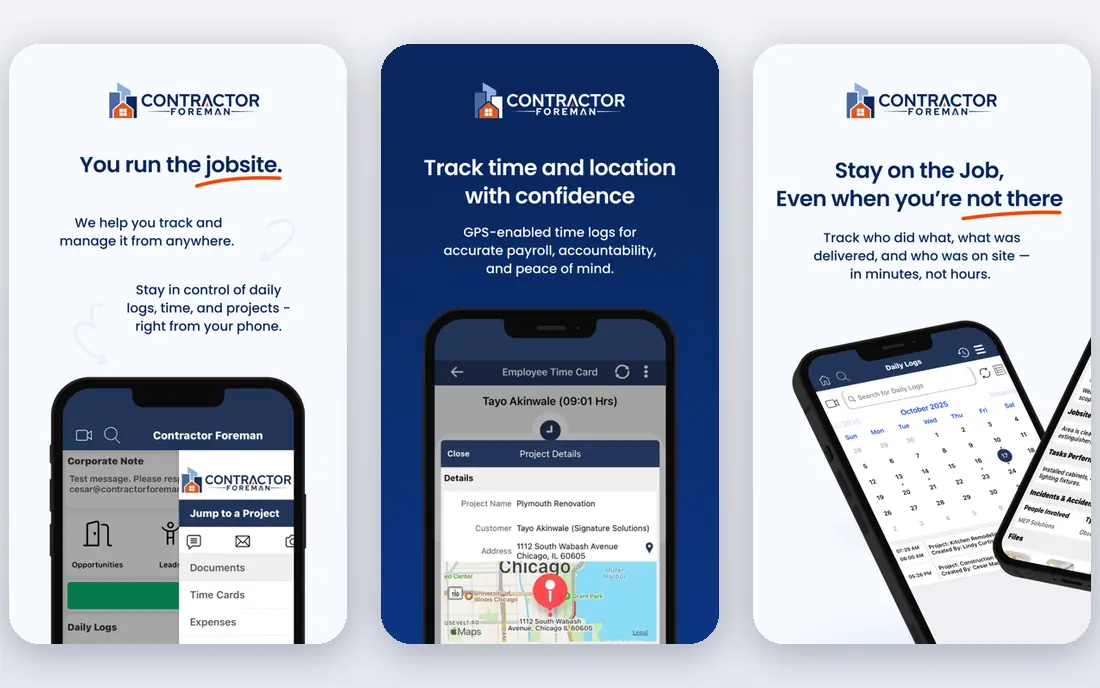
Contractor Foreman is the best construction scheduling app for a small firm that wants a real system without an enterprise bill. Scheduling, time tracking, daily logs, estimates and invoicing are included, and pricing starts at 49 dollars a month per company rather than per seat. That model matters when a crew of ten all need access.
The trade is depth. Reporting and integrations are more limited than the big platforms, and firms with complex commercial document control will outgrow it. For a contractor running a handful of jobs at once, though, the balance is right: enough scheduling structure to keep crews on track, at a price that does not need a finance meeting to approve.
- Low starting price per company, not per user
- Scheduling with daily logs and invoicing
- Straightforward setup
- Reporting is thinner than enterprise tools
- Fewer integrations than Procore or Buildertrend
Fieldwire starts where the work happens: on site. Crews see tasks tied to drawings and locations, check off work, attach photos and flag issues from a phone. That task-level view suits foremen who need to know what each crew does today, rather than a head-office Gantt chart that nobody on site opens.
The free Basic plan covers that core field coordination, which makes Fieldwire an easy trial for any crew. The limit is planning depth: complex dependencies, resource loading and client scheduling views sit elsewhere or on paid tiers. Use Fieldwire as the field layer, and pair it with a planning tool if your projects need detailed critical-path scheduling.
- Free basic plan for field coordination
- Task checklists tied to plans and locations
- Strong mobile app
- Full project management features need paid tiers
- Scheduling is task-based rather than full Gantt planning
JobTread appeals to builders who start every job with an estimate and want that estimate to drive the schedule. Budgets, selections, scheduling and invoicing stay connected, so a cost change shows up where the schedule and client communication live. The interface is clean for residential teams, and the learning curve is shorter than enterprise platforms.
Being newer is the honest weakness. The integration list is shorter than Procore or Buildertrend, and some specialist workflows may need a workaround. Residential builders who value estimating-first planning over a huge app marketplace will find that trade acceptable, especially if they test the scheduling views on a live job during the trial.
- Estimating linked to scheduling and job costing
- Clean interface for residential teams
- Client communication tools
- Newer than Buildertrend and Procore, with fewer integrations
- Pricing requires a quote check
CoConstruct is built around the custom home journey, where client selections drive the schedule as much as framing dates do. Builders track selections, allowances, change orders and communications beside the schedule, which helps when a homeowner delay moves several later tasks. That fit makes it a natural pick for custom builders who live in selection meetings.
Commercial teams should look elsewhere, since the tool is shaped for residential projects. Higher-tier features also add cost, so check which scheduling and financial views sit on the starting plan. For a custom builder, the combination of scheduling and client clarity in one place is the reason to choose it over a generic planner.
- Client selections and communication built in
- Scheduling for custom home projects
- Job costing views
- Best suited to custom residential work, not commercial
- Some advanced features need higher tiers
Projul stands out mainly for how it charges. Plans start at 199 dollars a month with no per-user fees, which makes costs predictable as a team grows. Scheduling, estimating, job costing and client tools are included, so a mid-size builder gets a full platform without watching the seat count on every hire.
The smaller ecosystem is the trade. Subcontractors and partners are more likely to already know Procore or Buildertrend, so onboarding them to Projul may take a little more explanation. Firms that value predictable pricing and a single flat bill over the largest marketplace will find that trade easy to accept.
- Published flat-rate pricing
- No per-user or per-project fees
- Scheduling with estimating and job costing
- Smaller ecosystem than Procore
- Less known among subcontractors who already use bigger platforms
monday.com is the generalist on this list, and that is both its strength and its limit. Timeline and Gantt views are flexible, boards adapt to almost any workflow, and most office staff learn it quickly. For a small firm that also schedules office work, marketing and maintenance beside construction jobs, one flexible tool can cover more than a specialist platform.
Construction depth is where it falls short on its own. Drawings, daily logs, change orders and job costing need integrations or separate tools, and per-seat pricing adds up with a large field crew. Choose monday.com when scheduling flexibility matters more than construction-specific depth, and keep a specialist tool in mind if job costing becomes the main job.
- Flexible boards, timelines and Gantt views
- Easy for office and field staff to learn
- Wide integration list
- Not construction-specific, so job costing and drawings need add-ons or integrations
- Per-seat pricing grows with crew size
How we picked these
We compared official feature pages, pricing pages, app store listings and public reviews for scheduling tools live in October 2026. We required real scheduling views, not only task lists, and we mixed enterprise, residential and budget tools so firms of different sizes can compare fairly. We did not claim hands-on testing, and where a vendor prices by quote only, we wrote See website rather than repeating an old or third-party estimate as fact.
How to choose the best construction scheduling software for your firm
Start with job type, not features. Residential builders need client portals, selections and change orders, while commercial teams need drawings, requests for information and resource planning across many subcontractors. A tool that excels at one often feels awkward at the other, so shortlist by the jobs you actually run.
Next, test the field experience on a real job. A schedule that looks perfect in the office fails if foremen cannot update it from a phone with poor signal. Check offline access, photo attachments and how quickly a task update reaches the office. Also confirm dependencies: can a delayed delivery move later tasks automatically, or must someone drag each bar by hand.
Finally, price the whole system. Quote-only tools need a written annual total, including modules for financials or advanced scheduling. Per-seat tools need a headcount that includes subcontractors who will log in. A free construction scheduling software plan can be a smart start, but confirm which scheduling views it includes before you build your process around it.
Frequently asked questions
What is the best scheduling software for construction small businesses?
Contractor Foreman at 49 dollars a month per company is the strongest low-cost full option, and Fieldwire covers basic field scheduling free. Small residential builders should also test JobTread and CoConstruct, since their estimating and client tools fit home building better than a generic planner.
What is the best construction scheduling app for field crews?
Fieldwire is our pick for field crews because its free plan ties tasks to plans and locations, with a mobile app built for site use. Procore also has a strong field app, but its quote-only enterprise pricing suits larger firms. Test both on site, not only in the office, before you decide.
What are the best construction scheduling apps with Gantt charts?
Procore, Buildertrend, monday.com and Projul all offer timeline or Gantt-style scheduling views, with dependencies that move later tasks when an early task slips. Fieldwire is more task-based, so it suits daily coordination rather than detailed critical-path planning. Check the plan level, since advanced scheduling views sometimes sit above the entry tier.
What are the best construction project management tools overall?
For commercial work, Procore leads on depth and adoption. For residential work, Buildertrend leads on client communication, with JobTread and CoConstruct close behind for estimating-first builders. For budget-conscious firms, Contractor Foreman and Fieldwire cover the core scheduling job at far lower cost.
Is there a best free construction scheduling software option?
Fieldwire Basic is the clearest free option for field task scheduling. monday.com also offers a free trial and limited free options, but its construction depth needs paid plans or integrations. A free plan works for a single crew or a trial, while multi-job firms usually need paid scheduling, reporting and client views.
What is the top construction scheduling software for large firms?
Procore is the top choice for large commercial firms because scheduling, drawings, budgets and document control live in one system with wide subcontractor adoption. Buildertrend is the residential equivalent at scale. Both price by quote, so get a full annual figure, including any add-on modules, before signing.
What is the top 10 construction scheduling software list missing here?
Many top 10 lists add general planners, takeoff tools or accounting-led suites. We kept this list to eight tools with real scheduling views and live products in October 2026. If you need takeoff, accounting or design tools, pair a scheduler here with a specialist tool rather than forcing one platform to do every job.
Sources
- https://www.procore.com
- https://www.buildertrend.com
- https://www.contractorforeman.com
- https://www.fieldwire.com
- https://www.jobtread.com
- https://www.coconstruct.com
- https://www.projul.com
- https://www.monday.com
- https://iconpolls.com/blogs/top-10-best-project-management-software-for-construction-companies-in-2026
- https://rankite.com/blog/best-construction-software
See where you really rank - block by block
ProMapRanker scans Google Maps across a grid of your service area. Simple monthly plans from $19, white-label on every plan.
Start freeKeep reading
 best subscription manager app
Best Subscription Manager App in 2026
Find the best subscription manager app for your budget with our 2026 comparison of 8 apps, covering automatic detection, renewal alerts and free plans.
Read → best stock picking service
Best Stock Picking Service in 2026
Compare the best stock picking service options for 2026, with 8 stock recommendation services for long-term, dividend, quant, growth and income investors.
Read → best software wallet
Best Software Wallet in 2026
Compare the best software wallet options for 2026, with 8 crypto wallets for desktop and mobile, covering self-custody, supported chains, fees and security.
Read →