 ProMapRanker
Best Coloring Apps in 2026: 8 Apps Compared

Realistic freeform coloring with brushes · Pricing starts at: $9.99 per month
Key takeaways
- The best coloring apps split into two styles: freeform coloring with brushes, and color by number with tap-to-fill pages.
- Free apps are best for casual coloring, while paid apps give larger libraries, more brushes, and an ad-free experience.
- Pigment is our pick for freeform coloring, while Happy Color is our pick for free color by number pages.
- Check subscription terms before paying, because many coloring apps renew weekly or monthly by default.
Quick comparison
| Pick | Great for | Pricing starts at | Free tier | |
|---|---|---|---|---|
| Pigment | Realistic freeform coloring with brushes | $9.99 per month | Yes | Visit |
 Happy Color | Free color by number pages for adults | Free | Yes | Visit |
 Lake | Artist-led pages and Apple Pencil coloring | $9.99 per month | Yes | Visit |
 Colorfy | Simple freeform coloring on iOS and Android | Free | Yes | Visit |
 Recolor | Daily color by number pages and community events | See website | Yes | Visit |
 Color Therapy | Social coloring and sharing finished pages | See website | Yes | Visit |
 Coloring Book for Me | Florals, mandalas, and detailed pattern pages | See website | Yes | Visit |
 Procreate | Advanced iPad coloring and custom art | $12.99 one-time | No | Visit |
The best coloring apps
We compared coloring apps that are live on iOS and Android in 2026, using app store listings, vendor support pages, and 2026 coloring app comparisons. Prices below reflect US app store listings where published, and we note where a price should be checked in the app before purchase.
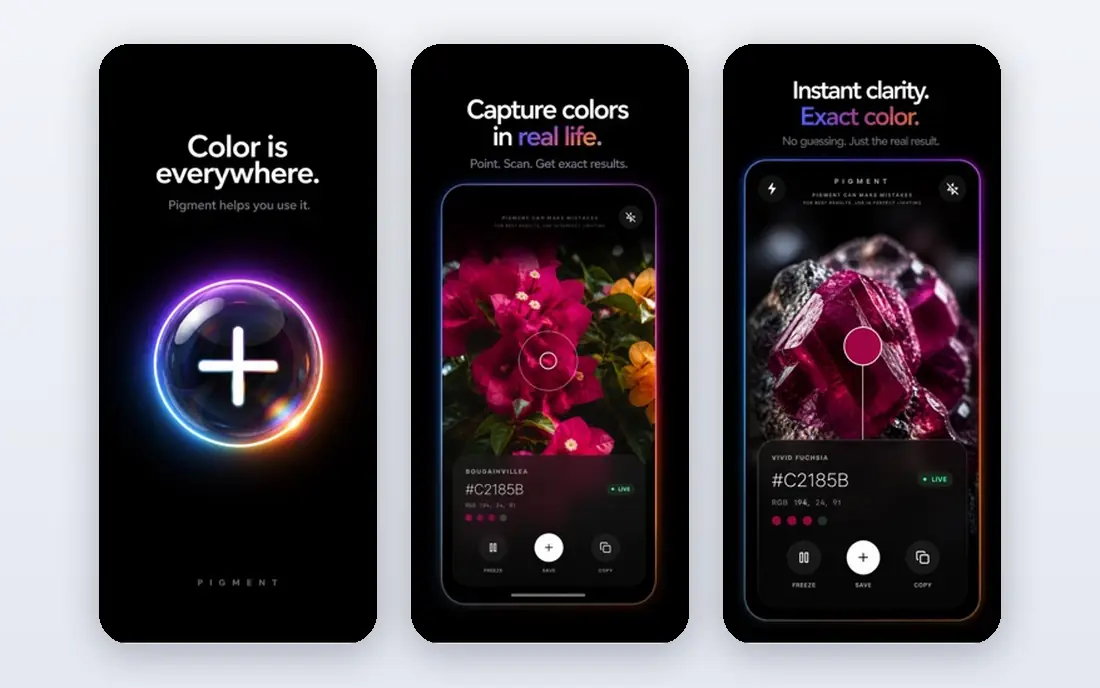
Pigment is the closest digital match to coloring with real pencils, markers, and watercolor tools. It offers a wide range of brushes, a color wheel for custom shades, and both manual coloring and tap-to-fill modes, so you can shade carefully or fill a page quickly. The gallery lets you share finished pages and see work from other colorists, which helps if you like ideas and encouragement. For an adult who wants a calm, creative break with real control over shading, Pigment is our top freeform pick.
The free version gives a taste of the tools, but the full library, premium brushes, and exclusive palettes sit behind a subscription. The monthly plan is the most sensible entry point, because the weekly plan adds up fast if you forget to cancel. If you color most days and want the widest toolset, Pigment is worth the subscription. If you color once a week, try the free version first and upgrade only when you hit its limits.
- Many realistic brushes and palettes
- Tap-to-fill and manual coloring modes
- Community gallery for sharing
- Much of the full library needs a premium subscription
- Weekly plan can be costly if left running

Happy Color is the best free coloring app for most people, because its large library of color by number pictures is free to color. You tap a numbered area, pick the matching color, and watch a detailed picture appear, which makes it easy to relax without choosing shades or worrying about staying inside lines. The range covers mandalas, animals, nature, art, and licensed collections, and new pictures arrive often. For a casual colorist, or for coloring with a child beside you, Happy Color is hard to beat on value.
The trade-off is control. Happy Color is a tap-to-fill game, not a freeform art studio, so you cannot shade, blend, or draw your own lines in the same way as Pigment. The free experience also includes ads and prompts for extra content. If you want a relaxing, low-effort coloring session and you do not mind ads, Happy Color is the best free starting point in this list.
- Very large library of free pictures
- Simple tap-to-fill play
- New pictures added regularly
- Limited freeform tools
- Ads and in-app offers appear in the free experience
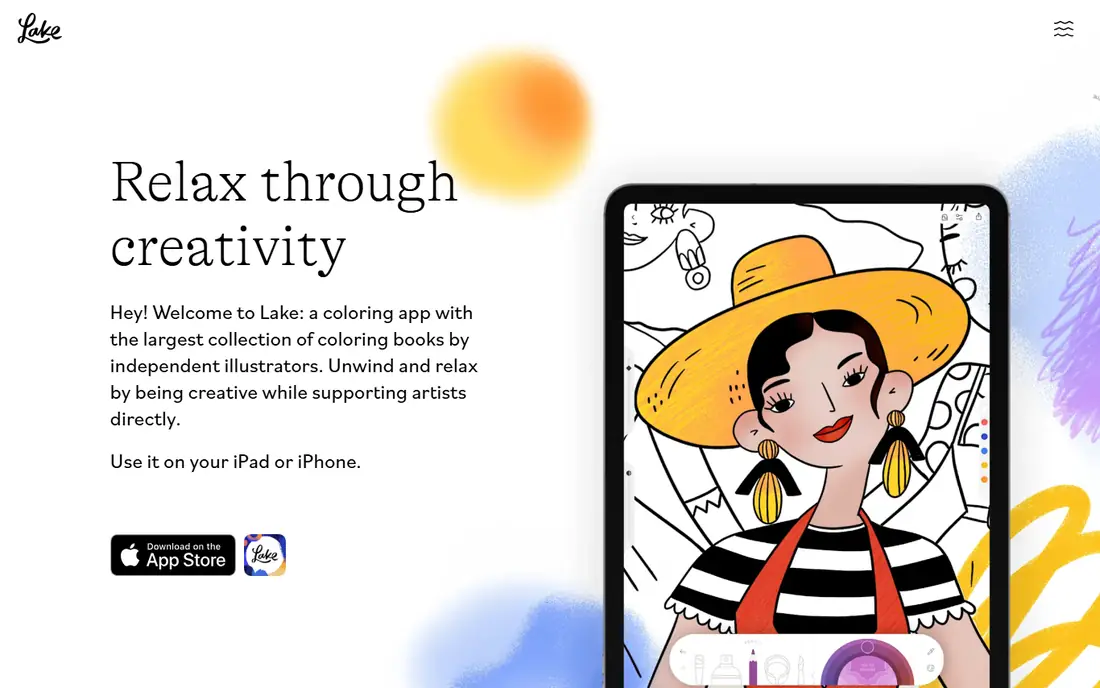
Lake focuses on original illustrations from artists, which gives its pages a distinct look compared with generic coloring libraries. The tools include brushes, spray paint, and custom palettes, and Apple Pencil support makes shading and detail work feel natural on an iPad. The app works offline and syncs through iCloud, so you can color on a plane or in a waiting room without losing progress. For an iPad owner who cares about art quality, Lake is a strong premium pick.
The main limit is platform. Lake is built for iPhone and iPad, so Android users will need another app from this list. The free content is also limited, with the full library behind a subscription. If you own an iPad and an Apple Pencil, and you want artist-led pages rather than generic tap-to-fill pictures, Lake is worth a trial. If you use Android, Pigment or Colorfy will serve you better.
- Original art from independent artists
- Strong brush and palette tools
- Works offline and syncs with iCloud
- IOS only for the full experience
- Premium needed for the full library
Colorfy is a good middle ground between a tap-to-fill game and a full art app. It offers a range of coloring pages, from mandalas to animals and florals, with palettes you can customise and a simple brush set. The free version gives daily pages to color, which suits a casual routine, and the app is available on both iOS and Android. For a beginner who wants more control than Happy Color but less complexity than Pigment, Colorfy is an easy first download.
The tools are simpler than Pigment, with fewer realistic media options and less shading control. Premium is needed for the full library and an ad-free experience, so heavy users will face a subscription decision. Still, Colorfy is a solid free starting point, and its simplicity is a strength for younger colorists and for adults who want a quick session without a learning curve.
- Easy to learn
- Mandalas, animals, and florals included
- Free version with daily pages
- Premium needed for full library and ad-free play
- Tools are simpler than Pigment or Lake
Recolor is built for daily colorists who like a routine. It offers free daily images, a large library of pictures, and community events where you can color themed pages and share results. The palette and effect options go beyond basic tap-to-fill, with gradients, filters, and custom palettes for finishing a page. For a colorist who opens an app every day and likes a social element, Recolor gives a clear reason to return.
The free daily images are limited, and the full library sits behind a premium subscription with a free trial. Prices vary by plan and region, so check the in-app checkout before committing. Recolor also focuses on tap-to-fill play, so freeform artists should look at Pigment or Lake instead. If you like daily pages and community challenges, Recolor is a strong choice.
- Several free daily images
- Large picture library
- Community events and sharing options
- Full library needs a premium subscription
- App store price varies by plan and region
Color Therapy, also listed in some stores under a similar name, focuses on coloring as a shared activity. You can color pages, share finished work, and browse pages from other users, which suits a colorist who likes feedback and ideas. The page range covers common themes such as animals, flowers, and patterns, and the tap-to-fill controls are easy to learn. For a user who wants a social coloring app rather than a solo art tool, Color Therapy is a good fit.
The social side is also its limit. Private colorists may not want sharing prompts or community feeds, and the full library needs a paid plan. Check the exact app name and developer in your app store before downloading, because several apps use similar names. If you enjoy sharing and browsing, Color Therapy is worth trying. If you prefer quiet solo coloring, Happy Color or Pigment will suit you better.
- Community sharing and galleries
- Wide range of pages
- Simple tap-to-fill play
- Premium needed for full access
- Social features may not suit private colorists
Coloring Book for Me appeals to colorists who love detailed patterns, florals, and mandalas above all else. Its pages reward patience, with small sections and rich color choices that make a finished page feel like a piece of art. The free pages let you test the style before paying, and the tap-to-fill controls are simple enough for a beginner. For a mandala fan, Coloring Book for Me can be more satisfying than a general app with a few mandala pages mixed among many other themes.
The narrower focus is the trade-off. If you want animals, outdoor scenes, portraits, and licensed art as well, a larger app such as Happy Color or Recolor will give more variety. Premium is also needed for the full library, so check the in-app price before subscribing. For a pattern lover who colors for calm and detail, Coloring Book for Me is a focused and enjoyable pick.
- Strong focus on florals and mandalas
- Detailed pages suit patient colorists
- Free pages available
- Narrower theme range than larger apps
- Premium needed for full library
Procreate is not a dedicated coloring app, but many serious iPad colorists use it as their main coloring tool. You pay once, with no subscription, and you get a full brush library, layers, and color tools that go far beyond tap-to-fill apps. You can import coloring pages as images or PDFs, color on separate layers, and export finished work at high quality. For an artist who already owns an iPad and wants full control, Procreate is the best long-term value in this list.
The learning curve is the catch. Procreate has no built-in coloring library, so you need to find or buy pages to import, and the toolset can feel overwhelming for a casual colorist. It is also iPad only, so Android and iPhone users need another app. If you want a simple relaxing app, choose Pigment or Happy Color. If you want a professional art tool that also handles coloring beautifully, Procreate is worth its one-time price.
- One-time purchase, no subscription
- Huge brush library and layer support
- Import coloring pages as PDFs or images
- IPad only
- Learning curve is steeper than dedicated coloring apps
- No built-in coloring library
How we picked these
We compared apps that are live in 2026 on iOS or Android, using app store listings, vendor support pages, and 2026 coloring app comparisons. We mixed freeform apps with color by number apps, and free apps with paid apps, because colorists want different levels of control. We kept only apps with a clear developer presence and a current listing, and we noted where prices should be checked in the app, since app store prices vary by region and plan.
What to check before you subscribe
First, decide between freeform coloring and color by number. Freeform apps such as Pigment, Lake, and Procreate give you brushes and shading control, while color by number apps such as Happy Color, Recolor, and Color Therapy give you a relaxing tap-to-fill routine. Trying one of each for a week is the fastest way to learn which style you enjoy. Second, check the subscription term. Many coloring apps offer weekly plans that look cheap but cost more over a month, so choose a monthly or yearly plan only after a trial.
Coloring for adults or kids
Adults who want calm and detail often prefer Pigment, Lake, or Coloring Book for Me, with their richer tools and detailed pages. Kids, or adults coloring with kids, often prefer Happy Color or Colorfy, with their simple controls and bright pages. Check age ratings and in-app purchase settings before handing a device to a child, and turn off purchase prompts where possible. For shared family coloring, a free app with a large library is usually the safest first step.
Free or paid
Free apps are enough for most casual colorists, especially Happy Color for color by number and the free tiers of Pigment and Colorfy for freeform play. A paid plan makes sense when you color several times a week, you want the full library, or ads interrupt your sessions. Before paying, use the free trial, check the renewal date, and set a reminder to review the subscription after a month.
Frequently asked questions
What is the best coloring app for free?
Happy Color is the best free coloring app for most people, because its large library of color by number pictures is free to color. Pigment and Colorfy also offer useful free tiers for freeform coloring. If you want freeform tools without paying, start with Pigment, and if you want simple tap-to-fill play, start with Happy Color.
What is the best color by number app?
Happy Color leads on free content, with a very large library and new pictures added regularly. Recolor is a strong alternative for daily pages and community events, while Color Therapy suits colorists who like sharing. Choose Happy Color for the most free pages, and Recolor if you want daily challenges and a community feel.
Are coloring apps good for relaxation?
Many adults use coloring apps as a short, calm break, because the repetitive motion and focus on color can help you step away from work or screens. The effect varies by person, and coloring is not a treatment for anxiety or other health conditions. If coloring helps you relax, a short daily session is a low-cost habit, and a free app is enough to test whether it works for you.
Do coloring apps work on both iPhone and Android?
Most apps in this list work on both iPhone and Android, including Pigment, Happy Color, Colorfy, and Recolor. Lake is iOS focused, and Procreate is iPad only, so check the platform before buying a subscription. If you switch phones, check if your subscription and saved pages transfer to the new device.
How do I avoid surprise subscription charges?
Check the plan term in the app store checkout, because weekly plans renew often and can cost more than a monthly plan. Use a free trial only if you set a reminder before it ends, and review subscriptions in your phone settings each month. If an app offers a yearly plan, start with a monthly plan until you know you will use it regularly.
Sources
See where you really rank - block by block
ProMapRanker scans Google Maps across a grid of your service area. Simple monthly plans from $19, white-label on every plan.
Start freeKeep reading
 top custom software development company
Top Custom Software Development Company in 2026
Looking for a top custom software development company? We compare 9 firms for web, mobile, and enterprise software, covering strengths and fit for 2026.
Read → tableau alternatives
Tableau Alternatives in 2026
Compare the best Tableau alternatives for 2026, from Power BI to Metabase, with prices, hosting options, and picks for small teams and enterprises today.
Read → microsoft teams alternatives
Best Microsoft Teams Alternatives in 2026
Looking for microsoft teams alternatives? We compare 9 chat and video tools for 2026, covering free plans, pricing, meetings, and integrations for teams.
Read →