 ProMapRanker
Best Call Tracking Software for Drywall Contractors in 2026

Lead attribution with call logging · Pricing starts at: See website
Direct answer
WhatConverts is my top pick for drywall contractors because it ties each incoming call to its source and lets you log the job type, which suits a trade where most leads arrive by phone. Pricing is quote-based, so check its pricing page. CallTrackingMetrics fits crews that want routing and recording controls, and SE Ranking suits contractors who mainly want to see which local searches and map listings produce calls.
I compared these tools from vendor documentation and public sources rather than hands-on testing. I looked at how each one handles call attribution, number management, routing and reporting, then judged which fits the way a drywall crew actually wins work: phone calls from homeowners, builders and property managers.
Key takeaways
- Drywall work is quoted over the phone, so knowing which ad, map listing or referral produced each call matters more than raw call volume.
- Call tracking numbers can be swapped dynamically per visitor or assigned per marketing channel, and the choice affects how clean your Google Business Profile data stays.
- Recording and routing features help you send emergency patch jobs to one crew and large hang-and-finish bids to another.
- Most tools bill by number of tracking numbers and call minutes, so match the plan to your busy season, not your quietest month.
- Check that the tool passes call data into your CRM or spreadsheet, because a drywall lead is useless if nobody follows up.
Quick comparison
| Pick | Great for | Pricing starts at | Free tier | |
|---|---|---|---|---|
| WhatConverts | Lead attribution with call logging | See website | Free trial | Visit |
 CallTrackingMetrics | Call routing and recording control | See website | Free trial | Visit |
 SE Ranking | Local rank and call insight | See website | Free trial | Visit |
 CallRail | Simple call tracking for small teams | See website | Free trial | Visit |
 Local Viking | Map ranking plus call tracking | See website | Free trial | Visit |
 Synup | Listing management with call tracking | See website | Not stated | Visit |
 Invoca | Larger operations with sales teams | See website | Not stated | Visit |
The best call tracking software for drywall contractors compared
WhatConverts is a lead tracking platform that captures phone calls, web forms and chat messages and puts them in one place. For a drywall contractor it works well because a single homeowner might call about a ceiling patch, then fill in a form about a basement finish, and you want both tied to the same lead.
In practice you assign tracking numbers to your Google Business Profile, your website and any paid ads, then log each call with a lead type such as repair, hang and finish, or commercial bid. That lets you see which channel produces the jobs you actually want, not just the most calls. You can also mark lead quality so your office knows which callers turned into quotes.
The limits are mostly about scale. If you run one truck and one phone, the feature set is more than you need, and the quote-based pricing means a short sales conversation before you know the cost.
- Ties calls, forms and chats to one lead record
- lets you tag lead type and quality
- reports on which source produced each call
- Pricing is quote-based
- the interface has more settings than a small crew needs
CallTrackingMetrics is a contact center style platform with strong routing and recording tools. It suits a drywall business that has grown past a single phone, for example one office line plus separate numbers for service calls and new construction bids.
You can route calls by time of day, by the number dialed or by a menu, so after-hours emergency patch calls reach the on-call finisher while bid enquiries queue for the estimator. Recordings and transcripts help you review how quotes are given and spot jobs that were never followed up.
The trade-off is complexity. A two-person crew will spend time learning settings it may never use, and the more advanced routing and reporting options sit on higher tiers.
- Detailed routing rules
- call recording and transcripts
- flexible number management
- Steep learning curve
- advanced features cost more
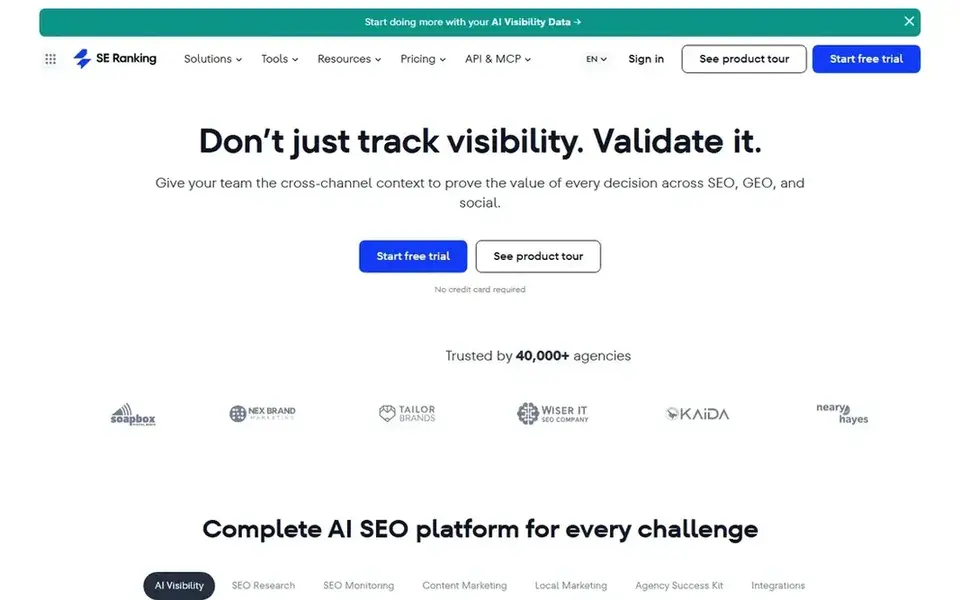
SE Ranking is a local SEO platform with rank tracking, competitor checks and call tracking built in. It fits a drywall contractor who wants to know whether the map listing or the website is producing calls, and how those positions move over time.
The call tracking side lets you see which local searches and listings generate phone calls, then compare that with your map positions for terms like drywall repair plus your city. That combination is useful when you are deciding whether to put more effort into your Google Business Profile or your website pages.
If all you want is call routing and recording, this is more software than you need, and the call features are less deep than a dedicated platform.
- Local rank tracking alongside call data
- clean reporting
- covers map and organic positions
- Call tracking is a smaller part of the suite
- not a dedicated call platform
CallRail is one of the best known call tracking tools for small local businesses, and it is a reasonable starting point for a drywall contractor who wants to know which ads and listings produce calls. Setup is quick: buy numbers, point them at your channels, and start logging calls.
For a drywall crew the useful part is tagging. You can label calls as quote requests, warranty callbacks or supplier calls, then see which marketing channel produces the quote requests. Recordings help when a homeowner describes a job in detail and you want the estimator to hear it.
The main limit is cost creep. Each additional tracking number and each extra feature tier adds to the bill, so keep the number of channels you track tight.
- Straightforward setup
- call recording and tagging
- works well with Google Ads and Analytics
- Per-number costs add up
- advanced attribution needs higher tiers
Local Viking is a Google Business Profile and local rank tracking tool with call tracking attached. It fits a drywall contractor whose leads mostly come from the map pack, for example searches like drywall repair near me or drywall contractor plus a suburb.
The geo-grid reports show where your listing ranks across a service area, which matters for a trade that travels to job sites. The call tracking side then shows whether those map positions turn into phone calls, so you can tell whether a ranking gain is worth the effort.
It is not a full call center product. If you need complex routing, menus or deep recording workflows, look at a dedicated platform instead.
- Built around Google Business Profile
- geo-grid rank tracking
- call tracking add-on
- Narrow focus on map rankings
- less useful outside Google
Synup is a listing management platform that keeps your business name, address and phone number consistent across directories, with call tracking included. It suits a drywall company that covers several towns and wants one clean record everywhere.
Consistent listings matter for a contractor because homeowners often find you through a directory rather than a direct search, and a wrong phone number loses the job. Synup lets you track calls from those listings and see which directories send real enquiries.
The setup is the main hurdle. You need to decide which numbers go where before you launch, and a single-location crew with one phone line will find it heavy.
- Manages listings across many directories
- call tracking included
- good for multiple service areas
- Setup takes planning
- more than a single-location crew needs

Invoca is a call intelligence platform built for businesses with real sales teams and meaningful ad budgets. A drywall contractor running several crews, a dedicated estimator and paid search across multiple cities could use it to see which campaigns produce booked jobs.
The platform analyses call conversations and ties them to marketing sources, which helps when you want to know why one campaign produces quotes and another produces price shoppers. It is a serious tool with a serious setup.
For most drywall contractors this is too much software. A one or two crew operation should look at the simpler options above first.
- Conversation analytics
- strong attribution for bigger ad spends
- integrates with major platforms
- Aimed at larger budgets
- overkill for small crews
How I chose
I built this list from vendor documentation and public sources, not from hands-on testing. I read each vendor's own product pages, help documentation and published feature lists, then checked how the tools handle the parts of call tracking that matter to a drywall contractor: number management, call attribution, routing, recording and reporting.
I also weighed limits honestly. A tool that is excellent for a ten-crew commercial outfit can be a poor fit for a two-person repair team, and pricing that looks simple can grow with every tracking number. Where a vendor does not publish clear pricing or free plan details, I say so rather than guess.
The final order reflects fit for the audience, not a claim that one product is better in every case. If your leads come mostly from the map pack, a local rank tool with call tracking may serve you better than a full call platform.
What to check before you buy
- Confirm how tracking numbers are assigned: dynamic number insertion per visitor, per channel, or per location, and whether that suits your Google Business Profile setup.
- Check whether call recordings and transcripts are included or cost extra, since reviewing quote calls is where most drywall contractors get value.
- Ask how call data reaches your CRM, spreadsheet or job software, because a lead that is not followed up is a lost bid.
- Match the plan to your busy season, since per-number and per-minute billing can spike when storm damage or renovation season drives call volume.
- Confirm the tool follows Google's guidelines for call tracking on your Business Profile, and keep your primary number consistent where required.
- Ask about porting and cancellation terms so you are not stuck with numbers you no longer use.
Frequently asked questions
Do drywall contractors need call tracking software?
Most drywall work starts with a phone call, so call tracking helps you see which ads, map listings and directories produce real enquiries. If you already know your leads come from one source, a simple setup is enough; if you run several channels, tracking pays for itself by showing where to spend.
Will call tracking numbers hurt my Google Business Profile?
Used correctly, no. Dynamic number insertion shows your main number to search engines and swaps in a tracking number for visitors, which keeps your listing consistent. Follow Google's guidelines and avoid putting a tracking number where your primary number belongs.
Can call tracking show which drywall jobs are worth taking?
Some platforms let you tag calls by lead type and quality, so you can separate repair callbacks from full hang-and-finish bids. That reporting helps you judge which channels produce the jobs you want, rather than just the most calls.
How many tracking numbers does a small crew need?
Start with one number per channel you actually measure, such as your website, your Google Business Profile and any paid ads. Adding numbers for every directory quickly raises costs, so track only the sources you plan to act on.
Is a local SEO suite better than a dedicated call platform?
It depends on where your leads come from. If map rankings drive most calls, a local SEO tool with call tracking gives you both views in one place. If routing, recording and attribution are the priority, a dedicated call platform is the better fit.
Sources
See where you really rank - block by block
ProMapRanker scans Google Maps across a grid of your service area. Simple monthly plans from $19, white-label on every plan.
Start freeBrowse all guides
← Best Call Tracking Software for Blinds Installers in 2026Best Call Tracking Software for Kennels in 2026 →
 best review request software for kitchen remodelers
Best Review Request Software for Kitchen Remodelers in 2026
A practical guide to review request software for kitchen remodelers, comparing tools on timing, reminders, channels, and Google policy fit.
Read → best review management software for siding contractors
Best Review Management Software for Siding Contractors in 2026
A siding contractor's guide to review management software in 2026: how each tool handles review requests, replies and Google Business Profile, compared.
Read → best review management software for crossfit gyms
Best Review Management Software for CrossFit Gyms in 2026
A practical guide to the best review management software for CrossFit gyms in 2026, covering request workflows, replies, and multi-location options.
Read → geo grid size local seo
What Grid Size and Spacing Should You Use for Local Rank Tracking?
Learn how to choose the right geo-grid size and point spacing for local rank tracking so your Google Maps data is accurate, useful, and not misleading.
Read → local seo for gutter cleaning companies
Local SEO for Gutter Cleaning Companies
A local SEO guide for gutter cleaning companies: Google Business Profile setup, reviews, and recurring-service local SEO for gutter cleaners.
Read → local seo for tow truck companies
Local SEO for Tow Truck Companies
A local SEO guide for towing companies: 24/7 GBP setup, service-area targeting, and emergency-search visibility.
Read →More in Local SEO & Google Maps · All guides A to Z by date · Latest guides