 ProMapRanker
Best App to Monitor Child's Phone in 2026

Key takeaways
- Google Family Link and Apple Screen Time are free and built in, so try them before paying for any parental control app.
- Qustodio gives the most detailed cross-device reports, while Bark gives alert-based monitoring that flags risky messages without showing full transcripts.
- Only lawful, disclosed parental controls for a parent monitoring their own minor child's device appear here, with no covert tracking tools.
- Monitoring must be disclosed to the child where appropriate, and these tools must not be used for covert tracking of adults or any other person.
Quick comparison
| Pick | Great for | Pricing starts at | Free tier | |
|---|---|---|---|---|
 Qustodio | Detailed cross-device reports | $59.95 per year | Yes | Visit |
 Bark | Alert-based teen monitoring | $14 per month | Free trial (7 days) | Visit |
 Google Family Link | Free Android supervision | Free | Yes | Visit |
 Apple Screen Time | Free Apple household controls | Free | Yes | Visit |
 Net Nanny | Real-time web filtering | $39.99 per year | No | Visit |
 Norton Family | Budget Windows and Android controls | $49.99 per year | Free trial (30 days) | Visit |
 Aura | Parental controls plus family security | $10 per month | Free trial (14 days) | Visit |
 Mobicip | Affordable mixed-device filtering | $2.99 per month | Free trial (7 days) | Visit |
 Microsoft Family Safety | Windows and Xbox families | Free | Yes | Visit |
 OurPact | Detailed mobile schedules | Free | Yes | Visit |
The best app to monitor child's phone
We compared official pricing and feature pages for disclosed parental control tools only. Every app here is designed for parents to supervise their own minor child's device openly, with screen time, filtering or alerts. No covert surveillance tools appear in this list.
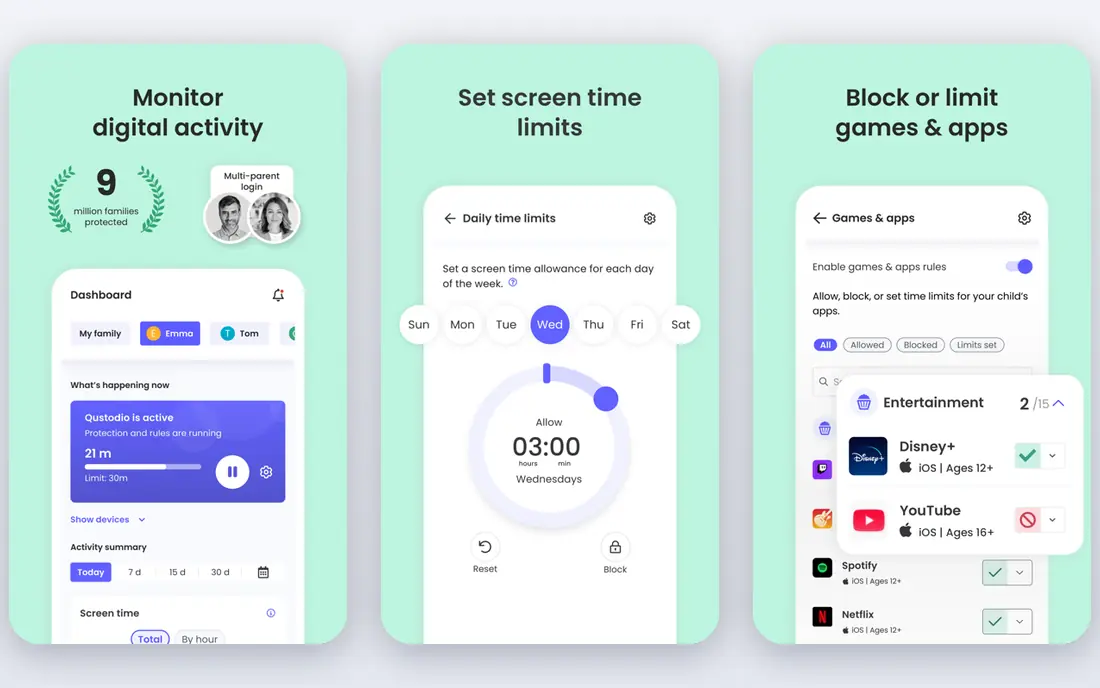
Qustodio is the most complete cross-device parental control app in this list. It covers Android, iOS, Windows, macOS, Chromebook and Kindle devices, with web filtering, app limits, routines and detailed reports in one dashboard. Parents can see app use, web activity and time patterns, then set rules by child and by device. The free plan covers core protection on one device, which is enough to test the system.
The limits come from platform rules. iOS restricts what third-party apps can see and control, so Android reports are fuller than iPhone reports. Paid plans start at $59.95 per year for up to five devices, with a Complete plan for unlimited devices at a higher price. For mixed-device families that want one dashboard, Qustodio is our first pick.
- Works across phones and computers
- Detailed activity reports
- Free plan for one device
- Full features need paid plans
- IOS limits are stricter than Android
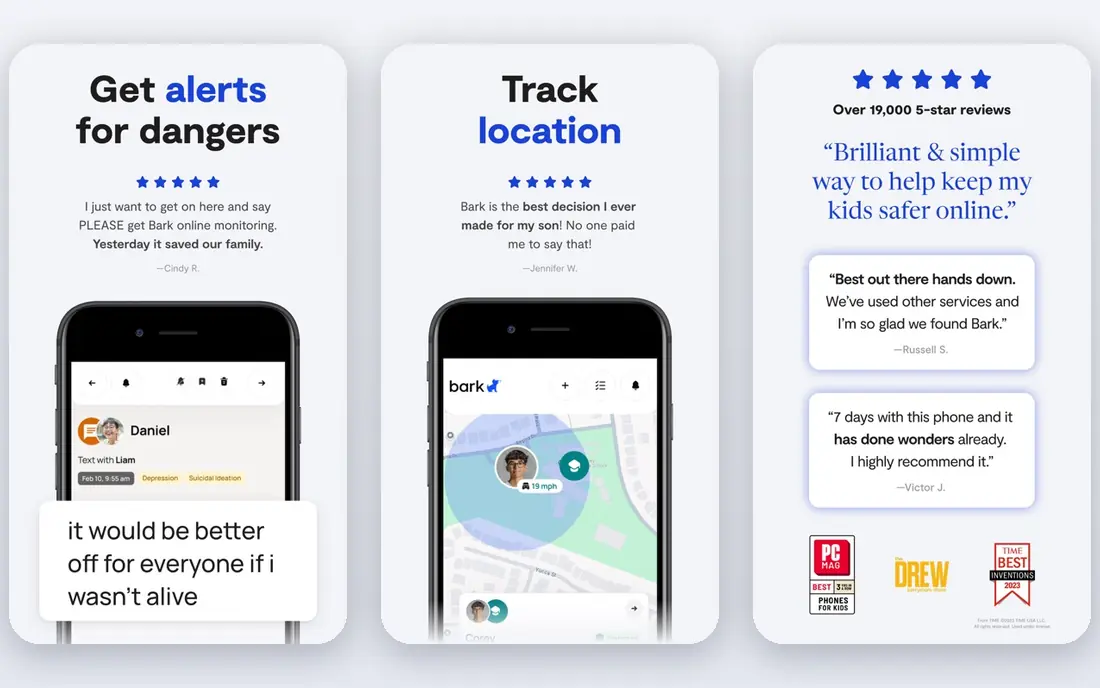
Bark takes a different approach from full activity logs. It monitors texts, email and more than 30 apps for signs of bullying, self-harm, predatory contact and other risks, then alerts parents only when it flags a concern. That alert-first design suits teens, since it gives them more privacy day to day while still catching serious issues. Parents can also set screen time and web filtering in the Premium plan.
Bark Premium costs $14 per month or $99 per year, with a seven-day trial. Availability is limited to the US, Australia and South Africa, so families elsewhere should pick Qustodio or another option. If your main worry is risky conversations rather than minute-by-minute tracking, Bark is the strongest alert-based choice.
- Scans texts, email and many apps for risks
- Alerts only on flagged content
- Good for teens
- US, Australia and South Africa only
- No lasting free tier
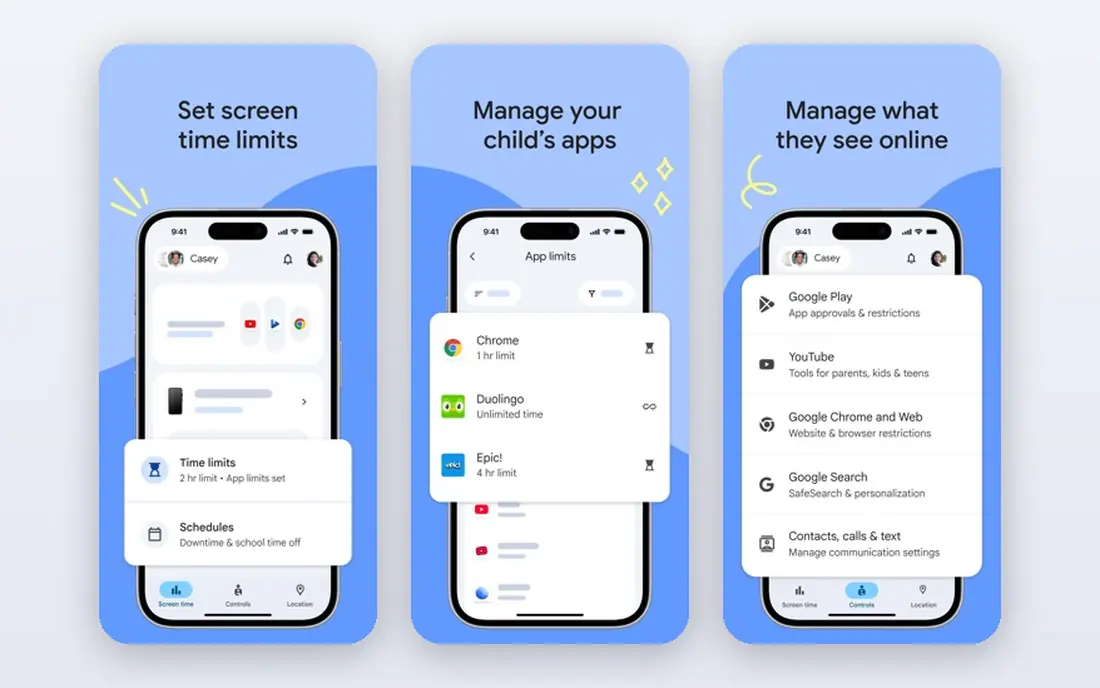
Google Family Link is the free supervision tool for Android phones and Chromebooks. Parents create a supervised Google account for the child, approve app installs, set daily limits and bedtime schedules, and see location where the child device supports it. School Time can limit distractions during school hours while keeping essential apps available.
Family Link is free with no paid tier, which makes it the obvious first step for Android families. It is less useful for iPhone households, and older teens may find its controls too basic. Try it before paying, since it covers the core jobs of limits, approvals and schedules at no cost.
- Free
- App approvals and limits
- Location and school time controls
- Android and Chromebook only
- Weaker for teens who need less supervision
Apple Screen Time is built into iPhone, iPad and Mac, with no separate app to buy. Through Family Sharing, parents can set app limits, downtime, content restrictions, communication limits and purchase approvals for a child's device. Because it is part of the operating system, its limits are harder to bypass than many third-party apps on iPhone.
The limit is ecosystem. Screen Time only helps if the child uses Apple devices, and setting up multiple children takes time. It also offers no cross-platform dashboard for Android or Windows devices. For Apple-only households, it is the best free option and the right starting point before any paid tool.
- Free and built into iOS
- Deep app and communication limits
- Purchase approvals
- Apple devices only
- Setup takes care across Family Sharing
Net Nanny has long led on web filtering, because it checks pages in real time rather than relying only on block lists. That approach catches new or borderline pages that list-based filters miss. Parents can block apps, set time limits and review reports, with a focus on web safety rather than social monitoring.
Current comparison listings note that Net Nanny does not support Android and that macOS support stops at older versions, so check device support before buying. Plans start at $39.99 per year for one desktop device. If web filtering on Windows and iOS is your main need, Net Nanny remains strong, but Android families should look elsewhere.
- Real-time page-level filtering
- App blocking
- Detailed reports
- No Android support in current listings
- MacOS support is limited
Norton Family, from the security company behind Norton 360, offers web supervision, search supervision, time limits and school time controls at $49.99 per year, with a 30-day trial. It works best on Windows and Android, where it can supervise web use and app time more fully. The price undercuts Qustodio and Bark, which makes it a good value pick for families on a budget.
iOS support is more limited, as with most third-party tools on iPhone, and there is no free tier beyond the trial. If your children use Windows computers and Android phones, Norton Family covers the main controls well for the price. Apple households should test Screen Time first.
- Good price for the features
- Web supervision and time limits
- School time controls
- IOS features are more limited
- No lasting free tier
Aura bundles parental controls with wider family security, including identity and device protection, in one subscription. Its parental controls cover content filtering, app limits and cyberbullying alerts, alongside the security tools adults in the household may already want. Plans start at $10 per month billed annually, with a 14-day trial.
The trade-off is that you pay for a bundle, not just controls. Families that only need screen time and filtering will find Qustodio or Family Link cheaper. Families that already want identity protection for adults may find the bundle good value. Check which parental features sit on your chosen plan, since bundle tiers differ.
- Parental controls bundled with security tools
- Cyberbullying alerts
- Family dashboard
- Higher total cost than controls alone
- Some features vary by plan
Mobicip is the value pick for mixed-device families. It covers Android, iOS, Windows, Mac, Chromebook and Kindle Fire, with web filtering, app limits and location features. The Lite plan starts at $2.99 per month billed annually, which undercuts most paid rivals while still covering the core controls.
The interface is plainer than Qustodio, and reports are less detailed, but the core job of filtering and limits works well. The seven-day trial is short, so test it with a focused week. If budget matters and you need many devices covered, Mobicip is hard to beat on price.
- Low monthly price
- Works across many device types
- Good filtering and limits
- Interface is plainer than Qustodio
- Trial is short
Microsoft Family Safety is the free family tool for Windows and Xbox households. It covers screen time limits, content filters, activity reports and location sharing, with Xbox controls that matter if gaming is part of the household. Core features are free, with extra features tied to Microsoft 365 plans.
Its phone controls are weaker than dedicated parental apps, especially on iPhone, so it works best as a complement rather than a sole phone monitor. Pair it with Family Link or Screen Time for phones, and use Family Safety for computers and consoles. For Windows-first families, it is a useful free layer.
- Free core features
- Screen time across Windows and Xbox
- Location sharing
- Weaker on iPhone and Android than dedicated apps
- Some features need Microsoft 365
OurPact focuses on schedules. Parents can build detailed daily routines, grant time allowances, block apps on demand and set bedtime rules from the parent app. The free tier covers basic scheduling, which is enough to test whether schedule-based control suits your family. Paid plans start at $6.99 per month and add web filtering and more devices.
OurPact covers iOS and Android phones well, but it is less of a full computer dashboard than Qustodio. If your main problem is phone use at meals, homework time and bedtime, its schedule tools are the most precise here. Start free, build one weekday schedule, and only upgrade if filtering becomes the next need.
- Detailed schedules and allowances
- Free tier to start
- Web filtering on paid plans
- Paid plans from $6.99 per month
- Fewer cross-device features than Qustodio
How we picked these
We compared official pricing and feature pages, and we kept only disclosed parental control tools designed for parents supervising their own minor children. We left out any tool marketed for covert tracking, since those tools are not parental controls and must not be used to monitor adults or other people without consent. We also checked device support, since iOS, Android and Windows limits change what each app can actually do.
How to set up parental controls honestly
Tell your child what you are installing and why, in plain language suited to their age. Explain which limits apply, what alerts you will see, and what happens if a limit is hit. That conversation matters more than the app choice, because a child who understands the rules is more likely to follow them and to tell you about problems.
Start with the built-in tools, then add a paid app only for a gap you can name, such as cross-device reports or social alerts. Set limits together where possible, review them as the child grows, and keep emergency access available. Check the app after operating system updates, since updates can change permissions. Above all, use these tools only for your own minor child's device, with disclosure where appropriate, and never for covert tracking of adults or any other person.
Frequently asked questions
What is the best app to monitor your child's phone?
Qustodio is the best all-around paid app for cross-device families, while Bark is best for alert-based teen monitoring. Google Family Link and Apple Screen Time are the best free starting points. The right pick depends on your child's devices and whether you need detailed reports or alerts only.
Can I monitor my child's phone for free?
Yes. Google Family Link is free for Android, Apple Screen Time is free for Apple devices, and Microsoft Family Safety offers free core features. Qustodio and OurPact also offer free tiers. Start with the free tool that matches your child's device before paying.
Should I tell my child about parental controls?
Yes, where appropriate for their age. Disclosure builds trust, helps the child understand the rules, and avoids surprises when a limit blocks an app. Explain what you will see, what you will not see, and how limits change as they show responsibility.
Do parental control apps work on iPhone?
Yes, but with limits. Apple Screen Time works best on iPhone because it is built into iOS. Third-party apps like Qustodio and Bark work on iPhone too, but iOS restricts some features, so reports and controls are fuller on Android. Check each app's iOS feature list before buying.
What is the difference between Bark and Qustodio?
Qustodio gives detailed activity reports across devices, while Bark focuses on alerts for risky texts and social activity without showing full transcripts. Choose Qustodio for detailed oversight of younger children, and Bark for alert-based monitoring that gives teens more day-to-day privacy.
Are these apps legal to use?
Parental control apps are designed for parents supervising their own minor children, and laws vary by location and by the child's age. Use them openly for that purpose only, and do not use them for covert tracking of adults or any other person. If you are unsure about local rules, check them before installing any monitoring tool.
Sources
See where you really rank - block by block
ProMapRanker scans Google Maps across a grid of your service area. Simple monthly plans from $19, white-label on every plan.
Start freeKeep reading
 who has best internet service
Who Has the Best Internet Service in 2026
Who has best internet service for US homes? We compare fiber, cable, fixed wireless and satellite providers on speed, price, availability and terms today.
Read → which survey tool has the best analytics
Which Survey Tool Has the Best Analytics in 2026
Find which survey tool has the best analytics in 2026, comparing Qualtrics, SurveyMonkey, Typeform, Alchemer, and more on reports, text, and stats today.
Read → which streaming service has the best movies
Which Streaming Service Has the Best Movies in 2026
Answering which streaming service has the best movies, with Netflix, Max, Criterion and more compared on libraries, prices and free options in this guide.
Read →