 ProMapRanker
Best App to Book Flights in 2026

Key takeaways
- Google Flights is our research pick, with price history, tracking, and flexible date views for free.
- Skyscanner is best for flexible travelers, with Everywhere search and strong budget airline coverage.
- Hopper is best for timing, with buy or wait advice and fare freeze options on some bookings.
- Wherever you find a fare, check the airline direct price too, because direct bookings often give better change terms.
Quick comparison
| Pick | Great for | Pricing starts at | Free tier | |
|---|---|---|---|---|
 Google Flights | Price tracking and research | Free | Yes | Visit |
 Skyscanner | Flexible destination search | Free | Yes | Visit |
 Hopper | Price predictions and timing | Free | Yes | Visit |
 Kayak | Complex trips and filters | Free | Yes | Visit |
 Momondo | Lowest fare hunting | Free | Yes | Visit |
 Kiwi.com | Mixed airline routes | Free | Yes | Visit |
 Expedia | Flight plus hotel bundles | Free | Yes | Visit |
 Going | Deal alerts by email | Free | Yes | Visit |
 CheapOair | Phone support and deals | Free | Yes | Visit |
The best apps to book flights
The best flight apps do two jobs: find a fair price, and make the booking terms clear before you pay. The apps below cover both, from search engines to booking platforms, and we compared them on search flexibility, price alerts, fees, and how easy it is to change a trip later.
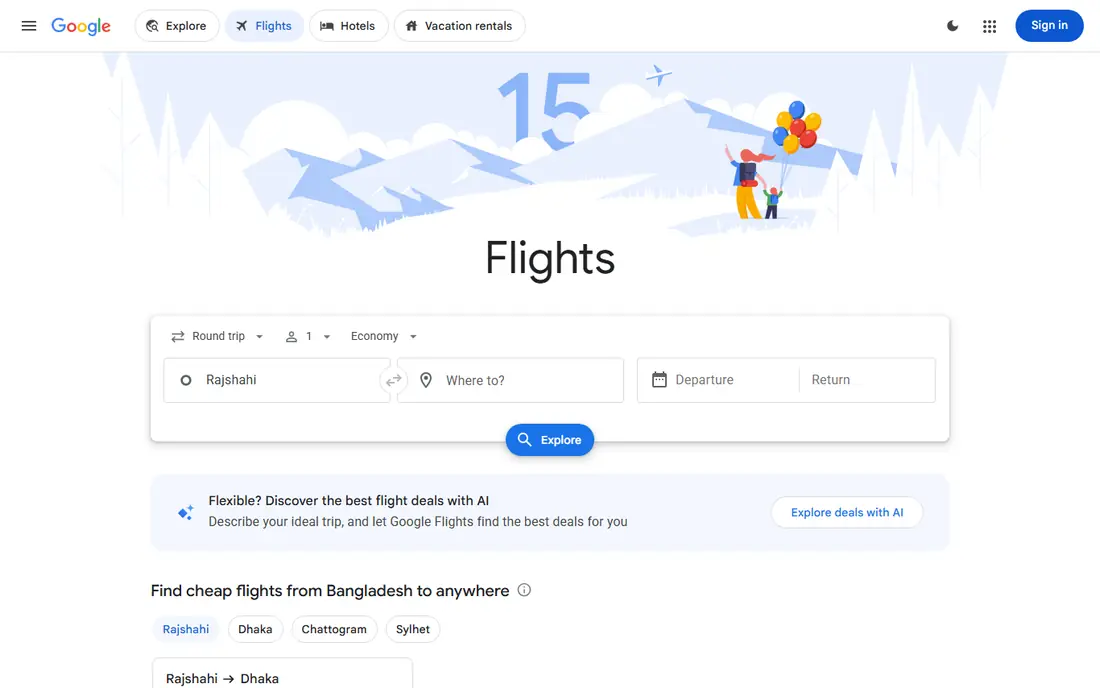
Google Flights is the research desk we recommend first. It shows price history, lets you track a route for alerts, and offers an Explore map for flexible travelers who know when they can fly but not where. The date grid makes it easy to see whether shifting by a day or two saves real money.
It is not a full booking app. Google Flights usually sends you to the airline or a partner to complete purchase, which is often a plus, because direct airline bookings tend to give better change and refund handling. Use Google Flights to find the fare and the timing, then book direct when the price matches.
- Price history and tracking alerts
- Flexible date and Explore map views
- Fast search across airlines
- Not a booking app in the full sense
- You usually complete purchase with an airline or partner
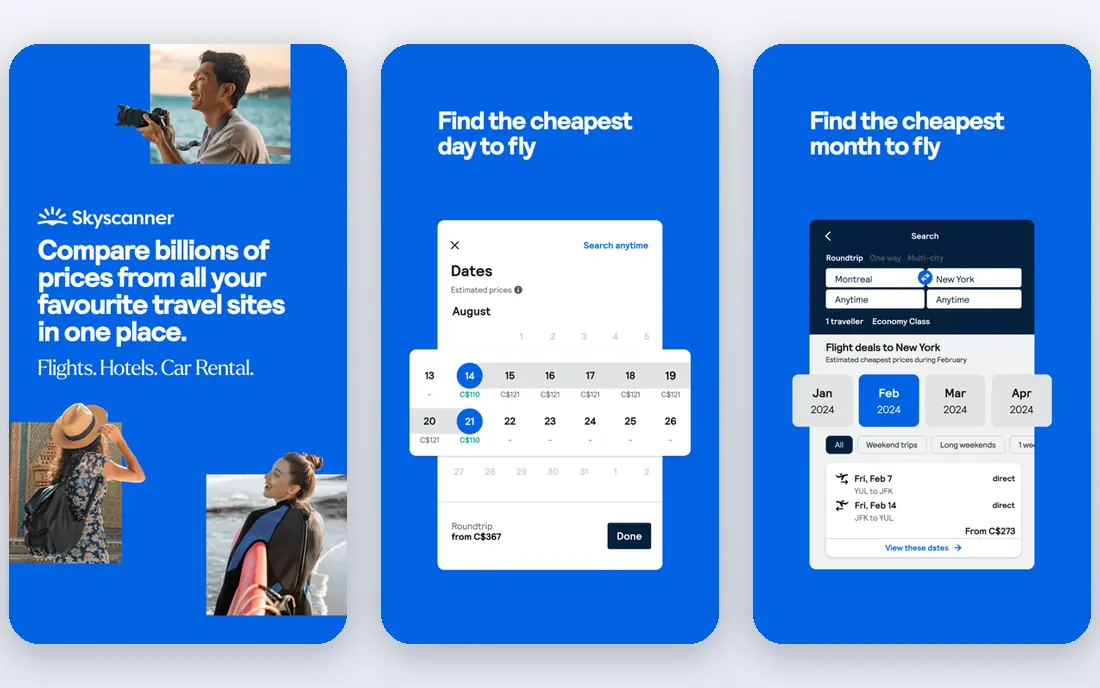
Skyscanner is the best app for flights when you are flexible. Set destination to Everywhere and it shows cheap trips from your home airport, which suits weekend breaks and open-ended travel. Its month view and price alerts help you pick cheaper days without checking daily.
Budget fares need care. The lowest price often excludes checked bags, seat choice, and changes, so compare the total with bags added before you call it a deal. Skyscanner links to airlines and partners for booking, so read the seller terms on the final screen, not just the search result price.
- Everywhere search for flexible trips
- Strong budget airline coverage
- Price alerts and month view
- Final price depends on the airline or partner you book through
- Some low fares exclude bags
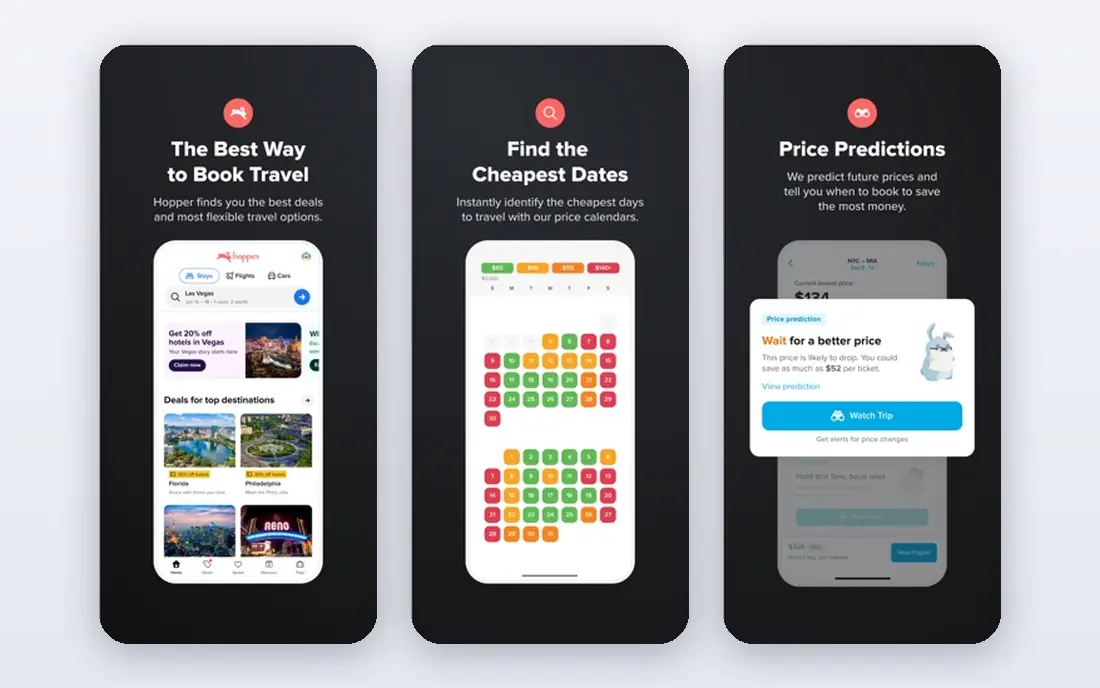
Hopper answers the question every traveler asks: book now or wait. Its predictions use fare history to advise timing, with a color coded calendar and alerts when a route hits a predicted low. Price Freeze lets you lock a fare for a fee while you decide, which helps when you need a day to confirm plans.
Treat predictions as guidance. Fuel prices, schedule cuts, and demand shifts can break a forecast, and booking through Hopper rather than the airline can slow changes during disruption. Our advice is to use Hopper for timing, then book direct with the airline when the price is close.
- Buy or wait predictions with color coded calendars
- Price freeze on some bookings
- Push alerts for drops
- Predictions are forecasts, not guarantees
- Booking through Hopper adds a middleman
Kayak suits power users with complex trips. Its filters cover stops, layover length, departure times, airlines, and airports, and its Hacker Fares can lower a price by combining two one-way tickets from different sellers. Trip management tools keep bookings, alerts, and price history in one place.
Hacker Fares deserve a warning. Because they may combine separate tickets, a missed connection on one ticket may not protect the next leg. Read the fare terms, check connection times, and only use a Hacker Fare when the saving is worth that risk. For a simple return, a standard fare is usually safer.
- Strong filters for stops, times, and airlines
- Hacker Fares that mix tickets
- Trip management tools
- Hacker Fares need careful reading, as they combine separate tickets
- Final seller terms vary
Momondo is a strong pick for travelers hunting the absolute lowest fare, especially on international routes. Its price graphs show cheap days at a glance, and its search covers many airlines and sellers. If Skyscanner and Google Flights miss a low fare, Momondo sometimes finds it.
The same caution applies as with any fare aggregator. Check who actually sells the ticket, what bags are included, and how changes work. A fare that looks 40 dollars cheaper can cost more once bags and a change fee are added. Compare the total, not just the headline price.
- Often surfaces very low fares, especially international
- Clear price graphs by day
- Owned by the Kayak group
- Low fares may come from smaller sellers with strict terms
- Bag and change rules vary by seller
Kiwi.com finds routes other search engines miss by mixing airlines that do not normally sell together. That can open a cheap path to a smaller city or a multi-stop trip that a single airline cannot price well. For adventurous travelers with flexible plans, Kiwi is a useful extra search.
Self-transfer risk is real. When Kiwi combines separate tickets, you may need to collect bags and re-check in, and a delay on one leg may not protect the next. Kiwi offers guarantees on some bookings, but read those terms closely. Use Kiwi for discovery, and weigh the saving against the risk before you book a tight connection.
- Finds routes that mix airlines that do not partner
- Virtual interlining for creative itineraries
- Good for adventurous travel
- Self-transfer routes carry real risk if a leg is delayed
- Support and change terms need careful reading
Expedia earns its place when you book a trip, not just a flight. Bundling flight plus hotel can save money versus booking each separately, and the app keeps flights, hotels, and cars in one itinerary. Rewards on many bookings add value for frequent travelers who stay in the Expedia system.
For flight only searches, Google Flights and Skyscanner give sharper price history and flexible views. Use Expedia when a bundle is the goal, compare the bundle total with separate airline and hotel prices, and read the hotel cancellation terms as closely as the flight terms.
- Bundles flight plus hotel for savings
- Large inventory
- Rewards on many bookings
- Flight only search is less sharp than Google Flights or Skyscanner
- Change terms vary by fare and hotel
Going, formerly Scott's Cheap Flights, works differently from a search app. You set home airports, and it emails mistake fares and strong deals when they appear. That passive model suits travelers who can fly on short notice and want someone else to watch fares for them.
It is not a replacement for search. When a deal alert arrives, you still need to check dates, bags, and booking terms, and book quickly before the fare disappears. Free alerts cover basic deals, while premium tiers add more airports and faster alerts. Pair Going with Google Flights for a full strategy.
- Curated flight deal alerts from your home airports
- Premium tiers add more alerts
- Good for flexible travelers
- Deals are alerts, not a full search engine
- You still book with the airline or partner
- Premium features need payment
CheapOair suits travelers who want human help with a booking. Phone support can untangle multi-city trips, group travel, or fare questions that an app screen cannot answer. Its app and site also run frequent promotions, which can help on popular routes.
Watch fees and terms. Some bookings carry service fees, and change and cancellation rules depend on the fare and airline. Compare the all-in total with the airline direct price, including any service fee, before you pay. For a simple direct flight, the airline site is often cleaner. For a complex trip, CheapOair support can be worth the fee.
- Phone booking support for complex trips
- Frequent promotions
- Large flight inventory
- Service fees may apply on some bookings
- Change terms vary and need reading before payment
How we picked these
We compared official app and site pages, plus recent flight app comparisons, for apps that search or book flights in October 2026. We kept search engines, prediction tools, booking platforms, and one deal alert service, because travelers use them together. We did not claim hands-on testing we did not do, and we noted where final prices, bags, and change terms depend on the airline or seller, not the app itself.
How to book without overpaying
Search in at least two apps, then check the airline direct price. Set a price alert early, especially for trips more than a month away, and watch the date grid for cheaper days. Read the fare class: basic fares often exclude bags, seat choice, and changes, while a main fare may cost little more once bags are added. For international trips, check connection times and whether separate tickets are involved.
Book direct when the price is close. Direct bookings usually give faster help during delays, cancellations, and schedule changes, because you deal with the airline, not a middleman. If a third-party fare is much cheaper, save screenshots of the total price, bag rules, and change terms, and confirm the booking reference with the airline after purchase.
Timing tips that still hold
Domestic fares often reward booking one to three months ahead, while international fares often reward three to six months ahead, but demand and season matter more than any rule. Midweek flights on Tuesdays, Wednesdays, and Saturdays often cost less than Friday and Sunday flights. Flexibility on dates and airports is the single biggest saving lever most travelers have.
Frequently asked questions
What is the best app for flights if I want cheap deals?
Skyscanner and Momondo are strong for lowest fare hunting, while Google Flights gives the best price history for judging a deal. Going adds deal alerts for flexible travelers. Compare the all-in total with bags, and check the airline direct price before you pay.
What is the best travel app for flights and hotels together?
Expedia is the best bundle pick here, because it prices flight plus hotel together and keeps both in one itinerary. For flight only research, Google Flights and Skyscanner are sharper. Compare the bundle total with separate bookings to confirm the saving is real.
What is the best app for flight deals on short notice?
Hopper alerts and Going deal emails both help for short notice trips, while Skyscanner Everywhere search finds cheap destinations from your airport. Short notice fares vary fast, so set alerts early and be ready to book when a strong fare appears.
Should I book through an app or directly with the airline?
Book direct when the price is close, because direct bookings usually give better change and disruption help. Use apps for search, timing, and alerts, then buy from the airline. If a third-party fare is much cheaper, read seller terms and confirm the booking with the airline after purchase.
Are flight price predictions accurate?
Predictions such as Hopper buy or wait advice are forecasts based on fare history, not guarantees. They help with timing on common routes, but they can miss fuel shifts, schedule changes, and demand spikes. Use predictions as guidance, set alerts, and book when the price fits your budget.
Do flight apps charge extra fees?
Search apps such as Google Flights, Skyscanner, and Kayak are free to search, and you pay the airline or seller price. Booking platforms may add service fees on some fares, so check the final total before payment. Always compare the all-in price, including bags and fees, across sellers.
Sources
See where you really rank - block by block
ProMapRanker scans Google Maps across a grid of your service area. Simple monthly plans from $19, white-label on every plan.
Start freeKeep reading
 top custom software development company
Top Custom Software Development Company in 2026
Looking for a top custom software development company? We compare 9 firms for web, mobile, and enterprise software, covering strengths and fit for 2026.
Read → tableau alternatives
Tableau Alternatives in 2026
Compare the best Tableau alternatives for 2026, from Power BI to Metabase, with prices, hosting options, and picks for small teams and enterprises today.
Read → microsoft teams alternatives
Best Microsoft Teams Alternatives in 2026
Looking for microsoft teams alternatives? We compare 9 chat and video tools for 2026, covering free plans, pricing, meetings, and integrations for teams.
Read →