 ProMapRanker
Best App for Writing a Book Free in 2026

Key takeaways
- Reedsy Studio is the strongest free starting point for finishing a book, because it combines chapter drafting with publish-ready EPUB and PDF export at no charge.
- Google Docs suits collaboration and backup, while dedicated novel tools such as yWriter, bibisco, and Wavemaker suit chapter, character, and plot planning.
- Free does not mean unlimited in every case, so check export limits, device limits, and whether your work stays readable outside the app.
- AI drafting help is a separate choice from a free writing app, and most strong AI tools for books sit on paid plans or bring-your-own-key models.
- The best free setup for many writers is one drafting app plus one backup, not five apps competing for the same manuscript.
Quick comparison
| Pick | Great for | Pricing starts at | Free tier | |
|---|---|---|---|---|
 Reedsy Studio | Free drafting with publish-ready export | Free | Yes | Visit |
 Google Docs | Free drafting with collaboration and version history | Free | Yes | Visit |
 LibreOffice Writer | Free desktop writing in standard document formats | Free | Yes | Visit |
 Wavemaker Cards | Free novel planning with a visual grid | Free | Yes | Visit |
 yWriter | Free chapter and scene writing on Windows | Free | Yes | Visit |
 bibisco | Free character and world building for novelists | Free | Yes | Visit |
 Manuskript | Free snowflake method and outline writing | Free | Yes | Visit |
 Obsidian | Free personal notes linked to a manuscript | Free | Yes | Visit |
The best app for writing a book free
A free book app must do three jobs well: hold a long manuscript without slowing down, let you move between chapters and notes, and give you a clean file at the end. We compared official product pages, app listings, and public documentation for free tools that writers actually finish books in, and we note where a free plan stops short.

Reedsy Studio is our pick for most people who want to write a book free and finish it. You create a free account, write chapter by chapter in a clean editor, and when the book is done you can export a typeset EPUB and a print-ready PDF without paying. That export step is where many free tools fail, because a draft trapped in a proprietary format is not a finished book. Reedsy also handles front matter and a table of contents, which saves a formatting job at the end.
The limits are plain. Reedsy Studio is a web editor, so offline writing is not its strength, and it does not offer character sheets, plot boards, or AI drafting help. Writers who need deep planning usually pair it with a planning tool or a notes app. If your goal is a clean, publishable manuscript at zero cost, though, Reedsy Studio is the free app we would start with.
- Free book editor with chapter organisation
- EPUB and print-ready PDF export at no charge
- Clean, distraction-light interface
- Web only, so you need internet access
- No built-in character or plot planning tools
- Manuscripts live on Reedsy servers
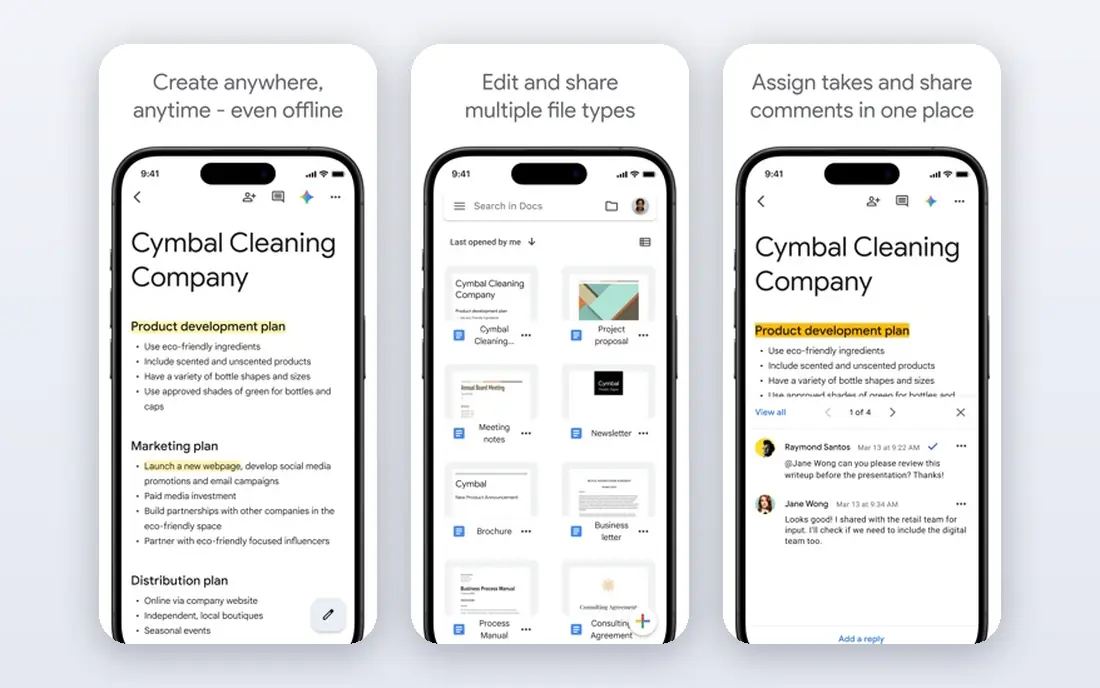
Google Docs is the free drafting tool most writers already know, and that familiarity is a strength. It syncs across devices, keeps version history so a bad edit can be undone, and makes it easy to share a chapter with an editor or a beta reader for comments. Many published books were drafted in Docs, which tells you that a simple, reliable editor is enough for the writing itself, even if it lacks novel-specific features.
The catch is structure. Docs gives you one long document, or a set of documents you must organise yourself, with headings and an outline as your main navigation aid. There is no built-in story bible, character database, or scene board, and a 300-page manuscript can feel unwieldy in a single file. Use Docs when collaboration and backup matter most, and pair it with a planning tool if your novel needs stronger organisation.
- Free with a Google account
- Cloud sync and version history
- Easy sharing and commenting for editors and beta readers
- No chapter, character, or plot structure built in
- Very long manuscripts can feel slow to navigate
LibreOffice Writer
Great for: Free desktop writing in standard document formats
LibreOffice Writer is the free desktop word processor for writers who want their files on their own computer in a standard format. It opens and saves document files that editors and publishers expect, keeps track changes intact, and its Navigator sidebar helps you jump between headings in a long manuscript without scrolling through hundreds of pages. For a writer who sends work to a traditional editor, that compatibility matters.
The trade-off is that Writer is a general word processor, not a novel tool. It has no character sheets, no plot grid, and no goal tracking, and cloud sync depends on where you store the file yourself. Its design also feels plain next to modern writing apps, though many writers prefer that plainness once they are drafting. If you want a free, offline, standard-format editor, Writer is a solid and honest choice.
- Free and open source
- Opens and saves standard document files
- Navigator helps jump between headings in long manuscripts
- No novel planning features
- Interface feels traditional compared with modern writing apps
- No built-in cloud sync of its own
Wavemaker Cards is the closest free equivalent to a paid novel planner for fiction writers who plot visually. It runs in the browser, offers a grid planner, a beat board in the Save the Cat style, a mind map tool, and a manuscript editor, all without a subscription. That combination suits a plotter who wants to see scenes, beats, and structure in one place before drafting, and its offline-capable design helps writers on a Chromebook or a shared computer.
The honest limits are export and sync. Export is more limited than a publishing-focused tool, so many writers draft and plan in Wavemaker and then move the text elsewhere for final formatting. Drive sync also needs a click at the end of each session, which is easy to forget. If you plan before you draft, and you want that planning free, Wavemaker is a strong pick.
- Free browser app with grid planner, beat board, and mind map
- Works offline as a progressive web app
- Distraction-free manuscript editor included
- Export options are more limited than Reedsy
- Google Drive sync needs a manual step each session
yWriter is a free novel tool built around a simple idea: a novel is a set of scenes inside chapters, and each scene knows its viewpoint character, location, and purpose. That structure helps a writer who loses track of a long draft, because you can move scenes, check what each scene does, and see which characters appear where. It is free, it works offline, and it does not push a subscription at any point.
The limits are platform and polish. yWriter is mainly a Windows tool, so Mac and Linux writers need a workaround or a different pick, and its interface looks dated compared with modern apps. Export also needs a formatting pass in another tool for a publish-ready file. For a Windows writer who wants free scene-level organisation, yWriter remains a useful and proven option.
- Free
- Breaks a novel into chapters and scenes
- Tracks characters, locations, and items per scene
- Windows focused, with limited Mac support
- Interface looks dated
- Export needs a formatting step elsewhere
bibisco is built for writers who think in characters first. Its free community edition lets you build detailed character sheets, locations, and objects, then link them to chapters and scenes, so a character detail written in chapter two stays findable in chapter twenty. It also tracks word goals and gives a structured view of a novel in progress, which helps pantsers who discover structure late as well as planners who build it early.
The catch is the edition split. The community edition is free and genuinely usable, but some advanced features sit in the paid supporters edition, so check the edition comparison before you rely on a specific feature. Its interface also takes a short learning period, and final publishing formatting still needs another tool. For character-driven fiction, bibisco is one of the best free tools available.
- Free community edition
- Character interviews, locations, and objects
- Chapter and scene structure with word goals
- Full feature set needs the paid supporters edition
- Interface takes a little learning
- Export is functional rather than publish-ready
Manuskript is an open-source novel tool for writers who like a method, especially the snowflake method, which grows a one-sentence idea into a full outline step by step. It combines an outliner, a distraction-free editor, character sheets, and world notes in one desktop app, and because it is open source, there is no subscription and no account lock-in. Writers who want a structured path from idea to draft often find that guidance helpful.
The honest downsides are pace and polish. Development has slowed, the interface feels dated, and installation can be awkward on some systems compared with a browser app. Formatting and export are also more limited than a publishing tool. If you are comfortable with open-source software and you want snowflake support free, Manuskript is worth trying, but keep a backup of your work in a standard format as well.
- Free and open source
- Snowflake method support
- Character sheets, world notes, and distraction-free mode
- Development has slowed
- Interface feels dated
- Installation can be fiddly on some systems
Obsidian is not a book app in the usual sense, and that is why it earns a place here. It stores notes as plain markdown files on your device, links them together, and lets you build a story bible, research notes, timelines, and draft fragments that stay readable in any text editor. For a writer who has lost work to a closed format, owning plain files is a real comfort, and the free personal tier is genuinely free.
The limit is that Obsidian will not format or publish your book. You still need a drafting or export tool for the final manuscript, and a novel workflow in Obsidian needs some setup with folders, templates, or community plugins. Use Obsidian as the thinking and planning layer, paired with Reedsy Studio or Google Docs for the manuscript itself, and you get a free system that respects both planning and finishing.
- Free for personal use
- Files stored as plain markdown you own
- Linked notes suit story bibles and research
- Not a book formatter
- Needs plugins and setup for novel workflows
- Sync across devices is paid unless you use your own method
How we picked these
We compared official product pages, app listings, and public documentation for free writing tools, and we favoured tools that are free in a real sense, not just a short trial, and that handle long manuscripts, chapter structure, or publishable export. We did not claim hands-on testing, and free tiers change, so check the vendor page for current limits before you commit a full novel to one app.
How to choose the best free book writing software
Start with how you write, not with a feature list. Plotters need planning tools, pantsers need a fast editor that stays out of the way, and collaborative writers need sharing and version history. Then check the end of the process: can you export a clean document, EPUB, or PDF without paying, and can you open that file elsewhere. A free app that traps your manuscript is not free in the sense that matters.
Build a free pipeline that finishes books
A practical free pipeline is one planning tool, one drafting tool, and one backup. For example, plan in Wavemaker or bibisco, draft in Reedsy Studio, and keep a copy in Google Docs or on your own drive. That split avoids the common trap of moving a manuscript between five apps and losing track of the latest version. Name one file as the master copy, back it up after each writing session, and only move the master when you mean to.
What about AI tools for writing a book
AI tools can help with outlining, brainstorming, and revision, but they are a separate layer from a free drafting app. Sudowrite and NovelCrafter are popular paid or bring-your-own-key options for fiction, and general assistants offer free tiers for brainstorming and editing help. If you use AI help, keep your own creative direction in charge, edit the output carefully, and check the publishing platform rules on AI disclosure before you publish.
Frequently asked questions
What is the best free novel writing software?
Reedsy Studio is the best free starting point for most novelists, because it combines chapter drafting with free EPUB and PDF export. Wavemaker suits visual plotters, bibisco suits character-driven writers, and Google Docs suits writers who need collaboration. The best choice depends on whether planning, collaboration, or publish-ready export matters most to you.
What is the best free software for writing a book on Windows?
LibreOffice Writer and yWriter both suit Windows writers well, with Writer offering standard document compatibility and yWriter offering scene-level novel structure. Reedsy Studio and Wavemaker also work in a Windows browser, so a Windows writer can combine a desktop editor with a browser planning tool at no cost.
Is there a best novel writing software free option for Mac?
Yes. Reedsy Studio, Google Docs, Wavemaker, bibisco, and Obsidian all work on Mac, with Reedsy and Wavemaker running in the browser and bibisco and Obsidian offering desktop apps. yWriter is the main exception here, since it is Windows focused, so Mac writers should pick from the browser and cross-platform options.
What is the best AI tool for writing a book?
There is no single best AI tool, because fiction drafting, outlining, and editing are different jobs. Sudowrite suits fiction drafting and revision, NovelCrafter suits long series with a detailed story bible, and general assistants suit brainstorming and structural feedback. Most strong AI fiction tools are paid or need your own AI provider key, so test a free tier or trial with a short sample before paying.
What are the best writing platforms for publishing a finished book?
Reedsy Studio handles drafting and export, and publishing platforms such as Amazon Kindle Direct Publishing, IngramSpark, and Draft2Digital handle distribution. Keep your master manuscript in a standard format, export a clean EPUB for ebooks and a print-ready PDF for print, and check each platform file requirements before upload.
Can I write a whole book for free?
Yes, with care. A free pipeline of Reedsy Studio for drafting and export, Google Docs for backup and collaboration, and a planning tool such as Wavemaker or bibisco can take a book from idea to publishable file at no software cost. You may still pay for editing, cover design, or distribution, but the writing software itself does not have to cost anything.
Sources
See where you really rank - block by block
ProMapRanker scans Google Maps across a grid of your service area. Simple monthly plans from $19, white-label on every plan.
Start freeKeep reading
 top custom software development company
Top Custom Software Development Company in 2026
Looking for a top custom software development company? We compare 9 firms for web, mobile, and enterprise software, covering strengths and fit for 2026.
Read → tableau alternatives
Tableau Alternatives in 2026
Compare the best Tableau alternatives for 2026, from Power BI to Metabase, with prices, hosting options, and picks for small teams and enterprises today.
Read → microsoft teams alternatives
Best Microsoft Teams Alternatives in 2026
Looking for microsoft teams alternatives? We compare 9 chat and video tools for 2026, covering free plans, pricing, meetings, and integrations for teams.
Read →