 ProMapRanker
Best AI Video Ad Creation Software in 2026

Key takeaways
- HeyGen and Synthesia lead for presenter-led ads, while Pictory, InVideo and Lumen5 lead for fast template and stock-based ads.
- Runway and Descript give more creative control for teams that edit their own footage, rather than relying only on templates or avatars.
- Credit and minute limits matter more than headline price, so check how many ads, minutes or exports a plan actually allows.
- Only use footage and likenesses of real people with clear consent, and label AI-generated presenters where viewers could mistake them for real people.
Quick comparison
| Pick | Great for | Pricing starts at | Free tier | |
|---|---|---|---|---|
 HeyGen | Best AI avatar ads | $29 per month | Yes | Visit |
 Synthesia | Best presenter ads for business | $29 per month | Yes | Visit |
 Pictory | Best script to ad video | $29 per month | Free trial | Visit |
 InVideo | Best all-round ad templates | $20 per month | Yes | Visit |
 Lumen5 | Best blog to ad video | $19 per month | Yes | Visit |
 Veed | Best ad editing with AI tools | $12 per user per month | Yes | Visit |
 Runway | Best generative ad clips | $15 per month | Yes | Visit |
 Descript | Best editing ads from a transcript | $24 per month | Yes | Visit |
The best AI video ad creation tools
AI video ad tools fall into three groups, which are avatar presenters, template and stock video makers, and editors with AI features. Avatar tools turn a script into a talking presenter, template tools turn text into a social ad from stock footage, and editors help you cut and polish footage you already own. We compared tools on ad fit, creative control, output quality, limits and price, using vendor pricing reported in October 2026. Note that OpenAI Sora is not listed, because its standalone consumer app closed in April 2026 and it is not a live standalone product to buy in this list.

HeyGen is the first tool to try for a presenter-led ad, because it turns a script into a talking presenter video in many languages without a shoot. The Creator plan starts at $29 per month, or about $24 per month on annual billing in reported terms, with a free plan for testing short videos. That speed suits product launches, local service ads and multilingual campaigns where hiring presenters for each language would be slow and expensive.
The catch is credits, since each video consumes credits and longer or higher-quality outputs cost more. Avatar ads also need careful scripting, because a flat presenter can hurt a brand if the ad relies on emotion or humour. Use HeyGen for clear, informative ads, get consent for any real person likeness or voice, and test one ad with real viewers before scaling a whole campaign.
- Realistic AI avatars and voice cloning options
- Multilingual ads
- Templates for social formats
- Credits limit output
- Avatar ads can feel impersonal if overused
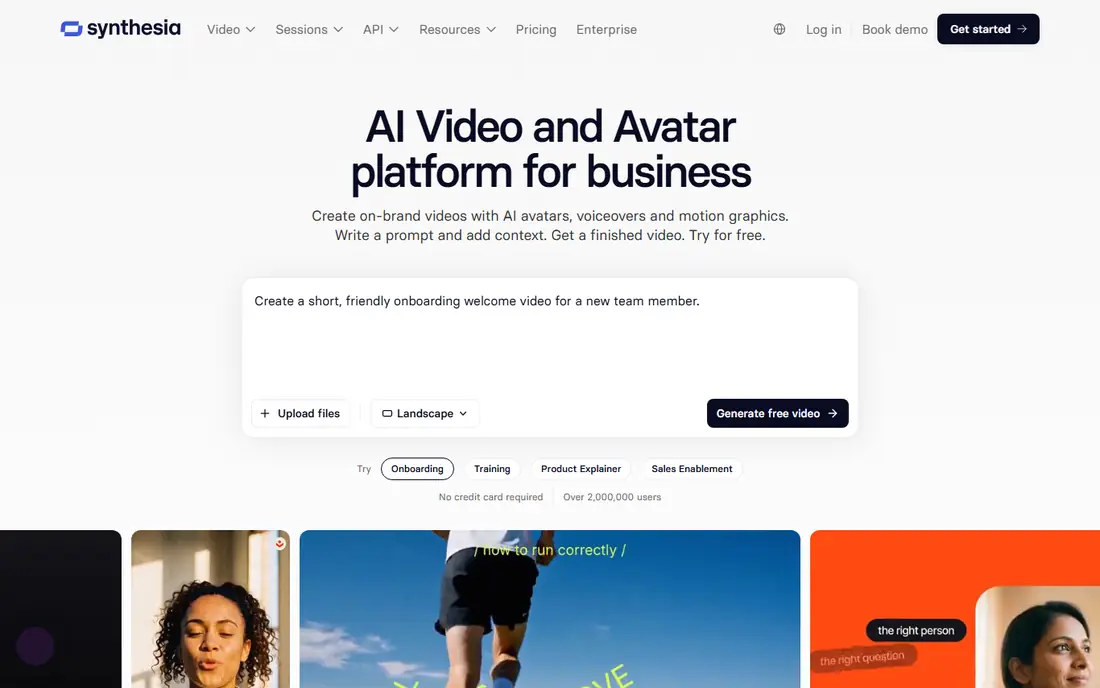
Synthesia suits business and training-style ads where consistency matters more than cinematic flair. A single presenter can deliver the same message across many ads, languages and updates, which helps brands that need a steady voice for product explainers and service ads. The Starter plan starts at $29 per month, or about $18 per month on annual billing in reported terms, with a free Basic plan offering limited minutes for testing.
Minute limits are the main constraint, since longer ads or many variations can exhaust a monthly allowance quickly. Synthesia is also not the best choice for a highly visual, fast-cut social ad that relies on footage rather than a presenter. Use it when a clear presenter, consistent branding and easy updates matter, and keep the script short and direct for social formats.
- Business-friendly avatars and templates
- Multilingual support
- Free Basic plan for testing
- Minute limits on lower plans
- Less suited to cinematic or highly stylised ads

Pictory is built for repurposing written content into video, which makes it a fast route from a product description or blog post to a short ad. Paste a script, choose stock footage and voiceover, add captions, and export in social formats, all without filming. The Starter plan starts at $29 per month, or about $25 per month on annual billing in reported terms, with a free trial rather than a permanent free plan.
The risk is generic output, because stock footage for common topics can look the same across many brands. Add your own product clips, brand colours and a strong hook in the first seconds to avoid that trap. Pictory works best for teams that already have good copy and need video versions quickly, rather than teams that need a fully original shoot.
- Turns scripts and blog posts into video
- Stock footage and voiceover built in
- Captions included
- No permanent free plan, trial only
- Stock footage can look generic without custom clips
InVideo is the most versatile template tool in this list, because it combines stock footage, AI-generated clips and a timeline editor in one product. The Starter plan starts at about $20 per month on annual billing in reported terms, with a limited free plan for testing. That breadth suits small marketing teams that need many ad variations for different platforms without learning a full editing suite.
The frustration for some users is control, since changing one scene or caption can require regenerating a segment rather than a simple drag-and-drop fix. Free exports also carry a watermark, so paid plans are needed for real campaigns. Use InVideo when speed and volume matter, and keep a short brand guide for colours, fonts and calls to action so variations stay consistent.
- Large template library
- Stock footage plus AI generation
- Timeline editing on paid plans
- Precise edits can require regenerating segments
- Free exports carry a watermark
Lumen5 is the simplest route from a blog post or product page to a social video ad, especially for teams without video experience. It extracts key points, matches them to stock visuals, and lets non-editors adjust text, colours and music in a straightforward editor. The entry paid plan starts at about $19 per month on annual billing in reported terms, with a free Community plan for testing.
The downside is a recognisable template look if you use default styles without customisation. Add your own footage, brand assets and a clear offer early in the video to stand out. Lumen5 is best for content teams that need many short social ads from written material, and less suited to high-end brand films that need original footage and precise editing.
- Fast blog to video conversion
- Simple editor for non-editors
- Social formats built in
- Template look can feel repetitive
- Less control than a full editor
Veed suits teams that already have footage and need to turn it into polished ads quickly in a browser. It offers captions, subtitles, translations, background removal and other AI tools alongside a timeline editor, so a raw product clip can become a social ad without desktop software. The entry paid plan starts at about $12 per user per month on annual billing in reported terms, with a free plan for testing.
The limits are export quality on free plans and per-editor pricing, which can add up for a larger team. Veed is also an editor first, not an avatar or generative video generator, so it will not create a presenter or a cinematic scene from text alone. Choose Veed when you have real product footage and want fast, branded edits with captions for silent social viewing.
- Browser editor with captions, subtitles and AI tools
- Good for polishing real footage
- Team editing
- Free exports are watermarked and limited to 720p in reported terms
- Per-editor pricing adds up for large teams
Runway is for creative teams that want original, stylised clips rather than stock footage or a talking avatar. Its generative models can create short scenes from text or images, and its editing tools help shape those clips into an ad. The entry paid plan starts at about $15 per month in reported terms, with a limited free credit allowance for testing.
The challenge is predictability, because generative output varies, credits are consumed by generations that may not be usable, and longer or higher-quality clips cost more. Runway rewards teams that iterate, storyboard and treat generation as a draft stage, not a one-click finished ad. Use it for distinctive visuals, product concepts and stylised campaigns, and pair it with an editor such as Veed or Descript for final polish.
- Generative video models for original clips
- Editing tools for creative teams
- Strong for stylised ads
- Credit system makes costs hard to compare
- Output quality varies by prompt and model
Descript changes how talking-head ads are edited, because you cut video by deleting words in a transcript, rather than scrubbing a timeline. That makes it fast to turn a founder video, testimonial or product demo into a short ad, with captions and filler-word removal built in. The entry paid plan starts at about $24 per month in reported terms, with a free plan offering limited transcription for testing.
Descript is not the right tool if you need stock footage, avatars or generative scenes, since it works best with footage you already have. Teams that film regularly will get the most value, especially for testimonial and explainer ads where the spoken message drives the cut. For a small team that records its own ads, Descript can cut editing time sharply.
- Edit video by editing text
- Transcription and captions built in
- Good for talking-head ads
- Not a stock or avatar ad generator
- Best for footage you already own
How we picked these
We compared vendor pricing pages, feature documentation and buyer comparisons for October 2026, favouring tools that are live, supported and actually used for advertising, not just general video generation. We included avatar, template, generative and editing tools, because ad teams have different starting points. We did not claim hands-on testing, and we used reported annual billing prices where vendors list monthly and annual rates differently. Only use footage and likenesses of real people with clear consent, and do not use these tools to create misleading ads that present an AI presenter as a real customer or employee without disclosure where that matters.
How to choose an ad tool
Start with the ad format, not the tool, because a presenter ad, a stock montage and a product demo need different strengths. Choose HeyGen or Synthesia for presenter-led ads, Pictory, InVideo or Lumen5 for fast stock-based social ads, and Veed, Descript or Runway when you have footage or want original visuals. Check the plan limits for minutes, credits, exports and seats, and run one real campaign on a trial before committing to a yearly plan.
Next, protect your brand and your audience, by using only licensed footage and music, getting consent for any real person voice or likeness, and labelling AI presenters where viewers could be misled. Keep the first three seconds strong, add captions for silent viewing, and export in the exact sizes each platform requires. Test two or three variations of each ad, measure clicks and conversions rather than views alone, and keep the winning format for the next campaign.
Frequently asked questions
What is the best AI video ad creation software?
For presenter-led ads, HeyGen and Synthesia lead, while Pictory, InVideo and Lumen5 lead for fast template ads from text. For more creative control, Runway and Descript are stronger, especially when you have your own footage or want original visuals. The best tool depends on whether your ad starts with a script, a presenter, stock footage or real product video.
What are the best AI video ad creation tools for small businesses?
InVideo, Lumen5 and Pictory are strong small-business picks, because they turn text into social ads quickly and offer low-cost entry plans. Veed is also useful if you already film product clips and need captions and polish. Start with a free plan or trial, make one real ad, and only upgrade when you need watermark-free exports or higher limits.
Can AI video tools replace a video shoot?
For simple presenter, explainer and stock-based ads, yes, they can replace a shoot and save time and cost. For high-end brand films, complex product demos and emotional storytelling, a real shoot still gives better control, authenticity and performance. Many teams use AI tools for volume and testing, and reserve shoots for hero campaigns.
Do I need consent to use a real person in an AI ad?
Yes, get clear consent before using a real person face, voice or likeness in an ad, including for AI clones or avatars based on them. Do not present an AI presenter as a real customer, employee or expert without disclosure where viewers could be misled. Check platform ad policies and local advertising rules, and keep consent records with the campaign files.
How much does AI video ad software cost?
Entry paid plans in this list start from about $12 to $29 per month, depending on the tool and whether you pay annually. Credit and minute limits mean the true cost depends on how many ads you make, how long they are, and how many exports you need. Compare total monthly cost for your actual volume, not just the entry price.
Is OpenAI Sora available for video ads?
No, do not buy Sora as a live standalone consumer product for ads, because OpenAI shut down the Sora app in April 2026 and ended API access in September 2026 in reported terms. Teams that need generative video for ads should use live alternatives in this list, such as Runway, HeyGen or InVideo, and check current availability before planning a campaign around any single model.
Sources
See where you really rank - block by block
ProMapRanker scans Google Maps across a grid of your service area. Simple monthly plans from $19, white-label on every plan.
Start freeKeep reading
 who has best internet service
Who Has the Best Internet Service in 2026
Who has best internet service for US homes? We compare fiber, cable, fixed wireless and satellite providers on speed, price, availability and terms today.
Read → which survey tool has the best analytics
Which Survey Tool Has the Best Analytics in 2026
Find which survey tool has the best analytics in 2026, comparing Qualtrics, SurveyMonkey, Typeform, Alchemer, and more on reports, text, and stats today.
Read → which streaming service has the best movies
Which Streaming Service Has the Best Movies in 2026
Answering which streaming service has the best movies, with Netflix, Max, Criterion and more compared on libraries, prices and free options in this guide.
Read →