 ProMapRanker
Best AI Tools for Lawyers in 2026

Key takeaways
- Harvey, CoCounsel and Lexis+ AI lead for research-heavy work, with answers linked to trusted legal sources that a lawyer can verify.
- Spellbook, Robin AI and Luminance lead for contract work, with drafting and review tools built around documents rather than chat alone.
- Clio Duo and Legora suit smaller firms and in-house teams that want AI inside practice management or matter workflows.
- AI output must be checked by a qualified lawyer, it is not legal advice, and confidentiality rules apply to client data.
Quick comparison
| Pick | Great for | Pricing starts at | Free tier | |
|---|---|---|---|---|
 Harvey | Large firm research and drafting | See website | No | Visit |
 CoCounsel | Westlaw research and review | See website | No | Visit |
 Lexis+ AI | Lexis research with citations | See website | No | Visit |
 Clio Duo | Small firm practice management | See website | No | Visit |
 Spellbook | Contract drafting in Word | See website | Free trial | Visit |
 Robin AI | Contract review and drafting | See website | No | Visit |
 Luminance | High-volume document review | See website | No | Visit |
 Legora | Matter work and document review | See website | No | Visit |
The best ai tools for lawyers
We compared legal AI tools on research quality, drafting features, document review, confidentiality controls and fit for different firm sizes. AI output must be checked by a qualified lawyer, it is not legal advice, and confidentiality rules apply to client data. The best ai tool for lawyers depends on the main job, since research, contracts and practice management need different strengths.
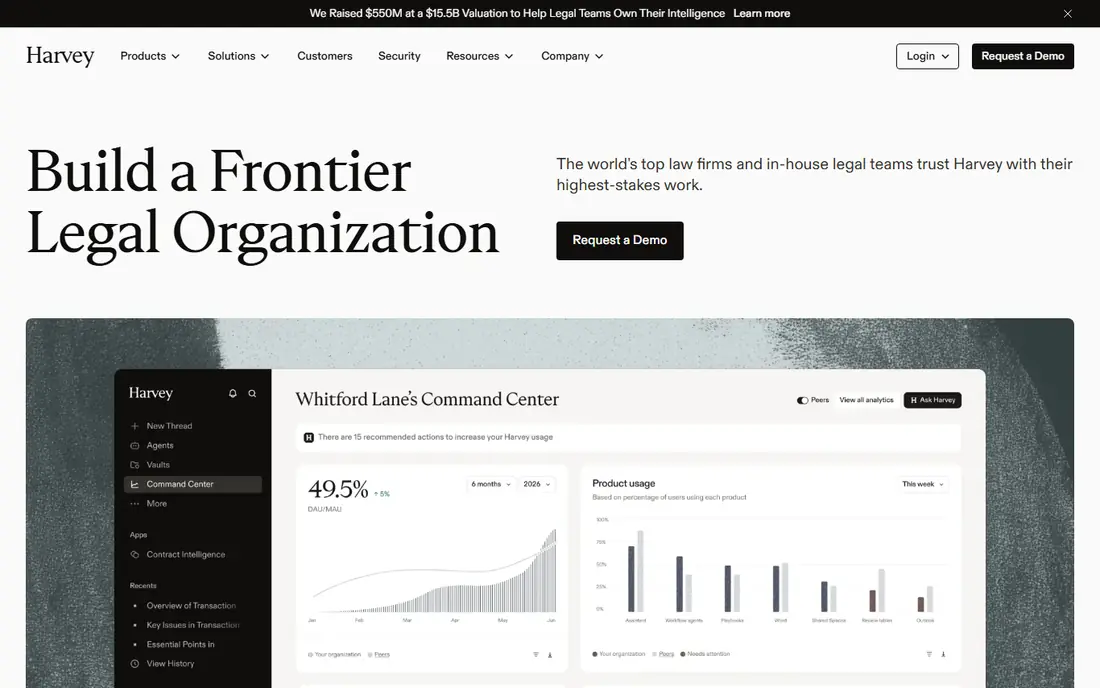
Harvey is a legal AI platform built for large firms and in-house teams, with workflows for research, document drafting, contract review and matter analysis. It can work with firm documents and licensed legal content, which helps lawyers move from a question to a draft without switching tools. The platform is designed for teams that handle complex, high-volume matters and need consistent workflows across practice groups. Security controls for enterprise deployment are a central part of the product.
Price and access are the main limits. Harvey uses enterprise pricing with no published rate, and it is not aimed at solo lawyers. Smaller firms should request a demo and a quote only after checking whether the minimum seat or contract terms fit their size. For large firms that can support an enterprise rollout, Harvey is the most complete legal AI platform in this list.
- Built for legal workflows across research, drafting and review
- Works with firm documents
- Enterprise security controls
- Enterprise pricing with no published price
- Less suited to solo lawyers on a small budget

CoCounsel, from Thomson Reuters, is built around Westlaw and Practical Law content, which gives its research answers a strong source base. Lawyers can ask research questions, review documents, prepare for depositions and summarise matter files in one workflow. The tool links answers to sources that can be checked, which matters for briefs and memos where a wrong citation carries real risk. That grounding is the main reason research-heavy firms pick CoCounsel.
The catch is ecosystem fit. CoCounsel works best for firms already paying for Westlaw, and pricing is custom, so a quote is needed. Firms outside the Thomson Reuters ecosystem may find Lexis+ AI a better fit. For litigation and research-heavy practices already on Westlaw, CoCounsel is a strong and trusted pick.
- Research grounded in Westlaw and Practical Law
- Document review and deposition preparation
- Agentic research workflows
- Best value needs a Westlaw subscription
- Pricing is custom

Lexis+ AI adds conversational research to the Lexis platform, with answers linked to primary law and secondary sources that lawyers can verify. It can summarise cases, draft documents and answer research questions in a workflow that stays inside Lexis. The Protégé features extend that workflow to drafting and review tasks. For firms already using Lexis, that integration avoids learning a separate research system.
Cost and ecosystem are the limits. Lexis+ AI pricing is custom and tied to Lexis plans, so firms without Lexis face a larger total cost. The tool also needs human review, since AI summaries can miss nuance or cite a case out of context. For Lexis firms that want citation-backed research, Lexis+ AI is the natural choice.
- Conversational research linked to Lexis sources
- Case summaries and document drafting
- Protégé workflow features
- Pricing is custom and tied to Lexis plans
- Full value needs a Lexis subscription
Clio Duo brings AI into Clio Manage, the practice management platform used by many solo and small firms. It can summarise documents, help with matter notes and speed up routine administrative work, without leaving the system where cases are managed. That fit matters for small firms, since a separate enterprise AI platform would be too large and too costly. Clio Duo is priced as an add-on to Clio plans, which keeps the total more predictable for a small team.
Research depth is thinner than dedicated research tools. Clio Duo helps with operations and summaries, but it does not replace CoCounsel or Lexis+ AI for deep legal research. Firms that need both should pair Clio Duo with a research tool, or accept that research will still be done elsewhere. For small firms that want practical AI inside daily case work, Clio Duo is a sensible pick.
- AI inside Clio practice management
- Document summaries and matter help
- Suits solo and small firms
- Best value needs a Clio subscription
- Research depth is thinner than Harvey or CoCounsel
Spellbook works as an add-in inside Microsoft Word, which is where most transactional lawyers already draft contracts. It suggests clauses, flags risky language, reviews drafts against playbooks and helps benchmark terms. That Word-native workflow avoids copying text between systems, which saves time and reduces errors. A free trial lets a lawyer test Spellbook on real contracts before paying, which is useful for solo and small firms.
Scope is the limit. Spellbook is a contract tool, not a research platform, so litigation research still needs another system. Pricing has varied across sources, so the current rate should be checked on the vendor site. For transactional lawyers who live in Word, Spellbook is the most practical drafting pick in this list.
- Works inside Microsoft Word
- Contract drafting, clause suggestions and risk flags
- Free trial to test the workflow
- Focused on contracts rather than research
- Pricing should be confirmed on the site
Robin AI focuses on contract review and drafting for in-house teams and firms with steady contract volume. It reviews contracts against playbooks, flags risky clauses and helps draft from approved templates. Portfolio reporting shows contract terms and risks across many documents, which helps in-house counsel manage renewals and obligations. That combination suits teams that review contracts every week, not just once a quarter.
Custom pricing and enterprise focus are the drawbacks. Small firms with low contract volume may find the cost hard to justify, and a trial or demo is needed to confirm fit. Robin AI also needs careful playbook setup, since review quality depends on the rules the team defines. For contract-heavy teams, it is a strong and focused tool.
- Contract review with playbook-based risk flags
- Drafting assistance
- Reporting on contract portfolios
- Enterprise focus with custom pricing
- Less suited to firms that only draft a few contracts a month
Luminance is built for high-volume document review, including due diligence, discovery and contract analysis. It reads large sets of documents, spots patterns and anomalies, and helps reviewers focus on the files that matter most. That scale suits M and A work, large litigation and compliance reviews where thousands of documents must be checked quickly. Enterprise security controls support work with sensitive client data.
Price and scale are the limits. Luminance uses enterprise pricing, and it is more than a small firm needs for a handful of contracts. Setup also takes time, since review models need tuning for each matter type. For large reviews where speed and pattern detection matter, Luminance is a powerful pick.
- Strong document review at scale for due diligence and discovery
- Pattern detection across large data sets
- Enterprise security
- Enterprise pricing with no published price
- Overkill for small document sets
Legora, formerly known as Leya, offers AI workflows across research, document review and drafting for firms and in-house teams. It suits matter work where lawyers move between documents, questions and drafts in one place. Collaborative features let teams share work and review outputs together, which helps larger matters. The platform is aimed at firms that want a broad legal AI tool without buying several separate products.
Custom pricing is the main drawback, since a quote is needed before budgeting. The rebrand from Leya to Legora can also confuse buyers reading older reviews, so the current product page should be checked. For teams that want a broad matter workflow tool, Legora is a modern option worth a demo.
- Matter workflows across research, review and drafting
- Collaborative features for teams
- Formerly known as Leya
- Pricing is custom
- Newer brand name may confuse buyers searching for older reviews
How we picked these
We compared official feature pages, pricing pages, review listings and public documentation for legal AI tools available in October 2026. We kept tools built for lawyers that offer research, drafting or document review today, and that state their confidentiality and security approach. We left out general chatbots used without legal controls, tools that had closed, and consumer legal apps with no firm workflow. Where a price could not be confirmed on the vendor site, we wrote See website rather than guessing.
How to use legal AI safely
Start with confidentiality. Check whether the tool trains on firm data, how data is stored, who can access it and what happens when a matter ends. Use enterprise or firm versions for client work, not consumer tiers, and follow bar guidance on competence, supervision and client disclosure. Keep sensitive matters in approved systems, and remove client data from a tool when the matter closes if the vendor allows it.
Next, verify every output. Check citations against primary sources, read full cases rather than trusting summaries, and review drafts clause by clause before they go to a client or a court. AI can hallucinate cases, misread context and miss jurisdiction differences, so a qualified lawyer must stay responsible for the final work. Keep a record of what was checked and changed, since that record supports supervision duties. A tool that saves time on first drafts is valuable, but only when verification stays part of the workflow.
Frequently asked questions
What is the best ai tool for lawyers?
Harvey is our pick for large firms that need broad research, drafting and review in one platform. CoCounsel suits Westlaw firms, Lexis+ AI suits Lexis firms, and Spellbook suits transactional lawyers who draft in Word. Solo and small firms often do best with Clio Duo plus Spellbook, since that pair covers practice management and contracts at a lower total cost.
What is the best ai app for lawyers on a small budget?
Clio Duo as an add-on to Clio, and Spellbook with a free trial, are the most budget-friendly starting points for small firms. General chat tools are cheaper, but they lack legal source grounding and firm confidentiality controls, so they should not be used for client work without careful checks. Request demos and quotes from legal vendors before committing, since pricing varies by firm size.
Can AI tools replace legal research?
AI tools speed up research, but they cannot replace a lawyer checking primary sources and applying judgment to a specific matter. AI summaries can miss nuance, cite cases out of context or invent citations, which is why every output needs verification. Use AI to find starting points and drafts, then confirm the law yourself before relying on it in a brief, memo or client advice.
Are AI tools safe for confidential client data?
Safety depends on the tool and the plan. Enterprise legal platforms offer data isolation, access controls and terms that bar training on firm data, while consumer tiers often do not. Check the vendor security page, data processing terms and bar guidance before uploading client data. AI output must be checked by a qualified lawyer, it is not legal advice, and confidentiality rules apply to client data in every workflow.
What are the best ai lawyer tools for contract work?
Spellbook and Robin AI lead for contract drafting and review, with Luminance leading for high-volume review at scale. Spellbook works inside Word and suits solo and small firms, while Robin AI and Luminance suit teams with steady contract volume. Choose based on contract volume, playbook needs and whether review happens in Word or in a dedicated platform.
Do lawyers still need to check AI output?
Yes, without exception. A qualified lawyer remains responsible for work product, even when AI drafted the first version. Check citations, read source documents, review clauses and confirm jurisdiction rules before filing or advising. That check is not optional admin work, it is the core professional duty that makes AI use safe and defensible.
Sources
See where you really rank - block by block
ProMapRanker scans Google Maps across a grid of your service area. Simple monthly plans from $19, white-label on every plan.
Start freeKeep reading
 best subscription manager app
Best Subscription Manager App in 2026
Find the best subscription manager app for your budget with our 2026 comparison of 8 apps, covering automatic detection, renewal alerts and free plans.
Read → best stock picking service
Best Stock Picking Service in 2026
Compare the best stock picking service options for 2026, with 8 stock recommendation services for long-term, dividend, quant, growth and income investors.
Read → best software wallet
Best Software Wallet in 2026
Compare the best software wallet options for 2026, with 8 crypto wallets for desktop and mobile, covering self-custody, supported chains, fees and security.
Read →