 ProMapRanker
Best AI Dubbing Tools in 2026

Key takeaways
- ElevenLabs is our pick for voice quality and cloning, but it produces audio dubbing without built-in lip sync for video.
- HeyGen is the strongest all-round video dubbing pick when lip-synced translated video is the deliverable.
- Rask AI suits high-volume audio-first dubbing, yet lip sync sits on a higher tier and costs extra credits.
- Price per finished minute matters more than the monthly headline price, because credit and minute allowances differ sharply.
- Always have a native speaker check translation and timing before you publish, because a fluent-sounding dub can still carry errors.
Quick comparison
| Pick | Great for | Pricing starts at | Free tier | |
|---|---|---|---|---|
 ElevenLabs | Best voice quality and cloning | $6 per month | Yes | Visit |
 HeyGen | Lip-synced video dubbing | $24 per month | Yes | Visit |
 Rask AI | High-volume audio dubbing | $60 per month | Free trial | Visit |
 Perso Dubbing | Low-cost dubbing at scale | $6.99 per month | Free trial | Visit |
 Dubverse | Budget dubbing for creators | $18 per month | Yes | Visit |
 Kapwing | Dubbing inside a video editor | $24 per month | Yes | Visit |
 Murf AI | Dubbing for presentations and training | $19 per month | Yes | Visit |
 VEED | Dubbing plus editing and subtitles | See website | Yes | Visit |
 VideoDubber | Low-cost dubbing with editing tools | $9 per month | Free trial | Visit |
The best ai dubbing tools
AI dubbing turns a video in one language into a version in another, using a translated script and a synthetic or cloned voice. The best tools differ in voice quality, lip sync, language count, and cost per minute, and the right one depends on whether your audience watches faces or listens to audio.
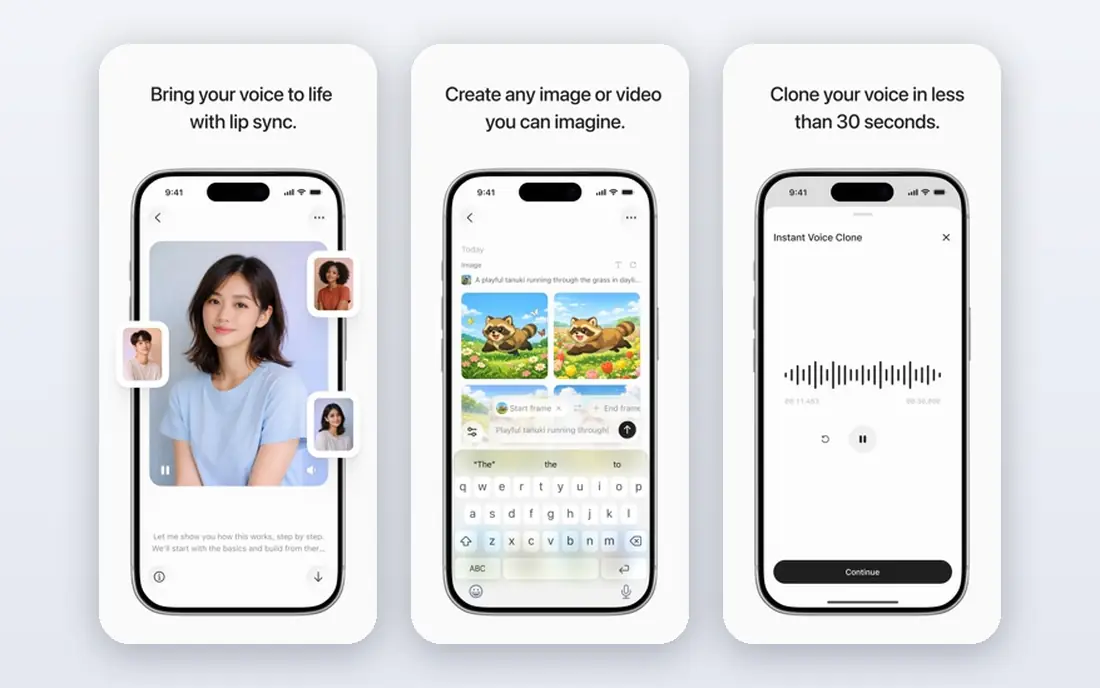
ElevenLabs is the voice quality benchmark in this category. Its stock voices sound natural over long passages, and its cloning options let creators keep a consistent voice across languages, which matters for courses, audiobooks, and YouTube channels with a recognizable host. The dubbing workflow translates the script and produces audio in the target language while trying to keep the original speaker's vocal character.
The limit for video creators is lip sync: ElevenLabs produces dubbed audio, not a video with matched mouth movement, so you will need another tool if the face must match the words. Credit math also matters, because dubbing a long video can use a large share of a monthly allowance, and the Creator plan at $22 per month is the realistic starting point for regular dubbing. For audio-first work, though, few tools match its voice quality at this price.
- Very natural voices with strong cloning options
- Dubbing studio for multilingual audio
- Free tier for testing voices
- No built-in video lip sync
- Dubbing burns credits fast on long videos
- Free tier is non-commercial
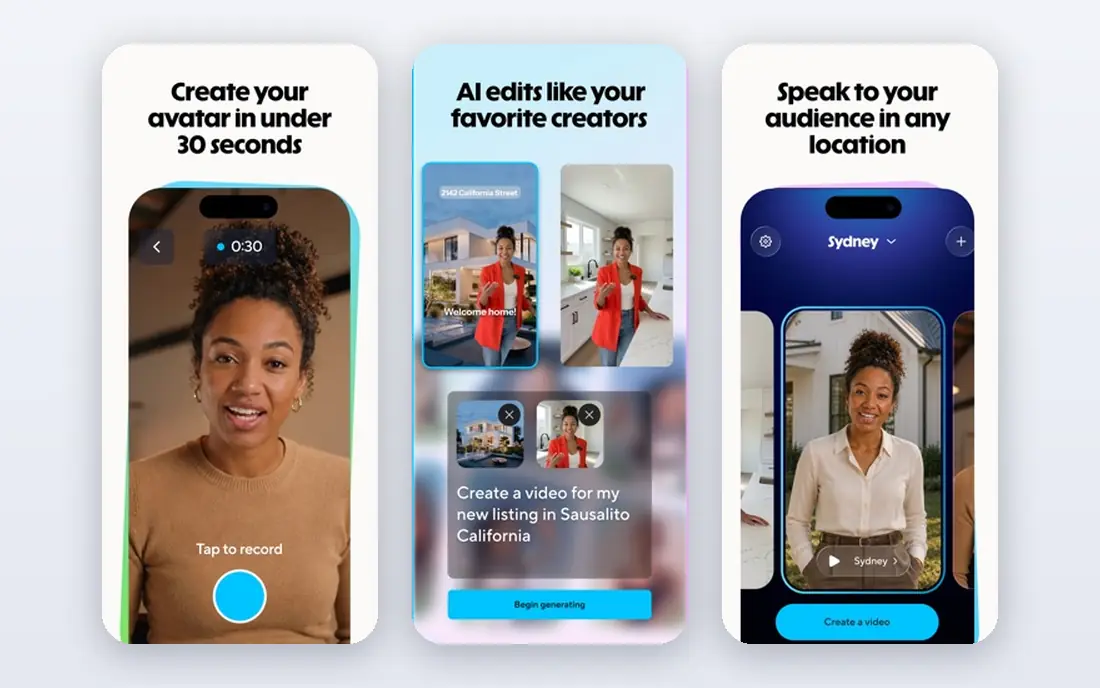
HeyGen is the strongest pick when the finished product is a video that people watch, not just listen to. Its video translation produces a dubbed version with lip sync that matches the new audio to the speaker's mouth, which keeps the result believable for marketing videos, training content, and social clips. Voice cloning, avatar creation, and 1080p output sit in the same platform, so a team can produce translated video without stitching several tools together.
Pricing needs a careful read, because the Creator plan at $24 per month and higher tiers differ in translation allowance, credit use, and script editing. The free tier gives a few videos a month for testing, which is enough to judge lip sync on your own footage. Test with a close-up, a profile shot, and two speakers, because those cases reveal lip sync limits faster than a single talking head.
- Lip-synced translation across many languages
- Voice cloning and avatar creation in the same platform
- Free tier with monthly videos
- Translation allowances and credit rules vary by plan
- Script editing sits on higher tiers
- Costs climb for high-volume teams
Rask AI is built for volume: podcasts, courses, webinars, and screen recordings where the audio matters more than the face. It covers many languages, handles multiple speakers, and gives you a transcript editor to fix translation errors before export. For a team dubbing hours of training material each month, that workflow is more useful than a pretty avatar tool.
The price is the barrier for small creators. The Creator plan at $60 per month covers about 25 minutes of dubbing, and lip sync requires the Creator Pro tier, where it costs extra credits per finished minute. That math favors long audio projects and penalizes short video tests. If lip sync is essential, compare HeyGen first. If audio volume is the job, Rask AI is a serious contender.
- Wide language coverage for audio dubbing
- Transcript editing and multi-speaker support
- Built for podcasts, courses, and screen recordings
- Entry price is high
- Lip sync requires a higher tier and extra credits
- Per-minute cost is high for short projects
Perso Dubbing, also known as Perso.ai, deserves attention for its pricing structure. The Starter plan at $6.99 per month is cheap to test, and its higher PRO plan reaches a low effective per-minute cost when you use the full allowance, which suits teams dubbing regularly. A custom glossary on all plans helps keep product names and brand terms untranslated, a small feature that saves real embarrassment in sales and training videos.
Lip sync is not bundled the same way as in HeyGen, and it sits under separate plan and credit conditions, so check that cost before you promise a lip-synced deliverable. The entry allowance is also small, at only a few minutes, so Perso is a scale tool rather than a one-clip tool. For teams with steady dubbing volume, its per-minute math is among the best here.
- Very low entry price
- Low effective per-minute cost on higher plans
- Glossary control for brand terms on all plans
- Lip sync is optional and priced separately
- Entry plan covers only a few minutes
- Interface favors teams over casual creators
Dubverse appeals to creators who want a dedicated dubbing tool without paying Rask AI prices. The Pro plan at $18 per month is the cheapest paid entry among the dedicated tools on this list, and the workflow is simple enough for a solo creator dubbing YouTube videos or course lessons. A free tier lets you test voice quality before you pay.
The allowance is the catch: the entry plan covers roughly a dozen dubbed minutes a month once credit use is counted, so it suits a few short videos rather than a full course. Lip sync is also limited compared with HeyGen. For a creator testing whether dubbing grows an audience, Dubverse is a low-risk start. For a team with weekly volume, Perso or HeyGen will cost less per finished minute.
- Lowest entry price among dedicated dubbing tools here
- Simple workflow for creators
- Free tier for trying the product
- Entry allowance covers only a short monthly total
- Lip sync quality is limited
- Credit math needs checking before a large project
Kapwing suits creators who already edit in the browser and want dubbing without leaving the editor. You can translate a video, edit the result, add subtitles, trim the ends, and export from one timeline, which saves the round trip between a dubbing tool and an editor. That integration matters for social teams producing many short clips, where export speed beats dubbing perfection.
Dubbing on Kapwing is credit-based, and the Pro plan at $24 per month covers a limited dubbing allowance, so count your minutes before you pick it as a dubbing-first tool. Lip sync is available as post-processing rather than as the headline feature, and free exports are watermarked. Choose Kapwing when editing and dubbing live together. Choose a dedicated tool when dubbing quality alone decides the purchase.
- Dubbing sits inside a full browser editor
- Subtitles, trimming, and export in one place
- Free tier with watermarked output
- Dubbing minutes are credit-based
- Lip sync is a post-processing step, not the core strength
- Free exports carry a watermark
Murf AI is a voiceover platform first, with dubbing and translation as part of a wider toolkit for presentations, training modules, and product demos. Its voices are clean and consistent, its script editor is easy for non-audio people, and its workflow suits corporate teams that need the same voice across many slides and lessons. For training content where clarity beats character, Murf is a reliable choice.
It is not a lip-sync specialist, and its free plan does not allow downloads or commercial use, so you must pay to ship anything. The Creator plan at $19 per month on annual billing gives a starting allowance, while business tiers add volume for teams. If your deliverable is a narrated deck or a training video with voiceover, Murf fits well. If lip-synced faces are the deliverable, HeyGen fits better.
- Clean voices for presentations, e-learning, and marketing
- Easy script editing and voice control
- Free tier for testing voices
- Dubbing is part of a voiceover platform, not a lip-sync specialist
- Free plan blocks downloads and commercial use
- Higher tiers cost more for volume
VEED is a browser video editor with translation and dubbing built in, which makes it a practical choice for marketing and social teams. You can upload a video, translate it, generate subtitles, edit the result, and export for several platforms without desktop software. Language support is broad, and the editor itself is easy for non-specialists.
The dubbing allowance is the limit: lower plans cover only a short monthly total, and the effective per-minute cost for long videos is higher than Perso or HeyGen at scale. Check the current plan page for the dubbing allowance, because VEED prices its AI features in credits that change with plan and usage. For short marketing clips with subtitles, VEED is convenient. For a course library, a dedicated dubbing tool will cost less.
- Video translation with subtitles and editing in one browser tool
- Many languages supported
- Useful for social and marketing teams
- Dubbing allowance is limited on lower plans
- Per-minute cost is high for long videos
- Pricing and credits need a live check
VideoDubber positions itself as a low-cost dubbing tool with a proper editor, and its entry plan at $9 per month is easy to test for a month. It offers voice cloning, many languages, a transcript editor for fixing translations and timing, and free re-edits, which matters because dubbing almost always needs a second pass. For creators who fix timing by hand, that editor is a real advantage over tools that charge per re-render.
The smaller profile means you should test it harder than a big-name tool: run a clip with two speakers, check lip sync if you need it, and confirm export quality at your target resolution. Plan limits also vary, so read the current allowance before a large project. For budget-conscious creators who edit their dubs, VideoDubber is a promising low-cost option.
- Low entry price with a useful minute allowance
- Full transcript and timing editor
- Free edits without extra per-edit charges in its model
- Smaller brand presence than HeyGen or Rask AI
- Lip sync and export quality need testing on your footage
- Plan limits vary
How we picked these
We compared official feature pages, pricing pages, and public pricing comparisons for tools still sold in October 2026. We favored tools with a real dubbing workflow, published pricing or a trial, and an official homepage we could verify. We left out avatar-only platforms whose dubbing sits behind enterprise pricing, and general voice tools without a dubbing workflow.
We did not claim hands-on lab testing. Our comparisons rest on published language counts, lip sync availability, credit rules, and pricing, and we recommend testing the same clip across two or three tools with a native speaker review before you commit to a plan.
How to choose the right dubbing tool
Start with the deliverable. If the audience watches a face, lip sync is not optional, and HeyGen should lead your shortlist. If the audience listens to audio, voice quality and cost per minute matter more, and ElevenLabs, Rask AI, or Perso will serve you better. If the deliverable is a narrated deck or training module, Murf or Kapwing may fit the workflow better than a dubbing specialist.
Next, count finished minutes, not source minutes. A tool that charges extra credits for lip sync, re-renders, or higher quality can cost double the headline allowance on a real project. Price five usable minutes, including one fix pass, across your shortlist, and compare that number. Finally, plan the review step: a native speaker should check translation, names, and timing, because no tool catches every error, and a fluent-sounding mistake reaches further than a silent one.
Frequently asked questions
What is the best ai dubbing software for YouTube videos?
HeyGen is the best all-round choice for YouTube videos with visible speakers, because it adds lip sync to the translated audio. ElevenLabs suits voiceover-style videos where the face does not need to match, while Dubverse and VideoDubber offer lower-cost starting points for creators testing dubbing.
Which ai tools are best for dubbing into many languages?
HeyGen, Rask AI, and Perso cover a wide range of languages, with HeyGen listing 175 or more and Rask AI and Perso each covering well over 100. Language count alone does not guarantee quality in every language, so test your target languages with a native speaker before you publish at scale.
Is there a free ai dubbing tool?
ElevenLabs, HeyGen, Dubverse, Kapwing, Murf, and VEED all offer free tiers or trials, but free dubbing is limited in minutes, resolution, or commercial use. For a real project, expect to pay for at least one month, and use the free tier to test voice quality and lip sync first.
Does AI dubbing include lip sync?
Some tools do and some do not. HeyGen includes lip sync in its video translation, Rask AI adds it on a higher tier at extra credit cost, and ElevenLabs produces audio dubbing without video lip sync. Check lip sync availability and cost on the plan you will actually buy, not just on the product homepage.
How much does AI dubbing cost per minute?
Cost per minute varies sharply by tool, plan, and whether lip sync is included. Budget tools can reach a low per-minute cost at full allowance use, while entry plans for dedicated tools often work out to a few dollars per finished minute. Price your real monthly minutes, including a fix pass, before you compare headline prices.
Can AI dubbing clone my voice in another language?
Yes, several tools offer voice cloning for dubbing, including ElevenLabs, HeyGen, and VideoDubber. Cloning quality depends on the quality and length of the voice sample, and you should only clone a voice you own or have clear permission to use. Check the vendor consent rules before you clone any voice.
Sources
See where you really rank - block by block
ProMapRanker scans Google Maps across a grid of your service area. Simple monthly plans from $19, white-label on every plan.
Start freeKeep reading
 top custom software development company
Top Custom Software Development Company in 2026
Looking for a top custom software development company? We compare 9 firms for web, mobile, and enterprise software, covering strengths and fit for 2026.
Read → tableau alternatives
Tableau Alternatives in 2026
Compare the best Tableau alternatives for 2026, from Power BI to Metabase, with prices, hosting options, and picks for small teams and enterprises today.
Read → microsoft teams alternatives
Best Microsoft Teams Alternatives in 2026
Looking for microsoft teams alternatives? We compare 9 chat and video tools for 2026, covering free plans, pricing, meetings, and integrations for teams.
Read →