 ProMapRanker
XCancel Alternatives in 2026

Key takeaways
- XCancel itself is not listed here: this guide lists alternatives only, including other X viewers, front-ends and social clients.
- Third-party viewers can break when X changes its access rules, so availability can change without warning, and a working viewer today may fail tomorrow.
- Public X viewers show public posts only: they cannot show protected accounts, and they cannot let you post, like or follow without an X account.
- TwStalker was reported working in October 2026 checks, while Sotwe did not load in the same checks, which shows how fast viewer status changes.
- For stable, long-term monitoring, use X itself or a compliant social client, and treat third-party viewers as a quick-look option, not a permanent system.
Quick comparison
| Pick | Great for | Pricing starts at | Free tier | |
|---|---|---|---|---|
 TwStalker | Quick public profile viewing | Free | Yes | Visit |
 Sotwe | Trend and hashtag viewing when it loads | Free | Yes | Visit |
 Nitter | Self-hosted privacy-focused front-end | Free | Yes | Visit |
 GetXAPI Viewer | No-login profile and search viewing | Free | Yes | Visit |
 X | Official and most stable access | Free | Yes | Visit |
 ThreadReaderApp | Reading long threads in one page | Free | Yes | Visit |
 TweetBinder | Tweet search and analytics reports | See website | Free trial | Visit |
 Social Searcher | Searching public posts across platforms | Free | Yes | Visit |
The best xcancel alternatives
XCancel was a third-party viewer for X and Twitter posts, based on the Nitter front-end, that let users read public posts without logging in. This guide lists alternatives to xcancel only, never XCancel itself, and it focuses on other X viewers and front-ends or social clients that serve a similar quick-look job. Third-party viewers can break when X changes its access rules, so availability can change without warning, and readers should check a viewer on the day they need it rather than trusting an old review.
TwStalker is the closest simple replacement for a quick XCancel-style check, because it lets users search a username, hashtag or keyword and view public profiles, posts and media without an X account. In checks reported in October 2026, TwStalker loaded a profile, recent posts and follower tabs after a Cloudflare human check, which is a useful sign but not a guarantee for every region or every day. Its trending view also helps readers find popular topics without logging in.
The limits are typical for third-party viewers. TwStalker cannot show protected accounts, and it cannot let you post, like, follow or send messages, since it is a viewer, not a full X client. Ads appear on the site, and a paid premium option has been reported in some sources, so the free experience may include ads that cannot be removed. Mirror domains also appear under similar names, so users should stick to the official domain listed here and avoid copycat sites that ask for login details.
- No login needed for public profiles
- Trending topics and popular users
- Media viewing and download options
- Ads on the site
- Some visits trigger a human check
- Availability can vary by region
Sotwe is another long-known X viewer that offers trend tracking, hashtag discovery, profile browsing and media viewing without an account. Its simple interface made it a popular XCancel-style option for journalists, researchers and casual readers who wanted to follow public conversations without logging in. When it works, it covers the core job well: search a user or hashtag, read public posts, and follow a trend.
The problem is current stability. In checks reported in October 2026, sotwe.com did not load, with browser errors and timed-out requests, while other viewers did load. Mirror domains under similar names also appear, but those mirrors are not the same as the original site, and their safety and reliability vary. That instability is why Sotwe is listed here with a clear warning, rather than as a reliable first choice.
- Simple trend and hashtag views
- No account needed when it works
- Media and profile browsing
- Did not load in October 2026 checks we found
- Mirror domains vary
- Availability is unstable
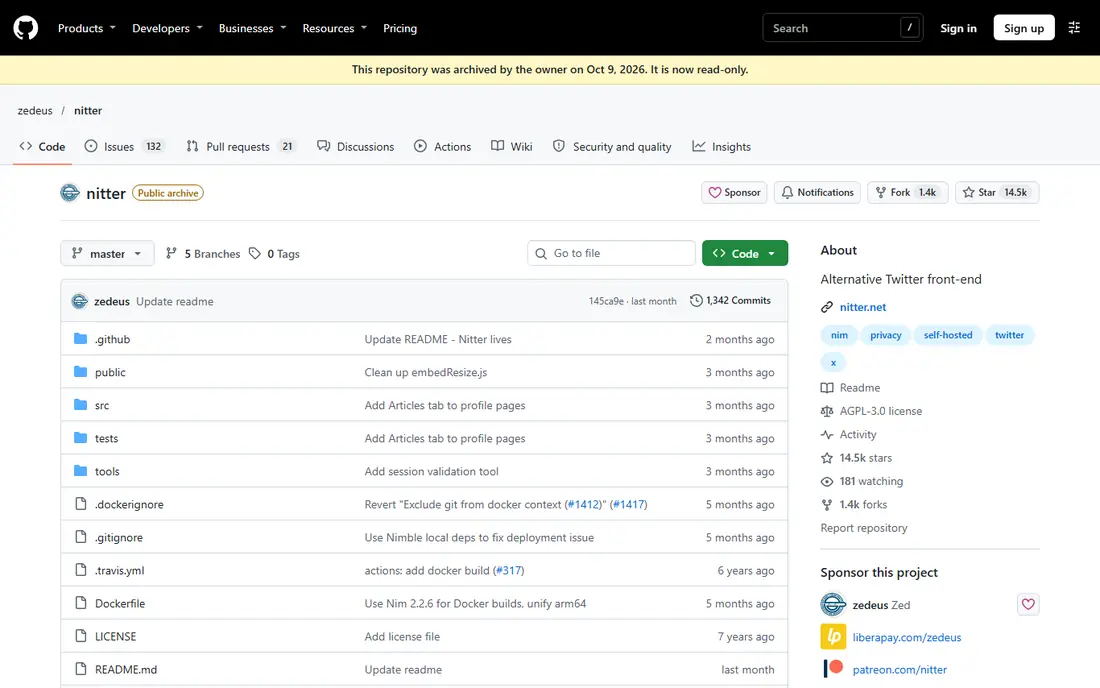
Nitter is the open-source front-end that XCancel itself was based on, and it remains the best option for users who want a privacy-focused viewer they control. Its design aimed to show X content without JavaScript and without tracking, and its code is available on GitHub for self-hosting. For a technical user, running a private Nitter instance for personal use is the closest way to keep the original Nitter model alive.
The catch is public access. Reports in August 2026 said X Corp sent cease-and-desist letters to the project and to public instances, and nitter.net went offline, with other public instances such as XCancel also appearing offline. That means readers should not expect a stable public Nitter instance to be available on demand. Self-hosting also needs a server, maintenance and an understanding that X access rules can still break a private instance.
- Open-source front-end
- Privacy-focused design
- Can be self-hosted on your own server
- Public instances went offline in August 2026 reports
- Self-hosting needs technical skill
GetXAPI Viewer is a hosted X viewer that lets users read public profiles, timelines, replies and search results in a browser without an account. In checks reported in October 2026, its free viewer worked for profiles and search, with no account and no human check, which makes it a practical alternative for a quick look. It also offers an API for developers who need post data as structured output, rather than only a web page.
The limits are that it is a hosted service, not a self-hosted privacy tool, and its API is a paid product for larger or ongoing use. That means it suits casual viewing and short-term research, but a team that needs a permanent data feed should plan for API costs and for the risk that X access rules change. As with other viewers, it cannot show protected accounts, and it cannot replace posting or interaction on X.
- Free viewer for profiles and search
- No account needed
- No human check in October 2026 checks we found
- Hosted service, not self-hosted
- API use is paid for larger needs
- Availability can change
X itself is the most stable alternative, even though it is not a third-party viewer. It offers complete access to public posts, profiles, lists, advanced search and notifications, plus posting, liking and following for account holders. For long-term monitoring, research or customer work, X is the only option in this guide that does not depend on a third party keeping access to X data working.
The trade-off is login and feed design. X often pushes users to log in to view full profiles or threads, and its feed mixes algorithmic suggestions with followed accounts. That makes it less private and less simple than a third-party viewer for a quick anonymous check. For serious work, though, that trade-off is worth it, because a third-party viewer can disappear or break without warning, while X remains the source itself.
- Most stable and complete access
- Posting, lists and search
- Official source for public posts
- Login often required for full viewing
- Ads and algorithmic feed
- Account needed for interaction
ThreadReaderApp suits readers who find a long thread on X and want to read it as a single page, rather than scrolling through replies and quote posts. It presents threads in a clean, blog-style format, which helps for research, teaching and long-form reading. That job is different from browsing a profile, but it overlaps with why many people used XCancel, which was to read public posts without friction.
The limit is that ThreadReaderApp is not a general X browser. It works best when you already have a thread link, and it does not replace profile browsing, trending views or search in the same way TwStalker does. Its availability also depends on X access, so it can break or change when X rules change. Readers should not assume every thread will render perfectly on every day.
- Turns long threads into a readable page
- Useful for research and reading
- No need to scroll through replies
- Needs a thread link or mention
- Not a general profile browser
- Availability depends on X access
TweetBinder suits marketers, journalists and event teams who need to search tweets, track hashtags and build reports, rather than only reading a single profile. It offers analytics on reach, contributors and top posts for a hashtag or account, which helps for campaign monitoring and event coverage. That analytical angle makes it a useful social client for work, even though it is not a direct XCancel clone.
The trade-off is cost and workflow. Full reports sit on paid plans, with pricing starting in the tens of dollars per month in the sources we found, so we list See website for current pricing. Some features also need an account, which means TweetBinder is less suited to a quick anonymous check than TwStalker. It is better seen as a monitoring and reporting tool for teams that need structured results.
- Search and analytics for hashtags and accounts
- Reports for events and campaigns
- Useful for monitoring
- Paid plans for full reports
- Not a simple anonymous profile viewer
- Needs an account for some features
How we picked these
We compared public viewer guides, status checks and official sites, and we favored tools that are live or self-hostable in October 2026, fit X viewing or social monitoring directly, and do not require an X login for basic viewing, except for X itself. We excluded XCancel itself, as required, and we excluded viewers that could not be verified as current or that asked for X login details for basic viewing. Where a viewer status conflicted across sources, we noted the most recent check we found rather than presenting it as stable.
We also weighed stability alongside features. A viewer with many features that fails to load is less useful than a simple viewer that loads today, which is why this guide stresses checking on the day of use. Third-party viewers can break when X changes its access rules, so availability can change without warning, and no viewer in this guide should be treated as a permanent system for work that must keep running.
What to check before you use a viewer
Start with the post or profile you need, and try the simplest viewer first. Open TwStalker or GetXAPI Viewer, search the username or hashtag, and check whether the profile, recent posts and media load. If a viewer fails, try another one, and if all third-party viewers fail, use X itself. That quick test saves time compared with trusting an old review that may no longer apply.
Next, protect your account and privacy. Never enter X login details, passwords or payment details into a third-party viewer for basic viewing, and avoid mirror domains that look similar to a known viewer but ask for login. Use the official domains listed here, and be wary of copycat sites that promise extra features in exchange for an account. For sensitive research, use X itself or a compliant tool with a clear privacy policy.
Finally, plan for breakage if viewer access matters for work. Keep a backup method, such as X lists, advanced search or a compliant social client like TweetBinder, and save key posts or links when you find them. A viewer that works today may be blocked tomorrow, and a research project that depends on a single viewer will stall when that happens. Treat third-party viewers as a convenience, not as infrastructure.
Frequently asked questions
What are the best alternatives to xcancel?
TwStalker and GetXAPI Viewer are practical starting points for public profile and search viewing without a login, while X itself is the most stable option for long-term work. Nitter suits technical users who can self-host, and ThreadReaderApp suits long thread reading. The best choice depends on whether you need a quick check, a thread view, or stable monitoring.
Are xcancel alternatives free?
Most viewers in this guide offer free basic viewing, including TwStalker, Sotwe, GetXAPI Viewer and Social Searcher. TweetBinder offers a free trial with paid plans for full reports, and X itself is free with an account for full interaction. Be wary of any viewer that charges for basic public viewing or asks for login details, since that is not the normal model for these tools.
Can I view private X accounts with these tools?
No. Third-party viewers show public posts only, and they cannot show protected accounts, even with a search. Protected posts are visible only to approved followers on X itself. Any tool that claims to show private accounts should not be trusted, and it may be a scam or a phishing site.
Why do X viewers stop working?
X viewers depend on access to X data, and X can change its access rules, markup, rate limits or enforcement at any time. That is why a viewer that worked last month may fail today, and why public Nitter instances went offline in August 2026 reports. Third-party viewers can break when X changes its access rules, so availability can change without warning, and readers should always have a backup method.
Is it safe to use a third-party X viewer?
For basic public viewing, a well-known viewer can be safe if you do not enter login details or personal data. Stick to official domains, avoid mirrors that ask for an account, and use X itself for anything sensitive or work-critical. A viewer that asks for your X password for basic viewing should be treated as unsafe, since viewing public posts does not require a login.
Sources
See where you really rank - block by block
ProMapRanker scans Google Maps across a grid of your service area. Simple monthly plans from $19, white-label on every plan.
Start freeKeep reading
 zoho inventory alternatives
6 Alternatives to Zoho Inventory, Compared on Price and Fit
Zoho Inventory alternatives: 6 tools compared on price, free plans and fit. Katana leads the list for manufacturers. Fit and flaws are laid out for each entry.
Read → zoho crm alternatives
Best Zoho CRM Alternatives (2026)
Need Zoho CRM alternatives? We compare 7 tools on cost, free access and who each suits. Every pick gets a straight assessment. Built for quick decisions.
Read → zelle alternatives
Best Zelle Alternatives in 2026
Compare the best Zelle alternatives for sending money to friends, paying sellers and moving funds abroad, with honest notes on fees, speed and safety in 2026.
Read →
Social Searcher
Great for: Searching public posts across platforms
Social Searcher suits researchers who want to search public posts across several social platforms, including X, from one search box. It helps when a topic spans X, forums and other networks, and a single-platform viewer would miss part of the conversation. Basic search is free, which makes it a useful first step for trend and sentiment checks.
The limits are platform coverage and depth. Social Searcher is a search tool, not a full X profile browser, so it will not give the same profile, timeline and media view as TwStalker. Results also depend on what each platform allows a third-party search tool to access, and advanced monitoring features sit on paid plans. For X-specific work, a dedicated viewer or X itself will give a fuller result.