 ProMapRanker
Who Offers the Best Nanny Payroll Services in 2026


Full-service household payroll · Pricing starts at: $59 per month
Key takeaways
- HomePay and Poppins lead for most families, with HomePay at $59 per month and Poppins at $49 per month for one employee.
- Full-service plans should cover payroll, quarterly filings, and W-2 and Schedule H preparation, so check year end fees closely.
- GTM suits families who want deeper household HR help, while SurePayroll suits families who want a lower monthly fee.
- This article is general information only, not tax or legal advice, and tax and employment rules vary by state.
Quick comparison
| Pick | Great for | Pricing starts at | Free tier | |
|---|---|---|---|---|
| HomePay by Care.com | Full-service household payroll | $59 per month | No | Visit |
 Poppins Payroll | Simple flat-rate household payroll | $49 per month | Free trial | Visit |
 SurePayroll by Paychex | Low-cost household payroll | $45 per month | Free trial | Visit |
 GTM Payroll Services | Household payroll with expert support | $70 per month | No | Visit |
 HomeWork Solutions | Household payroll with payment choice | $59 per month | No | Visit |
 NannyChex | Nanny payroll and tax filing | See website | No | Visit |
 Paychex Flex | Household pay inside a wider payroll system | See website | No | Visit |
 Simple Nanny Payroll | Do-it-yourself nanny payroll calculations | See website | No | Visit |
The best nanny payroll services
We compared household payroll services that handle pay, tax withholding, and filings for a nanny or other household employee. A nanny is normally treated as a household employee, not an independent contractor, when the family controls the schedule and the work in the home. This article is general information only, not tax or legal advice, and tax and employment rules vary by state, so check your state rules or speak to a tax professional for your situation.

For families who want the filing handled end to end, this is a strong place to start. HomePay is built for families who employ a nanny, caregiver, or housekeeper and want federal and state filings taken off their plate. The Essentials plan covers payroll processing and tax filing, while Plus adds dedicated account help and audit support.
The strength is the household focus, so the forms and deadlines are framed for home employers rather than for a small business with a shop floor. The catch is cost, since the Plus plan and any year end charges can push the annual total above a bare bones payroll tool.
The practical question is how much of the year end work is included in the monthly price. Before you sign up, list every state where the nanny works and ask HomePay to confirm registration and filing for each one.
- Payroll and tax filing handled for you
- Direct deposit
- W-2 and Schedule H preparation
- Year end forms may carry an extra fee on some plans
- Higher price than simpler options
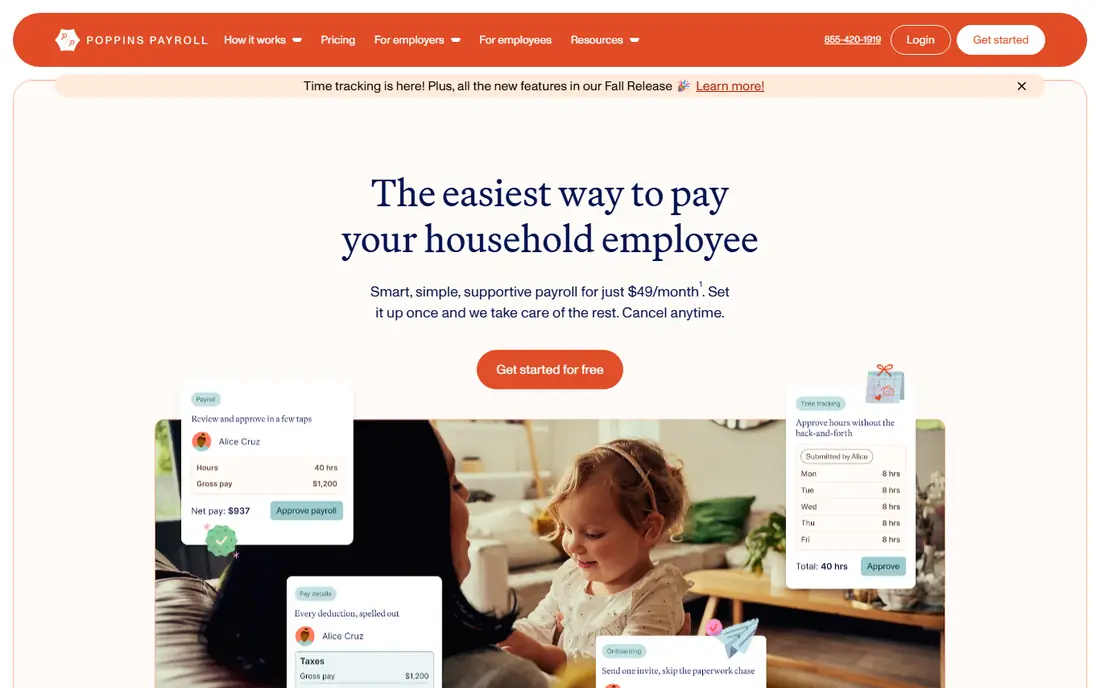
If a single clear monthly price matters more than a long list of extras, this option stands out. Poppins keeps the offer simple, with one plan that covers employer registration, payroll processing, quarterly filings, and year end documents for active accounts. Families can pay by direct deposit or issue checks themselves, and pay schedules can be weekly, biweekly, semimonthly, or monthly where state rules allow.
The strength is price clarity, since there is no tier puzzle to solve and no separate year end fee for active customers in the published terms. The catch is that families who want weekend help or a background check will need to look elsewhere for those extras.
Check the add on fees before you sign up, since the headline price does not tell the whole story. Ask about additional employee pricing and any fees for amended filings or prior period adjustments before you commit.
- One flat monthly price
- Quarterly filings and year end forms included for active accounts
- Paid time off tracking
- Support is limited to weekdays
- No background check service

This service suits households that want a familiar payroll brand behind the pay run. SurePayroll brings a large payroll platform to a household problem, with automated pay runs and tax filing for families with one nanny or several household staff. The household plan is aimed at families who want a low monthly fee and a straightforward three step pay run.
The strength is the combination of a lower price and a large payroll operator behind the service, which suits families with a steady schedule. The catch is that household guidance can feel more general than the advice from a firm that only serves home employers.
The value here depends on how often you need help, not just on the monthly fee. Confirm the exact household plan price, what is included at year end, and the per employee charge for a second worker.
- Automated tax filing on the household plan
- Direct deposit
- Signature-ready Schedule H
- Plan details have varied across listings, so confirm the household price at sign up
- Less household specific guidance than specialists
Families with a more complex household setup may find the extra guidance here worth the higher price. GTM is a household payroll specialist with a base plan that includes employer setup, new hire reporting, automated payroll, and tax filings. Higher plans add household HR support, expense reporting, and help with benefits and insurance enrolment.
The strength is depth of support, including audit help that many families value when a notice arrives. The catch is price and terms, since a setup fee applies and the premium plans carry a longer commitment.
Ask what happens when a tax agency sends a notice, because that support varies a lot by provider. If you need HR help or benefits advice, compare the total cost of the higher plan with buying payroll alone and advice separately.
- Expert household payroll help
- Unlimited audit support on the base plan
- Optional HR and benefits help
- Setup fee applies
- Higher tiers require a longer term
- Year end reporting may be an extra service
A long history in household employment is the main draw here, and the service covers the usual filing steps. HomeWork Solutions has served household employers for many years and focuses on nanny tax compliance rather than on general business payroll. The service covers payroll processing and tax filings, and families can choose from the payment options the firm supports.
The strength is the household specialism, which helps when a family is unsure about state registration or new hire reporting. The catch is that published pricing is less easy to compare at a glance than the flat rate plans from some rivals.
State rules are where household payroll gets tricky, so confirm coverage for your state first. Ask for a written quote that lists setup, monthly, and year end charges so you can compare it fairly with the flat rate options.
- Household payroll and tax compliance focus
- Direct deposit and other payment options
- State guidance
- Pricing details should be confirmed at sign up
- Less transparent published pricing than some rivals
This is a useful choice for families who want a person to talk to when a state rule is unclear. NannyChex focuses on nanny and household payroll, with tax filing and year end documents for families who want the paperwork handled. The service is aimed at families who prefer a specialist over a general payroll platform.
The strength is the narrow focus on nanny payroll, which keeps the setup questions relevant to home employment. The catch is limited public pricing, so the value is hard to judge until you request a quote.
A clear pay schedule and direct deposit help most families more than a long feature list. Request a full quote in writing and confirm which filings, states, and year end forms are included.
- Household payroll and tax services
- Help with employer registration
- Year end tax documents
- Public pricing is limited, so you need a quote
- Smaller brand than the largest payroll firms
Larger employers and families with several staff members may prefer the broader payroll platform behind this option. Paychex Flex is a broad payroll and human resources platform that can be configured for household pay, rather than a service built only for nannies. Families who already use Paychex for a business, or who want a single system for several types of workers, may find that breadth useful.
The strength is platform depth, with reporting, employee access, and tax handling in one place. The catch is setup, since household rules must be configured correctly and the service is not a simple household only checkout.
If you employ more than one person, the per employee charge can change the ranking quickly. Ask Paychex to confirm in writing that the setup covers Schedule H, state new hire reporting, and your state filings.
- Large payroll platform
- Automated wage and tax calculations
- Reporting and employee access
- Not built only for household employers, so setup needs care
- Pricing is quoted
Simple Nanny Payroll
Great for: Do-it-yourself nanny payroll calculations
Families who are comfortable doing more of the maths themselves can save money with this lighter tool. Simple Nanny Payroll is a lighter tool for families who want help with the maths but are happy to file forms themselves. It can produce pay stubs and year end totals, which suits a family with a steady schedule and a good grasp of deadlines.
The strength is low cost and simplicity for families who do not want a monthly full service fee. The catch is clear, since filing, deposits, and deadline tracking stay with the family.
This is best judged on total annual cost, including any year end or setup charges. Use this only if you are confident about federal and state deadlines, and set calendar reminders for every quarterly and year end date.
- Low-cost way to calculate pay and taxes
- Pay stubs and year end totals
- Useful for confident families
- Does not file taxes for you
- You must track deadlines and submit forms yourself
How we picked these
We compared official feature pages, pricing pages, and public service descriptions for each provider, and we kept only services that are live and that fit the topic directly. We favoured providers with clear filing, support, or delivery terms, and we marked prices as See website where a vendor does not publish a clear starting price. We did not claim hands-on testing, and we treated vendor claims about speed or quality as claims to check against your own brief, not as guarantees.
What to check before you pay for nanny payroll
Start with the total annual cost, not just the monthly price. Add setup fees, per employee charges, and any year end form fees, then compare that total across providers. Next, confirm state coverage, since registration, new hire reporting, and unemployment rules differ by state. Ask who handles a tax agency notice, what the response time is, and whether audit help is included or billed separately. Finally, check pay options and time off tracking, since direct deposit, pay frequency, and paid leave records affect both the nanny and the family. A service that fits your state, your schedule, and your comfort with paperwork will serve you better than the cheapest headline price alone.
Frequently asked questions
Do I have to pay nanny taxes?
In most cases, yes, once pay crosses the federal threshold for household employment, and state rules may apply sooner. A household payroll service calculates withholding, employer taxes, and filings, but the family remains the employer. Check the current IRS household employer guidance and your state rules before the first pay run.
What forms does a nanny payroll service handle?
Most full-service providers handle quarterly tax filings, pay stubs, a W-2 for the nanny, and Schedule H for the family tax return. Some charge separately for year end forms, so confirm that point in writing. Keep copies of every filing and pay record for your own files.
Can I use a nanny payroll service for a nanny share?
Yes, but each family in a share is normally treated as a separate employer, so each family needs its own payroll setup and filings. Ask the provider how it handles two employers paying one nanny, and confirm that each family receives its own W-2 and Schedule H documents.
How much does nanny payroll cost per month?
Prices in this guide range from $45 to $70 per month for one employee on the main plans listed, plus possible setup and year end charges. The cheapest plan is not always the lowest annual cost, so add every fee before you compare.
What if my nanny works in more than one state?
Tell the provider every state where work happens, since registration and filing duties can differ. Confirm that each state is covered in the quoted price, and ask about extra charges for an additional state setup.
Sources
See where you really rank - block by block
ProMapRanker scans Google Maps across a grid of your service area. Simple monthly plans from $19, white-label on every plan.
Start freeKeep reading
 worlds best local seo company
8 Worlds Best Local SEO Companies for Map Pack Growth in 2026
Compare the worlds best local seo company options for Google Business Profile work, citations, reviews, and multi-location rankings and reporting in 2026.
Read → world's best web hosting company
World's Best Web Hosting Company in 2026
Searching for the world's best web hosting company? We compared 10 hosts on price, renewal rates, speed, and support to help you choose well today in 2026.
Read → who's got the best nanny tax services
Who's Got the Best Nanny Tax Services in 2026
We answer who's got the best nanny tax services, comparing full filing, back taxes, software, and pricing so families can handle nanny taxes correctly.
Read →