 ProMapRanker
Which Tool Is Best for Website Visitor Tracking in 2026


Free traffic and attribution · Pricing starts at: Free
Key takeaways
- The best website visitor tracking software depends on the question, because traffic tools, behavior tools, and company identification tools solve different problems.
- Google Analytics 4 and Microsoft Clarity cover traffic and behavior for free, so most small teams should start there before paying.
- Leadfeeder, RB2B, and Warmly identify companies or people behind visits, which suits B2B sales teams with a clear follow-up process.
- Hotjar, FullSession, and Crazy Egg show what visitors do on a page through heatmaps and session replays, which helps fix confusing pages.
- Identification tools raise privacy questions, so check consent rules, data retention, and your privacy policy before turning them on.
Quick comparison
| Pick | Great for | Pricing starts at | Free tier | |
|---|---|---|---|---|
| Google Analytics 4 | Free traffic and attribution | Free | Yes | Visit |
 Microsoft Clarity | Free heatmaps and replays | Free | Yes | Visit |
 Hotjar | UX research and feedback | $49 per month | Free trial | Visit |
 Leadfeeder | Company-level visitor identification | See website | Free trial | Visit |
 RB2B | Person-level identification in the US | See website | Yes | Visit |
 Warmly | Real-time lead alerts | See website | Free trial | Visit |
 Mixpanel | Event and funnel analytics | See website | Yes | Visit |
 FullSession | Session replay for SaaS and ecommerce | $23 per month | Free trial | Visit |
 Crazy Egg | Heatmaps and A/B testing | See website | Free trial | Visit |
The best website visitor tracking tools
Website visitor tracking splits into three jobs. Traffic tools count visits and sources. Behavior tools show clicks, scrolls, and replays. Identification tools name the company or person behind a visit. We compared official feature and pricing pages for tools that are live in October 2026, and we included a mix across all three jobs so readers can build a stack rather than buying one tool for everything.

Google Analytics 4, often called GA4, is the baseline for almost every site. It shows where visitors come from, which pages they view, and which actions they complete. Because so many other tools integrate with it, GA4 also becomes the shared source for traffic numbers across marketing and product teams.
GA4 does not show why a visitor left a page. It counts the visit, but it does not replay the session or show where the visitor hesitated. Pair it with a behavior tool if you need that detail, and treat GA4 as the traffic layer rather than the full answer.
- Free for most sites
- Traffic source, page, and conversion reporting
- Widely supported by other tools
- No session replays or heatmaps
- Reports can feel complex for beginners
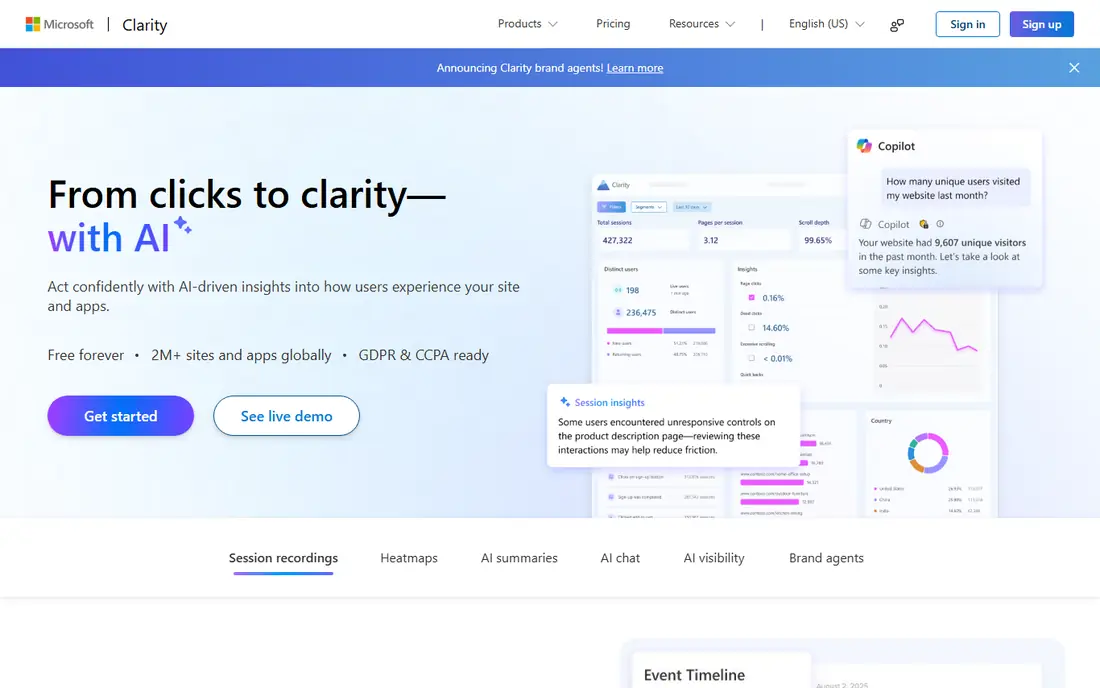
Microsoft Clarity is the easiest free upgrade to GA4. Heatmaps show where visitors click and scroll, and session recordings show real visits, including rage clicks that signal frustration. For a small team fixing a landing page, that visual evidence is often more useful than another traffic chart.
Clarity does not identify companies, and it is not a full product analytics suite. Use it to fix pages and forms, not to build a sales list. Its free model also makes it a low-risk first behavior tool, since a team can learn from replays before paying for a deeper platform.
- Free heatmaps and session recordings
- Rage-click and dead-click signals
- Simple setup for small sites
- No company identification
- Limited funnel depth compared with paid product analytics

Hotjar combines behavior data with direct feedback. Heatmaps and recordings show what visitors do, while surveys and feedback widgets ask why they did it. That combination helps a team move from guessing at a problem to hearing the reason in the visitor's own words.
The paid starting price means Hotjar needs a clear job to justify it over Clarity. It fits teams that run regular UX research, test landing pages, or need surveys alongside replays. Check session and response limits on the pricing page, because a high-traffic site can reach them quickly.
- Heatmaps, recordings, surveys, and feedback tools in one product
- Useful for UX and marketing teams
- Clear visual reports
- Starting price is higher than free alternatives
- Session limits apply by plan
Leadfeeder answers a sales question that GA4 cannot: which companies visited, and which pages did they view. A B2B team can route a visiting company to the right owner, score it by pages viewed, and follow up while interest is fresh. CRM links help keep that handoff inside the sales workflow.
Company data is not the same as a named person who wants a call. A visit from a large company may be one employee doing research, not a buying team. Treat Leadfeeder leads as warm signals to research and approach carefully, not as ready-to-call contacts, and respect privacy rules in your market.
- Identifies visiting companies from IP data
- CRM integrations for lead routing
- Strong coverage for global B2B traffic
- Pricing is not published as a single starting figure in all sources
- Company-level data is not a named contact
RB2B stands out because it aims for person-level identification in the United States, rather than only company names. For a US B2B team, that can shorten the gap between a pricing page visit and a relevant follow-up. Slack alerts help a small sales team act while the visit is still recent.
Person-level data carries a higher duty of care. Outreach should be relevant, honest about how you found the lead, and easy to opt out of. Teams outside the US, or with mostly global traffic, will get less value, so check coverage for your actual audience before relying on it.
- Person-level identification for US visitors
- Free starting tier for testing
- Slack alerts for high-intent visits
- US focus limits global use
- Person-level data needs careful, lawful outreach
Warmly is built around speed. It surfaces visiting accounts, scores them, and alerts the right person in real time, so a sales team can respond while interest is high. For teams that already have a clear ideal customer profile, that speed can turn a quiet website into a source of pipeline.
Speed only helps if someone acts on the alert. A team with no owner for inbound website leads will collect alerts without results. Before buying Warmly, agree on response times, routing rules, and what counts as a qualified visit, so alerts lead to conversations rather than noise.
- Real-time visitor alerts and lead scoring
- Orchestrates follow-up across sales tools
- Built for fast B2B response
- Pricing is not published as a simple starting plan
- Best value needs a sales team ready to act quickly
Mixpanel suits teams that need to track actions inside a product or app, such as signups, feature use, and retention steps. Its funnel reports show where users drop off between steps, which is more useful for product decisions than a simple pageview count. A free plan lets a small team test that model before paying.
The catch is planning. Mixpanel works best when a team defines events and properties before implementation, rather than tracking everything and sorting it later. It also does not identify visiting companies, so pair it with Leadfeeder or RB2B if sales identification is a separate need.
- Event-based funnels and retention reports
- Useful for product and SaaS teams
- Free plan for getting started
- Setup needs clear event planning
- Not built for company identification
FullSession offers a paid behavior stack at a lower starting price than many competitors, with session replay, heatmaps, and funnel views in one product. For a SaaS or ecommerce team that has outgrown free tools but does not need an enterprise platform, that balance is attractive. The $23 per month figure applies to annual billing in recent public pricing, so check the current monthly rate.
Limits still matter. Session volume, storage, and team seats vary by plan, and a growing site should confirm those caps. FullSession is best judged on a real trial with your own traffic, using replays to fix one or two known problem pages before committing.
- Session replay plus heatmaps and funnels
- Starting price is low for paid behavior analytics
- Suited to SaaS and ecommerce
- Smaller brand footprint than Hotjar or GA4
- Session limits vary by plan
Crazy Egg focuses on page-level optimization. Heatmaps show where attention goes, scrollmaps show how far visitors read, and A/B tests show whether a change improves results. For a marketing team testing headlines, buttons, or page layouts, that narrow focus is a strength.
Crazy Egg is not a product analytics tool, and it does not identify visitors. Use it alongside GA4 for traffic and a CRM for sales follow-up. Its value is clearest when a team runs regular tests and acts on the results, rather than collecting heatmaps that no one reviews.
- Visual heatmaps and scrollmaps
- A/B testing for page changes
- Long history in conversion optimization
- Pricing is not published as a single starting figure in all sources
- Less depth for product event analytics
How we picked these
We compared official feature pages, pricing pages, and public product descriptions for tools live in October 2026. We included traffic, behavior, and identification tools, because the main keyword covers all three jobs and a single category would mislead readers. Prices are shown where vendors publish them, and listed as See website where pricing is quote-based or varies by plan. We did not claim hands-on testing, and we did not invent match rates, visitor counts, or accuracy figures.
What to check before you buy
Start by naming the decision the tool must support. If the goal is fixing a landing page, a behavior tool such as Clarity or Hotjar is enough. If the goal is sales follow-up, an identification tool such as Leadfeeder or RB2B is needed, plus a CRM and a response process. Buying an identification tool without a follow-up owner is a common waste, because alerts pile up and no one acts.
Next, check privacy and consent. Identification tools use IP and related signals, and rules vary by region and by the type of data collected. Update your privacy policy, check consent settings, set retention limits, and mask sensitive fields in replays where possible. A tool that helps sales but creates a privacy problem is not a good trade.
Finally, test on real traffic. Run a free or trial plan for at least two weeks, and judge it on one concrete outcome, such as a fixed form, a faster follow-up, or a qualified meeting. Compare the same outcome with and without the tool where possible. That test is more useful than a feature list, because tracking tools differ most in how their data fits your daily workflow.
Frequently asked questions
Which tool is best for website visitor tracking for a small business?
Start with Google Analytics 4 for traffic and Microsoft Clarity for heatmaps and replays, since both are free. Add a paid tool only when you have a clear job it must do, such as UX research or B2B lead identification. That stack covers most small business needs without early cost.
What is the best website visitor tracking software for B2B sales?
Leadfeeder suits global company-level identification, RB2B suits person-level identification in the US, and Warmly suits real-time alerts for teams ready to act fast. The best choice depends on your audience location, your CRM, and whether your sales team can follow up the same day.
What is the best website visitor tracking tool for improving a landing page?
Microsoft Clarity and Hotjar are strong choices, because heatmaps and session replays show where visitors hesitate or leave. Crazy Egg and FullSession also help with heatmaps and testing. Use replays to find one fixable problem, test the change, and measure the result.
Is website visitor tracking legal?
It depends on the tool, the data, and the region. Traffic and behavior analytics are common, but identification tools that name companies or people need extra care with consent, privacy notices, and data retention. Check local rules and your privacy policy, and avoid collecting sensitive personal data you do not need.
Do I need both GA4 and a behavior tool?
Yes, for most sites, because GA4 shows traffic and conversions while a behavior tool shows what visitors did on the page. GA4 alone will not explain a confusing form, and a replay tool alone will not show which channel brought the visitor. Together they give a fuller picture.
How much does website visitor tracking cost?
Free tools cover traffic and basic behavior, while paid behavior tools start around $23 per month for FullSession and $49 per month for Hotjar in recent public pricing. Identification tools are usually quote-based or usage-based, so ask for a written quote tied to your traffic volume.
Sources
See where you really rank - block by block
ProMapRanker scans Google Maps across a grid of your service area. Simple monthly plans from $19, white-label on every plan.
Start freeKeep reading
 zscaler alternatives
Best Zscaler Alternatives in 2026
Looking for zscaler alternatives? We compare 9 SASE and zero trust platforms on architecture, data protection, pricing, and fit for your network and team.
Read → zapier alternatives free
Best Zapier Alternatives Free in 2026
Nine automation tools for zapier alternatives free in 2026, all with genuinely free tiers, plus free plan limits, starting prices and upgrade paths explained.
Read → which platform is best for online reputation
Which Platform Is Best for Online Reputation in 2026
Wondering which platform is best for online reputation? We compare 8 review, listing, and response tools for small and multi-location businesses and agencies.
Read →