 ProMapRanker
Which Digital Media Apps Have the Best Interface in 2026

Key takeaways
- Spotify wins on cross-platform consistency and discovery-led navigation, while Apple Music wins on visual polish inside the Apple ecosystem.
- Netflix and Disney+ offer the most TV-friendly browsing, but both bury personal lists under rows of recommendations.
- Audible and Pocket Casts show how a focused app can beat a larger one on playback controls, sleep timers and library handling.
- The best interface depends on device: test the app on the phone, TV or speaker you actually use, not just on a demo screen.
Quick comparison
| Pick | Great for | Pricing starts at | Free tier | |
|---|---|---|---|---|
 Spotify | Cross-platform music discovery | Free | Yes | Visit |
 Apple Music | Polished Apple music playback | $11.99 per month | Free trial | Visit |
 YouTube | Video discovery and playback | Free | Yes | Visit |
 Netflix | TV-first video browsing | $8.99 per month | No | Visit |
 Disney+ | Family and franchise browsing | $12.49 per month | No | Visit |
 Audible | Audiobook playback controls | See website | Free trial | Visit |
 Pocket Casts | Podcast library control | Free | Yes | Visit |
 Plex | Personal media libraries | Free | Yes | Visit |
The best digital media apps for interface quality
Interface quality is not just looks. We judged navigation clarity, search, playback controls, library handling, cross-device consistency and how often the home screen helps rather than distracts. We compared official feature pages, app store listings and public reviews, and we focused on concrete strengths and weaknesses rather than vague praise.
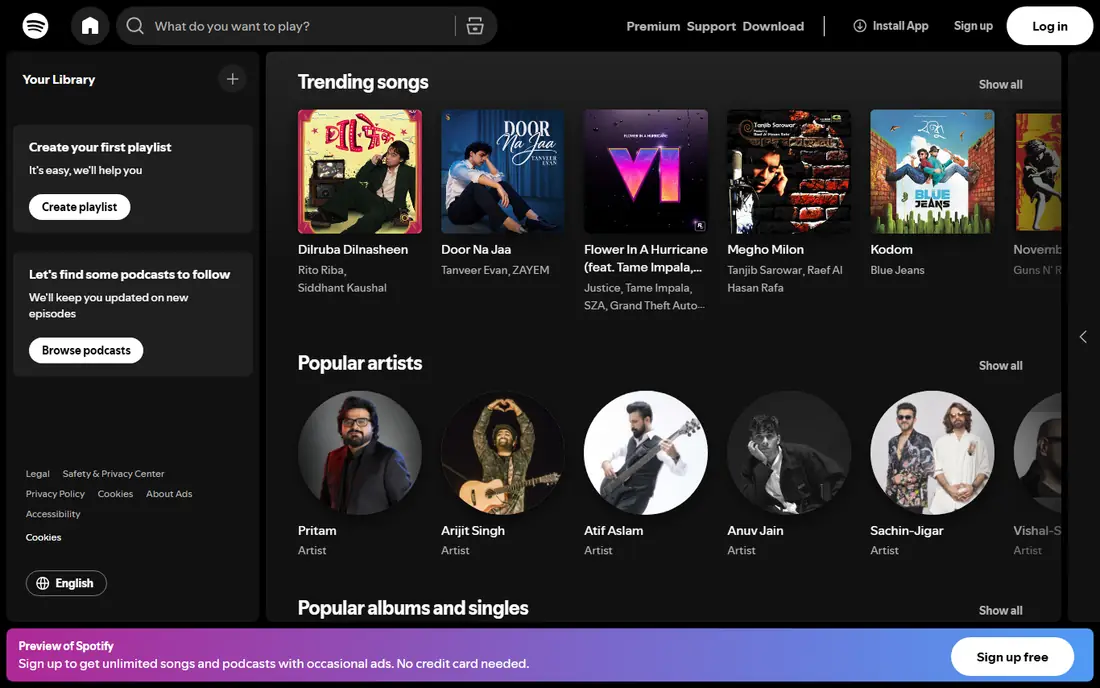
Spotify earns its top spot for consistency. The dark design, bottom navigation and large artwork tiles feel familiar on Android, iOS, desktop, TV and car systems, and Spotify Connect moves playback between devices with little friction. The home screen updates with personalised playlists, new releases and mixes, so regular listeners rarely start from a blank screen.
The weakness is clutter. Recommendation shelves, podcasts, audiobooks and ads on the free tier compete for attention, and finding a saved playlist can take more taps than it should. Bulk deleting or reorganising saved items is also awkward. Spotify is still the easiest music interface for most people, but it rewards users who learn search and library filters early.
- Consistent design across phone, desktop, TV and car
- Personalised home shelves
- Strong playback handoff between devices
- Home screen can feel crowded with recommendations
- Bulk library cleanup is awkward
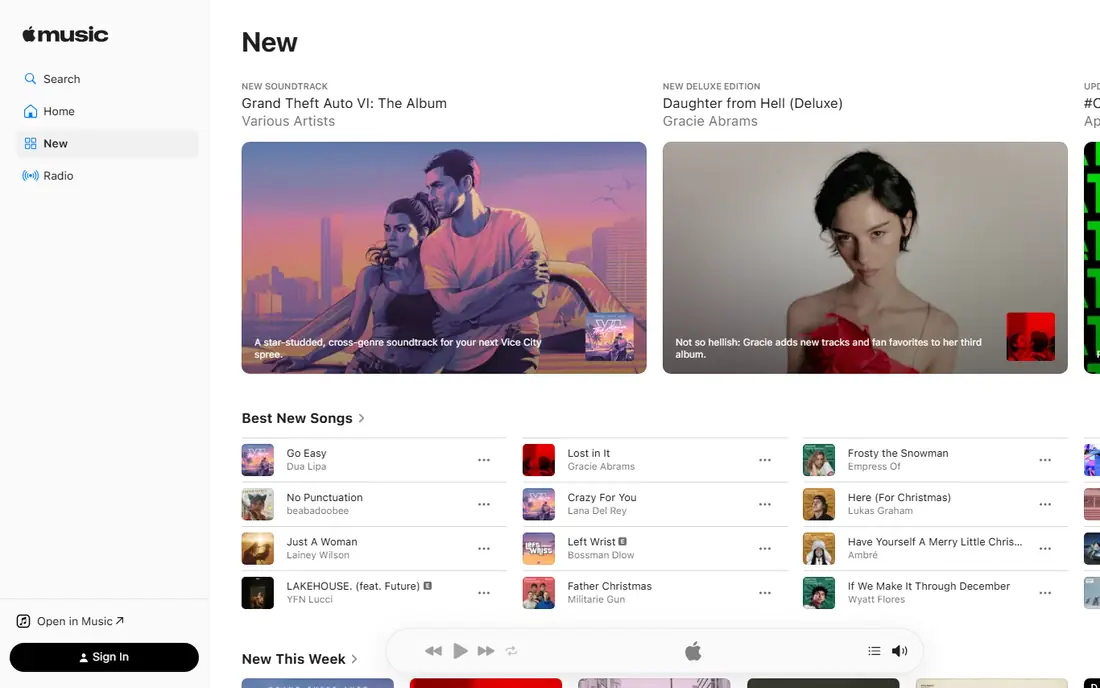
Apple Music looks calmer than Spotify, with generous artwork, animated album art on playback and a restrained layout that lets the music lead. Human-curated playlists and radio stations feel thoughtful, and integration with Siri, Apple Watch and HomePod makes playback feel native for Apple households. The Listen Now screen has improved, with personalised picks that are easy to scan.
Search is the weak point. Finding a song by partial lyric or sorting a large playlist takes more effort than on Spotify, and discovery adapts more slowly to changing taste. Android and Windows users also get a less polished experience than iOS and Mac users. Apple Music suits listeners who value visual calm and curation over algorithmic discovery.
- Clean, artwork-led playback screens
- Strong human-curated playlists and radio
- Deep Apple device integration
- Search and playlist sorting lag Spotify
- Android and Windows versions feel less polished
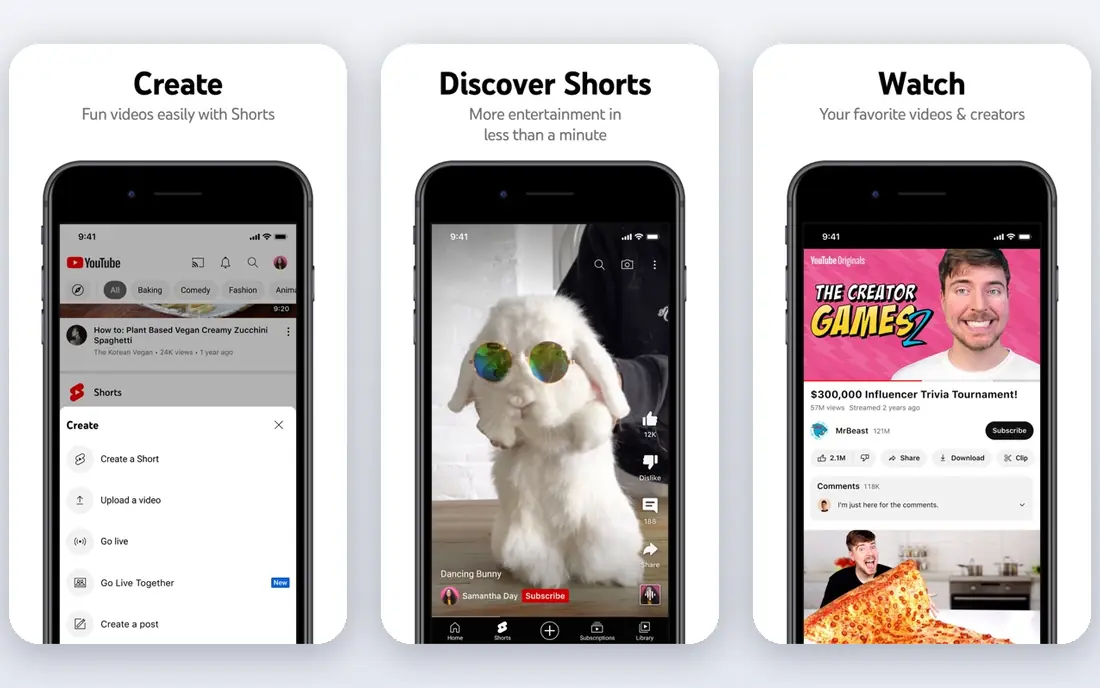
YouTube interface strength is speed of discovery. Search handles vague queries well, recommendations update quickly, and playback controls, chapters, captions and playback speed are easy to reach. Shorts, live streams and long videos sit in one app, which suits users who move between formats during the day.
The drawback is distraction by design. The home feed, Shorts shelf and autoplay queue can pull a five-minute task into a much longer session, and free users face ads before and during videos. Library handling is also weaker than a dedicated music or podcast app, since subscriptions, playlists and history live in different corners. YouTube is best for discovery, not for calm library management.
- Fast search and recommendation engine
- Clear playback controls and chapters
- Huge creator and music video library
- Home feed can pull users into endless browsing
- Ads interrupt free playback
Netflix remains the benchmark for TV browsing. Large artwork, hover previews and a clear Continue Watching row make it easy to resume a show from the sofa, and separate profiles keep kids, partners and housemates from mixing queues. Playback controls are simple, and downloads for offline viewing are easy to find on mobile.
The interface weakness is personal list handling. My List sits below many recommendation rows, so a saved title can take scrolling to reach, and autoplay previews with sound can feel intrusive on TV. Search filters are also basic compared with a catalogue app. Netflix is excellent for picking something fast, and less good for managing a large saved library.
- Strong TV browsing with large artwork and previews
- Continue Watching is easy to find
- Profiles keep households separate
- Recommendation rows bury My List
- Autoplay previews can annoy
- Search filters are basic
Disney+ browsing works best through its brand hubs. Users who know they want Marvel, Star Wars, Pixar or National Geographic can jump straight to that hub instead of scrolling a mixed feed. Kids profiles and parental controls are clear, which matters for family households, and playback quality on supported plans is strong.
The merged Hulu content inside Disney+ has made browsing busier for some users, since general entertainment now sits alongside family franchises. Continue Watching can also be harder to spot than on Netflix, and search results mix brands in ways that need filtering. Disney+ suits franchise fans and families, and it rewards users who use hubs and watchlists deliberately.
- Clear brand hubs for Disney, Pixar, Marvel, Star Wars and National Geographic
- Strong kids profiles and controls
- 4K playback on supported plans
- Merged Hulu content can clutter browsing
- Continue Watching and search need care
Audible playback interface is a model for long-form audio. Speed controls, chapter jumps, sleep timers, bookmarks and notes are easy to reach during listening, and progress syncs across phone, tablet and smart speaker. That focus on the listening moment matters, because audiobook sessions often last hours across many days.
The store side is less elegant. Browsing, buying with credits and managing the library can feel like two different apps stitched together, and new members often find the credit system confusing. Audible is still the best interface for audiobook playback itself, even if buying and organising books takes more learning than it should.
- Excellent playback speed, sleep timer and chapter navigation
- Library syncs across devices
- Bookmarks and notes
- Store and library feel like separate apps
- Credit system confuses new members
Pocket Casts is the podcast app for listeners who care about control. Custom filters, episode queues, playback speed, trim silence, volume boost and sleep timers give users precise handling of a large subscription list. The design is clean without being empty, and sync across phone, web and desktop keeps position and queue consistent.
Discovery is the trade-off. Pocket Casts does not match Spotify or Apple Podcasts for trending charts and algorithmic recommendations, so new listeners may need to find shows elsewhere first. Some advanced features also sit behind a paid plan, although core playback and queue tools are free. For serious podcast listeners, Pocket Casts interface control is hard to beat.
- Clean episode queues and filters
- Strong playback speed, trim silence and sleep timer
- Cross-platform sync
- Discovery is weaker than Spotify or Apple Podcasts
- Some advanced features need a paid plan
Plex turns a personal media collection into a streaming-style library, with poster art, episode details, watch progress and Continue Watching across phone, TV and web. Users who own movies, shows or music files get a polished browsing experience that file folders cannot match. Sharing libraries with family and watching together add social value beyond playback.
Setup is the barrier. Plex needs a server, correctly named media files and some technical setup before the pretty interface appears, and some mobile features need a paid pass or one-time purchase. Casual viewers who only use commercial streaming services will not need it. For personal libraries, Plex interface quality justifies the setup effort.
- Beautiful library views for personal movies, shows and music
- Server and client apps across many devices
- Watch together and sharing options
- Setup needs a server and media organisation
- Free tier limits some mobile playback features
How we picked these
We compared official feature pages, app store listings and public reviews for music, video, audiobook, podcast and personal media apps that are available now in the US. We judged navigation, search, playback controls, library handling and cross-device consistency, and we favoured concrete interface evidence over marketing claims. Prices are starting prices from recent listings and may vary by plan, ads or region.
How to judge an interface before you subscribe
Start on your main device, not on a website screenshot. Open the app on the phone, TV or speaker you use most, then try five tasks: find a saved item, resume playback, search for something specific, adjust playback speed or captions, and add something to a list. Time those tasks loosely. An app that makes all five easy is a better interface for you than an app that only looks good on its home screen.
Next, check how the home screen behaves after a week. Recommendation-heavy apps can feel exciting on day one and noisy by day seven, especially when ads, Shorts or autoplay previews dominate. Turn off autoplay previews where possible, clean up saved lists, and use search and library filters instead of scrolling the home feed. Those habits reveal whether an interface supports your routine or fights it.
Finally, test cross-device handoff if you listen or watch in more than one place. Move playback from phone to TV or speaker, check whether position syncs, and see whether downloads work offline. An interface that breaks between devices will frustrate daily use far more than a slightly plain home screen.
Frequently asked questions
Which media app has the best interface overall?
Spotify is the strongest all-round pick for music, thanks to consistency and discovery, while Netflix leads for TV video browsing. The overall winner depends on whether music, video, podcasts or audiobooks matter most, and on which devices you use.
Is Apple Music interface better than Spotify?
Apple Music looks calmer and more polished, especially on Apple devices, while Spotify offers stronger search, playlist handling and cross-platform consistency. Listeners who value curation and visuals may prefer Apple Music, while discovery-led listeners usually prefer Spotify.
Which video app is easiest to browse on TV?
Netflix is usually easiest on TV, thanks to large artwork, previews and a clear Continue Watching row. Disney+ is close for franchise fans, thanks to brand hubs, although merged content can make browsing busier.
Which podcast app has the best interface?
Pocket Casts offers the best library and playback control for serious podcast listeners, with filters, queues and playback tools. Apple Podcasts and Spotify offer better discovery, so many listeners use one app for finding shows and Pocket Casts for managing them.
Does a good interface matter more than content?
Both matter, but interface decides daily use. A huge catalogue in a confusing app often goes unwatched, while a smaller catalogue in a clear app gets used often. Choose content first for must-have shows or music, then pick the clearest interface among apps that carry it.
How can I reduce clutter in Spotify, YouTube or Netflix?
Use search and library filters instead of scrolling home feeds, turn off autoplay previews where the app allows it, clean saved lists regularly, and create profiles for different household members. Those steps usually improve any recommendation-heavy interface quickly.
Sources
See where you really rank - block by block
ProMapRanker scans Google Maps across a grid of your service area. Simple monthly plans from $19, white-label on every plan.
Start freeKeep reading
 zyte alternatives
Best Zyte Alternatives in 2026
These zyte alternatives cover managed scraping APIs, proxy networks and no code tools for lawful collection from your own or consented sources only in 2026.
Read → zerto alternatives
Best Zerto Alternatives in 2026
Compare the best zerto alternatives for disaster recovery and replication, with recovery targets, cloud options and honest trade-offs for teams in 2026.
Read → zerofox alternatives
Best ZeroFox Alternatives in 2026
We compared 9 zerofox alternatives for brand protection, phishing takedowns, dark web monitoring, and social impersonation, with clear coverage notes.
Read →