 ProMapRanker
Best VantageMDM Alternatives in 2026


Cross-platform value · Pricing starts at: $2.20 per device per month
Key takeaways
- Hexnode is our pick for most teams leaving VantageMDM, because it covers all major platforms at a clear per-device price.
- Mosyle and Miradore are the budget picks, with free tiers for small fleets, while Jamf is the Apple-first choice.
- Most MDM tools charge per device per month, so count every enrolled device, including spares in drawers, before you compare prices.
- Kiosk mode, remote wipe and app management matter more than extra dashboards, so test those three jobs in a trial first.
Quick comparison
| Pick | Great for | Pricing starts at | Free tier | |
|---|---|---|---|---|
| Hexnode UEM | Cross-platform value | $2.20 per device per month | Free trial | Visit |
 Jamf | Apple fleets | $4 per device per month | Yes | Visit |
 Mosyle | Low-cost Apple management | $1 per device per month | Yes | Visit |
 ManageEngine Mobile Device Manager Plus | Small free fleets | See website | Yes | Visit |
 Miradore | Free mixed fleets | Free | Yes | Visit |
 Scalefusion | Kiosk and frontline devices | $2 per device per month | Free trial | Visit |
 Microsoft Intune | Microsoft 365 organisations | $8 per user per month | Free trial | Visit |
 JumpCloud | Identity plus devices | $9 per user per month | Free trial | Visit |
 Addigy | Apple fleets for IT providers | See website | Free trial | Visit |
The best VantageMDM alternatives
VantageMDM manages iOS, Android, macOS, Windows and Chromebooks from one console, with kiosk mode, app management and remote wipe. The tools below do the same core job with different strengths, and the right one depends on which platforms dominate your fleet and how much you want to pay per device.

Hexnode is the most balanced replacement for VantageMDM, because it manages a mixed fleet from one console without an enterprise price tag. Policies, kiosk mode, app deployment and remote actions are all present, and the per-device price is published, which makes budgeting straightforward. For schools, retailers and field teams with mixed devices, that combination is hard to beat.
The breadth brings complexity. The console offers a lot of settings, and a first-time admin should plan a careful pilot rather than pushing policies to every device on day one. Once the base policies are settled, though, Hexnode is a steady, good-value daily tool.
- Covers iOS, Android, Windows, macOS and more
- Clear per-device pricing
- Strong kiosk and policy controls
- Interface has many options, so setup takes care
- Entry tier has a device minimum
Jamf is the Apple specialist, and if your fleet is mostly iPhones, iPads and Macs, no cross-platform tool matches its depth. Zero-touch enrolment, app deployment, configuration profiles and security controls all work through Apple's own management framework, and Jamf Now gives very small teams a low-cost starting point.
The limit is platform scope. Jamf manages Apple devices superbly and other platforms only in a limited way, so a mixed fleet will still need a second console. Price also rises for full Mac management, so check which Jamf product matches your device mix before you commit.
- Deepest Apple integration
- Zero-touch deployment through Apple Business Manager
- Free tier for up to 3 devices on Jamf Now
- Apple-focused, so Android and Windows fleets need another tool
- Full Mac management costs more
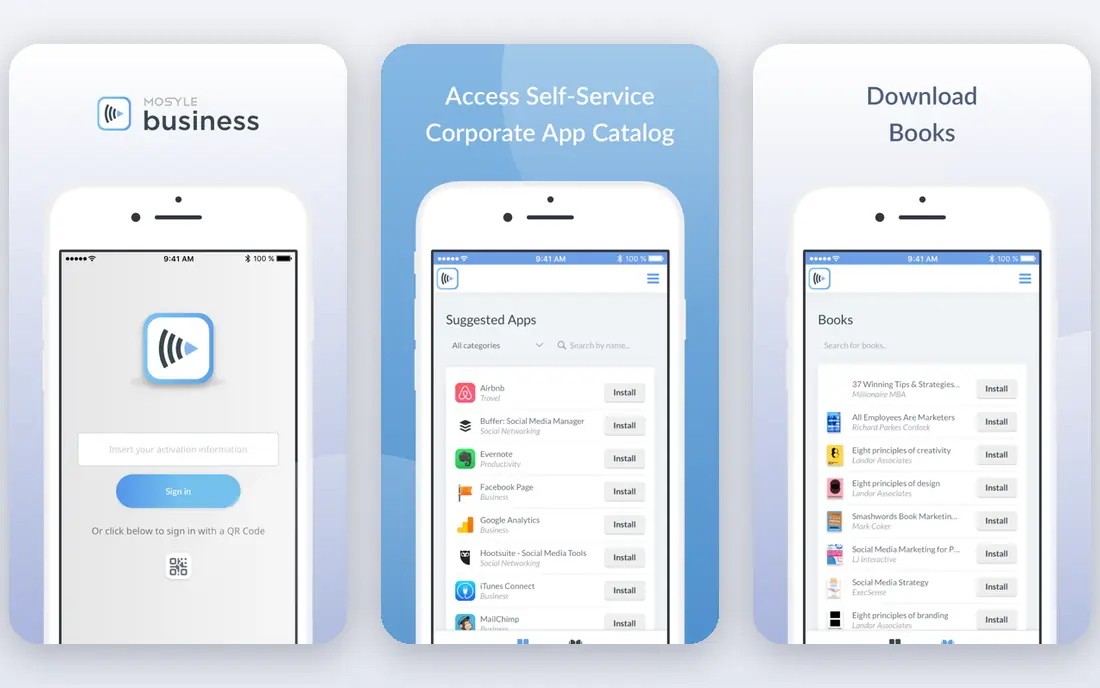
Mosyle is the budget Apple pick. Its Business plans start at around $1 per device per month, and a free tier covers up to 30 devices, which makes it practical for a small office or school that only needs solid Apple management. Enrolment, app deployment, restrictions and security policies are all covered without enterprise pricing.
Mosyle does not manage Android or Windows, so it only fits Apple-only fleets. Paid plans also carry minimum device counts, so a tiny team should check the terms for its exact size. For an Apple-only fleet on a tight budget, Mosyle is the first tool to trial.
- Very low entry price
- Free tier up to 30 devices
- Good Apple school and business tools
- Apple only, no Android or Windows management
- Paid plans have device minimums
ManageEngine MDM Plus is a practical choice for small teams because its free tier covers up to 25 devices, which is enough for many offices and classrooms to run a real deployment at no licence cost. It covers Apple, Android, Windows and ChromeOS, with kiosk mode, app management and remote wipe, and it offers both cloud and on-premises deployment.
The interface is more enterprise in feel than consumer tools, and larger fleets should confirm current pricing for their device count. For a team that wants to prove MDM value before spending, the free tier makes ManageEngine an easy first trial.
- Free for up to 25 devices
- Cloud and on-premises options
- Broad platform coverage including ChromeOS
- Interface feels enterprise-heavy
- Pricing for larger fleets needs a quote or plan check
Miradore stands out for its free tier, which covers up to 50 devices across Windows, macOS, Android and iOS. For a small business or school, that is often the whole fleet, managed from one console with inventory, policies and remote actions. Paid plans from around $2.75 per device per month add the deeper controls larger teams need.
The free tier is intentionally basic, so a team that needs advanced automation, detailed compliance reporting or large-scale deployment tools will need to pay. As a starting point for a mixed fleet, though, Miradore gives more free coverage than most rivals.
- Free tier up to 50 devices
- Covers Windows, macOS, Android and iOS
- Simple setup
- Advanced features sit on paid plans
- Less depth for large enterprise fleets
Scalefusion is the kiosk-first pick. It locks tablets and phones into single-app or multi-app modes, manages frontline and shared devices well, and covers Android, iOS, Windows and macOS from one console. At $2 per device per month billed annually, it is priced for fleets of shared devices rather than one-to-one office laptops alone.
Apple management is solid but not as deep as Jamf, and the entry plan carries a device minimum. For retail, logistics, healthcare and field teams whose devices serve a fixed purpose, Scalefusion is one of the strongest VantageMDM replacements.
- Strong kiosk and lockdown tools
- Good for Android and frontline fleets
- Clear per-device pricing
- Less Apple depth than Jamf or Mosyle
- Entry plan has a device minimum
Intune is the natural choice if your organisation already runs Microsoft 365. It manages Windows, macOS, iOS and Android, ties into Entra identity and conditional access, and is included in several Microsoft 365 bundles, which can make the extra cost zero for existing subscribers. For Windows-heavy fleets, that integration is a real advantage.
Per-user pricing is the catch for shared-device fleets, because a kiosk used by many people still counts by user licensing in ways that per-device tools do not. Intune also rewards teams that already live in Microsoft tools; a Google or Apple-only shop may find a simpler console elsewhere.
- Deep Microsoft 365 and Entra integration
- Covers all major platforms
- Often already included in business plans
- Per-user pricing can cost more for shared devices
- Setup is tied to the Microsoft ecosystem
JumpCloud suits teams that want one platform for both who can sign in and what devices they can use. It manages Windows, macOS, Android and iOS alongside user accounts, groups and access policies, which simplifies life for remote and hybrid teams that lack a traditional domain controller.
If you only need device management, JumpCloud costs more per user than device-only tools, so it only earns its price when you also use the identity features. For a small IT team that wants to replace separate identity and MDM tools with one console, it is a compelling package.
- Combines device management with identity and access control
- Cross-platform
- Good for remote teams
- Per-user pricing
- Device management alone is pricier than device-only rivals
Addigy is built for Apple management, with a particular strength for IT providers who manage devices for several clients. Multi-tenant views, automation and Apple-focused policies make it practical for managed service providers, and it also serves single organisations with Apple-heavy fleets.
Android and Windows coverage is not its strength, and pricing is often quoted rather than published, so budget-conscious buyers should get a firm figure early. For an Apple fleet, especially one managed by an outside IT provider, Addigy is a credible VantageMDM alternative.
- Strong Apple device management
- Multi-client tools for IT providers
- Good automation
- Apple-focused
- Pricing is quote-based for many buyers
- Less suited to Android-heavy fleets
How we picked these
We compared official pricing pages, product documentation and recent MDM comparisons, and we chose tools that are live, actively maintained and able to manage at least the core VantageMDM jobs: enrolment, policies, app management, kiosk mode and remote wipe. Where pricing is per device, per user or quote-based, we kept that distinction clear, because the same fleet can cost very different amounts under each model.
How to choose an MDM without a painful migration
Start with an accurate device count by platform, including shared, spare and seasonal devices, because per-device pricing punishes a messy inventory. Then list the three jobs you cannot compromise on, usually kiosk lockdown, remote wipe and app deployment, and test those three in a trial with real devices, not only in a demo.
Plan enrolment carefully. Apple Business Manager, Android zero-touch and Windows Autopilot each change how fast devices join, and a trial that only enrols one device by hand will hide the real setup effort. Finally, check your exit route: confirm you can export device lists and policies, because switching MDM later is far easier when your data is not trapped in one console.
Frequently asked questions
What does VantageMDM do?
VantageMDM is a mobile device management tool that lets organisations enrol, configure, secure and monitor phones, tablets, laptops and Chromebooks from one console. It supports iOS, Android, macOS, Windows and Chromebooks, with kiosk mode, app management and remote lock or wipe for lost devices.
Which alternative is cheapest for a small fleet?
Miradore and ManageEngine MDM Plus offer the most generous free tiers, up to 50 and 25 devices respectively, while Mosyle offers a free tier up to 30 devices for Apple fleets. For paid plans, Mosyle and Hexnode offer the lowest published per-device prices in this list.
Do I need MDM for a handful of company phones?
If the phones hold company email, customer data or internal apps, MDM is worth it even for a small fleet, because it lets you enforce passcodes, push apps and wipe a lost device remotely. A free tier from Miradore, ManageEngine or Mosyle can cover a small fleet at no licence cost.
Can MDM tools manage employee-owned devices?
Yes, most tools support a work profile or container that separates company apps and data from personal content on a bring-your-own-device phone. Tell staff clearly what the company can and cannot see, because trust matters as much as the technical setup, and check local privacy rules before enrolment.
What is kiosk mode?
Kiosk mode locks a device to one app, a set of apps or a set of websites, so it can serve as a point-of-sale terminal, a sign-in tablet or a digital sign without users wandering into other apps. It is a core feature for retail, hospitality and field deployments.
How hard is it to switch MDM providers?
Switching takes planning but is routine: export your device list, set up the new console, connect Apple Business Manager or Android zero-touch if you use them, and re-enrol devices. Some devices need a wipe and re-enrolment to join the new system, so schedule the move outside busy periods and test with a small group first.
Sources
See where you really rank - block by block
ProMapRanker scans Google Maps across a grid of your service area. Simple monthly plans from $19, white-label on every plan.
Start freeKeep reading
 zscaler alternatives
Best Zscaler Alternatives in 2026
Looking for zscaler alternatives? We compare 9 SASE and zero trust platforms on architecture, data protection, pricing, and fit for your network and team.
Read → zapier alternatives free
Best Zapier Alternatives Free in 2026
Nine automation tools for zapier alternatives free in 2026, all with genuinely free tiers, plus free plan limits, starting prices and upgrade paths explained.
Read → which platform is best for online reputation
Which Platform Is Best for Online Reputation in 2026
Wondering which platform is best for online reputation? We compare 8 review, listing, and response tools for small and multi-location businesses and agencies.
Read →