 ProMapRanker
Track Local Keyword Rankings by Location: The Geo-Grid Method

To effectively track local keyword rankings by location, businesses and SEO professionals must adopt the geo-grid method. This advanced approach goes beyond single-point rank checks by simulating user searches from multiple, distinct geographic points around a business, typically arranged in a grid pattern. By doing so, it reveals a comprehensive heatmap of local search visibility for specific keywords, illustrating exactly where a business ranks within its entire service area on Google Maps and local search results, providing critical insights into true local performance and areas for improvement.
What is Geo-Grid Local Rank Tracking and Why is it Essential?
Geo-grid local rank tracking is a sophisticated method that assesses your Google Maps and local SERP positions from numerous simulated physical locations within a defined radius around your business. This technique is essential because Google's local search results are highly dynamic and personalized, varying significantly based on the searcher's proximity and location at the time of their query. Understanding this localized performance across a grid provides a true picture of your local search presence, far beyond what a single-point rank check can offer.
Unlike traditional rank trackers that report a single ranking for a keyword, geo-grid tracking generates a visual heatmap. This heatmap displays your business's ranking for a target keyword (e.g., "HVAC repair near me," "dentist downtown") from each point on the grid, often represented by different colors indicating specific rank ranges. For instance, a 5x5 grid with points spaced every 0.5 miles would generate 25 individual rank checks, offering a granular view of your visibility. This level of detail is critical for local businesses, as even a slight shift in a searcher's location can dramatically alter the local pack results they see.
Without geo-grid tracking, you might mistakenly believe your business ranks well based on a single search from your office, only to discover you're invisible to potential customers just a few blocks away. This method helps identify "blind spots" in your local SEO strategy, allowing for targeted optimization efforts that genuinely improve local visibility and drive more qualified local traffic. It's a fundamental shift from monitoring a national or regional average to understanding precise, hyper-local performance.
How Does Geo-Grid Rank Tracking Work?
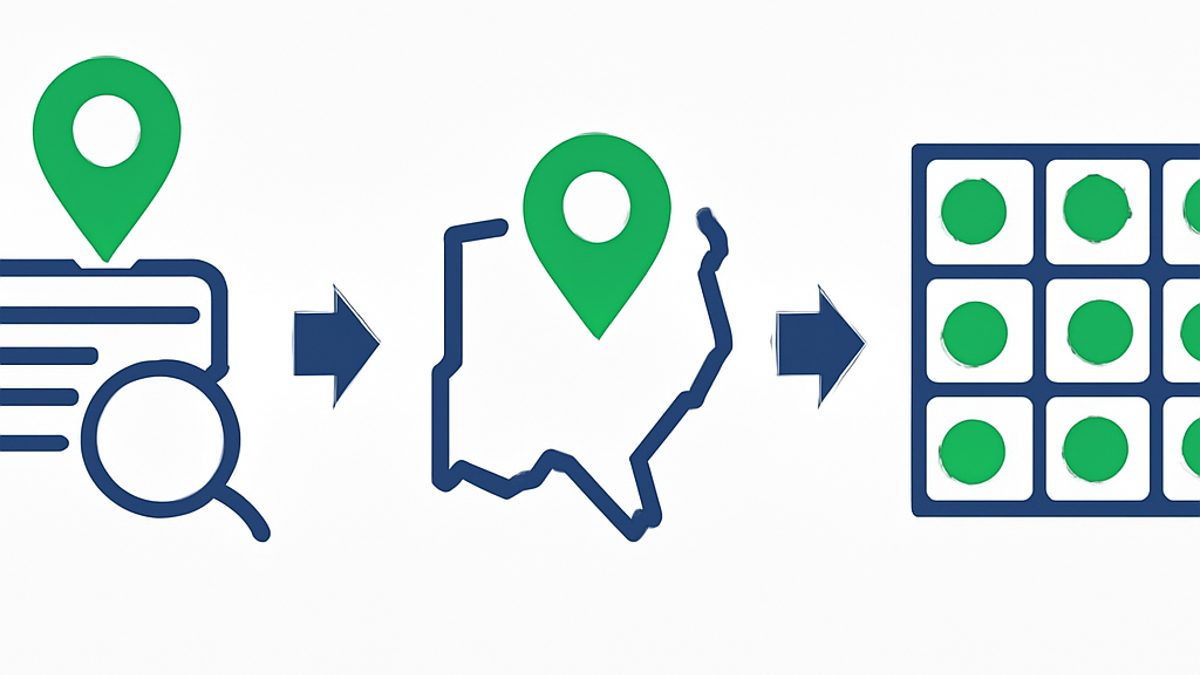
Geo-grid rank tracking operates by simulating individual Google searches from a series of distinct geographic coordinates, typically arranged in a uniform grid around a central business location. For each point on the grid, the system performs a localized search for specified keywords, capturing the exact Google Maps and local pack ranking for the target business at that precise virtual location. This data is then compiled and visualized as a heatmap.
The process begins by defining the central point (your business address) and then establishing the grid parameters: the grid size (e.g., 5x5, 7x7, 9x9) and the distance between each grid point (e.g., 0.5 miles, 1 mile, 2 miles). A 5x5 grid with 1-mile spacing would cover a 4-mile radius, generating 25 data points. For each of these 25 points, the system executes a search for your chosen keywords, such as "plumber in [city]" or "best coffee shop [neighborhood]." The collected ranking data from each point is then plotted onto an interactive map, often using a color-coding system where green might represent a top-3 ranking, yellow a 4-10 ranking, and red outside the local pack. This visual representation quickly highlights areas of strong performance and those needing attention, enabling data-driven decisions for local SEO optimization. For a deeper dive into what influences these rankings, explore our article on local pack ranking factors.
Why is Traditional Rank Tracking Insufficient for Local SEO?
Traditional rank tracking, which typically provides a single ranking position for a keyword from a broad geographic center, is fundamentally insufficient for local SEO because it fails to account for the hyper-localized and proximity-driven nature of Google's local algorithm. Google heavily personalizes local search results based on the searcher's exact location, meaning a business's ranking can fluctuate dramatically even within a few blocks.
Imagine a coffee shop owner in downtown Seattle using a traditional rank tracker. It might report they rank #5 for "coffee shop Seattle." While seemingly acceptable, this single data point doesn't tell them if they rank #1 for someone across the street, #8 for someone a mile away, or aren't even in the local pack for a potential customer three blocks south. Traditional tracking operates under the false premise of a monolithic SERP, which simply doesn't exist in local search. Google states that "proximity is a key factor" in local rankings, emphasizing the variability. Without understanding this granular, location-specific performance, businesses make optimization decisions based on incomplete and potentially misleading data, leading to wasted effort and missed opportunities to capture nearby customers. This limitation is precisely why tools like ProMapRanker were developed, to provide the crucial context traditional trackers lack.
What Are the Key Benefits of Using a Geo-Grid Rank Tracker?
Utilizing a geo-grid rank tracker offers several profound benefits that elevate local SEO strategies beyond conventional methods. These advantages include unparalleled accuracy, comprehensive visibility insights, competitive analysis capabilities, and the ability to measure the true impact of optimization efforts.
- Unmatched Accuracy in Local Visibility: A geo-grid tracker provides the most accurate representation of your business's local search presence. By simulating searches from multiple points, it eliminates the guesswork associated with single-point rank checks, showing precisely where you rank (or don't) for specific keywords across your service area. This granular data reveals the true reach of your Google Business Profile (GBP) and local SEO efforts.
- Identify Local SEO "Blind Spots": The visual heatmap generated by geo-grids quickly highlights areas where your business has strong visibility (often green) versus areas where you are less visible or completely absent from the local pack (often red). These "blind spots" are critical for identifying neighborhoods or zones where you need to intensify your local SEO efforts, such as building more targeted local citations or optimizing your GBP for specific service areas.
- Strategic Competitive Analysis: Geo-grid tools allow you to track your competitors' local rankings across the same grid. This enables you to see exactly where your competitors are outperforming you geographically for key terms, or where you have a competitive edge. This insight is invaluable for developing targeted strategies to capture market share in specific areas. For more on this, consider how to optimize your Google Business Profile to gain an edge.
- Measure ROI and Demonstrate Value: By tracking changes in your geo-grid rankings over time, you can directly measure the impact of your local SEO campaigns. Did optimizing your GBP categories improve rankings in a specific quadrant? Did adding more service area pages boost visibility further out? Geo-grids provide concrete data to prove SEO ROI to local clients and stakeholders, showing tangible progress in expanding local search reach.
- Optimize for Proximity and Specific Locations: With geo-grid data, you can tailor your GBP optimization and content strategy to improve rankings in specific, high-value neighborhoods or zones. For example, if you see weak rankings in a particular suburb, you might focus on acquiring reviews from customers in that area, creating location-specific content, or ensuring your service areas are accurately represented in your GBP.
- Enhanced Share of Local Voice (SoLV) and Average Rank Position (ARP) Metrics: Advanced geo-grid trackers, like ProMapRanker, provide aggregate metrics such as Share of Local Voice (SoLV) and Average Rank Position (ARP). SoLV indicates the percentage of grid points where your business appears in the local pack, while ARP provides an average ranking across all points. These metrics offer a concise overview of your overall local visibility and help benchmark progress.
| Feature | Traditional Rank Tracking | Geo-Grid Rank Tracking (ProMapRanker) |
|---|---|---|
| Coverage | Single point, city-level average | Multiple, distinct points across a defined service area |
| Accuracy | Limited; prone to misrepresentation due to personalization | High; reflects real-world, proximity-based search results |
| Data Output | List of keywords with single rank numbers | Interactive heatmap with rank ranges per grid point |
| Insights | Basic idea of overall performance | Identifies local "blind spots," competitive advantages, and geographic strengths/weaknesses |
| Actionability | General optimization advice | Specific, location-targeted optimization strategies |
| Competitive Analysis | Limited to overall rank comparison | Direct comparison of local visibility heatmaps against competitors |
| Key Metrics | Average rank | Average Rank Position (ARP), Share of Local Voice (SoLV), Local Pack Presence |
How to Choose the Right Geo-Grid Local Rank Tracker?
Choosing the right geo-grid local rank tracker involves evaluating several key features to ensure it meets your specific needs for accuracy, depth of analysis, and ease of use. A robust tool should offer flexible grid configurations, comprehensive data visualization, competitive tracking, and actionable insights.
When selecting a tool, prioritize those that offer customizable grid sizes (e.g., 3x3, 5x5, 7x7) and adjustable spacing between points (e.g., 0.5 miles, 1 mile, 2 miles) to precisely match your service area and target density. Look for intuitive heatmap visualizations that clearly display rank performance across your chosen grid, ideally with color-coding for quick interpretation. Multi-keyword tracking capabilities are essential, allowing you to monitor several relevant terms simultaneously. Competitive tracking is another crucial feature, enabling you to compare your local visibility against key rivals on the same grid. Furthermore, consider tools that provide advanced metrics like Share of Local Voice (SoLV) and Average Rank Position (ARP), which offer a quick snapshot of your overall local presence. Finally, robust reporting features, GBP audit capabilities, and integrations can significantly enhance your local SEO workflow. ProMapRanker, for example, is designed with these capabilities in mind, offering a comprehensive suite for local SEO agencies and businesses.
Step-by-Step: Implementing Geo-Grid Tracking for Your Business
Implementing geo-grid tracking involves a straightforward process of setting up your business, defining your keywords and grid parameters, and then analyzing the results to inform your local SEO strategy. This practical approach ensures you gain actionable insights from your tracking efforts.
- Select Your Geo-Grid Rank Tracker: Choose a reliable tool like ProMapRanker that offers customizable grid sizes, competitive tracking, and clear visualization. Ensure it supports tracking for Google Maps and local pack results.
- Define Your Business Location and Service Area: Input your primary business address as the central point for your grid. Then, determine the geographic extent of your service area to decide on the appropriate grid radius and spacing. For instance, a small local coffee shop might use a 3x3 grid with 0.5-mile spacing, while a city-wide HVAC service might opt for a 7x7 grid with 1-mile spacing.
- Identify Your Target Keywords: Brainstorm and select the most important local keywords customers use to find businesses like yours. Include both specific (e.g., "emergency plumber Houston") and broader (e.g., "plumber near me") terms. Consider long-tail variations as well.
- Set Up Your Grid Scan: Within your chosen tool, configure the grid parameters. This includes selecting the grid size (e.g., 5x5), the distance between grid points (e.g., 1 mile), and the target keywords. You'll also specify the frequency of scans (e.g., weekly, bi-weekly).
- Add Competitors (Optional, but Recommended): For a comprehensive view, add your top 2-3 local competitors to the tracking. This allows you to generate comparative heatmaps and identify their strengths and weaknesses geographically.
- Run the Initial Scan and Analyze the Heatmap: Execute your first geo-grid scan. Once complete, review the generated heatmap. Look for patterns:
- Green Zones: Areas where you consistently rank in the top 3 of the local pack. These are your strongholds.
- Yellow/Orange Zones: Areas where you rank 4-10. These are opportunities for improvement.
- Red Zones: Areas where you are outside the local pack. These are your "blind spots" and require immediate attention.
- Formulate Actionable SEO Strategies: Based on your heatmap analysis, develop targeted local SEO actions. If a specific neighborhood is red, consider:
- Optimizing your Google Business Profile (GBP) categories and services.
- Encouraging reviews from customers in that specific area.
- Building local citations on directories relevant to that zone. Learn more about what are local citations and their importance.
- Creating location-specific content on your website.
- Monitor and Refine: Regularly run geo-grid scans (e.g., monthly) to track progress. As your rankings improve in red zones, you'll see the heatmap "green up." Continuously refine your strategy based on these ongoing insights. This iterative process is key to sustained local search growth. For a complete guide, refer to our local rank tracker guide.
Beyond Rankings: Using Geo-Grid Data for Actionable Insights
Geo-grid data extends far beyond simply showing your ranking positions; it provides a wealth of actionable insights that can drive comprehensive local SEO and business strategy. By deeply analyzing the heatmaps and associated metrics, you can uncover opportunities to optimize your online presence, improve customer acquisition, and gain a competitive edge.
Firstly, the data helps prioritize your Google Business Profile (GBP) optimization efforts. If your geo-grid shows strong rankings closer to your physical address but a rapid decline further out, it suggests your GBP might not be adequately optimized for broader service areas. This could mean refining your service descriptions, adding more relevant categories, or ensuring your business description uses keywords that resonate across a wider geographic spread. Secondly, geo-grid insights are invaluable for content strategy. If you identify a specific neighborhood where you have low visibility for a key service, you can create targeted landing pages or blog posts that explicitly mention that location and service, signaling relevance to Google. Thirdly, it informs your local citation building strategy. By knowing where your visibility is weak, you can focus on acquiring citations from local directories and publications that serve those specific areas, enhancing your authority and relevance. Tools like ProMapRanker also offer features like Share of Local Voice (SoLV) and Average Rank Position (ARP), which provide aggregate performance indicators, allowing you to quickly gauge overall progress and identify trends in your local search performance over time. This data empowers you to make data-driven decisions that directly impact your local market share and customer reach.
Ready to gain these unparalleled insights and dominate your local market? Start your free trial with ProMapRanker today and see your local visibility in a whole new light.
How ProMapRanker Elevates Your Local SEO Strategy
ProMapRanker is engineered to be the most comprehensive geo-grid local rank tracker and Google Business Profile audit tool, designed specifically to provide the granular data and actionable insights necessary for local SEO success. Our platform goes beyond basic rank tracking to offer a holistic view of your local search performance, empowering businesses and agencies to make smarter, data-driven decisions.
With ProMapRanker, you gain access to highly customizable geo-grid scans, allowing you to define grid sizes from 3x3 to 13x13 and beyond, with precise spacing to perfectly match any service area. Our intuitive heatmaps visually represent your rankings for multiple keywords, revealing strengths and weaknesses at a glance. We provide advanced metrics like Share of Local Voice (SoLV), which quantifies your market presence, and Average Rank Position (ARP) for a clear performance benchmark. The platform also includes robust competitor tracking, enabling you to overlay competitor heatmaps and identify their geographic advantages and disadvantages. Beyond rank tracking, ProMapRanker integrates a powerful GBP audit tool, identifying critical optimization opportunities directly from your profile data. We also track AI Overview rankings, anticipating the future of search. As a dedicated Local Falcon alternative and a product of Rankite.com, ProMapRanker is built to provide agencies and local businesses with the precision and depth needed to outrank competitors, improve local visibility, and drive tangible growth. Get a free Google Business Profile audit to see how we can transform your local SEO.
Frequently asked questions
How often should I run geo-grid scans?
The optimal frequency for geo-grid scans depends on your business and the pace of your SEO efforts. For active campaigns or new businesses, weekly or bi-weekly scans are recommended to quickly observe the impact of changes. For established businesses with slower-paced optimization, monthly scans are generally sufficient to monitor trends and maintain a competitive edge.
What is a good local ranking?
A "good" local ranking typically means appearing in the top 3 positions of the Google Local Pack for your target keywords across a significant portion of your service area. These top spots receive the most clicks and visibility. While ranking in positions 4-10 is still visible, the goal should always be to achieve top-3 placements, especially in high-priority zones.
Can I track competitor local rankings with a geo-grid tool?
Yes, one of the most powerful features of a geo-grid rank tracker is the ability to track and compare competitor local rankings. You can set up scans for your main local competitors on the same grid and keywords, generating comparative heatmaps. This reveals where competitors are stronger or weaker than you geographically, informing your strategic attack plan.
What factors influence local Google Maps rankings?
Google identifies three primary local ranking factors: Relevance (how well your GBP matches a search query), Distance (how far each potential search result is from the searcher's location), and Prominence (how well-known a business is, based on factors like reviews, links, and overall web presence). Optimizing your GBP, acquiring reviews, and building local citations are key to influencing these factors.
Is geo-grid tracking expensive?
The cost of geo-grid tracking varies by provider and usage (e.g., number of locations, keywords, scan frequency). While it's generally a premium feature compared to basic rank tracking, the investment is justified by the precise, actionable insights it provides, which directly translate into improved local visibility and customer acquisition. Many tools, like ProMapRanker, offer tiered pricing suitable for individual businesses and large agencies alike.
See where you really rank - block by block
ProMapRanker scans Google Maps across a grid of your service area. Simple monthly plans from $19, white-label on every plan.
Start free