 ProMapRanker
Comparing 6 Rated AI Image Editor Software Options in 2026

Direct answer
Our first pick is Fotor, best for beginner one-click edits. Look at Topaz Photo AI for Denoise, sharpen, upscale, and at Adobe Photoshop for full generative editing. The remaining 3 options are covered below with prices and limits.
Key takeaways
- This list starts with Fotor, which is built for beginner one-click edits.
- The lowest published monthly entry price here is $8.99 per month, from Fotor.
- For Photo libraries and RAW, Adobe Lightroom is worth a look.
- Only 2 of the 6 tools have a free plan (Fotor, Photoroom), so check the caps.
Quick comparison
| Pick | Great for | Pricing starts at | Free tier | |
|---|---|---|---|---|
 Fotor | Beginner one-click edits | $8.99 per month | Yes | Visit |
 Topaz Photo AI | Denoise, sharpen, upscale | $199 one-time | No | Visit |
 Adobe Photoshop | Full generative editing | $22.99 per month | No | Visit |
 Photoroom | Product photo backgrounds | $15 a month | Yes | Visit |
 Luminar Neo | Offline AI photographer tools | $9.95 a month | No | Visit |
 Adobe Lightroom | Photo libraries and RAW | $9.99 a month | No | Visit |
6 options for rated AI image editor software in detail
This ProMapRanker guide covers 6 options for rated AI image editor software. Each profile lists a starting price, free plan details, strengths and drawbacks, so you can drop poor fits quickly.

In short, Fotor is for beginner one-click edits. The free level handles casual edits at up to HD output, whereas Pro costs about $8.99 a month and layers on higher resolution and premium features.
Where Fotor stands out: Batch editing.
Where it is weaker: Editing depth restricted. Headshot and batch workflows suit small firms editing plenty of photos at once. For everyday use, editing depth trails Photoshop and Luminar, and free output caps at HD. Price to start with Fotor: $8.99 per month. Fotor has a free plan.
- AI generation
- Templates
- Output up to HD on free
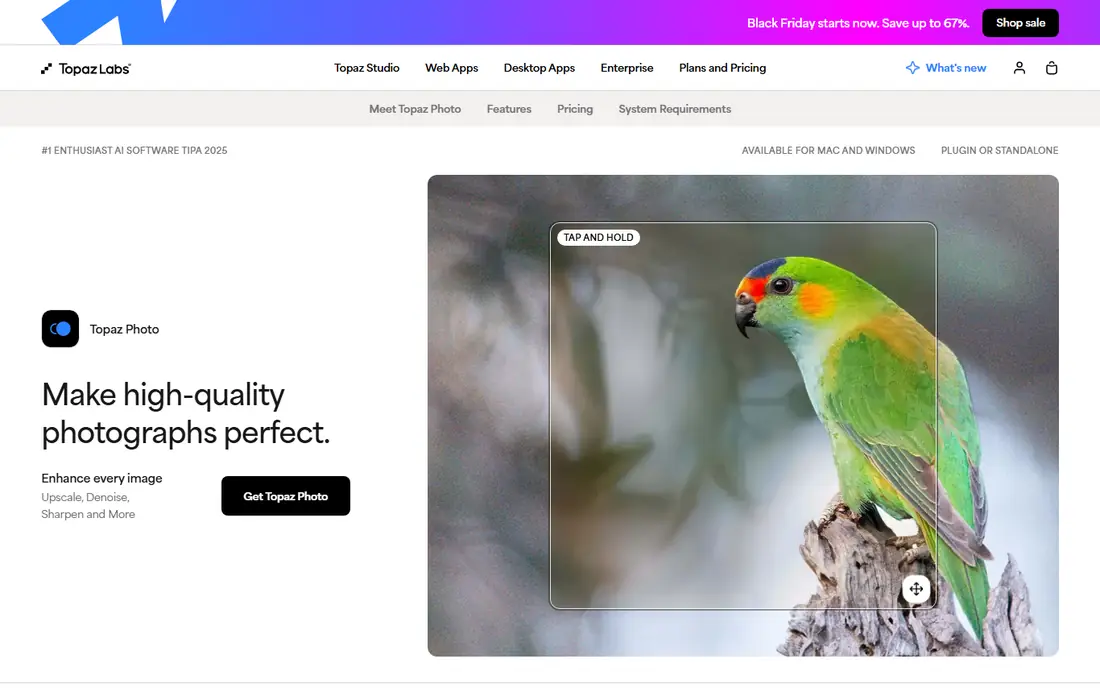
Topaz Photo AI is aimed squarely at Denoise, sharpen, upscale. Its sharpen, denoise, and upscale models consistently rank best in the category, with output up to 600 megapixels.
It works standalone or as a Lightroom plugin. On top of that, batch processing manages entire folders overnight, which fits wedding and event photographers with thousands of frames. Price to start with Topaz Photo AI: $199 one-time. No free plan comes with Topaz Photo AI.
Trade-offs to know: Slow on older machines.
Where it shines: Lightroom plugin.
- Up to 600MP output
- Best denoising and upscaling
- Skin can look plastic at defaults

Think of Adobe Photoshop for full generative editing. Content Credentials record AI edits, which helps clients and publishers verify what changed in an image.
Watch-outs: 7-day trial only; $22.99 monthly.
Pricing is listed at $20.99 to $22.99 a month based on plan, with a 7-day trial. What you pay to start with Adobe Photoshop: $22.99 per month. Adobe Photoshop has no free tier.
- Generative fill
- Layers and masks
- Steep ramp-up time
Photoroom is built with product photo backgrounds in mind. Photoroom is made for e-commerce product photography: background removal, studio looks, shadows, and marketplace backgrounds turn phone snapshots into catalog images. The free level spans entry-level removal, whereas premium plans start at $15 a month in some guides and lower on yearly billing in others, so confirm current pricing.
Also, premium output reaches 4K. For a seller who photographs products daily and needs clean, consistent listings, Photoroom pays for itself in time saved. Photoroom pricing: $15 per month. Photoroom has a free plan.
Upsides: Background removal.
The main drawbacks: Free tier restricted.
- Product catalogs
- Up to 4K on premium
- $15 monthly
Luminar Neo makes the most sense for offline AI photographer tools. Luminar Neo fits photographers who want offline AI tools without a subscription lock-in: portrait enhancement, sky replacement, and scene edits run locally, which also serves privacy requirements for professional shoots.
Points against: No free plan, trial only.
Where Luminar Neo stands out: One-time $119 choice.
On top of that, there is no free plan beyond a trial, and compositing tools trail Photoshop. Price to start with Luminar Neo: $9.95 per month. Luminar Neo has no free plan.
- Sky replacement
- Portrait enhancement
- Performance varies
Adobe Lightroom targets Photo libraries and RAW. Adobe Lightroom pairs AI masking and Generative Remove with the best photo library organization available.
The Photography plan runs about $20 a month for Lightroom plus Photoshop, with Lightroom alone listed near $9.99 in some guides, so confirm current pricing on the vendor page. Entry price for Adobe Lightroom: $9.99 per month. Adobe Lightroom has no free plan.
Strengths: Generative Remove.
Drawbacks to consider: Catalog ramp-up time.
- RAW editing
- Library organization
- Photography plan about $20 monthly for full bundle
How these tools were picked
Each tool was reviewed on what its vendor publishes: price, plan limits, core features and stated drawbacks. We did not run hands-on tests. Prices and plan limits come from vendor pages and can change, so confirm them on the vendor site before you buy. Position on the page reflects fit for a typical buyer first, with price clarity and free access breaking ties. Treat it as a guide, not a ruling.
What to confirm before you sign up
- Prices are a starting point; Fotor shows $8.99 per month to start, so verify what your seat count would cost.
- Look at free plan limits closely: Fotor and Photoroom have one, and the caps decide whether it is usable for real work.
- Read the limits listed for Fotor first: Pro $8.99 monthly.
- The entry price of Topaz Photo AI is only the starting point; model the full cost with seats and extras.
- Verify that exporting from Fotor is possible on your plan and covers all your records.
Frequently asked questions
Can I try these options before paying?
Often, yes. Fotor and Photoroom have a free plan. Use your own data and a real task during the test, and check what the free tier or trial limits before you rely on it.
What is the cheapest option for rated AI image editor software in this list?
On published monthly entry prices, Fotor is the lowest here at $8.99 per month. Entry price is only part of the cost, because seats, add-ons and billing terms can change the total.
How are the tools for rated AI image editor software ordered?
Fotor sits first and Adobe Lightroom last because the order follows typical fit for rated AI image editor software, then price clarity and free access. It is a judgement call, so read each profile for fit and limits.
Are AI photo editors good enough for professional work?
Yes, for the right tasks. Lightroom AI masking and Generative Remove are professional-grade, Topaz upscaling beats manual techniques, and Luminar Neo deals with quick client turnarounds. Final retouching for print and commercial work still benefits from human judgment.
Is Fotor the right pick for everyone comparing rated AI image editor software?
No single tool suits every team. Fotor comes first because it fits beginner one-click edits, while Topaz Photo AI suits Denoise, sharpen, upscale and Adobe Photoshop suits full generative editing. Match the tool to your own size, budget and workflow before deciding.
Sources
See where you really rank - block by block
ProMapRanker scans Google Maps across a grid of your service area. Simple monthly plans from $19, white-label on every plan.
Start freeKeep reading
 zoho inventory alternatives
6 Alternatives to Zoho Inventory, Compared on Price and Fit
Zoho Inventory alternatives: 6 tools compared on price, free plans and fit. Katana leads the list for manufacturers. Fit and flaws are laid out for each entry.
Read → zoho crm alternatives
Best Zoho CRM Alternatives (2026)
Need Zoho CRM alternatives? We compare 7 tools on cost, free access and who each suits. Every pick gets a straight assessment. Built for quick decisions.
Read → zelle alternatives
Best Zelle Alternatives in 2026
Compare the best Zelle alternatives for sending money to friends, paying sellers and moving funds abroad, with honest notes on fees, speed and safety in 2026.
Read →