 ProMapRanker
Top Course Authoring Software in 2026


Teams needing both Rise and Storyline · Pricing starts at: $1,449 per author per year
Key takeaways
- Articulate 360 remains the broadest choice for teams that need both fast block courses and deep custom interactions.
- iSpring Suite suits PowerPoint users, while Easygenerator and Elucidat suit subject experts working in a browser.
- Pricing models differ sharply: some tools charge per author per year, others charge per month or as a one-time licence.
- SCORM, xAPI and LMS publishing matter more than a template count, so confirm the export formats your LMS needs before buying.
- A free trial with a real course, not a demo video, is the best way to judge learning curve and output quality.
Quick comparison
| Pick | Great for | Pricing starts at | Free tier | |
|---|---|---|---|---|
| Articulate 360 | Teams needing both Rise and Storyline | $1,449 per author per year | Free trial | Visit |
 Adobe Captivate | Software simulations and responsive courses | $39.99 per month | Free trial | Visit |
 iSpring Suite | PowerPoint-based course creation | $970 per author per year | Free trial | Visit |
 Easygenerator | Subject experts authoring in a browser | $1,399 per year | Free trial | Visit |
 Elucidat | Large teams producing branded courses at scale | See website | Free trial | Visit |
 Lectora | Accessible, compliance-focused courses | See website | Free trial | Visit |
 ActivePresenter | Solo authors wanting a one-time licence | $249 one-time | Free trial | Visit |
 dominKnow | Teams needing collaborative, responsive authoring | See website | Free trial | Visit |
 Gomo Learning | Cloud authoring with multi-device output | See website | Free trial | Visit |
The best course authoring software
We compared vendor pricing pages, product documentation and public reviews to find authoring tools that produce real, publishable courses, not only slide decks.

Articulate 360 bundles two different authoring styles. Rise 360 builds responsive, block-based courses quickly in a browser, which suits teams that must publish often. Storyline 360 builds slide-based courses with triggers, states, branching and custom interactions, which suits teams that need precise control over a learning experience. Together, they cover more course types than any single-style tool here.
The cost is the main barrier. The personal plan starts at $1,449 per author per year, and teams pay more per seat, so a large author group should budget carefully. Storyline also requires Windows, which matters for Mac-only teams. For professional learning teams that produce courses year-round, the breadth still justifies the price for many buyers.
- Rise for fast block courses plus Storyline for custom interactions
- Large asset library
- SCORM, xAPI and cmi5 publishing
- High per-author price
- Storyline requires Windows
- Advanced AI features may need extra credits

Adobe Captivate is built for detailed, responsive courses and software training. Its simulation tools record on-screen actions and turn them into practice exercises, which suits IT training and systems onboarding. Responsive projects adapt to phones, tablets and desktops, and the individual subscription at $39.99 per month is comparatively affordable for a solo author.
The learning curve is real. Captivate rewards authors who learn its triggers, variables and slide navigation, and newcomers may need training time before they work quickly. Team and education pricing is by quote, so a larger buyer should confirm the full cost. Captivate fits authors who need simulation depth and precise interaction control.
- Strong software simulations
- Responsive course output
- Lower monthly entry price than many rivals
- Steep learning curve
- Interface can feel dated in places
- Team pricing is by quote
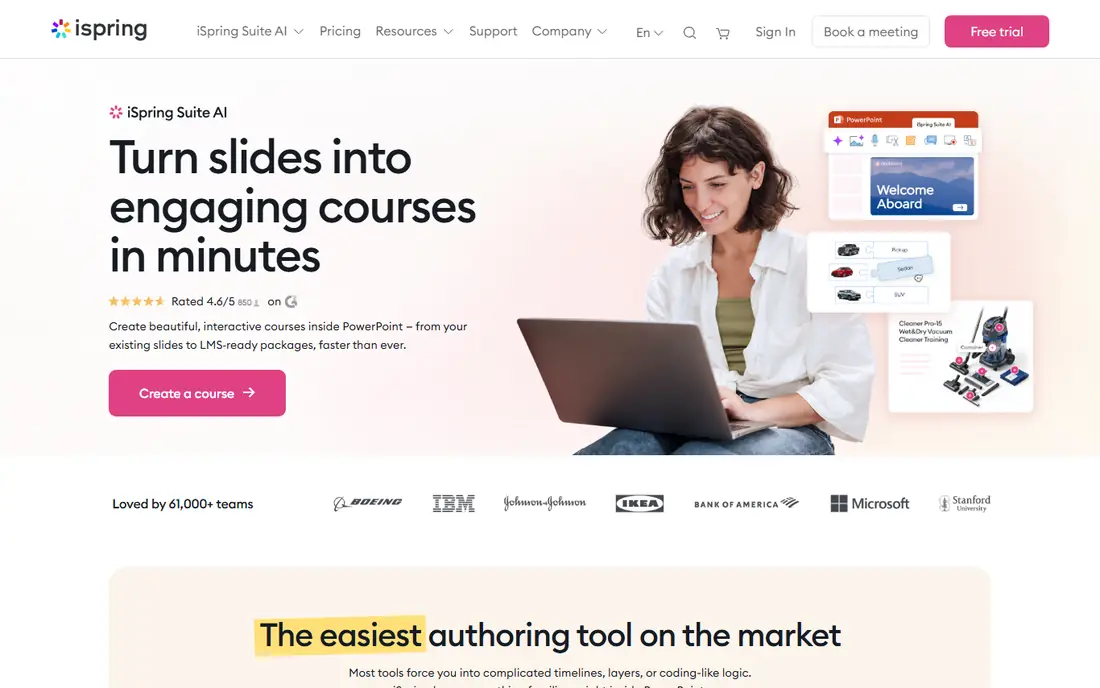
iSpring Suite turns PowerPoint into a course authoring environment, which is its main appeal. Authors who already build slides can add quizzes, role-play scenarios, branching, screen recordings and video, then publish to SCORM or xAPI for an LMS. The workflow feels familiar, so teams can produce a first course faster than with a tool that requires learning a new editor from scratch.
The catch is platform dependence. iSpring Suite needs Windows and a supported desktop PowerPoint, which excludes Mac-only teams and browser-only workflows. Template choice is also narrower than some cloud tools. For corporate training teams already living in PowerPoint, iSpring Suite is one of the fastest routes to a publishable course.
- Familiar PowerPoint workflow
- Quizzes, role-plays, branching and video in one suite
- SCORM and xAPI publishing
- Windows and PowerPoint required
- Template range is narrower than some cloud rivals
Easygenerator is designed for subject matter experts, not only trained instructional designers. Its block-based, browser editor lets a knowledgeable employee build a course without installing desktop software, and team plans add co-authoring, reviewers, analytics and branding. AI guidance helps structure a course from a topic or document, which speeds up a first draft.
Customisation is the limit. Authors who need deep branching, custom variables or highly styled layouts will find Easygenerator more constrained than Articulate or Captivate. The Pro plan, starting at $1,399 per year for one author, also limits courses and learners, so larger teams should price the Team plan. Easygenerator fits organisations that want many experts to contribute courses safely.
- Clean browser-based editor
- Co-authoring and review tools
- AI guidance for course structure
- Limited customisation compared with Storyline or Captivate
- Pro plan limits courses and learners
Elucidat suits large teams that must produce many courses with consistent branding and quality. Its template-driven, cloud editor guides authors toward approved layouts, which helps when dozens of people contribute. Collaboration, review and translation workflows support global teams, and output is responsive across devices.
The trade-off is price and flexibility. Elucidat is priced by quote for enterprise teams, and authors who want fully custom layouts may find templates restrictive. It is not the cheapest pick for a solo author. For a large organisation that values speed, consistency and governance over bespoke design, Elucidat is a strong choice.
- Template-driven authoring for consistent branding
- Collaboration and review workflows
- Responsive output
- Enterprise pricing is by quote
- Design flexibility is narrower than slide-based tools
Lectora has long been a choice for accessible, compliance-focused eLearning. Its controls for accessibility, including WCAG and Section 508 considerations, suit public sector and regulated training where accessibility is a requirement, not a preference. It publishes to SCORM, xAPI and cmi5, and offers templates plus an AI course wizard to speed up a first draft.
The interface can feel dated next to newer cloud editors, and new authors face a learning curve before they work fast. Pricing is by quote for many configurations, so buyers should confirm the plan that fits their author count. Lectora fits power users and compliance teams that prioritise accessibility and control.
- Strong accessibility controls
- SCORM, xAPI and cmi5 publishing
- AI course wizard and rich templates
- Learning curve
- Interface can feel dated
- Pricing is by quote for many plans
ActivePresenter combines screen recording, video editing and eLearning authoring in a single desktop application. An author can record a software demo, trim and annotate the video, then add quizzes, hotspots, branching scenarios and interactions, all without switching tools. The Standard edition starts at $249 as a one-time licence, with a Pro edition at a higher one-time price, which makes long-term cost easy to predict.
The limits are scale and library depth. Its template and asset range is smaller than Articulate 360, and it is less built for large, collaborative author teams. For a freelancer, solo trainer or small studio producing software tutorials and interactive courses, ActivePresenter offers strong value.
- Screen recording, video editing and authoring in one app
- One-time licence option
- Branching and interactions without code
- Smaller template and asset library than Articulate
- Less suited to large team collaboration
dominKnow is a cloud authoring platform built around team collaboration and responsive output. Multiple authors can work on the same project, review content and publish courses that adapt to different screen sizes. It suits learning teams that need shared templates, review cycles and consistent output across many courses.
Pricing is by quote, so a buyer should get a clear figure for author count and features before committing. Because dominKnow is less widely used than Articulate or Adobe, a trial with a real course is especially important. Teams that value collaboration and responsive design over a huge asset library should put it on the shortlist.
- Cloud collaboration for teams
- Responsive course output
- Built for multi-author projects
- Quote-based pricing
- Less well known than Articulate or Adobe, so trial testing matters
Gomo Learning is a cloud-based authoring tool that produces responsive courses for phones, tablets and desktops from one project. Authors work in a browser, which suits distributed teams and organisations that do not want desktop installs. Collaboration features help reviewers and authors work on the same course without passing files back and forth.
The drawbacks are price clarity and scale of community resources. Pricing is by quote, and its template and community range is smaller than Articulate or iSpring. Gomo fits teams that want a straightforward cloud authoring workflow and responsive output, and that are comfortable evaluating a smaller vendor through a trial.
- Fully cloud-based authoring
- Responsive output for phones, tablets and desktops
- Collaboration tools
- Quote-based pricing
- Smaller community and template range than the largest vendors
How we picked these
We compared official pricing pages, product documentation and public reviews, and we kept only tools that produce publishable courses with standard LMS formats. We mixed desktop, cloud and PowerPoint-based tools, and we included both high-end suites and a one-time licence option. We did not claim hands-on testing, and we wrote "See website" where a vendor does not publish a price.
What to check before you choose
Start with your LMS and your learners. Confirm which formats your LMS accepts, such as SCORM 1.2, SCORM 2004, xAPI or cmi5, and test a published course on a phone as well as a desktop. A course that looks fine in the editor can still fail on a small screen or in a strict LMS.
Next, test the workflow that matches your team. A PowerPoint team will work fastest in iSpring, a subject-expert team will work fastest in Easygenerator, and a specialist team will get more from Storyline or Captivate. Finally, price per author, not per course. A low monthly price can still cost more than a one-time licence when many authors need seats year-round.
Frequently asked questions
What is the best course authoring software?
For most professional teams, Articulate 360 is the broadest pick, since it covers fast Rise courses and deep Storyline interactions. For PowerPoint teams, iSpring Suite is often faster. For subject experts in a browser, Easygenerator is easier to adopt. The best tool depends on who authors, how often, and what your LMS accepts.
What are the best course authoring tools for beginners?
Easygenerator, Rise 360 inside Articulate 360, and Gomo Learning are among the easier starting points, since they use block-based or template-guided editors. iSpring Suite also suits beginners who already know PowerPoint. Start with a trial and a short real course, rather than judging by a demo alone.
What is the best course authoring tool for software training?
Adobe Captivate and ActivePresenter are strong for software training, since both record screen actions and turn them into practice simulations. Captivate offers deeper responsive and interaction controls, while ActivePresenter combines recording, video editing and authoring in one lower-cost app.
Do I need an LMS to use course authoring software?
No, not always. Authoring tools create the course, and an LMS delivers, tracks and reports on it. Some tools offer their own delivery or hosting options, but most teams publish SCORM or xAPI courses into an existing LMS. Confirm your delivery plan before you buy, since authoring and hosting are separate jobs.
How much does course authoring software cost?
It varies widely. ActivePresenter starts at $249 as a one-time licence, Adobe Captivate starts at $39.99 per month for individuals, iSpring Suite starts at $970 per author per year, and Articulate 360 starts at $1,449 per author per year. Enterprise tools such as Elucidat, Lectora and dominKnow are priced by quote.
Sources
See where you really rank - block by block
ProMapRanker scans Google Maps across a grid of your service area. Simple monthly plans from $19, white-label on every plan.
Start freeKeep reading
 zoro.to alternatives
Best Zoro.to Alternatives in 2026
We compare the best zoro.to alternatives in 2026, listing only legal licensed anime streaming services, from Crunchyroll to free options for fans today.
Read → zip alternatives
Best Zip Alternatives in 2026
We compare the best zip alternatives for buy now, pay later in 2026, covering pay-in-4 plans, fees, spending limits, and credit reporting options today.
Read → yesware alternatives
Best Yesware Alternatives in 2026
Compare the best yesware alternatives for sales email tracking, templates, and sequences, with current pricing and honest tradeoffs for small sales teams.
Read →