 ProMapRanker
Software Asset Management Best Practices in 2026


Large enterprises with complex licenses · Pricing starts at: See website
Key takeaways
- A trustworthy inventory comes first, because license decisions made from stale data are guesses, not management.
- License reconciliation matters most for large publishers, where shelfware and shortfalls both cost money.
- Smaller teams can get real value from a free tier or an open source tool, as long as someone owns the data.
- Renewal and contract dates deserve the same attention as discovery, since missed renewals create gaps and surprise bills.
- The best tool is the one your team will actually keep current, not the one with the longest feature list.
Quick comparison
| Pick | Great for | Pricing starts at | Free tier | |
|---|---|---|---|---|
| Flexera One | Large enterprises with complex licenses | See website | No | Visit |
 ServiceNow SAM | Enterprises already on ServiceNow | See website | No | Visit |
 Snow Atlas | License optimization at scale | See website | No | Visit |
 Lansweeper | Teams that need discovery fast | See website | Yes | Visit |
 ManageEngine AssetExplorer | Mid-size teams on a budget | See website | Yes | Visit |
 Ivanti Neurons for ITAM | Endpoint-heavy organizations | See website | No | Visit |
 Asset Panda | Flexible tracking beyond IT | See website | Free trial | Visit |
 Snipe-IT | Small teams and self-hosting | Free | Yes | Visit |
The best software asset management tools
Good software asset management is mostly unglamorous discipline: know what you own, know what you use, and check both on a regular cycle. The tools below support that discipline in different ways, from full license optimization to simple, dependable tracking.

Flexera One suits organizations where software spend is large enough that a few percentage points of waste matter more than the price of the tool itself. It pulls together installed software, SaaS use, and cloud spend, then compares that picture against entitlements. That comparison is the heart of software asset management, and Flexera has spent years building publisher-specific rules for it.
The trade-off is effort. Connecting many data sources, cleaning the results, and agreeing on license positions takes staff time, and smaller teams may find the platform heavier than they need. If your estate is modest, start with a lighter tool and move up when license complexity, not curiosity, forces the change.
- Broad publisher license coverage
- Strong SaaS and cloud visibility
- Mature optimization reporting
- Quote-based pricing can be hard to budget
- Implementation takes real effort
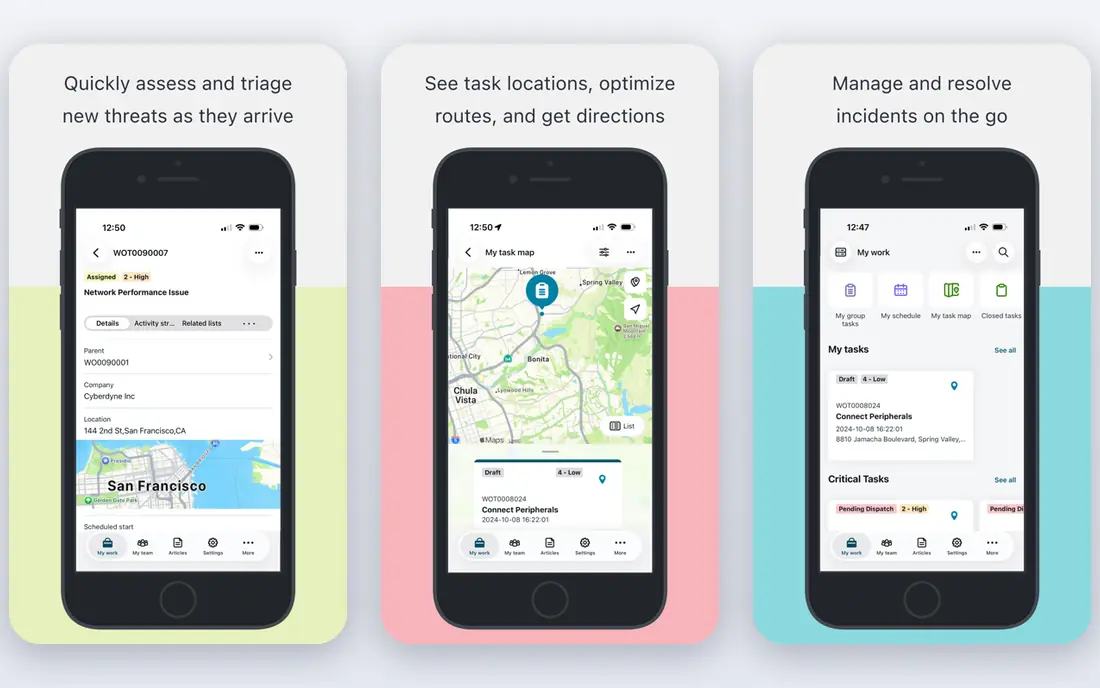
ServiceNow SAM makes the most sense when ServiceNow already runs your service desk and change process. License data then sits next to incident, request, and procurement records, so a renewal or a reclamation task can flow through the same system your team already uses. Publisher packs handle the messy details of major vendors, which saves a great deal of manual mapping.
The catch is scope. Buying ServiceNow mainly for SAM is a large commitment, and implementations are often measured in months rather than weeks. If your organization already lives in ServiceNow, though, adding SAM is usually more sensible than running a separate system beside it.
- Tight fit with ITSM workflows
- Strong publisher packs
- Good audit preparation support
- Pricing is by quote
- Best value requires an existing ServiceNow investment

Snow Atlas, from Snow Software, focuses on turning discovery data into license positions you can defend in an audit. It tracks installations and usage across on-premises software, SaaS, and cloud, then flags unused licenses and compliance gaps. For teams facing a true-up with a major publisher, that clarity is worth a lot.
Snow works best when one person or team owns the process. Discovery without follow-up produces a report that slowly goes stale, and no tool fixes that on its own. Treat Snow as the system of record, and give it a named owner and a monthly review slot.
- Deep license and usage insight
- Strong for hybrid estates
- Clear optimization recommendations
- Custom pricing only
- Needs ownership to stay accurate
Lansweeper is the fastest route to an honest inventory. Its scans find computers, servers, network devices, and installed software without manual entry, and the free tier covers up to 100 assets, which is enough for many small environments. If your current inventory is a spreadsheet nobody trusts, Lansweeper gives you a better starting point in days.
Where it falls short is the deeper license math. Complex publisher rules and entitlement reconciliation may still need another tool or careful manual work. Use Lansweeper as the discovery layer, and judge it on whether your inventory finally matches reality.
- Fast agentless discovery
- Free tier for up to 100 assets
- Clear hardware and software inventory
- Weaker on deep license entitlement work
- Paid tiers rise quickly with asset count
ManageEngine AssetExplorer covers the practical middle ground: discovery, software inventory, purchases, contracts, and license tracking in one product, with a free edition for small asset counts. For a mid-size team that needs order more than optimization, that breadth is useful. Contract dates and warranty records sit beside the asset itself, which helps when renewal season arrives.
The honest limit is depth. Very large or publisher-heavy estates will outgrow its license features, and the interface will not win design awards. But for teams moving from spreadsheets to a real system, AssetExplorer is a solid, affordable step.
- Free edition for small estates
- Contract and purchase tracking
- Barcode and audit support
- Interface feels dated in places
- Enterprise SAM depth is limited
Ivanti Neurons for ITAM fits organizations where endpoints dominate the estate and endpoint management already matters. It ties asset data to device health, lifecycle stage, and workflows, so retiring, reassigning, or reclaiming a device becomes a tracked process rather than an email thread. Compliance reporting benefits from that same endpoint detail.
Pricing is modular and by quote, so scope the modules you actually need before signing. Teams that only want license tracking may find simpler tools cheaper, while teams already managing endpoints with Ivanti get more value from keeping asset data in the same family.
- Strong endpoint context
- Lifecycle and workflow support
- Good compliance reporting
- Quote-based pricing
- Modular setup can complicate scoping
Asset Panda stands out when your asset list is not purely software. It handles laptops and licenses, but also tools, equipment, and facilities items, with custom fields and mobile scanning that suit teams working away from a desk. That flexibility makes it popular in organizations where IT shares the tool with operations.
If your main problem is publisher license math, Asset Panda is the wrong first choice. It tracks well, but it does not replace a dedicated SAM engine for complex entitlements. Pick it when breadth and ease of use matter more than deep license optimization.
- Highly configurable fields and workflows
- Mobile barcode scanning
- Works for non-IT assets too
- License optimization is not its strength
- Pricing is by quote
Snipe-IT is the honest budget pick. Self-hosted, it costs nothing but your time, and it covers the basics well: assets, license seats, check-in and check-out, depreciation, and audit trails. Small teams that need a real system of record without a vendor contract will find it refreshingly direct.
The cost is maintenance. Updates, backups, and security fall to you on the free edition, and paid hosting exists for teams that would rather pay someone else to handle that work. If you have even modest server skills, Snipe-IT is hard to beat for the price.
- Free and open source when self-hosted
- Check-in and check-out with audit trails
- License seat tracking
- You host and maintain it yourself
- Paid hosting adds cost for support
How we picked these
We compared official feature pages, pricing pages, and app and platform documentation for established SAM and IT asset tools, and we favored tools that are still actively sold and supported in October 2026. We looked for coverage of the core practices in this article: discovery, inventory accuracy, license reconciliation, contract tracking, and regular review. Tools with only a marketing page and no clear current product were left out, and prices we could not verify from the vendor were written as See website.
Building the habits that make SAM work
Tools help, but the practices do the work. Start with discovery and keep it running, so new devices and installs appear without manual entry. Reconcile licenses against entitlements at least quarterly, and more often before a renewal or an audit. Record every purchase, contract date, and renewal term in the same system, not in separate inboxes.
Assign one owner for the license position, even in a small team, and give that owner a monthly review slot. Reclaim unused licenses before buying new ones, and remove software from machines that no longer need it. When a publisher changes its licensing rules, update your records at once, because an old rule applied to a new purchase is a common source of shortfalls.
Finally, measure waste in plain terms: licenses bought but not used, renewals paid for retired software, and duplicate SaaS tools doing the same job. Those three numbers justify the whole program to anyone who controls the budget.
Frequently asked questions
What is the best software asset management best practice to start with?
Start with a complete, current inventory. You cannot reconcile licenses, reclaim waste, or pass an audit from a list that misses machines, so discovery comes before optimization, reporting, or any purchase decision.
How often should we review our software licenses?
Review them at least once a quarter, and again before any major renewal or audit. Monthly checks work better for fast-changing SaaS estates, where seats are added and dropped without formal procurement.
What is the difference between SAM and IT asset management?
IT asset management covers hardware and software together, while SAM focuses on software licenses, entitlements, usage, and compliance. SAM is the part that keeps you legal with publishers and stops you paying for software nobody uses.
Can small teams do software asset management without an enterprise tool?
Yes. A free tier or an open source tool such as Snipe-IT or Lansweeper covers discovery and basic license tracking for small estates, as long as one person owns the data and reviews it on a schedule.
What causes most SAM failures?
Stale data causes most failures. Tools are bought, inventories are built once, and then nobody updates them, so the license position drifts from reality until an audit or a renewal exposes the gap.
Sources
See where you really rank - block by block
ProMapRanker scans Google Maps across a grid of your service area. Simple monthly plans from $19, white-label on every plan.
Start freeKeep reading
 zoho inventory alternatives
6 Alternatives to Zoho Inventory, Compared on Price and Fit
Zoho Inventory alternatives: 6 tools compared on price, free plans and fit. Katana leads the list for manufacturers. Fit and flaws are laid out for each entry.
Read → zoho crm alternatives
Best Zoho CRM Alternatives (2026)
Need Zoho CRM alternatives? We compare 7 tools on cost, free access and who each suits. Every pick gets a straight assessment. Built for quick decisions.
Read → zelle alternatives
Best Zelle Alternatives in 2026
Compare the best Zelle alternatives for sending money to friends, paying sellers and moving funds abroad, with honest notes on fees, speed and safety in 2026.
Read →