 ProMapRanker
Best SmartVault Alternatives in 2026

Key takeaways
- TaxDome and Canopy replace more than document storage, because they add practice management, billing, and client work in one place.
- ShareFile and Box suit firms that mainly need secure sharing, without a full practice management change.
- Per user pricing varies a lot, so check minimum user counts and storage limits before you compare headline prices.
- Firms tied to QuickBooks or Xero should shortlist tools with a direct accounting link, not only a generic file folder.
- A trial with real client documents tells you more than a feature page, especially for portal setup and permissions.
Quick comparison
| Pick | Great for | Pricing starts at | Free tier | |
|---|---|---|---|---|
 TaxDome | Full practice management for firms | $58 per month | Free trial | Visit |
 Canopy | Growing firms that want workflow plus documents | $45 per month | Free trial | Visit |
 ShareFile | Secure client file sharing | See website | Free trial | Visit |
 Liscio | Simple client communication and files | $50 per month | Free trial | Visit |
 Karbon | Work tracking and team collaboration | $59 per month | Free trial | Visit |
 Box | General business file storage and sharing | See website | Free trial | Visit |
 Dropbox Business | Familiar file sync with team controls | See website | Free trial | Visit |
 DocuWare | Larger document workflows and approvals | $300 per month | Free trial | Visit |
 ClientHub | Client portal with task tracking | $69 per month | Free trial | Visit |
The best SmartVault alternatives
These tools cover the same core job: holding sensitive client documents, sharing them safely, and keeping an audit trail. Some add full practice management, while others stay focused on storage and sharing.
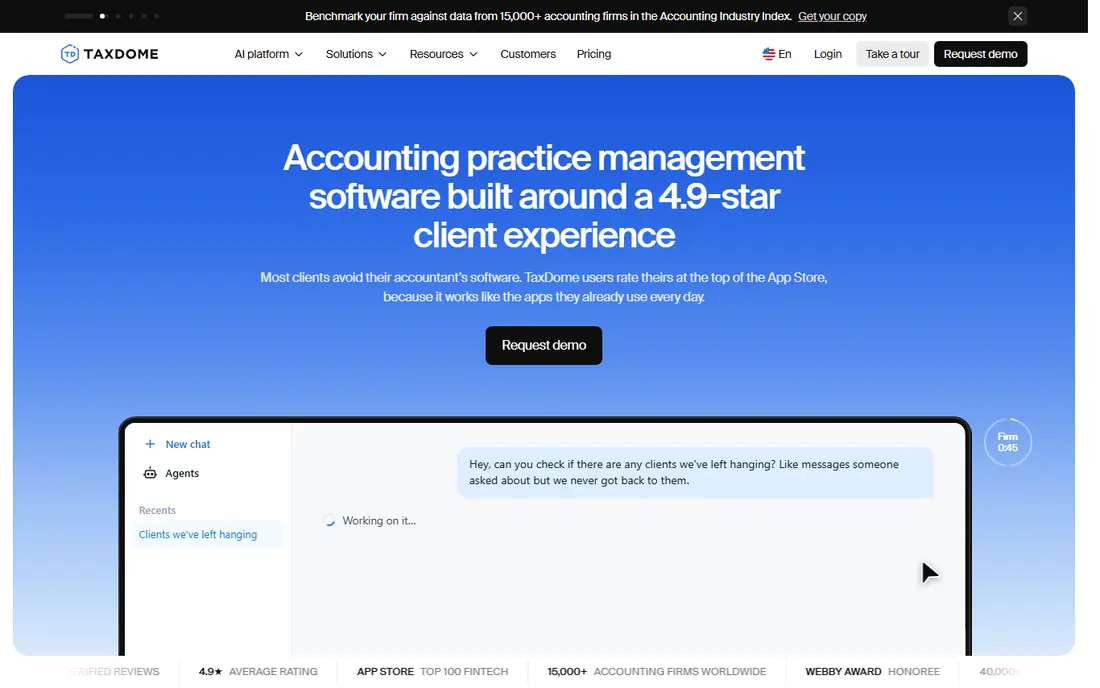
TaxDome is the closest all-in-one replacement for firms that want documents, messages, tasks, billing, and e-signatures in one system. Clients get a portal for uploads and requests, and staff can track work from intake to delivery. That breadth helps firms that currently stitch together several tools for the same job. It also means the first weeks need care, because templates, pipelines, and permissions all deserve a proper setup.
The honest catch is scope. A small firm that only needs a safe place to exchange tax documents may find TaxDome larger than required. If you already use a separate practice tool you like, a lighter file-sharing option may fit better. For firms ready to move their daily work into one hub, though, TaxDome is a strong and current choice.
- Client portal included
- Workflow and billing in one place
- Accounting integrations
- Broader scope takes longer to set up
- Price rises with team size

Canopy pairs document management with task tracking, time, billing, and client requests. That combination suits firms that have outgrown simple folders but do not want to rebuild every process at once. Workflow templates help standardise repeat work such as tax season intake, and the portal keeps client uploads in one place. We like that the focus stays on firm work, rather than general file storage alone.
Pricing needs a close read, because add-ons can change the total. Check what is included for document storage, e-signatures, and intake before you sign. If your firm wants a single system for work and files, Canopy deserves a trial with a real workflow, not only a demo folder.
- Practice management plus documents
- Client portal included
- Workflow templates
- Some features sit in add-ons
- Migration needs planning

ShareFile, from Citrix, is built for secure sending, receiving, and storing of business files. Firms can create branded client portals, request files, and control who sees each folder. That makes it a practical swap when the main pain is email attachments and scattered drives, rather than workflow tracking. It also offers e-signatures on many plans, which helps with engagement letters and approvals.
ShareFile will not run your whole practice. It does not aim to replace task pipelines, billing, and intake in the same way TaxDome or Canopy do. If you already have those tools and only need safer document exchange, that focus is a plus. If you want one system for everything, pair it with your current practice tool or choose a broader option.
- Client-facing sharing and requests
- E-signature options
- Admin controls
- Not a full practice management system
- Pricing is not simple to compare at a glance
Liscio keeps the client experience simple. Clients can message, upload documents, and sign forms from one portal, without learning a complex system. For firms that lose time chasing documents by email, that simplicity matters. Staff get a shared view of client communication, which cuts duplicate requests and missed attachments.
The trade-off is depth. Liscio is not the best pick for firms that need detailed workflow automation, capacity planning, and deep reporting. It works best as a clean client front door, paired with your accounting and tax software. Smaller firms and solo practices often get the most value from that clear focus.
- Client portal included
- Messaging and files in one place
- Straightforward setup
- Less depth for complex practice workflows
- Per user cost adds up for larger teams
Karbon is a work management platform for accounting firms, with document handling, client communication, and task tracking built around the work itself. That angle helps managers see who owns each job, what is blocked, and which clients still owe documents. Email can be tied to work items, so context does not sit in separate inboxes. For busy firms, that visibility is often worth more than extra storage space.
Karbon is less appealing if you only need a document vault. Its strength shows when a team juggles many clients, deadlines, and reviewers at once. Pricing is per user, so model the cost for your full team, not only for partners. A trial built around one busy service line will show whether the workflow fits your firm.
- Strong work and email tracking
- Team collaboration
- Client portal options
- Document features are part of a wider system
- Setup takes time for large teams
Box is a general business content platform, not an accounting tool, and that is both its strength and its limit. It offers strong permissions, version history, integrations, and admin controls for teams that share many files. Firms can build client folders with careful access rules, and staff can work from desktop, web, and mobile. If your firm also needs general document storage beyond tax work, Box covers more ground than a narrow portal.
The gap is accounting workflow. Box does not provide tax intake, practice pipelines, or client task tracking out of the box. You will need to build those processes around it or connect other tools. For firms that want a dependable, well supported file platform and already have practice software, Box is a sound choice.
- Broad integrations
- Granular permissions
- Large business user base
- Not accounting specific
- Portal feel differs from a dedicated client portal
Dropbox Business will feel familiar to most clients, which lowers the training burden. Files sync across devices, links can be shared with controls, and team admins can manage members and folders. For firms moving from personal drives or email, that familiarity helps clients adopt the new process quickly. It also integrates with many common business apps.
Familiarity is not the same as a dedicated client portal. Dropbox does not offer accounting intake, e-signatures as a core practice feature, or the same branded client request flow as specialist tools. Check the plan details for storage, security controls, and support before choosing it for sensitive tax documents. It fits best when ease of use matters most and your practice system handles the rest.
- Easy sync and sharing
- Widely familiar
- Team admin controls
- Not built for accounting portals
- Advanced compliance features sit on higher plans
DocuWare suits larger firms and businesses that need document workflows beyond simple storage. You can route documents for approval, set deadlines, and connect to ERP, CRM, and HR systems. That depth helps when documents pass through several teams or need formal review steps. It also supports forms and signatures inside document workflows, which reduces switching between tools.
That power comes with a learning curve and a higher starting price. Small firms may find the setup heavier than needed, and costs can rise once modules and implementation are added. If your need is mainly a client portal for tax documents, a smaller specialist tool will be simpler. If your firm runs complex, multi-step document processes, DocuWare is worth a careful evaluation.
- Workflow automation and approvals
- Integrations with business systems
- E-signatures and forms
- Steeper learning curve
- Total cost rises with modules and setup
ClientHub focuses on the client portal and the work around it. Clients can see tasks, upload files, and follow progress, while staff keep requests in one place. That shared view reduces status emails and helps clients know exactly what is still needed. For firms that want a clean portal without adopting a full practice suite, ClientHub hits a useful middle ground.
As a smaller vendor, ClientHub may not match the integration range of the largest platforms, so check your accounting, tax, and signature tools before committing. Also confirm storage limits and user minimums on the plan you need. When the fit is right, though, the portal experience is clear for both staff and clients, and that clarity often drives adoption.
- Client portal included
- Task tracking for clients and staff
- Unlimited client access on plans
- Smaller vendor than the largest platforms
- Check integrations for your stack
How we picked these
We compared official feature pages, pricing pages, and public reviews for tools that serve accounting firms or secure business document sharing. We kept only tools that are live in October 2026 and that offer a real client-facing way to share files, not only internal storage. We favoured a mix of full practice platforms and focused sharing tools, so firms can match the pick to their current stack. Prices shown are starting prices from vendor or comparison sources, and we wrote See website where pricing was not clearly published or varied by plan.
What to check before you switch
Start with your must-have workflow, not the feature list. List the document types you exchange, the clients who struggle most with uploads, and the approvals you need. Then test that exact flow in a trial, including a client upload, a staff review, and a signature step if you use one. Check permissions carefully, because a portal that is easy for staff but confusing for clients will still create email workarounds.
Next, check migration and cost in full. Ask how existing folders, client access, and audit history move across, and what happens to data if you leave. Model per user pricing for your whole team, plus any minimum user count, storage limit, or add-on for signatures and intake. Finally, confirm security basics such as encryption, access controls, and audit trails, and confirm support hours for tax season peaks. A tool that fits your busiest month is the right tool.
Frequently asked questions
What is the best SmartVault alternative for accountants?
TaxDome or Canopy are the strongest all-in-one picks, because they combine documents with practice work, billing, and client portals. If you only need secure sharing, ShareFile or Liscio may be simpler and cheaper to run. Choose based on whether you want to replace your practice system or only fix document exchange.
Can I use Box or Dropbox instead of SmartVault?
Yes, for general file storage and sharing, but neither is built as an accounting client portal. You will need to build request workflows, intake steps, and client task tracking around them. Firms that already have practice software often find that trade-off acceptable, while firms that want one portal may prefer a specialist tool.
Do these tools work with QuickBooks and Xero?
Many specialist tools, including TaxDome, Canopy, and Karbon, are built with accounting workflows in mind, while general storage tools rely on broader integrations. Check the exact integration on the vendor site, because sync depth varies by plan and by the accounting product you use. Test a real client file flow before you commit.
How much do SmartVault alternatives cost?
Starting prices in this list range from around $45 per month per user for Canopy to $300 per month for DocuWare, with several tools priced on request or by plan. Per user totals, minimum users, storage, and add-ons change the real cost, so request a quote for your team size. A free trial helps you confirm what is included before you pay.
Is a client portal safer than email for tax documents?
A portal with controlled access, encryption, and an audit trail is generally safer than sending sensitive files by ordinary email. Clients upload to a defined folder, staff control permissions, and activity can be tracked. Still check the vendor security page and your own access rules, because weak passwords and broad permissions can undo good tools.
What should I check during a free trial?
Test a full client journey from invitation to upload, review, and sign-off, using real document types from your firm. Check mobile access, because many clients work from phones, and check how staff find older files. Also test support response times, since tax season problems need fast help.
Sources
See where you really rank - block by block
ProMapRanker scans Google Maps across a grid of your service area. Simple monthly plans from $19, white-label on every plan.
Start freeKeep reading
 zoro.to alternatives
Best Zoro.to Alternatives in 2026
We compare the best zoro.to alternatives in 2026, listing only legal licensed anime streaming services, from Crunchyroll to free options for fans today.
Read → zip alternatives
Best Zip Alternatives in 2026
We compare the best zip alternatives for buy now, pay later in 2026, covering pay-in-4 plans, fees, spending limits, and credit reporting options today.
Read → yesware alternatives
Best Yesware Alternatives in 2026
Compare the best yesware alternatives for sales email tracking, templates, and sequences, with current pricing and honest tradeoffs for small sales teams.
Read →