 ProMapRanker
Best Scrivener Alternatives in 2026

Key takeaways
- Ulysses is our pick for Apple writers who want a clean, synced workspace for long articles and books.
- Reedsy Studio is the best free starting point, with book structure and formatting for self-publishers.
- NovelPad and LivingWriter suit novelists who want chapter planning, scene cards, and goal tracking in one place.
- Obsidian suits writers who want local files, links between notes, and full control over their drafts.
- Atticus is the best pick when print and ebook formatting matter more than drafting features.
Quick comparison
| Pick | Great for | Pricing starts at | Free tier | |
|---|---|---|---|---|
 Ulysses | Apple writers, synced writing | $5.99 per month | Free trial | Visit |
 Reedsy Studio | Free book writing and formatting | Free | Yes | Visit |
 Plottr | Visual story planning | $60 per year | Free trial | Visit |
 Dabble | Novel drafting and planning | $9 per month | Free trial | Visit |
 NovelPad | Novel writing with scene cards | $15 per month | Free trial | Visit |
 Obsidian | Local notes and linked writing | Free | Yes | Visit |
 Novlr | Goal-driven minimalist drafting | See website | Yes | Visit |
 LivingWriter | Guided novel writing | $12 per month | Free trial | Visit |
 Atticus | Book formatting for print and ebook | $147 one-time | No | Visit |
The best Scrivener alternatives
Scrivener is known for its binder, corkboard, and compile system, which help authors organize book-length projects. Writers look for alternatives to Scrivener when the learning curve feels steep, when they want real-time collaboration, or when they need simpler formatting for self-publishing. We compared rivals on structure, drafting, planning, export, and price, and we did not list Scrivener itself in its own alternatives list.

Ulysses is the cleanest alternative for writers who want to focus on words, not on menus. Sheets hold chapters or scenes, groups collect them into parts, and keywords and filters help you find research notes fast. Sync across Mac, iPad, and iPhone works well for writers who draft on more than one Apple device.
The limits are clear. There is no Windows or Android version, no real-time collaboration, and export is good for web and Word but not a full print formatter. Plans cost $5.99 per month or $39.99 per year, with a 14-day trial. If you write on Apple devices and want a calm, organized workspace, Ulysses is our pick.
- Clean distraction-free editor
- Sync across Mac, iPad, and iPhone
- Sheets and groups for long projects
- Apple only, no Windows or Android
- No real-time collaboration
- Print formatting is basic
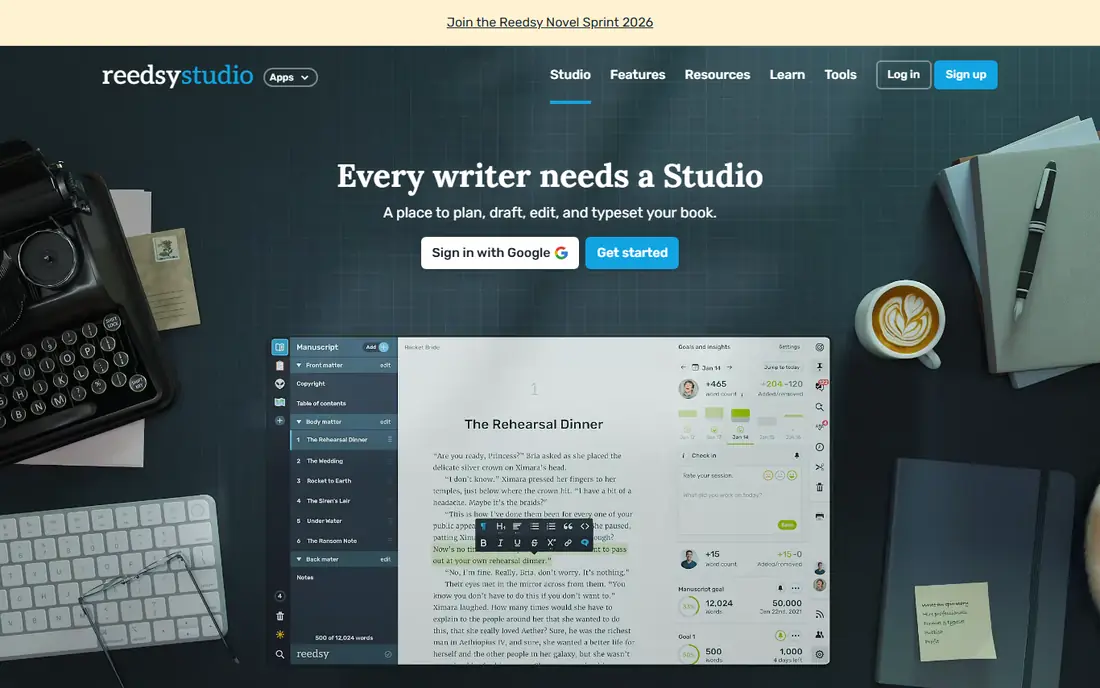
Reedsy Studio is the best free starting point for authors who want to write and format a book without paying first. It organizes front matter, chapters, and back matter in a clear structure, and it exports EPUB and print-ready PDF files for self-publishing. That combination is rare at zero cost.
It is web-based, so you need a connection to write, and its planning tools are lighter than Scrivener or Plottr. Paid add-ons are available, with some listings showing add-ons up to $10.99 per month, but core writing and export remain free. For a first novel or a nonfiction book on a tight budget, Reedsy Studio is hard to beat.
- Free for core writing
- Book structure built in
- EPUB and print PDF export for self-publishers
- Web only, no offline desktop app
- Collaboration is limited
- Fewer planning tools than Scrivener

Plottr solves a different problem from most writing apps: seeing the story. Its timeline view lets you map scenes across plot lines, characters, and places, so you can spot gaps, pacing problems, and overlapping arcs before you draft. Templates for characters, places, and story structure help new novelists start with a plan.
Plottr is a planning tool first, not a full drafting and formatting app, so many writers pair it with Ulysses, NovelPad, or Word. Plans are listed at $60 per year or $150 for a lifetime license, with a trial to test the timeline. If your main struggle is plot structure, Plottr is the best tool in this list for that job.
- Visual timeline and plot lines
- Character and place templates
- Works on web, Mac, and Windows
- Planning only, not a full drafting app
- Formatting and export are limited
- Paid tiers for collaboration
Dabble is a straightforward novel tool that keeps drafting and planning in one place. Books split into chapters and scenes, a plot grid shows your story at a glance, and notes stay attached to the project. It works on web, Mac, Windows, Linux, iOS, and Android, which suits writers who switch devices.
Export is mainly to Word format, so print formatting needs another tool, and collaboration features sit on paid tiers. Plans start at $9 per month in current listings, with higher tiers up to $29 per month and a lifetime option. For novelists who want Scrivener-style structure without the steep learning curve, Dabble is a solid middle choice.
- Chapter and scene organization
- Plot grid and notes
- Works on web and desktop
- Export is mainly Word format
- Collaboration needs paid tiers
- Formatting is basic
NovelPad is built for novelists who want to finish a draft. Scene cards, chapter structure, color coding, and an insight board keep the story organized, while word-count goals and version history help you track progress and recover earlier drafts. It works in a browser and as a desktop app, with offline writing on desktop.
Pricing starts at $15 per month, with a $89 one-time desktop option and a $349 lifetime option in current listings, and a 14-day trial with no card required. Sync, web access, and sharing sit on higher plans. If you want a focused novel workspace with strong scene tools, NovelPad is worth the trial.
- Scene cards and chapter structure
- Goal tracking and version history
- Offline desktop app plus web
- Monthly cost adds up
- Sync and web features need higher plans
- Formatting is ebook-focused
Obsidian is different from the other tools here, because it is a note system first. Your files live on your device as plain Markdown, links connect notes, characters, places, and research, and a graph view shows how ideas connect. Writers who build large fictional worlds or research-heavy nonfiction often love that freedom.
Book formatting needs external tools, and there is no built-in corkboard or compile system like Scrivener. The app itself is free for personal use, while Sync costs $5 per month for those who want built-in sync across devices. If you value ownership of your files and linked research over ready-made book templates, Obsidian is a strong, free foundation.
- Free for personal use
- Local files you control
- Links and graph view for research and worldbuilding
- No built-in book formatting
- Sync costs extra
- Setup takes time for new users
Novlr is a minimalist web app for writers who want goals, not clutter. It tracks word counts, writing streaks, and progress toward a target, and its clean editor keeps the focus on the next paragraph. A free tier covers basic writing, which makes it easy to test whether the goal system helps you finish.
It is web-based, so offline writing is limited, and EPUB export is basic with no print PDF. Paid tiers are listed in current comparisons at around $6 to $14 per month, but pricing varies, so we list it as See website here. For writers who stall without targets, Novlr gives gentle structure without a complex setup.
- Clean, goal-focused editor
- Free tier for basic writing
- Progress and writing analytics
- Web only
- Print formatting is basic
- Full features need paid tiers
LivingWriter guides novelists through the writing process with templates, chapter and scene organization, and story elements for characters, settings, and research. That guidance helps beginners who want structure but do not want to learn a complex app first. It works on web and major devices, with a 14-day trial.
Plans start at $12 per month in current listings, with higher tiers for more features. Formatting and export are more limited than Scrivener or Atticus, so final book layout may need another tool. If you want a friendly, guided novel workspace, LivingWriter is a good fit, especially for first-time novelists.
- Guided templates for novels
- Chapter and scene tools
- Story elements for characters and places
- Monthly cost
- Formatting is limited
- Fewer export options than Scrivener
Atticus is the best pick in this list when formatting matters most. It offers many themes, clean chapter headings, and export for both print and ebook, which makes it popular with self-publishers who want a professional-looking book without hiring a formatter. The one-time price of $147 avoids a monthly subscription.
Drafting and planning are lighter than Scrivener, NovelPad, or LivingWriter, so many authors draft elsewhere and use Atticus for the final layout. There is no free plan, though a 30-day money-back guarantee is listed. If your draft is done and formatting is the next step, Atticus is the tool to check first.
- Strong print and ebook formatting
- Many themes
- One-time price, no subscription
- Limited offline use
- Collaboration needs an account
- Drafting tools are lighter than Scrivener
How we picked these
We compared official product pages, pricing pages, and current 2026 comparison reviews for each app, and we checked that each one is still offered in October 2026. We favored apps that handle long-form structure, drafting, or formatting, and we included free, one-time, and subscription options. Where pricing varies by source or plan, we wrote See website rather than guessing. We did not claim hands-on testing; our comparison rests on published features, pricing, and public reviews.
How to choose a Scrivener alternative
Start with your weakest step. If you struggle to organize a long draft, pick a tool with strong chapter, scene, and research tools, such as NovelPad, Dabble, or LivingWriter. If you struggle to focus, pick a clean editor such as Ulysses or Novlr. If your draft is done and formatting is the problem, pick Atticus or Reedsy Studio instead of another drafting app.
Check export before you commit
Export matters more than most writers expect. Test how your draft leaves the app: Word, EPUB, Markdown, or print PDF, and whether chapter structure, notes, and formatting survive the export. A tool that traps your book is a poor choice, even if drafting feels good. Keep a backup export in Word or Markdown at every major milestone, and test the full export before you reach the final chapter.
Match the tool to your devices
Apple-only tools, web-only tools, and desktop tools all work well, but only if they match how you write. If you draft on a phone, check the mobile app. If you write offline on planes or in cafes without Wi-Fi, check offline support. A tool that fits your devices will get used, while a tool that needs a device you do not own will sit unused after the trial.
Frequently asked questions
What are the best alternatives to Scrivener?
Ulysses is the best pick for Apple writers, Reedsy Studio is the best free pick, and NovelPad and LivingWriter are the best picks for novel planning and drafting. Obsidian suits writers who want local files and linked notes, while Atticus suits writers who need strong print and ebook formatting. The right pick depends on whether your main need is drafting, planning, or formatting.
Is there a free alternative to Scrivener?
Yes. Reedsy Studio is free for core writing and formatting, Obsidian is free for personal use, and Novlr offers a free tier for basic drafting. These free options cover writing and basic export, but advanced features, sync, and full formatting often need a paid plan or a second tool.
Which Scrivener alternative is best for novels?
NovelPad, Dabble, and LivingWriter are the strongest novel picks, because they combine chapter and scene structure with plot tools and goal tracking. Plottr is best for visual story planning, and Ulysses is best for writers who want a clean drafting space. Many novelists pair a planning tool with a drafting tool rather than using one app for everything.
Does Ulysses work on Windows?
No. Ulysses is Apple only, covering Mac, iPad, and iPhone. Windows writers who want a similar clean editor should look at Dabble, NovelPad, LivingWriter, or Obsidian, which all work on Windows. Check the current platform list on the vendor site before you buy, since platform support can change.
Can I format a book for self-publishing without Scrivener?
Yes. Reedsy Studio exports EPUB and print PDF for free, and Atticus offers stronger themes and print formatting for a one-time price. Draft in the app you like, then format in Reedsy Studio or Atticus for the final files. Test a sample chapter in both formats before you format the full book.
How do I move a Scrivener project to another app?
Most tools accept Word or Markdown imports, so export your Scrivener draft in chapters or as a single Word file, then import it into the new app and check that chapter breaks and notes survived. Keep your original Scrivener project as a backup until the new version is complete. Some structure, such as corkboard cards and metadata, may need manual rebuilding in the new tool.
Sources
See where you really rank - block by block
ProMapRanker scans Google Maps across a grid of your service area. Simple monthly plans from $19, white-label on every plan.
Start freeKeep reading
 zscaler alternatives
Best Zscaler Alternatives in 2026
Looking for zscaler alternatives? We compare 9 SASE and zero trust platforms on architecture, data protection, pricing, and fit for your network and team.
Read → zapier alternatives free
Best Zapier Alternatives Free in 2026
Nine automation tools for zapier alternatives free in 2026, all with genuinely free tiers, plus free plan limits, starting prices and upgrade paths explained.
Read → which platform is best for online reputation
Which Platform Is Best for Online Reputation in 2026
Wondering which platform is best for online reputation? We compare 8 review, listing, and response tools for small and multi-location businesses and agencies.
Read →