 ProMapRanker
Best Rabbit Alternatives in 2026

Key takeaways
- This article treats Rabbit as the Rabbit R1 pocket AI device, so the alternatives below are pocket and wearable AI devices, not streaming services.
- The most useful replacements in 2026 are note-capture wearables, not general agents, because they do one job reliably every day.
- Bee Pioneer is the cheapest way to try ambient capture, while Plaud NotePin suits structured meeting notes.
- Omi suits people who want open software and extensions, while Friend suits people who want a companion, not a productivity tool.
- Check privacy and consent rules before wearing a recorder anywhere, since recording other people without consent can break local law and workplace policy.
Quick comparison
| Pick | Great for | Pricing starts at | Free tier | |
|---|---|---|---|---|
 Plaud NotePin | Structured meeting capture | $159 | Free trial | Visit |
 Bee Pioneer | Cheapest ambient capture | $49.99 | Yes | Visit |
 Omi | Open-source wearable notes | $179 | Yes | Visit |
 Friend | AI companion necklace | $249 | No | Visit |
 Meta Ray-Ban AI Glasses | Hands-free voice help | See website | No | Visit |
 Pocket | Phone-back AI recorder | $129 | Free trial | Visit |
 Fieldy 3 | All-day wearable capture | $129 | Yes | Visit |
 Vibe Dot | Client-facing note capture | $199 | Yes | Visit |
 HiDock P1 | Call recording with earbuds | $169 | Yes | Visit |
The best rabbit alternatives
These alternatives to rabbit focus on pocket AI devices in the Rabbit R1 sense: small devices that listen, transcribe, summarize, or answer questions without pulling out a laptop.

Plaud NotePin is the strongest pick for people who want meeting notes they can actually use. It clips to a shirt or wristband, records selectively, and turns recordings into structured summaries with action items. For professionals who attend many meetings, that structure matters more than raw transcription.
The catch is the plan. Core capture works without a large subscription, but the fuller AI summaries and longer allowances sit behind paid tiers. Check what the free allowance covers against your weekly meeting load before buying.
- Small clip or pin form
- Structured summaries
- Strong meeting templates
- Full AI features may need a paid plan
- Needs charging and app setup

Bee Pioneer is the cheapest way to try an always-on wearable. It listens through the day, builds summaries and reminders, and keeps the hardware simple enough to wear without thinking about it. For curious buyers, the low price makes it an easy first experiment.
It is less structured than Plaud for formal meetings, and its summaries suit daily recall better than detailed minutes. As with any ambient recorder, check consent rules and privacy settings before wearing it in shared spaces.
- Low entry price
- Simple wearable design
- Daily summaries
- Less structured than meeting-focused tools
- Cloud processing raises privacy questions
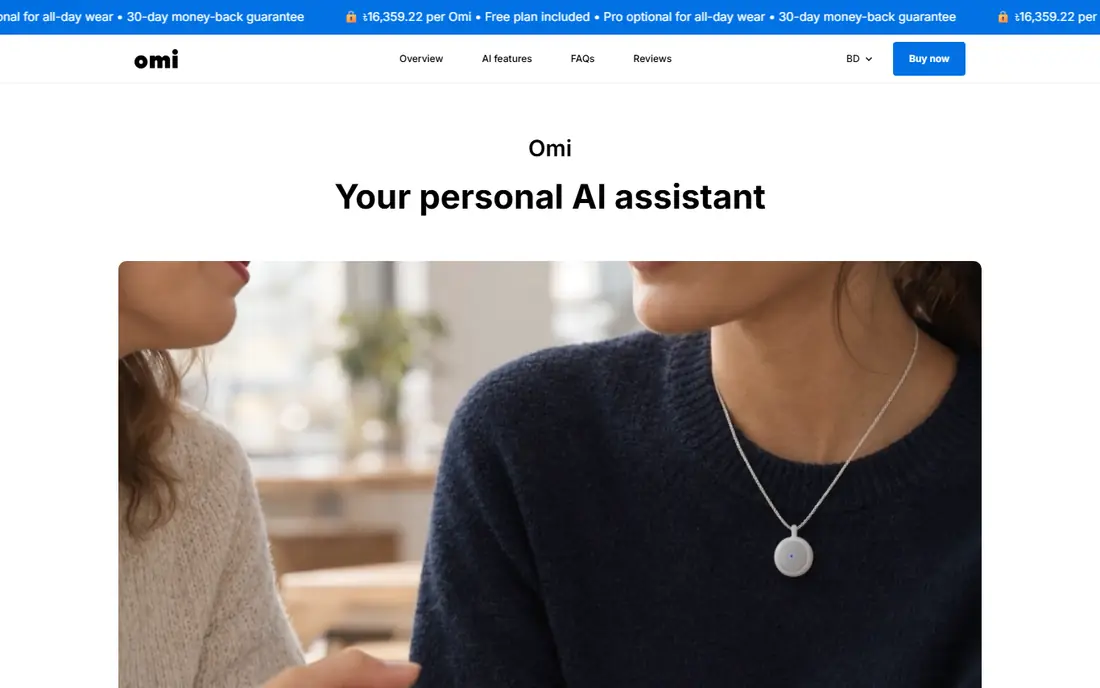
Omi appeals to people who want control over their device. Its hardware, firmware, and app are open source, and a plugin store lets developers extend what it does. That openness makes it the most flexible wearable here for tinkerers and developers.
Flexibility comes with setup effort. You may need to choose plugins and tune settings to get the summaries you want, while closed rivals work well out of the box. If you enjoy that tuning, Omi rewards it. If not, a simpler device will suit you better.
- Open-source hardware and app
- Plugin store for extensions
- Flexible capture
- More setup than closed rivals
- Summary quality varies by plugin
Friend is a different kind of device from the rest of this list, and that difference matters. It is an AI companion necklace that sends messages and observations about your day, not a tool for meeting minutes or action items. Buyers who want a friendly presence will like it.
Buyers who want productivity should skip it. Friend does not replace a note taker, a calendar, or a task manager, and judging it on those jobs would miss its point. It is a real product for a narrow need.
- Companion-style messages
- Simple necklace design
- Always available
- Not a meeting note tool
- No structured productivity features
- Niche appeal
Meta Ray-Ban AI glasses put a voice assistant on your face, with a camera and speakers built into frames that look like ordinary glasses. You can ask questions, capture moments, and hear answers without holding a device. For walking, commuting, or working with your hands full, that hands-free design is a genuine advantage.
Battery life limits long days of heavy use, and wearing a camera in public raises privacy questions that buyers should take seriously. Check the model and price carefully, since frames, lenses, and features vary widely across the range.
- Hands-free voice assistant
- Camera and audio built in
- No extra screen to carry
- Battery limits heavy use
- Style and price vary by model
- Privacy concerns in public
Pocket is a small recorder that attaches to the back of a phone, which makes it easy to carry without another wearable to remember. It records conversations and calls where supported, then produces summaries, with a choice of AI models for the write-up. That model choice appeals to people who care how summaries are phrased.
It is tied to your phone in a way a pendant is not, so it suits phone-first users best. Check the plan details for summary allowances, since the cheapest path may limit the features you use most.
- Attaches to a phone
- Model choice for summaries
- Compact recorder
- Needs a phone nearby
- Summary depth depends on plan
- Smaller brand
Fieldy 3 is a wearable note taker built for conversations in rooms, classes, clinics, and customer visits, not just scheduled video calls. It captures real-life talk all day, records online meetings without sending a bot into the call, and offers a free transcription allowance with no required plan for core use.
As a newer brand, it has less long-term track record than Plaud or Otter-style software. Its summaries suit daily recall and follow-up, while highly structured meeting minutes may still need editing. For field work, that trade is often worth it.
- Wearable all-day capture
- Free transcription allowance
- No required plan for core use
- Newer brand
- Meeting structure varies
- Needs regular charging
Vibe Dot is a hardware recorder paired with an AI workspace, aimed at people who work with clients or in regulated fields. It turns conversations into follow-up notes, and its core features work without a required subscription, which makes the total first-year cost easier to predict.
The hardware price is higher than Bee or Pocket, and the brand is newer than Plaud. Buyers who need client-ready notes and a predictable cost will value that combination. Buyers who only need casual capture can spend less elsewhere.
- Core features without a required subscription
- Suited to regulated work
- Clear follow-up notes
- Higher hardware price
- Newer brand
- Smaller ecosystem than big rivals
HiDock P1 is a small recorder that sits with your laptop or desk setup and records calls while you wear earbuds, capturing both sides of the conversation. That solves a common gap for remote workers, since phone and laptop microphones often miss the other speaker or pick up room noise.
It is less of a walking-around wearable than a pin or pendant, so it suits desk-based workers best. If most of your important conversations happen at a desk, it is a practical pick. If they happen on the move, a wearable will serve you better.
- Records both sides of calls
- Works with earbuds
- Transcription included for life on core use
- Desk and laptop focus
- Less suited to walking capture
- Needs app setup
How we picked these
We compared shipping pocket AI devices and wearables that are available in October 2026, using vendor pages and recent device guides. We kept only products that are still sold, that do a useful job today, and that fit the Rabbit R1 idea of a small AI device for everyday help. We left out discontinued devices, including the Humane AI Pin and the Limitless Pendant, since a reader cannot buy them as new products with full support.
How to choose a pocket AI device
The category is still young, so a clear job description matters more than a feature list.
Decide the one job first
Meeting notes, daily recall, call recording, and companionship are different jobs. A device that does meeting notes well may be poor at daily recall, and a companion device will not write minutes. Pick the job, then pick the device built for it.
Check consent and privacy before you wear it
Recording other people carries legal and workplace rules that vary by state and employer. Tell people when you are recording, check your workplace policy, and review where recordings are stored and how long they are kept. A device with clear controls is worth more than one with a longer feature list.
Count the first-year cost, not just the hardware
Some devices include core features free, while others need a paid plan for full summaries. Add hardware plus twelve months of any required plan, and compare that total. A cheap device with a costly plan can cost more than a pricier device with free core features.
Test it in your real routine
Wear the device for a week of real meetings, calls, and walks. Check whether summaries need heavy editing, whether battery life covers your day, and whether you actually remember to carry it. A device left at home helps no one, no matter how good its specs look.
Frequently asked questions
What are the best alternatives to rabbit in 2026?
For note capture, Plaud NotePin, Bee Pioneer, Omi, Fieldy 3, and Vibe Dot are the strongest shipping wearables. For hands-free help, Meta Ray-Ban AI glasses are the main option. For call recording, HiDock P1 and Pocket suit desk and phone users. The best pick depends on whether you need meeting notes, daily recall, or hands-free answers.
Is the Rabbit R1 still available?
The R1 hardware was still in use in 2026, with Rabbit shifting focus to its OS3 software for computers, but manufacturing had stopped according to reports. That shift is why many buyers now look at wearables or their phone instead. Check Rabbit's current site before buying any R1 hardware secondhand.
Are pocket AI devices private?
Privacy varies by product, since some process recordings in the cloud and others offer more local control or open software. Read the privacy policy, check retention settings, and consider consent rules for other people in the room. Omi's open approach appeals to privacy-minded buyers, but no wearable removes the need for consent.
Do I need a subscription for these devices?
It depends on the device. Bee and Fieldy offer core use without a required plan, while Plaud reserves fuller AI features for paid tiers. Vibe Dot includes core features without a required subscription. Always add hardware plus any required plan to get the true first-year cost.
Can a phone replace a pocket AI device?
Often, yes. A phone with a good AI assistant and a recording app covers questions, notes, and summaries for many people. A dedicated wearable earns its place when you need hands-free capture, all-day listening, or a device you do not have to hold. Try the phone route first if you are unsure.
Sources
See where you really rank - block by block
ProMapRanker scans Google Maps across a grid of your service area. Simple monthly plans from $19, white-label on every plan.
Start freeKeep reading
 zscaler alternatives
Best Zscaler Alternatives in 2026
Looking for zscaler alternatives? We compare 9 SASE and zero trust platforms on architecture, data protection, pricing, and fit for your network and team.
Read → zapier alternatives free
Best Zapier Alternatives Free in 2026
Nine automation tools for zapier alternatives free in 2026, all with genuinely free tiers, plus free plan limits, starting prices and upgrade paths explained.
Read → which platform is best for online reputation
Which Platform Is Best for Online Reputation in 2026
Wondering which platform is best for online reputation? We compare 8 review, listing, and response tools for small and multi-location businesses and agencies.
Read →