 ProMapRanker
Best PuTTY Alternatives in 2026

Key takeaways
- Windows Terminal with OpenSSH covers basic SSH free, while MobaXterm adds SFTP, X11 and network tools on Windows.
- Termius suits users who want hosts and keys synced across desktop and mobile.
- Tabby, KiTTY and Bitvise give free or low-cost routes with different strengths on customisation and file transfer.
- SecureCRT and Xshell suit teams that need strong session controls and enterprise support.
- Keep SSH keys protected, use key-based login where possible, and never share private keys.
Quick comparison
| Pick | Great for | Pricing starts at | Free tier | |
|---|---|---|---|---|
 MobaXterm | Windows all-in-one toolkit | Free | Yes | Visit |
 Termius | Cross-device SSH sync | Free | Yes | Visit |
 Windows Terminal | Built-in Windows SSH | Free | Yes | Visit |
 iTerm2 | Mac terminal productivity | Free | Yes | Visit |
 Tabby | Open-source custom terminal | Free | Yes | Visit |
 SecureCRT | Enterprise session control | $119 per licence | No | Visit |
 Bitvise SSH Client | Free SSH plus SFTP on Windows | Free | Yes | Visit |
 KiTTY | Lightweight Windows SSH | Free | Yes | Visit |
 Xshell | Tabbed sessions on Windows | $119 per licence | Yes | Visit |
The best putty alternatives
These nine tools cover SSH, terminal sessions, file transfer and host management, and we compared their published pricing, platforms and limits. The named tool being replaced is not listed as a product below.
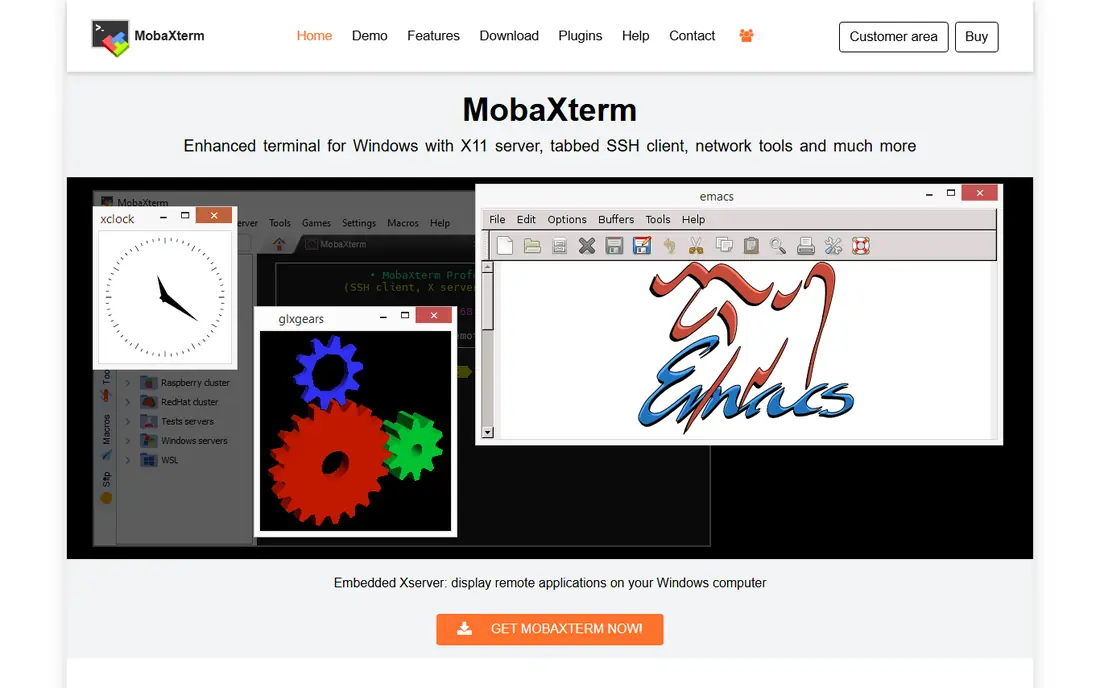
MobaXterm is the strongest free upgrade for a Windows admin who wants more than a bare terminal. It bundles SSH, SFTP, an X11 server, RDP, VNC and network tools, so remote work rarely needs a second app. The graphical SFTP pane lets you drag files to a server while a terminal session stays open, which is handy for quick config edits.
The Home Edition is free for personal use, but it caps sessions, tunnels and macros, and it limits daemon runtime. Professional removes those caps for about $69 per user in third-party listings, though the vendor page should be checked for the current licence terms. There is no mobile app and no native sync, so MobaXterm suits one Windows desk rather than a multi-device workflow.
- SSH, SFTP, X11, RDP and network tools in one app
- Portable edition for USB use
- Graphical SFTP pane
- Windows only
- Home Edition limits sessions, tunnels and macros
- No native cloud sync

Termius suits people who move between a laptop and a phone and want the same hosts everywhere. The free Starter plan covers local SSH on one device, while Pro adds cloud sync, snippets and team features. SFTP, Mosh and serial support on desktop round out a workflow that covers servers, network gear and mobile fixes.
The trade-off is the sync model. Sync runs through the Termius cloud, with no self-hosted vault option in its standard plans, so teams with strict local-only rules should check policy first. Pro is listed at $10 per user per month on annual billing in recent listings. For cross-device continuity, Termius remains the most polished option in this list.
- Hosts and snippets sync across Windows, Mac, Linux, iOS and Android
- SFTP and Mosh support
- Clean mobile apps
- Sync needs a paid Pro plan
- Cloud vault model may not suit teams that want local-only storage

Windows Terminal with OpenSSH is the simplest modern replacement for basic SSH on Windows. It is free, it supports tabs and panes, and the OpenSSH client lets you connect with a single command. Profiles, colour schemes and key-based login cover daily server work without installing a third-party client.
It is a terminal, not a full SSH manager. There is no graphical SFTP pane, no host vault with sync, and file transfer needs WinSCP or a command-line tool. For developers and admins who live in the command line and already manage keys well, that simplicity is a plus. For users who want a visual host list and drag-and-drop files, MobaXterm or Termius will feel easier.
- Free and built into modern Windows
- Tabs, panes and profiles
- OpenSSH client included
- No built-in SFTP pane or host vault
- Needs separate tools for file transfer and sync
iTerm2 is the Mac terminal many developers install first, and it pairs well with OpenSSH for server work. Split panes, searchable scrollback, session restore and profiles help when you juggle several servers at once. It is free, actively maintained and deeply customisable, from hotkeys to triggers that highlight errors.
It is not a cross-platform host manager. There is no Windows version, no mobile app and no cloud vault, so host lists must be managed by profiles, config files or another tool. For a Mac-only workflow, iTerm2 plus OpenSSH is fast and free. For a mixed Windows and Mac team, a cross-platform client will be easier to standardise.
- Free for Mac
- Split panes, search and session restore
- Strong scripting and profile options
- Mac only
- SSH host management is lighter than Termius
- No Windows or mobile version
Tabby, formerly Terminus, is the open-source pick for users who want a modern terminal they can shape. It runs on Windows, Mac and Linux, supports SSH, Telnet and serial sessions, and offers SFTP file transfer, themes and plugins. Tab layouts, profiles and a clean interface make it a good step up from a bare terminal without a licence fee.
Open source brings trade-offs. Plugin quality varies, and there is no vendor support desk in the same sense as a paid client. Updates depend on community and maintainer work, though the project remains active. For a user who values open code, cross-platform use and customisation, Tabby is a strong free choice.
- Free and open source
- Windows, Mac and Linux support
- Plugins, themes and SFTP support
- Plugin quality varies
- Less polished enterprise support than paid clients
SecureCRT suits teams that need strict session control, scripting and terminal emulation. It supports SSH, Telnet and serial sessions, with session folders, log options and scripting for repeat tasks. Its long history in enterprise and network operations gives IT teams a familiar and supportable tool.
Price and packaging need a check. SecureCRT is listed at about $119 per licence with a period of updates, and SecureFX, the file transfer companion, is sold separately. That total can exceed a simple SSH client, but for regulated or large environments, the control and support may justify it. Small teams with basic SSH needs will find free tools enough.
- Strong session management, scripting and emulation
- Windows, Mac and Linux support
- Long track record in enterprise use
- Perpetual licence plus update costs
- SecureFX file transfer is a separate product
Bitvise SSH Client is a free Windows option that pairs a terminal with a strong graphical SFTP window. It covers SSH, SFTP, tunnelling and port forwarding, and it supports key-based login and session profiles. For a Windows user who moves files to servers often, the SFTP pane is a real advantage over a terminal-only client.
The interface is functional rather than modern, and there is no Mac, Linux or mobile version. That limits Bitvise to Windows desks, but on Windows it is a dependable and free workhorse. Teams that want a free, no-account client with file transfer should shortlist it alongside MobaXterm Home Edition.
- Free for personal and commercial use in listings
- Graphical SFTP
- Terminal, tunnelling and port forwarding in one app
- Windows only
- Interface feels dated next to modern terminals
- No mobile app
KiTTY is a fork of the classic lightweight SSH client, with added features such as session filters, portability, automatic login scripts and extra shortcuts. It stays small and fast, which suits locked-down machines, older hardware and users who want a simple session list without a heavy install.
Its look and workflow remain close to the original, so users who want tabs, modern themes or cloud sync may prefer Tabby or Termius. KiTTY also lacks a mobile app and native sync, so host lists must be copied by file. For a minimal, free Windows SSH client that just works, KiTTY remains a valid and honest pick.
- Free and very light
- Adds sessions, portability and extra features to the classic PuTTY base
- Runs well on older hardware
- Windows focus
- Interface is dated
- No cloud sync or mobile app
Xshell suits Windows users who manage many servers and want tabs, not separate windows. Its session manager, tab groups and custom key mappings help organise dozens of hosts, and it supports SSH, Telnet and serial connections. The free version for home and school use lets a learner test the interface before buying.
Commercial use needs a paid licence, listed at about $119 in third-party sources, so businesses should check the current Netsarang terms. Xshell is Windows only, with no mobile companion. For a Windows admin who values tabbed organisation and session control, it is a polished alternative to a single-window client.
- Tabbed sessions and clear session manager
- Strong SSH, Telnet and serial support
- Free version for home and school use in listings
- Windows only
- Paid licence needed for commercial use
- No mobile app
How we picked these
We compared official product pages, pricing listings and platform support for SSH and terminal clients, and we kept only tools that are available and supported in October 2026. We looked for SSH support, session management, file transfer, key handling and cross-platform or mobile coverage, and we noted where a free tier limits sessions, sync or commercial use.
We did not claim hands-on testing. Our comparison rests on vendor documentation, pricing pages and public reviews. Protect private keys with strong passphrases, prefer key-based login over passwords where your server allows it, and never paste a private key into a chat, ticket or shared document.
How to choose an SSH client
Start with your devices. A Windows-only admin can choose MobaXterm, Bitvise or Xshell. A Mac user can start with iTerm2 and OpenSSH. A user who works across desktop and phone should shortlist Termius, even though sync is paid. Matching the client to your devices avoids a tool that works well on one machine and nowhere else.
Next, check file transfer and host management. If you move files daily, a graphical SFTP pane saves time. If you manage dozens of servers, session folders, search and snippets matter more than themes. If you script deployments, check command-line tools, scripting and key agent support, because a pretty terminal that breaks scripts will slow a team down.
Finally, check security and support. Confirm how keys are stored, whether sync is encrypted, and whether the vendor publishes updates. Free open-source tools can be secure when actively maintained, but an abandoned client is a risk. Pick a client with current updates, a clear key model and a workflow your team will actually use for every login.
Frequently asked questions
Do I still need an SSH client on modern Windows?
Modern Windows includes OpenSSH and Windows Terminal, so basic SSH works without a third-party client. A dedicated client still helps when you need SFTP panes, host vaults, sync, scripting or enterprise session controls.
What is the safest way to log in with SSH?
Use key-based login with a passphrase-protected private key, disable password login on the server where possible, and keep the private key on your own device only. Never share a private key, and revoke keys promptly when staff leave or a device is lost.
Can I sync SSH hosts between devices safely?
Yes, if the sync service encrypts data and you use a strong account password and two-factor login where offered. Teams with strict data rules may prefer local config files or a self-managed vault instead of cloud sync.
Is a free SSH client safe for business use?
A free client from an active, reputable vendor can be safe, but check its licence terms, because some free tiers cover personal use only. Confirm update frequency, key storage and support options before rolling it out to a team.
What is SFTP, and do I need it?
SFTP is secure file transfer over SSH, and it lets you upload and download files to a server through an encrypted connection. You need it if you edit config files, deploy code or move backups by hand, rather than only running commands.
Should I use Mosh as well as SSH?
Mosh can improve SSH over unstable mobile or roaming connections, because it handles roaming and intermittent network drops better than plain SSH. Termius and some other clients support Mosh, but check server support before relying on it.
Sources
See where you really rank - block by block
ProMapRanker scans Google Maps across a grid of your service area. Simple monthly plans from $19, white-label on every plan.
Start freeKeep reading
 zyte alternatives
Best Zyte Alternatives in 2026
These zyte alternatives cover managed scraping APIs, proxy networks and no code tools for lawful collection from your own or consented sources only in 2026.
Read → zerto alternatives
Best Zerto Alternatives in 2026
Compare the best zerto alternatives for disaster recovery and replication, with recovery targets, cloud options and honest trade-offs for teams in 2026.
Read → zerofox alternatives
Best ZeroFox Alternatives in 2026
We compared 9 zerofox alternatives for brand protection, phishing takedowns, dark web monitoring, and social impersonation, with clear coverage notes.
Read →