 ProMapRanker
Overleaf Alternatives in 2026

Key takeaways
- Papeeria, TeXPage, and Crixet are the closest online replacements for collaborative LaTeX editing in a browser.
- CoCalc and Authorea suit researchers who need computation or publishing workflows beside LaTeX, not just an editor.
- TeXstudio and Visual Studio Code with LaTeX Workshop suit writers who want full local control and no compile limits.
- Typst is not LaTeX, but it is worth testing if you want faster compiles and simpler markup for a new project.
Quick comparison
| Pick | Great for | Pricing starts at | Free tier | |
|---|---|---|---|---|
 Papeeria | Online collaborative LaTeX editing | $5 per month | Yes | Visit |
 CoCalc | LaTeX plus computation and teaching | See website | Yes | Visit |
 Authorea | Collaborative research papers and publishing | See website | Free trial | Visit |
 TeXstudio | Free offline LaTeX editing | Free | Yes | Visit |
 TeXPage | Online editing with track changes | $5 per month | Yes | Visit |
 Crixet | Free online collaborative editing | See website | Yes | Visit |
 LaTeX Base | Lightweight online LaTeX editing | See website | Yes | Visit |
 Typst | Faster modern typesetting alternative | See website | Yes | Visit |
 Visual Studio Code with LaTeX Workshop | Local editing with full extension control | Free | Yes | Visit |
The best overleaf alternatives
These tools help you write, compile, and share LaTeX documents without using Overleaf itself, from browser editors with live collaboration to offline editors that run on your own machine. We compared official feature pages, pricing pages, and plan limits for tools live in October 2026, and we left Overleaf itself out of this list, because this article is about alternatives to it.
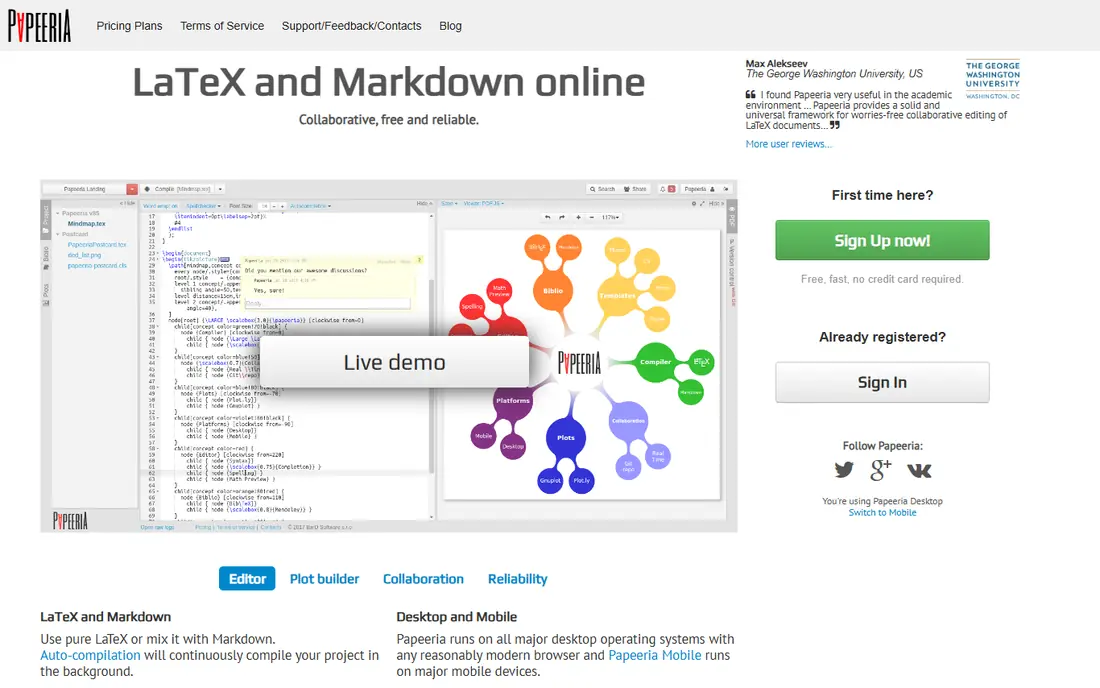
Papeeria is the closest direct online replacement for many Overleaf users. It offers collaborative editing in the browser, live preview, project templates, and sync with Git and Dropbox, with a full TeX Live setup behind it. The paid plan is listed at 5 dollars per month in recent comparisons, and the free plan suits beginners and small projects.
The limits are scale and ecosystem. Papeeria has fewer journal templates and third-party integrations than the largest platforms, so check whether your target journal template is available before switching a submission. For coursework, group assignments, and straightforward papers, Papeeria is a clean and capable online editor.
- Real-time collaboration
- Live preview
- Project templates and Git sync
- Fewer templates and integrations than larger platforms
- Paid plan needed for longer compiles
CoCalc, formerly SageMathCloud, is a collaborative workspace that includes LaTeX editing beside Jupyter notebooks, Python, Sage, and terminal access. That mix suits teaching and computational documents, where code, results, and typeset text need to live together. Real-time collaboration, chat, and automatic version history help classes and research groups work on the same project.
The trade-off is focus. If you only need a clean LaTeX editor, CoCalc interface can feel busier than Papeeria or TeXPage, and free accounts have limited computing resources. For teachers, students in computational courses, and researchers writing documents that include live code, CoCalc is a strong and distinctive alternative.
- Real-time LaTeX editing plus Jupyter and computation
- Course management
- Chat and version history
- Interface feels less polished for pure LaTeX
- Free plan resources are limited
Authorea is a collaborative writing platform for researchers, with both visual editing and LaTeX modes. It supports versioning, figures and data embeds, and workflows for submitting to journals and publishers, which suits teams writing papers that need more than a plain editor. Collaboration, comments, and multi-format export help research groups move from draft to submission.
The limits are LaTeX depth and price. Authorea is less focused on complex LaTeX packages than a pure LaTeX editor, and some publishing features sit behind paid plans. If your paper needs heavy custom LaTeX, a dedicated editor may serve you better. If your team mixes LaTeX users and visual editors, Authorea bridges that gap well.
- WYSIWYG and LaTeX modes
- Versioning and data embeds
- Journal submission workflows
- Some features need a paid plan
- LaTeX ecosystem is less deep than pure LaTeX editors
TeXstudio is the best free offline LaTeX editor for most writers. It runs on Windows, Mac, and Linux, offers auto-completion, syntax highlighting, a structure view, and an integrated PDF viewer with forward and inverse search, so clicking in the PDF jumps to the source and back. There are no compile time limits, because compilation runs on your own machine.
The trade-offs are setup and collaboration. You need to install a TeX distribution such as TeX Live or MiKTeX first, and real-time co-editing is not built in, so teams must share files through Git or a cloud folder. For solo writers, thesis authors, and anyone who wants full control without a subscription, TeXstudio is an excellent and durable choice.
- Free and open source
- Auto-completion and structure view
- Integrated PDF viewer with forward and inverse search
- No native real-time collaboration
- Requires a local TeX distribution
- Many options can overwhelm beginners
TeXPage is an online LaTeX editor with a focus on collaboration and review. It supports real-time and asynchronous editing, track changes for revisions, and Git integration, which helps supervisors and co-authors review a draft without overwriting each other work. The paid plan is listed at 5 dollars per month in recent comparisons, with a free plan for smaller projects.
The limits are template range and compile time on free plans, which are common trade-offs for smaller online editors. Check whether your document class and packages compile cleanly in a trial project before moving a large paper. For teams that need clear revision tracking in a browser editor, TeXPage is a practical alternative.
- Real-time and async collaboration
- Track changes
- Git support
- Smaller template range than larger platforms
- Paid plan needed for longer compiles
Crixet is a newer online LaTeX editor that, at time of writing, offers a free tier with real-time collaboration and no stated collaborator limit, which makes it attractive for student teams and short projects. It provides instant previews in the browser and exports to PDF and ZIP, with Git repository export for hybrid workflows.
The caution is maturity. As a smaller platform, Crixet has fewer templates, integrations, and support resources than Papeeria or CoCalc, and its free offer could change. Test it on a real project, keep a local copy of your source files, and confirm that your packages compile before relying on it for a deadline. For a free, collaborative start, it is worth trying.
- Real-time collaboration in the browser
- Unlimited collaborators on free tier at time of writing
- PDF and ZIP export
- Smaller and newer platform
- Fewer templates and integrations than established editors
LaTeX Base is a lightweight online editor for quick LaTeX work without installing anything. It suits learning, homework, and small documents, where you want to write, compile, and see a PDF in the browser with minimal setup. That simplicity makes it a good first step for students who are still learning LaTeX syntax.
The limits are collaboration and scale. LaTeX Base is not a full team platform, and large multi-file papers with many figures and bibliographies will be easier in TeXstudio, Papeeria, or CoCalc. Use it for practice, snippets, and short assignments, and move to a fuller editor when your project grows.
- Simple online editor with fast compilation
- Good for learning and small projects
- No install needed
- Limited collaboration and project features
- Less suited to large multi-file papers
Typst is not a LaTeX editor, but it belongs on this list because many people searching for LaTeX alternatives want a modern typesetting system, not just a new editor. Its markup is simpler than LaTeX, compiles are very fast, and the browser app supports real-time collaboration. A free tier covers basic use, with Pro plans adding more features.
The honest warning is compatibility. Typst cannot run your existing LaTeX code unchanged, and its template and package range is smaller than the TeX ecosystem, so journal templates may not exist. For a new project where you control the format, Typst is fast and pleasant. For a submission that requires a specific LaTeX class, stay with a true LaTeX editor.
- Very fast compiles
- Simpler markup than LaTeX
- Real-time collaboration in the browser app
- Not LaTeX, so existing LaTeX code needs rewriting
- Smaller template and package range
Visual Studio Code with LaTeX Workshop
Great for: Local editing with full extension control
Visual Studio Code with the LaTeX Workshop extension is the pick for writers who already code or who want full control over their setup. The extension adds linting, snippet support, recipe-based builds, live preview, and integrated terminal and Git, all inside a free editor. There are no compile limits, because builds run locally.
The trade-offs are setup and collaboration. You need to install a TeX distribution and configure the extension, which takes more time than opening a browser editor, and real-time co-editing is not native. For developers, researchers with complex projects, and writers who value a customizable local workflow, this pairing is powerful and free.
- Free editor with a powerful LaTeX extension
- Linting, snippets, and live preview
- Git built in
- Requires setup of a TeX distribution and extensions
- No native real-time collaboration
How we picked these
We compared official feature pages, pricing pages, and plan limits for LaTeX editors and typesetting tools live in October 2026. We kept tools that let you write, compile, and produce a PDF from LaTeX source, plus Typst as a clearly labeled modern alternative for new projects. We left out ShareLaTeX as a separate product, because it merged into Overleaf, and we left Overleaf itself out, because this article lists alternatives to it.
What to check before you switch
First, test your actual document, not a sample. Compile your real preamble, packages, figures, and bibliography in the new tool, and check compile time, package support, and PDF output. A tool that handles a short homework file may struggle with a thesis or a journal class.
Next, check collaboration and backup. Confirm how co-authors edit, how version history works, and how you export source files and PDFs, so you are not locked into one platform before a deadline. Keep a local Git copy of important papers regardless of which editor you choose, and confirm your target journal accepts the output format.
Frequently asked questions
What are the best alternatives to Overleaf for collaboration?
Papeeria, TeXPage, and Crixet are the closest online alternatives for real-time LaTeX collaboration in a browser. CoCalc also offers real-time editing, with added computation and teaching tools, while Authorea suits research teams that mix visual and LaTeX editing.
Is there a free alternative to Overleaf?
Yes. TeXstudio and Visual Studio Code with LaTeX Workshop are free offline options with no compile limits, while Papeeria, TeXPage, Crixet, and LaTeX Base offer free online tiers. Typst also offers a free tier for its browser app.
Can I use Typst instead of LaTeX?
You can for a new project where you control the format, because Typst offers faster compiles and simpler markup. You cannot simply paste existing LaTeX code into Typst, and journal templates may not be available, so check your submission requirements first.
Which alternative is best for a thesis?
TeXstudio and Visual Studio Code with LaTeX Workshop suit a thesis best, because local compilation has no time limits and Git gives you full version control. Papeeria or CoCalc are good online options if you need browser collaboration with a supervisor.
Do these alternatives support journal templates?
Some do, but coverage varies. Papeeria and CoCalc offer templates, while TeXstudio and Visual Studio Code let you use any template you download, because you control the local TeX distribution. Always test your target journal class before switching a submission.
Sources
See where you really rank - block by block
ProMapRanker scans Google Maps across a grid of your service area. Simple monthly plans from $19, white-label on every plan.
Start freeKeep reading
 zscaler alternatives
Best Zscaler Alternatives in 2026
Looking for zscaler alternatives? We compare 9 SASE and zero trust platforms on architecture, data protection, pricing, and fit for your network and team.
Read → zapier alternatives free
Best Zapier Alternatives Free in 2026
Nine automation tools for zapier alternatives free in 2026, all with genuinely free tiers, plus free plan limits, starting prices and upgrade paths explained.
Read → which platform is best for online reputation
Which Platform Is Best for Online Reputation in 2026
Wondering which platform is best for online reputation? We compare 8 review, listing, and response tools for small and multi-location businesses and agencies.
Read →