 ProMapRanker
Best Opencode Alternatives in 2026

Key takeaways
- Opencode is the current name for the open source agent formerly called OpenCode, so we left that product out of this alternatives list and focused on genuinely different tools.
- If you want to keep choosing your own model, Cline, Aider, Kilo Code, Continue, and Roo Code give you that freedom, with your own API key paying for model use.
- If you want a polished, managed experience, Claude Code, Cursor, and Codex CLI trade some flexibility for tighter integration and support.
- Terminal tools suit developers who live on the command line, while IDE tools suit developers who want suggestions and edits inside the editor they already use.
- Model cost is often the real cost of a free agent, so compare token prices and subscription credits before you judge a tool by its sticker price.
Quick comparison
| Pick | Great for | Pricing starts at | Free tier | |
|---|---|---|---|---|
 Claude Code | Managed terminal agent work | See website | No | Visit |
 Cursor | AI-first editing in an IDE | $20 per month | Yes | Visit |
 Codex CLI | OpenAI model users in the terminal | Free | Yes | Visit |
 Cline | Approval-gated editing in VS Code | Free | Yes | Visit |
 Aider | Git-focused terminal pair programming | Free | Yes | Visit |
 Kilo Code | All-in-one agent inside an editor | Free | Yes | Visit |
 Continue | Open source editor assistant | Free | Yes | Visit |
 Roo Code | Autonomous modes in VS Code | Free | Yes | Visit |
 Junie | JetBrains users who want an agent | See website | Yes | Visit |
The best opencode alternatives
Opencode is a terminal-first, model-flexible coding agent, and the tools below cover the same job from different angles. Some run in the terminal, some live in an editor, and some come with a managed subscription. We compared official feature pages, pricing pages, and documentation, and we did not claim hands-on testing.
Claude Code is the closest managed counterpart to Opencode for developers who prefer the terminal. You describe a task, the agent reads files, edits code, and runs commands, and you review the result. The workflow feels direct for multi-file changes, refactors, and bug fixes where you want the agent to keep context across steps.
The trade-off is model choice. Claude Code is built around Anthropic models, so it is a poor fit if your team standardises on another provider or on local models. It also suits developers who are comfortable reviewing diffs carefully, since an agent that moves fast still needs a human to check edge cases, tests, and security-sensitive changes.
- Strong agentic workflow in the terminal
- Tight fit with Anthropic models
- Clear session and plan controls
- Tied to Anthropic models
- Subscription cost adds up for heavy use
- Less model freedom than open tools
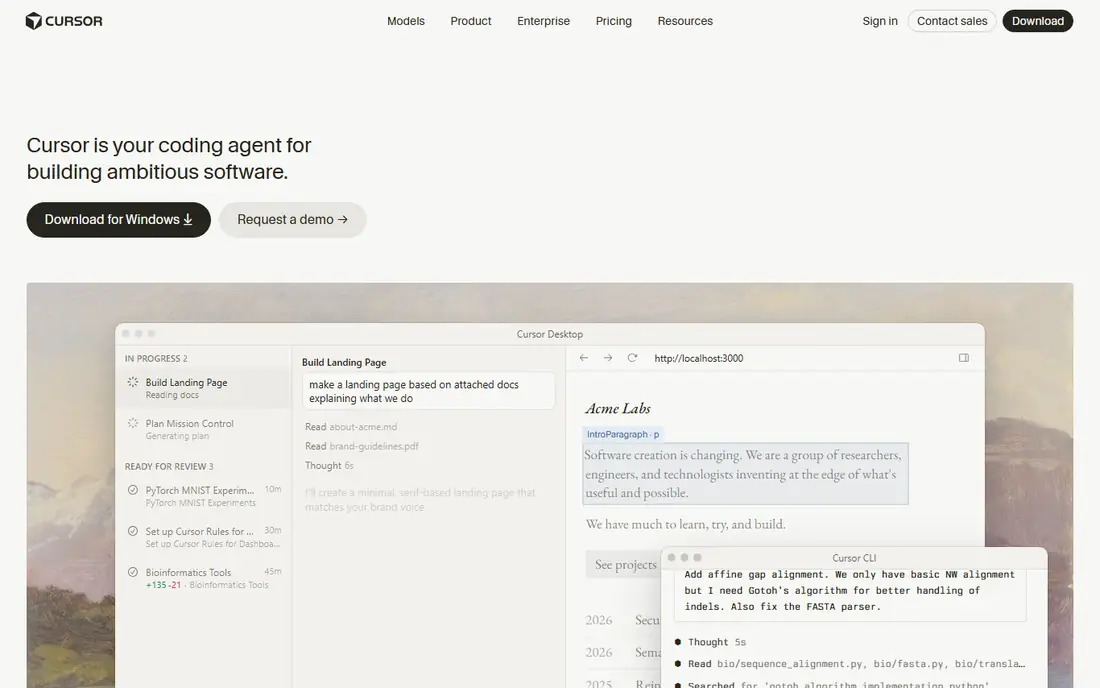
Cursor is an IDE built around AI assistance, which makes it a natural move for developers who do not want to leave the editor. You can ask for edits inline, run an agent across files, and keep using the editor features you already know. For many teams, that lower friction matters more than raw terminal power.
Cursor also offers a curated choice of models rather than the open-ended provider list of a bring-your-own-key tool. That curation helps beginners, but it limits teams that need a specific provider, a local model, or a custom endpoint. Check the current plan limits before you commit, since agent request allowances shape the real monthly cost.
- Editor-native completions and agent mode
- Support for several model providers
- Familiar workflow for IDE users
- Paid plan needed for heavy agent use
- Can feel opinionated about workflow
- Costs rise with team seats
Codex CLI is OpenAI's terminal coding agent, and it is a strong pick if your team already pays for OpenAI access. The tool reads files, proposes edits, and runs commands from a terminal interface, with GitHub integration for repo work. It is open source, which helps teams that want to inspect the tool itself.
The limit is scope. If you want Gemini, Claude, or a local model as your main engine, Codex CLI is not the right home for that work. It also rewards terminal comfort. Developers who prefer visual diff tools and editor panels may find an IDE agent easier to supervise.
- Open source terminal agent
- Strong fit with OpenAI models
- Full-screen terminal interface
- OpenAI models only in practice
- Paid plan or API use still costs money
- Less editor integration than IDE agents
Cline runs inside VS Code as an autonomous coding agent with human checkpoints. You can approve each step, or allow more automation once you trust a workflow. That control appeals to developers who like agent help but do not want silent changes across a codebase.
Cline is free as a tool, but model use is not free unless you use a free or local model. Bring your own key from a provider you trust, and watch token use on large refactors. The payoff is freedom. You can switch models when prices change or when a new model fits a task better, without changing your agent.
- Works in VS Code and forks
- Approval steps before edits and commands
- Wide model choice with your own key
- You pay for model tokens separately
- Setup takes more care than a managed tool
- Heavy tasks need close supervision
Aider is a terminal pair programmer that works closely with Git. You add files to a chat session, ask for changes, and Aider edits those files and commits with clear messages. That discipline makes it a good fit for developers who value a clean history and small, reviewable changes.
Aider keeps you in control by design. It edits what you add, and you stay close to each change. That control can slow down sprawling feature work compared with a fully autonomous agent, but it reduces surprises. Pair it with a local model through Ollama if you want to keep costs low and code on your own machine.
- Git-native workflow with clean commits
- Strong model flexibility
- Focused, chat-driven editing
- Terminal only, so no IDE panels
- You manage API keys and costs
- Less suited to very large autonomous tasks
Kilo Code aims to be a single agent for several jobs: writing code, planning changes, answering questions about a codebase, and debugging. It runs in popular editors and from the command line, and it supports a wide range of models with your own key. That breadth suits developers who want one tool across projects.
Breadth has a cost. New users may need time to learn modes, settings, and provider setup before the tool feels simple. As with other open tools, the agent itself is free to install, but strong frontier models charge per token. Start with a cheaper model for routine edits and save stronger models for hard problems.
- Works in VS Code, JetBrains, and the terminal
- Broad model support
- Modes for code, architect, ask, and debug work
- Feature breadth can overwhelm beginners
- Model costs are separate
- Quality still depends on the model chosen
Continue is an open source assistant for VS Code and JetBrains that adds chat, inline edits, and code completion to your editor. It is a good alternative if you want AI help without handing a whole feature to an autonomous agent. You stay in the editing loop, and the tool explains and applies changes in context.
Continue suits teams that want local models or a specific provider, since it supports a broad set of backends. It is less suited to developers who want an agent to run a long task unattended. Think of it as a capable copilot for daily coding rather than a replacement for planning and review.
- Open source and editor-native
- Works with many models and local models
- Chat, edit, and autocomplete in one place
- More assistant than fully autonomous agent
- Setup varies by editor
- Some advanced features need paid models
Roo Code is a VS Code agent with distinct modes for different kinds of work. You can plan first, then build, then debug, rather than asking one general agent to do everything at once. That structure helps on larger tasks where a plan and a checkpoint save rework later.
Roo Code is free to install, with model costs paid to your provider. The autonomous modes are powerful, but they work best with clear instructions, small steps, and tests that catch mistakes early. Give it a tight scope on your first projects, and expand that scope as you learn how it handles your codebase.
- Multiple modes for building, planning, and debugging
- VS Code native
- Wide provider support
- Autonomous modes need careful limits
- Model costs are separate
- Configuration can take time to tune
Junie is JetBrains' coding agent, and it is the most natural pick on this list for developers who already live in IntelliJ IDEA, PyCharm, WebStorm, or another JetBrains IDE. It works inside the editor, so you keep your inspections, refactoring tools, and project views close to the agent's work.
The main limit is ecosystem fit. If your team uses VS Code, Junie is not a direct substitute, and if you need a terminal-first agent, a terminal tool will feel more natural. Check the current free tier and paid plan quotas on the JetBrains site, since agent use is metered and heavy projects can reach limits faster than expected.
- Built for JetBrains IDEs
- Agent workflows inside a familiar editor
- Free tier to try the basics
- JetBrains focus limits editor choice
- Paid tiers needed for heavier use
- Model and quota details vary by plan
How we picked these
We compared official product pages, pricing pages, and documentation for tools that do the same core job as Opencode: read code, edit files, run commands, and work through multi-step tasks. We kept only tools that are live and maintained in October 2026, and we excluded Opencode itself, including its former OpenCode name, because this is an alternatives list. We favoured a mix of terminal agents, IDE agents, open source tools, and managed products so different workflows are covered.
What to check before you switch
Start with where you work. Terminal developers should shortlist Claude Code, Codex CLI, and Aider, while editor developers should shortlist Cursor, Cline, Kilo Code, Continue, Roo Code, and Junie. Next, decide how much model freedom you need. Bring-your-own-key tools let you change providers and control costs, while managed tools simplify billing and support at the price of lock-in.
Cost, control, and safety checks
Add up the full cost, not just the tool price. A free agent plus frontier model tokens can cost more than a flat subscription, while a local model can bring the total close to zero for routine work. Set approval rules for file edits and shell commands, keep secrets out of prompts and shared logs, and run tests before you merge agent output. Review diffs line by line on security-sensitive code, and keep a clean Git history so you can revert a bad change fast.
Frequently asked questions
What are the best alternatives to Opencode?
For most developers, Cline and Kilo Code are strong open choices, Cursor is the smoothest IDE option, and Claude Code is the strongest managed terminal option. The right pick depends on your editor, your model provider, and how much supervision you want over edits.
Is there a free alternative to Opencode?
Yes. Cline, Aider, Kilo Code, Continue, and Roo Code are free to install, and Codex CLI is open source. You still pay for model use unless you use a free model or a local model, so check provider pricing before you start a large task.
Which alternative lets me use my own model?
Cline, Aider, Kilo Code, Continue, and Roo Code all support bringing your own key from many providers, including local models in several cases. That freedom lets you switch models when prices or quality change without learning a new agent.
Is Opencode the same as OpenCode?
Yes, in practical terms. Opencode is the current name for the agent formerly called OpenCode, with its site at opencode.ai. That is why OpenCode does not appear as a separate entry in this alternatives list.
Should I choose a terminal agent or an IDE agent?
Choose a terminal agent if you work from the command line, script your workflow, or manage servers and repos there. Choose an IDE agent if you want inline suggestions, visual diffs, and editor refactoring close to the agent's work.
Do I need to pay for a model with a free agent?
In most cases, yes, unless you use a free tier model or run a local model on your own machine. Free agents save on tool fees, but model tokens are a separate cost, so test with small tasks first and watch usage.
Sources
See where you really rank - block by block
ProMapRanker scans Google Maps across a grid of your service area. Simple monthly plans from $19, white-label on every plan.
Start freeKeep reading
 zscaler alternatives
Best Zscaler Alternatives in 2026
Looking for zscaler alternatives? We compare 9 SASE and zero trust platforms on architecture, data protection, pricing, and fit for your network and team.
Read → zapier alternatives free
Best Zapier Alternatives Free in 2026
Nine automation tools for zapier alternatives free in 2026, all with genuinely free tiers, plus free plan limits, starting prices and upgrade paths explained.
Read → which platform is best for online reputation
Which Platform Is Best for Online Reputation in 2026
Wondering which platform is best for online reputation? We compare 8 review, listing, and response tools for small and multi-location businesses and agencies.
Read →